
ToolkitRC M7AC
ToolkitRC M7AC Multi-Function AC Smart Balance Charger User Manual
Model: M7AC
Уводзіны
The ToolkitRC M7AC is a versatile multi-function smart balance charger designed for various battery types and applications. It features dual AC/DC input and supports 2-6S batteries. Beyond its primary charging capabilities, the M7AC integrates several useful tools, including a power supply, multimeter, signal source, drone charger, and signal tester, making it an indispensable tool for hobbyists and professionals alike.
Асноўныя функцыі ўключаюць у сябе:
- Dual AC/DC Input for flexible power options.
- XT30/XT60 Output for broad compatibility.
- Supports 2-6S LiPo, LiHV, LiFe, Lion, LTO batteries, 1-16S NiMh, and 1-10S Pb batteries.
- Integrated functions: Power supply, multimeter, signal source, drone charger, and signal tester.
- IPS 2.4 inch LCD display for clear information.
Інфармацыя па бяспецы
Please read and understand all safety warnings and instructions before using the M7AC charger. Improper use can lead to property damage, injury, or death.
- Заўсёды выкарыстоўвайце зарадную прыладу ў добра вентыляваным памяшканні, удалечыні ад лёгкаўзгаральных матэрыялаў.
- Не пакідайце зарадная прылада без нагляду падчас працы.
- Ensure correct battery type and cell count settings before charging.
- Use only compatible power sources and cables.
- Трымайце прыладу далей ад вады, вільгаці і экстрэмальных тэмператур.
- Не спрабуйце разабраць або мадыфікаваць зарадная прылада.
Прадукт скончаныview
Familiarize yourself with the components and interfaces of your M7AC charger.

Малюнак 1: Спераду View. This image displays the front of the M7AC charger, highlighting its 2.4-inch IPS LCD screen. The screen shows real-time charging data, including voltage, current, capacity, and individual cell voltages. To the right of the screen are the navigation button and scroll wheel for menu interaction.

Малюнак 2: бок View (Парты). This image shows the side of the M7AC charger where various input and output ports are located. Visible ports include a USB-A output (5.0V 2.1A), a balance port (2-6S), and dual XT60 output ports labeled "OUTPUT".

Figure 3: Signal Output Display. This image captures the M7AC's screen displaying the "Signal Output" function, specifically for SBUS. It shows multiple channels with adjustable pulse widths, demonstrating the device's capability as a signal source or tester.
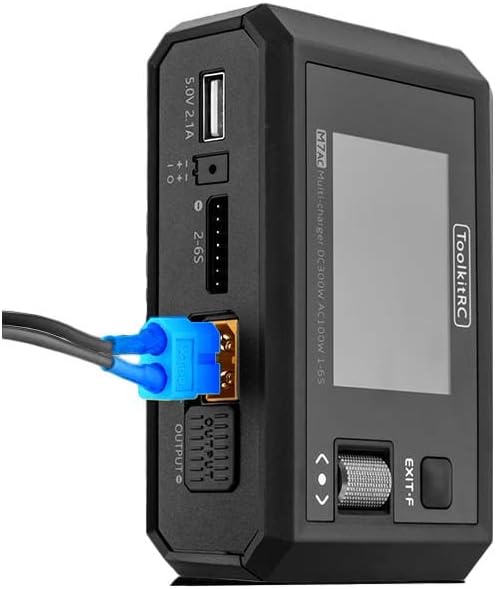
Figure 4: XT60 Output in Use. This image illustrates an XT60 connector plugged into one of the M7AC's output ports, demonstrating how a battery or device would connect for charging or power supply functions.
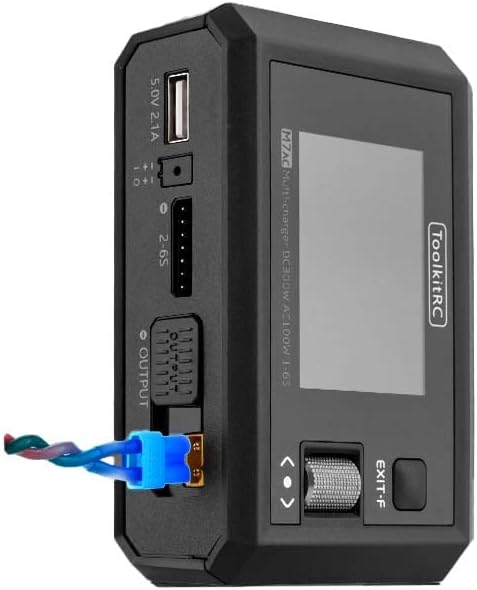
Figure 5: XT60 and Balance Lead Connected. This image provides another perspective of the M7AC with an XT60 connector and a balance lead connected, showing the typical setup for balanced charging of a multi-cell battery pack.
Настройка
- Падключэнне сілкавання:
- For AC input, connect the provided AC power cable to the charger's AC input port and then to a standard wall outlet (AC 100-240V).
- For DC input, connect a DC power source (7.0-28.0V) to the charger's DC input port. Ensure correct polarity.
- Першапачатковае ўключэнне: Once connected to power, the charger will automatically power on and display the main menu on the IPS LCD screen.
- Навігацыя: Use the scroll wheel and button on the right side of the charger to navigate through menus and select options.
Інструкцыя па эксплуатацыі
1. Зарадка акумулятара
- Падключыце акумулятар: Connect your battery's main discharge lead to one of the XT60 output ports. For multi-cell batteries, also connect the balance lead to the appropriate balance port (2-6S).
- Выберыце тып батарэі: From the main menu, navigate to the "Charger" function. Select the correct battery type (LiPo, LiHV, LiFe, Lion, LTO, NiMh, Pb) and cell count (e.g., 3S, 6S).
- Set Charging Parameters: Adjust the charging current (up to 15A) and mode (e.g., Balance Charge, Fast Charge, Storage Charge) as required for your battery. The maximum charging power is 300W.
- Пачаць зарадку: Confirm settings and start the charging process. The screen will display real-time charging status, including total voltage, current, charged capacity, and individual cell voltagэс.
2. Разрад акумулятара
The M7AC supports discharging batteries with a power of up to 300W in Recycle mode or 15W in Normal mode.
- Падключыце акумулятар: Connect the battery to the XT60 output and balance port.
- Select Discharge Function: Navigate to the "Discharge" function in the menu.
- Задаць параметры: Set the discharge current and target voltage.
- Start Discharging: Initiate the discharge process. Monitor the battery temperature and voltagе падчас выпіскі.
3. Power Supply Function
The M7AC can act as a regulated DC power supply (1.0-28.0V, 0.5-15A).
- Access Power Supply Mode: Select the "Power Supply" option from the main menu.
- Усталюйце выхад Voltagе і ток: Адрэгулюйце патрэбную выходную гучнасцьtage and current limit using the scroll wheel.
- Падключыць прыладу: Connect your device requiring power to the XT60 output port.
- Актываваць выхад: Enable the power supply output.
4. Multimeter Function
Вымяраць абtage and internal resistance of batteries.
- тtage Вымярэнне: Connect the battery to the balance port to measure individual cell voltages (1.0-5.0V per cell, 1-6S).
- Internal Resistance Measurement: The charger can measure internal resistance from 0.1 mR to 99mR for 1-6S batteries.
5. Signal Source / Tester
The M7AC can generate and test various signals.
- ШІМ выхад: Generate PWM signals (500-2500us @ 20-1000Hz).
- Выхад PPM: Generate PPM signals (880-2200us * 8CH @ 20-50Hz).
- SBUS Output: Generate SBUS signals (880-2200us * 16CH @ 20-100Hz).
6. Выхад USB-A
The USB-A port provides 5.0V at 2.1A, suitable for charging mobile devices or powering small electronics.
Тэхнічнае абслугоўванне
- Уборка: Выкарыстоўвайце мяккую сухую тканіну для чысткі вонкавага боку зараднай прылады. Не выкарыстоўвайце растваральнікі або абразіўныя ачышчальнікі.
- захоўванне: Захоўвайце зарадная прылада ў прахалодным, сухім месцы, удалечыні ад прамых сонечных прамянёў і экстрэмальных тэмператур.
- Праверка кабеля: Рэгулярна правярайце ўсе кабелі і раздымы на наяўнасць зносу або пашкоджанняў. Неадкладна замяняйце пашкоджаныя кабелі.
- Абнаўленні прашыўкі: Check the ToolkitRC official website periodically for firmware updates to ensure optimal performance and access to new features. The TF Card slot (128MB-16GB) is used for updates.
Ліквідацыю непаладак
| праблема | Магчымая прычына | Рашэнне |
|---|---|---|
| Зарадная прылада не ўключаецца. | No power input or faulty cable. | Check AC/DC power connection. Ensure power source is active. Try a different power cable. |
| Battery not detected. | Incorrect connection or damaged battery. | Ensure main and balance leads are securely connected. Verify battery is not severely over-discharged or damaged. |
| Паведамленне пра памылку зарадкі. | Incorrect battery settings (type, cell count) or battery fault. | Double-check battery type and cell count settings. Inspect battery for swelling or damage. |
| Экран не рэагуе. | Часовы збой праграмнага забеспячэння. | Disconnect power, wait a few seconds, then reconnect to restart the device. |
Тэхнічныя характарыстыкі
| Катэгорыя | Параметр | Каштоўнасць |
|---|---|---|
| Зарадная прылада | Уваходны кнtage | AC 100-240V MAX 100W 1.5A / DC 7.0-28.0V @MAX 20A |
| Падтрымка тыпу батарэі | Lipo LiHV LiFe Lion LTO@1-6S / NiMh @1-16S Pb @1-10S | |
| Магутнасць зарадкі | 300W @MAX 15A | |
| Разрадная магутнасць | 300W @MAX 15A Recycle mode / 15W@3A Normal mode | |
| Ток балансу | 800мА пры 4.2В | |
| Выхад USB-A | 10 Вт @ 5.0V | |
| Генерал | ВК | IPS 2.4 inch LCD 320*240 resolution |
| Памер прадукту | 112x73x38 мм | |
| Вага прадукту | 245 г | |
| Падтрымка карты TF | 128 МБ-16 ГБ | |
| Колер | Чорны | |
| Вымярэнне | Унутраны супраціў | 0.1 mR-99mR @ 1-6S |
| тtage | 1.0-5.0V @ 1-6S | |
| СБУС | 880-2200us * 16CH @ 20-100Hz | |
| PPM | 880-2200us * 8CH @ 20-50Hz | |
| ШІМ | 880-2200us @ 20-400Hz | |
| Выхад | Электразабеспячэнне | 1.0-28.0V @0.5-15A mode: CC CVSBUS |
| СБУС | 880-2200us * 16CH @ 20-100Hz | |
| PPM | 880-2200us * 8CH @ 20-50Hz | |
| ШІМ | 500-2500us @ 20-1000Hz | |
| Іншае | Вага прадмета | 12.96 унцый (прыблізна 367 г) |
| Рэкамендаваны вытворцам узрост | 14 гады і вышэй | |
| Спецыфікацыя Met | UL |
Гарантыя і падтрымка
ToolkitRC products are manufactured to high quality standards. For warranty information and technical support, please refer to the official ToolkitRC webсайт або звярніцеся непасрэдна ў службу падтрымкі кліентаў. Захоўвайце чэк аб куплі як пацвярджэнне пакупкі для любых гарантыйных прэтэнзій.
Для атрымання дадатковай дапамогі наведайце ToolkitRC Official Webсайт.
Ask a question about this manual
Ask about setup, troubleshooting, compatibility, parts, safety, or missing instructions. Manuals+ will review the question and use this page’s manual context to help answer it.