
Уводзіны
Thank you for choosing the Dpofirs Portable MP3 Player. This device is designed to provide high-quality, lossless audio playback in a compact and durable form factor. This manual will guide you through the setup, operation, and maintenance of your new MP3 player.
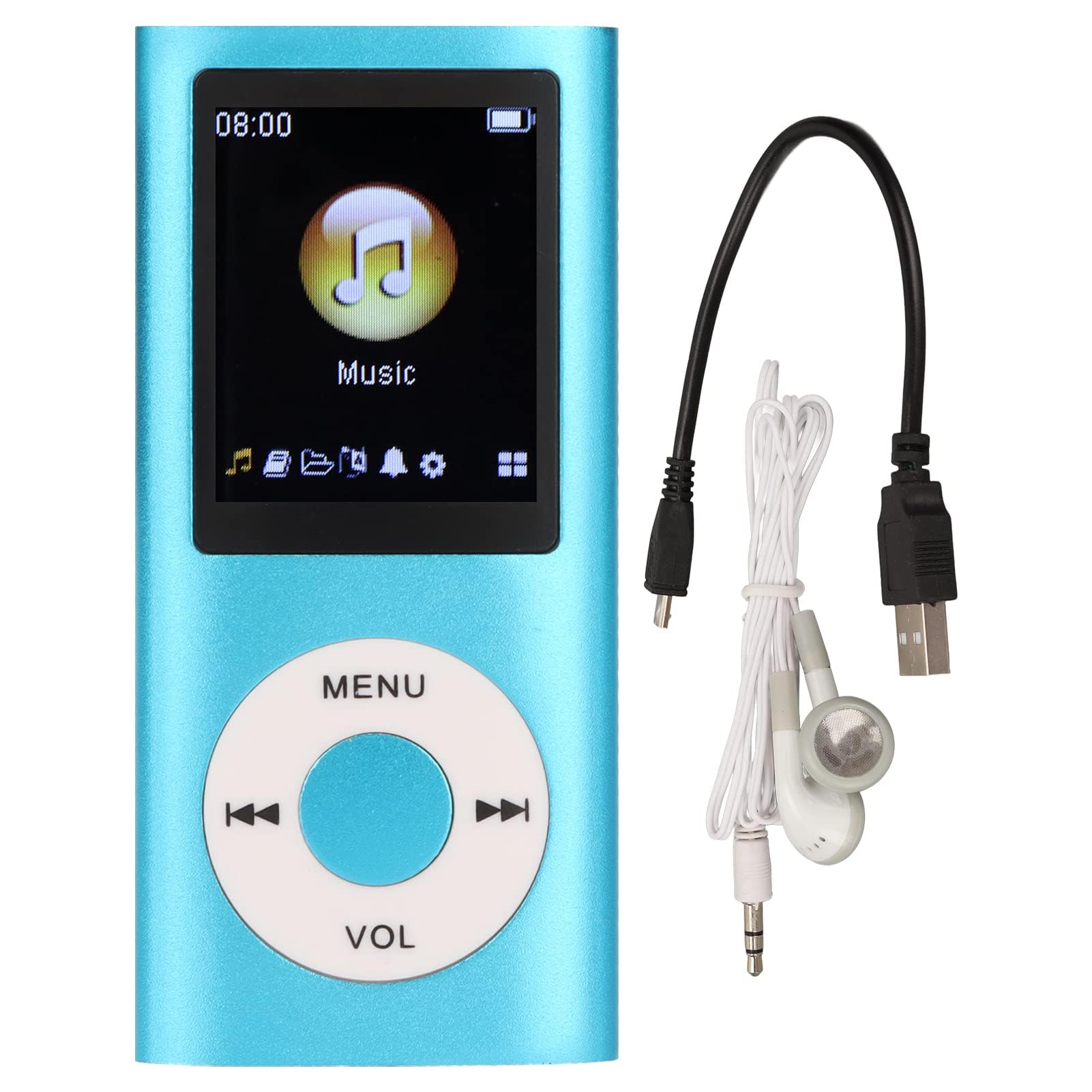
Image: The Dpofirs Portable MP3 Player, featuring a blue aluminum alloy casing and a circular control pad. A person is visible in the background, enjoying music with headphones.
Змест пакета
Калі ласка, праверце ўпакоўку на наяўнасць наступных прадметаў:
- 1 x Dpofirs MP3 Player
- 1 х зарадны кабель
- 1 х навушнікі
Асноўныя характарыстыкі
- Якасць гуку без страт: Supports MP3, WMA, FLAC, APE, AAC, OGG, and ACELP audio formats.
- Пашыраная памяць: Supports up to 64GB memory card (not included). MYMAHDI memory cards are recommended.
- Зручны інтэрфейс: Easy navigation for selecting songs, creating playlists, and managing playback.
- Доўгі тэрмін службы батарэі: Да 8 гадзін бесперапыннага прайгравання пры поўнай зарадцы.
- Трывалы дызайн: Constructed from premium aluminum alloy for enhanced durability.
- Рэжымы прайгравання: Supports sequential and random playback, and sleep shutdown function.
Настройка
1. Зарадка прылады
Перад першым выкарыстаннем цалкам зарадзіце MP3-плэер.
- Connect the provided charging cable to the MP3 player's charging port.
- Падключыце другі канец кабеля да адаптара харчавання USB (не ўваходзіць у камплект) або да USB-порта кампутара.
- The device will indicate charging status. A full charge typically takes approximately 2 hours.
Важна: Ensure the charging cable is functioning correctly. If the device does not charge, try a different USB port or adapter.
2. Устаўка карты памяці
The MP3 player requires a memory card for storing music.
- Locate the memory card slot on the side of the MP3 player.
- Gently insert a microSD card (up to 64GB, not included) into the slot until it clicks into place.
- Каб выняць карту, злёгку націсніце на яе, пакуль яна не выскочыць.
Заўвага: A memory card is not included with the player. MYMAHDI brand memory cards are recommended for optimal performance.
3. Падключэнне навушнікаў
Connect the provided earphones or your preferred 3.5mm audio headphones to the headphone jack on the MP3 player.
Інструкцыя па эксплуатацыі
1. Уключэнне/выключэнне харчавання
- To power on, press and hold the power button (usually the Play/Pause button or a dedicated power button) until the screen lights up.
- Каб выключыць прыладу, зноў націсніце і ўтрымлівайце кнопку харчавання, пакуль экран не выключыцца.
2. Базавая навігацыя
The MP3 player features a circular control pad with several buttons:
- МЕНЮ: Access the main menu or go back to the previous screen.
- ГУЧНАСЦЬ (+/-): Адрэгулюйце ўзровень гучнасці.
- Прайграванне/Паўза: Пачаць або прыпыніць прайграванне.
- Наступны/Папярэдні: Skip to the next track or go back to the previous track. Long press to fast forward/rewind.
3. Перадача музыкі Files
To transfer music to your MP3 player:
- Connect the MP3 player to your computer using the charging cable.
- The player should appear as a removable disk drive on your computer.
- Перацягніце музыку files (MP3, WMA, FLAC, APE, AAC, OGG, ACELP) into the player's memory card folder.
- Перад адключэннем кабеля бяспечна адключыце прыладу ад кампутара.
4. Прайграванне музыкі
- У галоўным меню перайдзіце ў раздзел «Музыка» або «Аўдыё».
- Browse your music by artist, album, genre, or all songs.
- Выберыце песню, каб пачаць прайграванне.
- Use the Play/Pause, Next/Previous, and VOL buttons to control playback.
5. Playback Options
- Плэйлісты: Create and manage custom playlists directly on the device.
- Shuffle/Repeat: Toggle between sequential playback, shuffle, and repeat modes.
- Выключэнне ў рэжыме сну: Set a timer for the device to automatically power off.
Тэхнічнае абслугоўванне
- Трымайце прыладу сухім. Вільгаць можа пашкодзіць унутраныя схемы.
- Пазбягайце экстрэмальных тэмператур.
- Clean the device with a soft, dry cloth. Do not use harsh chemicals or cleaning agents.
- Protect the screen from scratches.
- Захоўвайце прыладу ў бяспечным месцы, калі яна не выкарыстоўваецца.
Ліквідацыю непаладак
Прылада не ўключаецца:
- Пераканайцеся, што акумулятар зараджаны. Падключыце плэер да крыніцы харчавання і дайце яму зарадзіцца не менш за 30 хвілін.
- Try pressing and holding the power button for an extended period (5-10 seconds).
Cannot hear any sound:
- Check if the earphones are properly connected to the headphone jack.
- Increase the volume using the VOL+ button.
- Test with a different pair of earphones to rule out faulty headphones.
- Забяспечце аўдыё fileне пашкоджаныя і маюць падтрымоўваны фармат.
Музыка files are not recognized:
- Ensure the memory card is properly inserted and recognized by the device.
- Пераканайцеся, што музыка files are in one of the supported formats (MP3, WMA, FLAC, APE, AAC, OGG, ACELP).
- Try reformatting the memory card (this will erase all data) and re-transferring the music.
- Ensure the memory card is not full.
Прылада завісае або перастае рэагаваць:
- Націсніце і ўтрымлівайце кнопку харчавання каля 10-15 секунд, каб прымусова перазагрузіць прыладу.
- If available, use a small pin to press the reset button (if present on the device).
Тэхнічныя характарыстыкі
| Марка | Дпофіры |
| Нумар мадэлі | Dpofirs5yhtvp70d23123-13 |
| Матэрыял | Алюмініевы сплаў |
| акумулятар | Убудаваны літыевы акумулятар ёмістасцю 200 мАг |
| Час зарадкі | Прыбл. 2 гадзіны |
| Час прайгравання | Да 8 гадзін (цалкам зараджаны) |
| Падтрымка карты памяці | Up to 64GB (microSD, not included) |
| Падтрымліваюцца аўдыяфарматы | MP3, WMA, FLAC, APE, AAC, OGG, ACELP |
| Тэхналогія падлучэння | Дапаможны, Bluetooth, Wi-Fi (Note: Bluetooth/Wi-Fi functionality not detailed in product description, focusing on core MP3 player features) |
| Колер | Сіні |
| Краіна паходжання | Кітай |
Гарантыя і падтрымка
Specific warranty information for this product is not provided in the available documentation. Please refer to the retailer's return policy or contact the seller directly for details regarding warranty coverage.
For technical support or further assistance, please contact Dpofirs customer service through the platform where you purchased the product.