
1. Уводзіны
Welcome to the user manual for your new TAOPON Smartwatch IP67 Round. This guide provides essential information on setting up, operating, maintaining, and troubleshooting your device. Please read this manual thoroughly to ensure proper use and to maximize your smartwatch's features.
2. Прадукт скончыўсяview
The TAOPON Smartwatch is a versatile wearable device designed for both men and women, offering a range of features to support your health and daily activities. It features a round, high-definition display and is built with IP67 water resistance.

Малюнак 2.1: Крупны план view of the TAOPON Smartwatch, showcasinяго круглы дысплей і элегантны дызайн.
Асноўныя характарыстыкі:
- Physical Health Monitoring: Equipped with a heart rate sensor, the smartwatch helps monitor your heart rate and blood pressure. Sleep data analysis assists in improving sleep quality.
- High-Definition Round Screen: Features a 1.28-inch IPS 240x240 color touchscreen for easy operation. Offers 5 main interfaces and a soft, humanized silicone strap for comfort.
- Адсочванне актыўнасці: Tracks steps, calories burned, distance, and other important fitness information. Includes functions like 'find phone', stopwatch, alarm, music control, and sedentary reminders.
- Апавяшчэнні: Connects via Bluetooth to your smartphone using the 'Da Fit' app to display caller ID/number, SMS, and SNS notifications (Facebook, WhatsApp, Twitter, Instagram, Messenger, email, Skype). Vibrates to alert you to important calls and messages.
- Compatibility & Battery: Compatible with iOS 9.0+ and Android 5.0+ smartphones. Features a 200mA battery providing 7-10 days of normal use and charges fully in 2 hours.
Змест пакета:
Пераканайцеся, што ўсе прадметы прысутнічаюць у пасылцы:
- TAOPON Smartwatch
- Зарадны кабель
- Кіраўніцтва карыстальніка
- Сіліконавы раменьчык

Figure 2.2: The smartwatch package contents, including the watch, charging cable, and user manual.
3. Настройка
3.1 Зарадка разумнага гадзінніка
Перад першым выкарыстаннем цалкам зарадзіце свой разумны гадзіннік. Падключыце магнітны зарадны кабель да зарадных кантактаў на задняй панэлі гадзінніка і падключыце USB-канец да адаптара харчавання (не ўваходзіць у камплект) або USB-порта кампутара. Поўная зарадка звычайна займае каля 2 гадзін.

Figure 3.1: The smartwatch charging, highlighting its ultra-thin dial and battery life.
3.2 Усталёўка прыкладання
Каб разблакіраваць усе функцыі і сінхранізаваць дадзеныя, запампуйце 'Da Fit' app on your smartphone. You can find it on the App Store (for iOS devices) or Google Play Store (for Android devices).
- Scan the QR code in the manual or on the watch packaging, or search for 'Da Fit' in your phone's app store.
- Спампуйце і ўсталюйце праграму.
- Grant necessary permissions when prompted by the app.
3.3 Спалучэнне прылад
Пасля ўсталёўкі праграмы падключыце разумны гадзіннік да смартфона:
- Пераканайцеся, што Bluetooth уключаны на вашым смартфоне.
- Open the 'Da Fit' app.
- Перайдзіце ў раздзел «Прылада» або «Дадаць прыладу» ў праграме.
- The app will search for available devices. Select your TAOPON Smartwatch from the list (it may appear as 'Smartwatch' or a similar identifier).
- Пацвердзіце запыт на спалучэнне як на тэлефоне, так і на смарт-гадзінніку, калі будзе прапанавана.
4. Інструкцыя па эксплуатацыі
4.1 Асноўная навігацыя
The smartwatch features a full touchscreen for intuitive control:
- Правядзіце пальцам уверх/уніз: Пракручвайце меню і апавяшчэнні.
- Правядзіце пальцам улева/управа: Доступ да хуткіх функцый або розных цыферблатаў гадзінніка.
- Націсніце: Выберыце элемент або пацвердзіце дзеянне.
- Націсніце бакавую кнопку: Вяртанне на галоўны экран або ўключэнне/выключэнне (доўгі націск).
4.2 Маніторынг здароўя
Your smartwatch continuously monitors various health metrics:
- Частата сардэчных скарачэнняў: Access the heart rate interface to view your current heart rate. The watch can track your heart rate throughout the day.
- Артэрыяльны ціск: Measure your blood pressure directly from the watch. For accurate readings, remain still during measurement.
- Маніторынг сну: Wear the watch to bed to track your sleep patterns, including total sleep, light sleep, and deep sleep. View detailed analysis in the 'Da Fit' app.

Figure 4.1: Health monitoring features including heart rate, calories, blood oxygen, and detailed sleep tracking.
4.3 Адсочванне актыўнасці
The smartwatch is equipped with multiple sports modes to track your workouts:
- Лічыльнік крокаў: Automatically records your daily steps.
- Адлегласць і калорыі: Calculates distance traveled and calories burned based on your activity.
- Спартыўныя рэжымы: Select from various sports modes (e.g., walking, running, cycling) to get specific data for your activity.

Figure 4.2: The smartwatch tracking steps, distance, and calories during a run.
4.4 Апавяшчэнні
Receive real-time alerts directly on your wrist:
- Call Alerts: The watch will vibrate and display the caller's name or number. You can accept or reject calls from the watch.
- Паведамленні аб паведамленнях: View incoming SMS and social media notifications (e.g., Facebook, WhatsApp, Twitter) directly on the watch screen.

Figure 4.3: The smartwatch displaying an incoming call and icons for various messaging apps.
4.5 дадатковых функцый
The smartwatch offers several convenient features:
- Кіраванне музыкай: Control music playback on your smartphone (play, pause, skip tracks) directly from your watch.
- Аддаленая камера: Use your watch as a remote shutter button for your smartphone camera.
- Знайсці тэлефон: If your phone is misplaced, use this feature to make it ring.
- Секундамер і будзільнік: Utilize the built-in stopwatch and set alarms.
- Сядзячы напамін: Атрымлівайце апавяшчэнні аб неабходнасці перамяшчэння, калі вы занадта доўга неактыўныя.
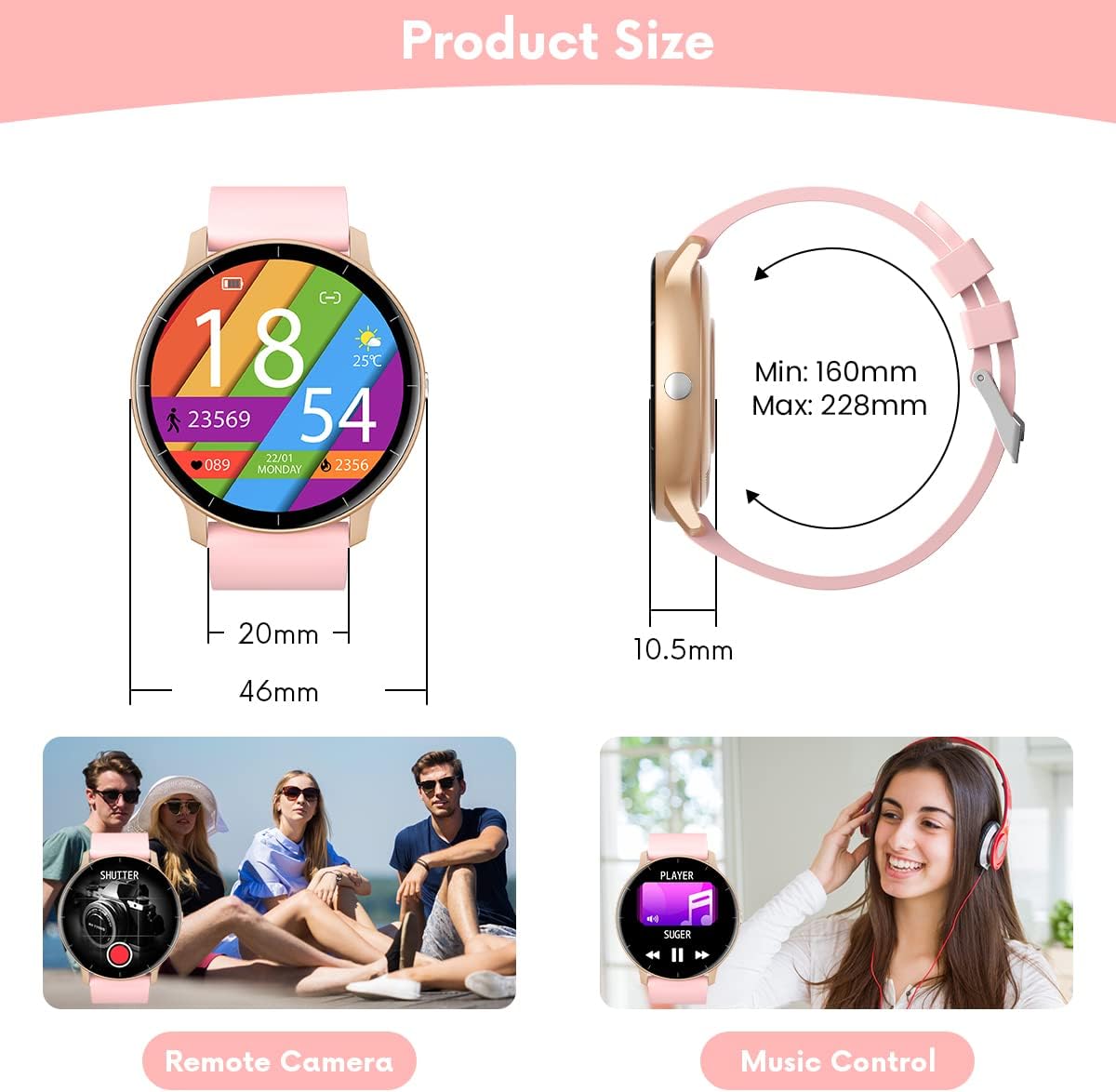
Figure 4.4: Illustrations of remote camera control and music playback features.
4.6 Налада цыферблатаў гадзінніка
Personalize your smartwatch with various watch faces:
- The watch comes with several pre-installed main interfaces.
- Through the 'Da Fit' app, you can access a wider selection of watch faces or even upload your own photos to create custom designs.
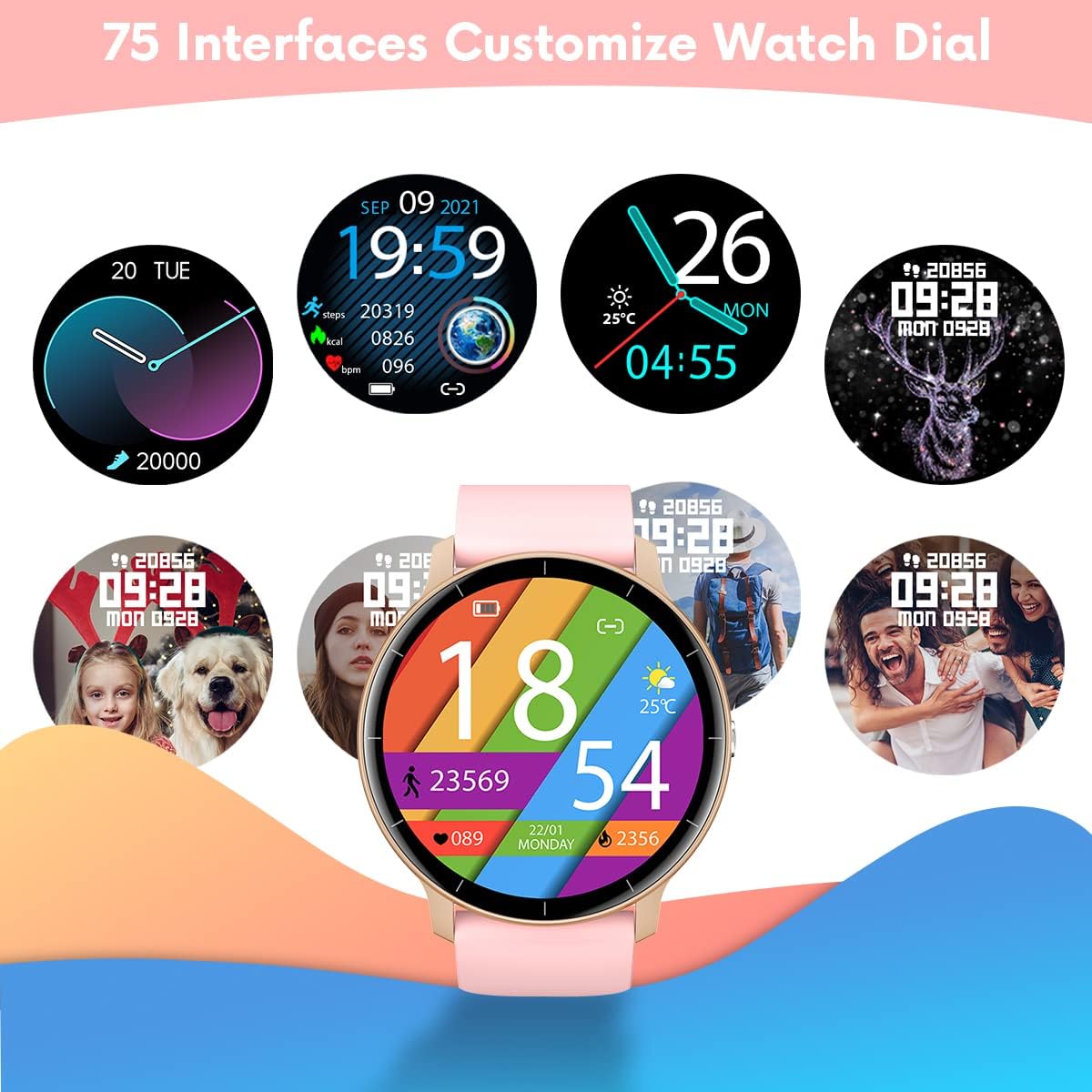
Figure 4.5: A variety of customizable watch face designs available for the smartwatch.
5. Тэхнічнае абслугоўванне
5.1 Чыстка разумнага гадзінніка
Каб захаваць знешні выгляд і функцыянальнасць вашага разумнага гадзінніка:
- Рэгулярна працірайце экран і раменьчык мяккай сурвэткайamp тканіна.
- Пазбягайце выкарыстання агрэсіўных хімічных рэчываў або абразіўных матэрыялаў, бо яны могуць пашкодзіць прыладу.
- Перад зарадкай пераканайцеся, што кантакты зараднай прылады чыстыя і сухія.
5.2 Воданепранікальнасць (IP67)
Your TAOPON Smartwatch is rated IP67, meaning it is resistant to dust and can withstand immersion in water up to 1 meter for up to 30 minutes. This makes it suitable for daily use, such as washing hands or light rain exposure.
- Не рабі use the watch for swimming, diving, or showering with hot water.
- Avoid exposing the watch to high-pressure water or steam.
- Калі гадзіннік намокне, старанна высушыце яго перад зарадкай або выкарыстаннем сэнсарнага экрана.

Figure 5.1: A person washing hands with the smartwatch on, illustrating its water-resistant design.
6. Выпраўленне непаладак
Калі ў вас узніклі праблемы са разумным гадзіннікам, звярніцеся да наступных распаўсюджаных рашэнняў:
| праблема | Рашэнне |
|---|---|
| Гадзіннік не ўключаецца | Пераканайцеся, што гадзіннік цалкам зараджаны. Падключыце яго да зараднай прылады як мінімум на 30 хвілін. |
| Немагчыма спалучыць прыладу са смартфонам | 1. Пераканайцеся, што на вашым тэлефоне ўключаны Bluetooth. 2. Make sure the watch is within 10 meters of your phone. 3. Перазагрузіце гадзіннік і тэлефон. 4. Check if the 'Da Fit' app has necessary permissions. |
| Апавяшчэнні не атрыманы | 1. Check Bluetooth connection. 2. Ensure notification permissions are granted in the 'Da Fit' app and your phone's settings. 3. Verify that the app is running in the background. |
| Недакладныя дадзеныя пра здароўе | 1. Пераканайцеся, што гадзіннік шчыльна прылягае да запясця, не занадта свабодна і не занадта туга. 2. Keep your arm still during measurements. 3. Environmental factors and individual physiology can affect readings. |
| Кароткі тэрмін службы батарэі | 1. Зменшце яркасць экрана. 2. Turn off continuous heart rate monitoring if not needed. 3. Limit frequent notifications. 4. Ensure the watch is fully charged (2 hours). |
If the problem persists, please refer to the 'Da Fit' app's help section or contact customer support.
7. Тэхнічныя характарыстыкі
| Асаблівасць | Дэталь |
|---|---|
| Марка | ТААПОН |
| мадэль | Smartwatch IP67 Round (B0BKSFDWWL) |
| Памер экрана | 1.28 цалі |
| Тып дысплея | IPS Color Touchscreen (LED) |
| дазвол | 240 х 240 пікселяў |
| Сувязь | Bluetooth |
| Сумяшчальнасць | Android 5.0+ / iOS 9.0+ |
| Ёмістасць батарэі | 200mA Lithium-polymer |
| Тэрмін службы батарэі | 7-10 дзён (тыповы час выкарыстання) |
| Час зарадкі | Прыбл. 2 гадзіны |
| Воданепранікальнасць | IP67 (пыла- і воданепранікальнасць пры апусканні на глыбіню да 1 метра на працягу 30 хвілін) |
| Прыкладанне, якое падтрымліваецца | Da Fit |
| Асаблівасці здароўя | Heart Rate Monitor, Blood Pressure Monitor, Sleep Tracker |
| Activity Features | Pedometer, Calorie Counter, Distance Tracker, Multiple Sports Modes |
| Іншыя асаблівасці | Notifications (Calls, SMS, SNS), Music Control, Remote Camera, Alarm, Stopwatch, Sedentary Reminder, Find Phone |
8. Гарантыя і падтрымка
8.1 Інфармацыя аб гарантыі
Your TAOPON Smartwatch is covered by a standard manufacturer's warranty. Please refer to the warranty card included in your product packaging for specific terms and conditions, including the warranty period and coverage details. Keep your proof of purchase for warranty claims.
8.2 Падтрымка кліентаў
For any questions, technical assistance, or issues not covered in this manual, please contact TAOPON customer support. Contact details can typically be found on the product packaging, the official TAOPON webсайце або праз вашага прадаўца.
When contacting support, please have your product model (B0BKSFDWWL) and purchase information ready.