
Contixo E9
Contixo E9 Smart Floodlight Security Camera User Manual
Мадэль: E9
1. Уводзіны
The Contixo E9 Smart Floodlight Security Camera is designed to provide comprehensive outdoor surveillance with advanced features. This manual will guide you through the installation, setup, and operation of your new security camera, ensuring optimal performance and security for your property.
Асноўныя характарыстыкі:
- 2.5K (3MP) Full HD Video: High-resolution live streaming and recording.
- Adjustable Bright Floodlight: Up to 1000 Lumens for enhanced visibility and deterrence.
- Colored & Infrared Night Vision: Clear surveillance even in low-light conditions.
- Двухбаковы аўдыё: Звязвайцеся з наведвальнікамі або адпужвайце зламыснікаў дыстанцыйна.
- Выяўленне руху PIR: Accurate detection with customizable sensitivity.
- Сірэна сігналізацыі: Deter unwanted activity with an audible alarm.
- IP65 Воданепранікальнасць: Трывалая канструкцыя для выкарыстання на вуліцы ў розных умовах надвор'я.
- Cloud/SD Card Storage: Flexible options for video footagэлектроннае захоўванне.
- Разумнае кіраванне праграмамі: Manage settings and view feeds via the Xodo Smart App.
- Інтэграцыя галасавога памочніка: Сумяшчальнасць з Amazon Alexa і Google Assistant.
2. Што ў скрынцы
Калі ласка, праверце змесціва вашай упакоўкі, каб пераканацца, што ўсе прадметы наяўныя і ў добрым стане.
- 1x Contixo E9 Smart Floodlight Security Camera
- 1x Кіраўніцтва карыстальніка (гэты дакумент)
- 4 -х крапежныя шрубы
- 1x кабель USB
- 1x адаптар сілкавання
3. Настройка і ўстаноўка
Follow these steps to install and set up your Contixo E9 camera.
3.1 Кантрольны спіс перад устаноўкай
- Ensure you have a 2.4GHz Wi-Fi network available at the installation location. The camera does not support 5GHz Wi-Fi.
- Identify a suitable outdoor location with access to a power outlet. The camera requires a wired power connection and is not battery-operated.
- Спампаваць Xodo Smart App з крамы праграм вашага смартфона (iOS або Android).
3.2 Фізічная ўстаноўка
- Выберыце месца ўстаноўкі: Выберыце месцазнаходжанне, якое забяспечвае жаданае viewing angle and is within reach of a power outlet. The camera is IP65 weatherproof, suitable for outdoor environments.
- Устанавіце камеру: Use the provided screws to securely mount the camera to a wall or suitable surface. Ensure the mounting is stable.
- Падключыце харчаванне: Plug the USB cable into the camera and connect the power adapter to a nearby electrical outlet. The camera will power on.

Image: The Contixo E9 camera showing its USB power cable and plug adapter, highlighting the easy DIY installation process. A power socket is required for operation.
3.3 Налада і спалучэнне праграм
- Open Xodo Smart App: Launch the Xodo Smart App on your smartphone. If you are a new user, register an account.
- Дадаць прыладу: Tap the "+" icon or "Add Device" to begin the pairing process. Select "Security Camera" or "Smart Floodlight Camera" from the device list.
- Выконвайце падказкі на экране: The app will guide you through connecting the camera to your 2.4GHz Wi-Fi network. This typically involves scanning a QR code displayed on your phone with the camera lens.
- Назавіце сваю камеру: Once connected, assign a name to your camera (e.g., "Front Yard Camera," "Back Door Floodlight").

Image: A smartphone screen showing the Xodo Smart App, illustrating the various controls available for the camera, including live view, dimming, siren activation, and real-time notifications.
4. Інструкцыя па эксплуатацыі
Learn how to use the various functions of your Contixo E9 camera.
4.1 У прамым эфіры View і запіс
- Доступ да жывой стужкі: Open the Xodo Smart App and select your camera to view the live 2.5K HD video stream.
- Manual Recording/Snapshots: Use the controls within the app to manually record video or take still images from the live feed.
- Прайграванне: Доступ да запісанага footage from the cloud storage (subscription required) or a locally inserted Micro SD card (not included).

Image: The Contixo E9 camera mounted on a building, with a smartphone showing its live 2.5K Full HD video feed, demonstrating real-time monitoring.
4.2 Двухбаковае аўдыё
Камера мае ўбудаваны мікрафон і дынамік для двухбаковай сувязі.
- Initiate Talk: Пакуль viewing the live feed, tap the microphone icon in the app to speak through the camera's speaker.
- Слухай: The camera's microphone will pick up audio from its surroundings, allowing you to hear what's happening.
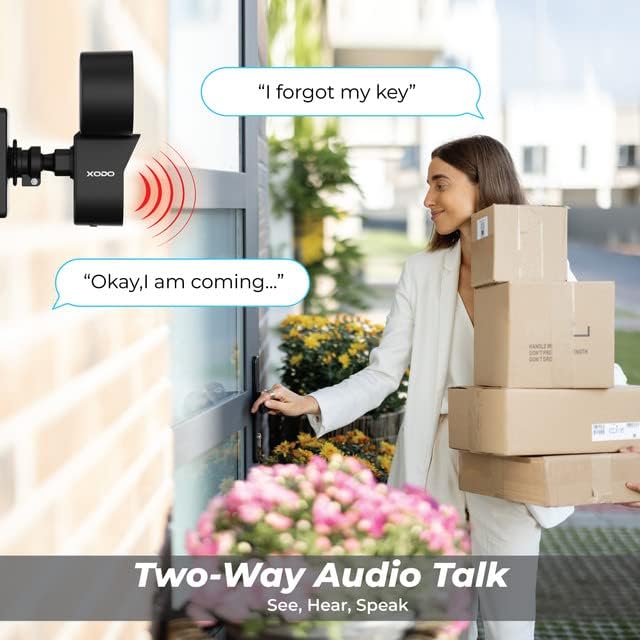
Image: A visual representation of the two-way audio feature, showing a user communicating with a delivery person via the camera.
4.3 Выяўленне руху і абвесткі
The E9 camera uses PIR motion detection to identify activity and send alerts.
- Уключыць/Выключыць: Adjust motion detection settings within the Xodo Smart App.
- Адчувальнасць: Customize the PIR sensitivity to reduce false alarms (e.g., from passing cars or small animals).
- Апавяшчэнні: Receive instant push notifications on your smartphone when motion is detected.
- Сірэна сігналізацыі: Activate the built-in siren manually or set it to trigger automatically upon motion detection via the app.

Image: The Contixo E9 camera detecting a figure at night, with icons indicating flashlight alarm, siren alert, and motion detection notifications, highlighting its security capabilities.
4.4 Night Vision and Floodlight Control
The E9 camera offers versatile night vision options and an adjustable floodlight.
- Colored Night Vision: The floodlight can illuminate the area to provide full-color video at night.
- Інфрачырвонае начное бачанне: For discreet monitoring, the camera can use infrared LEDs for black and white night vision without the floodlight.
- Яркасць пражэктара: Adjust the floodlight brightness (800lm-1000lm) and schedule its operation through the Xodo Smart App.

Image: Comparison of Smart Mode, Color Light Mode, and Infrared Mode for night vision, illustrating the camera's ability to provide clear footagе ў розных умовах асвятлення.
4.5 Інтэграцыя з разумным памочнікам
Integrate your Contixo E9 camera with Amazon Alexa or Google Assistant for voice control.
- Connect Accounts: Link your Xodo Smart account to your Alexa or Google Home app.
- Галасавыя каманды: Use commands like "Alexa, show me the backyard" or "Hey Google, show the front door camera" to view your live feed on compatible smart displays.

Image: A user interacting with a smart assistant to view the camera feed, highlighting compatibility with Amazon Alexa and Google Assistant.
5. Тэхнічнае абслугоўванне
Правільнае абслугоўванне забяспечвае даўгавечнасць і аптымальную працу вашай камеры.
- Уборка: Periodically clean the camera lens and floodlight cover with a soft, damp тканінай, каб выдаліць пыл і смецце. Не выкарыстоўвайце агрэсіўныя хімікаты.
- Абнаўленні прашыўкі: Regularly check the Xodo Smart App for available firmware updates. Updates often include performance improvements and security enhancements.
- Падключэнне сілкавання: Пераканайцеся, што кабель харчавання надзейна падключаны і не мае пашкоджанняў.
6. Выпраўленне непаладак
If you encounter issues with your Contixo E9 camera, refer to the following common solutions.
| праблема | Магчымае рашэнне |
|---|---|
| Камера не падключаецца да Wi-Fi. |
|
| Няма ў прамым эфіры view або запіс. |
|
| Motion detection is too sensitive/not sensitive enough. |
|
| Двухбаковы гук незразумелы або не працуе. |
|
If these solutions do not resolve your issue, please contact Contixo customer support.
7. Тэхнічныя характарыстыкі
| Асаблівасць | Дэталь |
|---|---|
| Назва мадэлі | E9 |
| Дазвол відэа | 2.5K (3MP), 2304 pixels |
| Сувязь | Wired Power, Wi-Fi (2.4GHz only) |
| Начное бачанне | Colored & Infrared Night Vision |
| Яркасць пражэктара | 800lm-1000lm (Adjustable) |
| Аўдыё | 2-баковая аўдыёсувязь (мікрафон і дынамік) |
| Дэтэктар руху | Датчык руху PIR |
| Параметры захоўвання | Cloud Storage (subscription), Micro SD Card (not included) |
| Ацэнка ўстойлівасці да надвор'я | IP65 |
| Сумяшчальныя прылады | Смартфон (iOS/Android), Amazon Alexa, Google Assistant |
| Крыніца харчавання | Правадная электрычная |
| Памеры прадмета | 7.1 х 4.7 х 5.5 цалі |
| Вага прадмета | 1.4 фунта |
8. Гарантыя і падтрымка
8.1 Інфармацыя аб гарантыі
Contixo products are covered by a limited warranty. For specific details regarding your product's warranty period and terms, please refer to the warranty card included in your product packaging or visit the official Contixo webсайт.
8.2 Падтрымка кліентаў
If you require further assistance, technical support, or have questions not covered in this manual, please contact Contixo customer support:
- Інтэрнэт-падтрымка: Наведайце ст Contixo Store on Amazon або іх чыноўнік webсайт з часта задаванымі пытаннямі і рэсурсамі падтрымкі.
- Кантактная інфармацыя: Refer to your product packaging or the Contixo webсайт для атрымання найбольш актуальнай кантактнай інфармацыі (тэлефон, электронная пошта).