
Кіраўніцтва карыстальніка партатыўнай калонкі REAL-EL X-770
Мадэль: EL121600004
1. Уводзіны
Thank you for choosing the REAL-EL X-770 Portable Speaker. This manual provides essential information for the safe and efficient operation of your device. Please read it thoroughly before use and retain it for future reference.
2. Інфармацыя па бяспецы
To ensure safe operation and prevent damage to your device, please observe the following precautions:
- Не падвяргайце дынамік уздзеянню вады, вільгаці або экстрэмальных тэмператур.
- Пазбягайце падзення дынаміка і не падвяргайце яго моцным ударам.
- Не спрабуйце разбіраць, рамантаваць або мадыфікаваць дынамік самастойна. Звярніцеся па дапамогу да кваліфікаванага абслугоўваючага персаналу.
- Трымайце дынамік далей ад крыніц цяпла, прамых сонечных прамянёў і лёгкаўзгаральных матэрыялаў.
- Выкарыстоўвайце для зарадкі прылады толькі пазначаны зарадны кабель і адаптар сілкавання (калі ўваходзіць у камплект).
- Працяглае праслухоўванне на высокай гучнасці можа прывесці да пашкоджання слыху.
3. Змесціва ўпакоўкі
Акуратна распакуйце скрынку і пераканайцеся, што ўсе прадметы наяўныя:
- REAL-EL X-770 Portable Speaker Unit
- Charging Cable (USB-A to USB-C, or similar, specific type not provided)
- Кіраўніцтва карыстальніка (гэты дакумент)
Note: The product data mentioned "Camera Body" as an included component. This is likely an error. The actual included components for a portable speaker typically include the speaker unit and a charging cable.
4. Прадукт скончыўсяview
Familiarize yourself with the main components of your REAL-EL X-770 Portable Speaker:
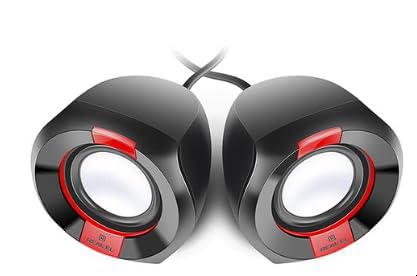
Выява 1: Спераду view of the REAL-EL X-770 Portable Speaker. This image displays the speaker's compact design, the main speaker grille, and typical control buttons for power, volume, and playback.
- Кнопка харчавання: Націсніце і ўтрымлівайце, каб уключыць/выключыць дынамік.
- Кнопка павелічэння гучнасці/наступнага трэка: Кароткае націсканне для павелічэння гучнасці, доўгае націсканне для наступнага трэка.
- Кнопка памяншэння гучнасці/пераключэння на папярэдні трэк: Кароткае націсканне для памяншэння гучнасці, доўгае націсканне для папярэдняга трэка.
- Кнопка прайгравання/паўзы: Націсніце, каб прайграць або прыпыніць гук.
- Кнопка рэжыму: Press to switch between input modes (e.g., Bluetooth, HDMI, AUX).
- Порт для зарадкі: Для падключэння зараднага кабеля.
- Порт HDMI: Для аўдыёўваходу з сумяшчальных прылад.
5. Настройка
5.1 Зарадка дынаміка
- Падключыце зарадны кабель да зараднага порта дынаміка.
- Connect the other end of the charging cable to a USB power adapter (not included) or a powered USB port.
- The charging indicator light will illuminate (color may vary) to show that the speaker is charging.
- Once fully charged, the indicator light may change color or turn off. Disconnect the speaker from the charger.
5.2 Уключэнне/выключэнне
- To power ON: Press and hold the Кнопка харчавання for approximately 3 seconds. An indicator light will turn on, and you may hear an audible prompt.
- To power OFF: Press and hold the Кнопка харчавання for approximately 3 seconds. The indicator light will turn off, and you may hear an audible prompt.
6. Кіраванне дынамікам
6.1 Спалучэнне па Bluetooth
- Ensure the speaker is powered ON and in Bluetooth pairing mode (usually indicated by a flashing blue LED). If not, press the Кнопка рэжыму until Bluetooth mode is active.
- На мабільнай прыладзе (смартфоне, планшэце, камп'ютары) уключыце Bluetooth і знайдзіце даступныя прылады.
- Select "REAL-EL X-770" from the list of found devices.
- Пасля спалучэння дынамік выдасць гук пацверджання, а індыкатар Bluetooth перастане міргаць і будзе гарэць пастаянна.
- Цяпер вы можаце прайграваць аўдыё з прылады праз дынамік.
6.2 HDMI Audio Input
The REAL-EL X-770 supports audio input via HDMI. This allows connection to devices such as TVs, gaming consoles, or media players that output audio through HDMI.
- Connect an HDMI cable (not included) from the audio output port of your source device to the HDMI input port on the REAL-EL X-770 speaker.
- Power on both the speaker and the source device.
- Націсніце Кнопка рэжыму on the speaker until the HDMI input mode is selected.
- Ensure the audio output settings on your source device are configured to send audio via HDMI.
- Adjust the volume on both the speaker and the source device as needed.
6.3 Рэгулятар гучнасці
- To increase volume: Short press the Кнопка павелічэння гучнасці/наступнага трэка.
- To decrease volume: Short press the Кнопка памяншэння гучнасці/папярэдняй дарожкі.
6.4 Кіраванне прайграваннем
- To play/pause: Press the Кнопка прайгравання/паўзы.
- To skip to the next track: Long press the Кнопка павелічэння гучнасці/наступнага трэка.
- To go to the previous track: Long press the Кнопка памяншэння гучнасці/папярэдняй дарожкі.
7. Тэхнічнае абслугоўванне
7.1 Ачыстка
- Wipe the speaker's exterior with a soft, dry, lint-free cloth.
- Не выкарыстоўвайце абразіўныя ачышчальнікі, спірт, бензол або іншыя хімічныя растваральнікі, бо яны могуць пашкодзіць паверхню.
- Пазбягайце траплення вільгаці ў любыя адтуліны.
7.2 Захоўванне
- Калі дынамік не выкарыстоўваецца працяглы час, захоўвайце яго ў прахалодным, сухім месцы, удалечыні ад прамых сонечных прамянёў і экстрэмальных тэмператур.
- It is recommended to charge the speaker at least once every three months to maintain battery health.
8. Выпраўленне непаладак
| праблема | Магчымая прычына | Рашэнне |
|---|---|---|
| Дынамік не ўключаецца. | Акумулятар разраджаны. | Цалкам зарадзіце дынамік. |
| Няма гуку з дынаміка. | Гучнасць занадта нізкая або адключаная. Выбраны няправільны рэжым уводу. Прылада не спалучана (Bluetooth). | Increase volume on both speaker and source device. Ensure correct input mode (Bluetooth/HDMI). Re-pair Bluetooth device. |
| Немагчыма падключыцца праз Bluetooth. | Дынамік не ў рэжыме спалучэння. Прылада занадта далёка. Перашкоды. | Ensure speaker is in Bluetooth pairing mode. Move devices closer. Turn off other Bluetooth devices. |
| HDMI audio not working. | Incorrect mode. Cable issue. Source device settings. | Ensure speaker is in HDMI mode. Check HDMI cable connection. Verify source device audio output settings. |
9. Тэхнічныя характарыстыкі
| Асаблівасць | Дэталь |
|---|---|
| Марка | РЭАЛЬНА-ЭЛ |
| Назва мадэлі | Х-770 |
| Нумар мадэлі | EL121600004 |
| Тэхналогія падлучэння | HDMI, Bluetooth (assumed for portable speaker) |
| Памеры прадукту | 25.4 х 5.08 х 6.86 см |
| Вага прадмета | 5.29 кілаграма |
| Колер | шматколернасць |
| Батарэі ўваходзяць у камплект | няма |
| Патрабуюцца батарэі | няма |
Note: While the product data indicates no batteries are included or required, portable speakers typically feature an internal rechargeable battery for wireless operation. This specification might refer to the absence of user-replaceable or external batteries. The speaker is designed to be charged via its charging port. Specifications are subject to change without prior notice. For the most up-to-date information, please refer to the manufacturer's official webсайт.
10. Гарантыя і падтрымка
The REAL-EL X-770 Portable Speaker comes with a manufacturer's warranty. Please refer to the warranty card included with your purchase or visit the official REAL-EL webсайт для атрымання падрабязных гарантыйных умоў.
For technical support, service inquiries, or further assistance, please contact REAL-EL customer service through their official channels. Contact information can typically be found on the product packaging or the manufacturer's webсайт.