
1. Уводзіны
This manual provides essential information for the safe and correct operation of your Vonyx VMM100 4-Channel DJ Mixer. Please read this manual thoroughly before using the device to ensure optimal performance and to prevent damage. Keep this manual for future reference.
2. Інструкцыі па тэхніцы бяспекі
- Пераканайцеся, што аб'ём блока харчаванняtage matches the requirements specified for the device.
- Do not expose the device to rain or moisture to avoid electric shock.
- Пазбягайце размяшчэння прылады побач з крыніцамі цяпла або пад прамымі сонечнымі прамянямі.
- Не адчыняйце casinг; унутры няма дэталяў, якія можна абслугоўваць самастойна. Звяртайцеся да кваліфікаванага персаналу па ўсё абслугоўванне.
- Disconnect the power adapter during thunderstorms or when not in use for extended periods.
- Захоўвайце прыладу далей ад дзяцей.
3. Асаблівасці прадукту
- Compact 4-channel analog mixer.
- Падключэнне Bluetooth для бесправадной перадачы аўдыё.
- Integrated USB MP3 player with digital display.
- Adjustable delay effect with dedicated volume control.
- Effect send/return on channels 1 and 2.
- High and low tone controls for each channel.
- USB power supply (5V) for mobile use, compatible with power banks.
- Channels 1 and 2 feature +48V phantom power for condenser microphones.
- LED VU meter and peak indicators for signal monitoring.
- Includes USB power adapter and USB cable.
4. Змесціва ўпакоўкі
Калі ласка, пераканайцеся, што ўсе прадметы наяўныя пры распакаванні:
- Vonyx VMM100 4-Channel DJ Mixer
- USB адаптар харчавання
- Кабель USB
- Кіраўніцтва карыстальніка (гэты дакумент)
5. Элементы кіравання і функцыі
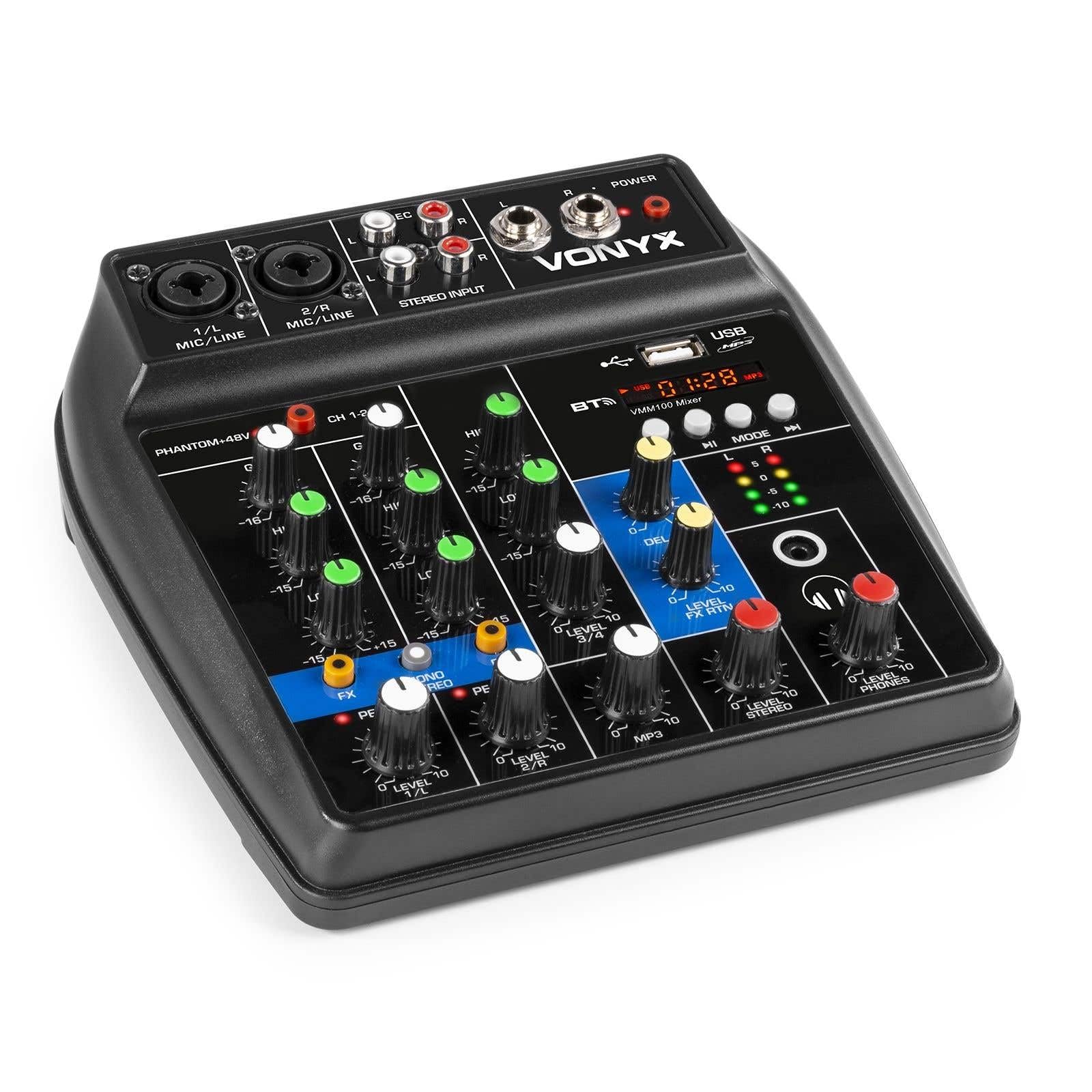
Малюнак 1: У цэлым view of the Vonyx VMM100 mixer, highlighting the layout of all controls, inputs, and outputs.

Малюнак 2: Close-up of the mixer's control panel, showing individual channel controls, EQ, gain, and effect knobs.
5.1 Input Channels (1 & 2)
- Combi XLR / 6.3mm Jack: Connect microphones (XLR) or line-level instruments (6.3mm jack).
- Phantom +48V Switch: Activates phantom power for condenser microphones on channels 1 and 2.
- Ручка GAIN: Adjusts the input sensitivity for the connected device.
- Ручка HIGH: Adjusts the high-frequency (treble) level for the channel.
- Ручка LOW: Adjusts the low-frequency (bass) level for the channel.
- Ручка FX: Controls the amount of delay effect applied to the channel.
- Пікавы святлодыёд: Illuminates when the input signal is too high, indicating potential clipping. Adjust GAIN to prevent this.
- Ручка LEVEL: Adjusts the overall output level of the channel.
5.2 Stereo Input (Channel 3)
- RCA Inputs (L/R): Connect external stereo audio sources such as CD players or other line-level devices.
- Ручка LEVEL: Adjusts the output level of the stereo input.
5.3 MP3/Bluetooth Channel (Channel 4)

Малюнак 3: USB port with a USB drive, demonstrating media playback capability.

Малюнак 4: Bluetooth and USB player section, showing the display and control buttons.
- Порт USB: Устаўце флэш-назапашвальнік USB для прайгравання MP3.
- Дысплей: Shows track information, playback time, and mode.
- Control Buttons (Play/Pause, Skip, Mode): Navigate tracks and switch between USB and Bluetooth modes.
- Bluetooth (BT) Indicator: Lights up when Bluetooth is active and paired.
- Ручка LEVEL: Adjusts the output level of the MP3/Bluetooth channel.
5.4 Галоўная секцыя
- DELAY Knob: Adjusts the overall intensity of the delay effect.
- LEVEL FX RTN Knob: Controls the return level of the delay effect.
- LEVEL STEREO Knob: Master volume control for the main stereo output.
- LEVEL PHONES Knob: Рэгулюе гучнасць выхаду на навушнікі.
- VU Meter (LED): Displays the main output level.
- Main Output (6.3mm Jack L/R): Падключаецца да ampліфёры або дынамікі з харчаваннем.
- Record Output (RCA L/R): Падключаецца да запісвальных прылад.
- Выхад для навушнікаў (раздым 6.3 мм): Connects stereo headphones.
- Святлодыёд харчавання: Indicates when the mixer is powered on.
5.5 Уваходная магутнасць

Малюнак 5: Збоку view of the mixer, illustrating the 5V DC USB power input port.
- 5V DC USB Input: Connect the provided USB power adapter or a compatible USB power source (e.g., power bank) to power the mixer.
6. Настройка
6.1 Падключэнне харчавання
- Connect the supplied USB cable to the 5V DC USB input on the mixer.
- Connect the other end of the USB cable to the provided USB power adapter.
- Plug the USB power adapter into a suitable wall outlet. The POWER LED on the mixer will illuminate.
6.2 Падключэнне аўдыёкрыніц
- Microphones/Line Instruments: Connect microphones via XLR or line-level instruments via 6.3mm jack to channels 1 and 2. If using condenser microphones, activate the +48V phantom power switch.
- Stereo Line Devices: Connect devices like CD players to the RCA inputs of channel 3.
- USB-дыск: Устаўце USB-назапашвальнік з MP3 files into the USB port on channel 4.
6.3 Падключэнне выхадаў
- Асноўны выхад: Connect the 6.3mm jack main outputs (L/R) to your amplifier, powered speakers, or PA system.
- Навушнікі: Connect your headphones to the 6.3mm headphone jack.
- Запісваючая прылада: Connect the RCA record outputs (L/R) to an external recording device if desired.
7. Інструкцыя па эксплуатацыі
7.1 Асноўнае змешванне
- Ensure all LEVEL and GAIN knobs are set to their minimum positions before powering on.
- Power on the mixer and any connected audio equipment.
- Gradually increase the GAIN knob for each active input channel until the PEAK LED flashes only occasionally during the loudest parts of the signal.
- Adjust the HIGH and LOW EQ knobs for each channel to shape the tone as desired.
- Use the individual LEVEL knobs to balance the volume of each channel.
- Adjust the main STEREO LEVEL knob to control the overall output volume. Monitor the VU meter to avoid clipping.
- Adjust the PHONES LEVEL knob for comfortable headphone monitoring.
7.2 Праца Bluetooth
- Press the MODE button on the MP3/Bluetooth channel until the display shows "BT" or the Bluetooth indicator flashes.
- On your smartphone, tablet, or PC, search for Bluetooth devices and select "Vonyx VMM100".
- Once paired, the Bluetooth indicator will glow steadily. You can now stream audio wirelessly to the mixer.
- Use the playback controls on the mixer or your device to manage audio.
7.3 Прайграванне MP3 праз USB
- Устаўце USB-назапашвальнік з MP3 files у порт USB.
- Press the MODE button on the MP3/Bluetooth channel until the display shows track information.
- Use the playback controls (Play/Pause, Skip) to navigate and play tracks.
7.4 Using Effects
- Turn the FX knob on channels 1 and 2 to send a portion of that channel's signal to the internal delay effect.
- Adjust the main DELAY knob to control the overall intensity and characteristics of the delay.
- Use the LEVEL FX RTN knob to control how much of the processed effect signal is mixed back into the main output.
8. Запіс
The VMM100 mixer allows for easy recording of your mix. Connect the RCA record outputs (L/R) to the input of a suitable recording device (e.g., computer audio interface, dedicated recorder). Ensure your recording software or device is configured to receive audio from the connected inputs. The signal sent to the record output is a stereo mix of all active channels, post-fader.
9. Тэхнічнае абслугоўванне
- Уборка: Для чысткі вонкавай паверхні міксера выкарыстоўвайце мяккую сухую тканіну. Не выкарыстоўвайце абразіўныя ачышчальнікі або растваральнікі.
- захоўванне: Захоўвайце міксер у прахалодным, сухім месцы, удалечыні ад прамых сонечных прамянёў і экстрэмальных тэмператур.
- Апрацоўка: Avoid dropping or subjecting the mixer to strong impacts.
10. Выпраўленне непаладак
| праблема | Магчымая прычына | Рашэнне |
|---|---|---|
| Няма ўлады | Адаптар харчавання не падключаны або няспраўны. | Check power connections. Try a different USB port or adapter. |
| Няма выхаду гуку | Incorrect cable connections; volume knobs too low; incorrect input selection. | Verify all audio cables are securely connected. Increase channel LEVEL and STEREO LEVEL knobs. Ensure correct input mode (e.g., USB/BT). |
| Скажоны гук | Input GAIN too high; output level too high. | Reduce GAIN for the affected channel until the PEAK LED stops flashing excessively. Lower STEREO LEVEL. |
| Bluetooth не спалучаецца | Mixer not in Bluetooth mode; device too far; previously paired device connected. | Ensure mixer is in BT mode. Move device closer. Disconnect from other Bluetooth devices. |
| Прайграванне з USB не працуе | USB drive not formatted correctly; unsupported file type; mixer not in USB mode. | Ensure USB drive is FAT32 formatted and contains MP3 files. Press MODE to select USB. |
11. Тэхнічныя характарыстыкі
- Уваходы:
- Channels 1 & 2: Combi XLR / 6.3mm Jack (Line or Microphone)
- Channel 3: RCA (Stereo)
- Channel 4: Bluetooth or USB MP3 Player
- Выхады:
- Main: 6.3mm Jack (Stereo)
- Record: RCA (Stereo)
- Headphone: 6.3mm Jack
- Дыяпазон частот: 20 Гц - 20 000 Гц
- Эквалайзер: 2-band (High, Low) per channel
- Фантомная магутнасць: +48V (Channels 1 & 2)
- Злучэнне Voltage: 5 В пастаяннага току (праз USB)
- Памеры (Д х Ш х У): 18 х 19.5 х 5.8 см (7.09 х 7.68 х 2.28 цалі)
- Вага: 0.5 кг (1.1 фунтаў)
- матэрыял: Нейлон
12. Гарантыя і падтрымка
Vonyx products are designed and manufactured to the highest quality standards. In the unlikely event of a problem with your product, please contact your retailer for warranty service. Please retain your proof of purchase. For technical support or further inquiries, refer to the official Vonyx webсайт або звярніцеся ў іх аддзел абслугоўвання кліентаў.