1. Уводзіны
Thank you for choosing the White Shark GK-2022 SHINOBI Mechanical Keyboard. This compact 61-key keyboard is designed for optimal performance and durability, featuring OUTEMU Red mechanical switches and vibrant RGB backlighting. This manual provides detailed instructions for setup, operation, maintenance, and troubleshooting to ensure you get the most out of your new keyboard.
2. Змесціва ўпакоўкі
Калі ласка, праверце ўпакоўку на наяўнасць наступных прадметаў:
- White Shark GK-2022 SHINOBI Mechanical Keyboard
- Кабель USB-A да USB-C (1.8 м)
- Кіраўніцтва карыстальніка (гэты дакумент)
3. Прадукт скончыўсяview
The White Shark GK-2022 SHINOBI is a 61-key compact mechanical keyboard, ideal for users seeking a minimalist design without compromising on functionality. It features durable mechanical switches and customizable backlighting.

Малюнак 3.1: Верх view of the White Shark GK-2022 SHINOBI keyboard, showcasing its compact 61-key layout and vibrant RGB backlighting.

Малюнак 3.2: Пад вуглом view of the keyboard, highlighting its ergonomic profile і дызайн каўпачкоў клавіш.
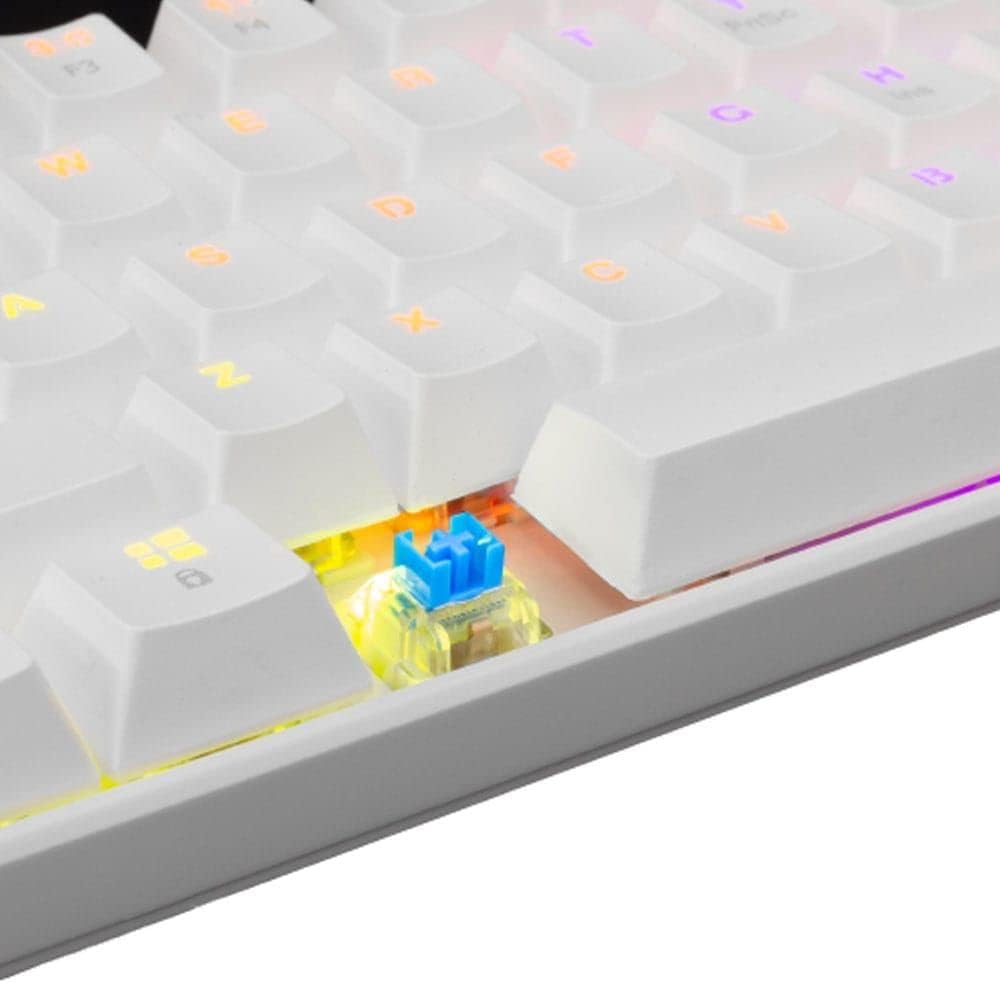
Малюнак 3.3: Крупны план view of an OUTEMU Red mechanical switch, known for its linear and quiet operation.
4. Настройка
Follow these steps to set up your White Shark GK-2022 SHINOBI keyboard:
- Unpack the keyboard and the USB cable from the box.
- Знайдзіце порт USB-C на клавіятуры.
- Insert the USB-C end of the cable into the keyboard's port.
- Connect the USB-A end of the cable to an available USB 2.0 port on your computer (PC, Laptop, etc.).
- The keyboard is plug-and-play and should be automatically recognized by your operating system. No additional drivers are typically required.

Figure 4.1: Connecting the USB-C cable to the keyboard's port for power and data transmission.
5. Інструкцыя па эксплуатацыі
5.1 Асноўныя аперацыі
Once connected, the keyboard is ready for immediate use. Type as you would on any standard keyboard.
5.2 Function Keys and Shortcuts
Due to its compact 61-key layout, many standard functions are accessed via a combination of the Function (Fn) key and other keys. Refer to the keycaps for specific Fn layer markings.
- Fn + [клавіша]: Access secondary functions printed on the keycaps (e.g., F1-F12, multimedia controls, navigation keys).
- Кіраванне падсветкай: The keyboard features single-color backlighting. Use Fn key combinations to cycle through lighting modes or adjust brightness. Specific combinations are usually marked on the keys (e.g., Fn + \ for lighting modes, Fn + arrow keys for brightness/speed).
5.3 Анты-гостынг
The GK-2022 SHINOBI supports full 61-key anti-ghosting, ensuring that every key press is registered accurately, even during rapid, simultaneous keystrokes, which is beneficial for gaming and fast typing.
6. Тэхнічнае абслугоўванне
Proper maintenance will extend the lifespan of your keyboard:
- Уборка: Use a soft, dry cloth to wipe the surface of the keyboard. For deeper cleaning, you may use compressed air to remove dust and debris from between the keycaps.
- Разлівы: In case of liquid spills, immediately unplug the keyboard from your computer. Turn it upside down to drain any liquid and allow it to dry completely before reconnecting. Do not use a hairdryer as excessive heat can damage components.
- Захоўванне: Store the keyboard in a cool, dry place away from direct sunlight and extreme temperatures.
7. Выпраўленне непаладак
Калі ў вас узніклі праблемы з клавіятурай, паспрабуйце наступныя рашэнні:
- Клавіятура не адказвае:
- Пераканайцеся, што USB-кабель надзейна падключаны як да клавіятуры, так і да кампутара.
- Паспрабуйце падключыць клавіятуру да іншага USB-порта на вашым кампутары.
- Перазагрузіце кампутар.
- Праверце клавіятуру на іншым кампутары, каб вызначыць, ці праблема ў клавіятуры, ці ў вашай сістэме.
- Клавішы не рэгіструюцца або ўводзяцца два разы:
- Check for any debris or foreign objects under the affected keycap.
- Пераканайцеся, што каўпачок клавішы правільна ўсталяваны на перамыкачы.
- Падсветка не працуе:
- Пераканайцеся, што клавіятура мае належнае харчаванне.
- Try cycling through the lighting modes using the Fn key combinations.
- Адрэгулюйце параметры яркасці.
If the problem persists after trying these steps, please contact White Shark customer support.
8. Тэхнічныя характарыстыкі
| Асаблівасць | Апісанне |
|---|---|
| мадэль | GK-2022 SHINOBI |
| Марка | Белая акула |
| Колькасць ключоў | 61 |
| Тып перамыкача | Mechanical - OUTEMU (Red) |
| Націск клавішы | 60 г +/- 15 г |
| Анты-прывіды | 61 keys (Full Anti-Ghosting) |
| Колер | Белы |
| Інтэрфейс | USB 2.0 |
| Даўжыня кабеля | 1.8 метраў |
| Сумяшчальныя прылады | PC, Laptop, Tablet, Smartphone (via USB) |
| Рэкамендуемае выкарыстанне | Gaming, Office Work, Multimedia Editing |
| Падсвятленне клавіятуры | Single Color (RGB effects) |
| Матэрыял | Пластыкавыя |
| Вага прадмета | 556 г |
| Памеры ўпакоўкі | 31 х 13 х 5 см |
9. Гарантыя і падтрымка
White Shark products are manufactured to the highest quality standards. For information regarding warranty coverage, technical support, or service inquiries, please refer to the warranty card included with your product or visit the official White Shark webсайт. Калі ласка, захавайце пацвярджэнне пакупкі для прэтэнзій па гарантыі.
For further assistance, you may contact White Shark customer support through their official channels.