
1. Уводзіны
The TP-Link Archer AX80/A is a high-performance AX6000 WiFi 6 router designed to deliver ultra-fast wireless speeds and enhanced network capacity. Featuring advanced technologies like OFDMA, MU-MIMO, and 8-stream connectivity, it ensures a stable and efficient network experience for numerous connected devices, including smartphones, tablets, and IoT devices. This manual provides detailed instructions for setting up, operating, and maintaining your Archer AX80/A router.


2. Змесціва ўпакоўкі
Пераканайцеся, што ваш пакет змяшчае наступныя элементы:
- TP-Link Archer AX80/A AX6000 WiFi 6 Router
- Адаптар сілкавання
- Кабель Ethernet
- Кіраўніцтва па хуткай ўстаноўцы
3. Фізічны канецview
3.1 Парты і кнопкі
The Archer AX80/A router features various ports and buttons for connectivity and control.

- Порт WAN/LAN 2.5 Гбіт/с: One port for high-speed internet connection or LAN device.
- Гігабітны порт WAN/LAN: One port for standard internet connection or LAN device.
- Gigabit LAN Ports: Three ports for connecting wired devices.
- Порт USB 3.0: One port for connecting external storage devices for network sharing.
- Кнопка ўключэння/выключэння: To power the router on or off.
- Кнопка скіду: To restore factory default settings (use a pin to press and hold).

3.2 Варыянты размяшчэння
The Archer AX80/A offers flexible placement options to suit your environment.

4. Кіраўніцтва па наладцы
4.1 Падлучэнне абсталявання
- Power off your modem and remove the backup battery if it has one.
- Connect the modem to the router's WAN port (usually the 2.5Gbps port) using an Ethernet cable.
- Power on the modem, then power on the router.
- Wait for the router's LED indicators to stabilize, indicating a successful connection.
4.2 Easy Setup via TP-Link Tether App
The TP-Link Tether app provides an intuitive way to set up and manage your router from your smartphone or tablet.
- Спампуйце праграму TP-Link Tether з App Store або Google Play.
- Падключыце мабільную прыладу да сеткі Wi-Fi маршрутызатара па змаўчанні (SSID і пароль знаходзяцца на налепцы маршрутызатара).
- Open the Tether app and follow the on-screen instructions to complete the initial setup, including creating a TP-Link ID, setting up your Wi-Fi name and password, and configuring internet settings.

5. Інструкцыя па эксплуатацыі
5.1 Падключэнне прылад
- Бесправоднае злучэнне: Пошук your Wi-Fi network name (SSID) on your device and enter the password you set during setup.
- Правадное злучэнне: Connect your computer or other wired devices to the router's LAN ports using Ethernet cables.

5.2 Кіраванне сеткай
You can manage your router settings through the TP-Link Tether app or by accessing the web інтэрфейс кіравання праз web browser (typically at http://tplinkwifi.net or http://192.168.0.1).
- Змяніць налады Wi-Fi (SSID, пароль, тып бяспекі).
- Маніторынг падлучаных прылад.
- Configure advanced network settings.
6. Пашыраныя магчымасці
6.1 OneMesh™ Support
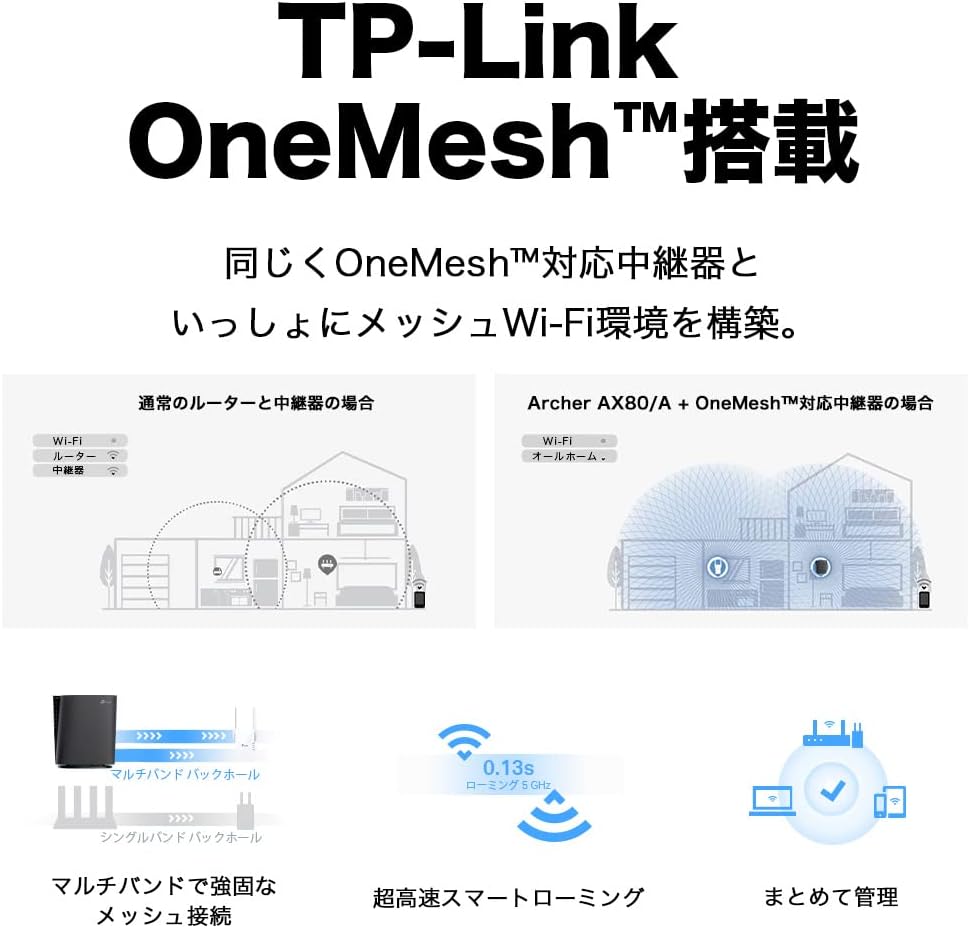
The Archer AX80/A supports TP-Link OneMesh™, allowing you to create a seamless whole-home Wi-Fi network by connecting to OneMesh-compatible range extenders. This eliminates Wi-Fi dead zones and provides uninterrupted roaming.
6.2 VPN Client Functionality
The router includes VPN client functionality, enabling you to establish a secure VPN connection without needing additional VPN software on each device. It supports OpenVPN, PPTP VPN, and L2TP VPN protocols.

6.3 IPv6 IPoE Support
The Archer AX80/A supports IPv6 IPoE (IPv4 over IPv6), including v6 Plus, OCN Virtual Connect, and DS-Lite, ensuring compatibility with modern internet service provider configurations for optimal performance.
6.4 Бацькоўскі кантроль
Manage and control internet access for family members with robust parental control features available through the Tether app. Set time limits, block inappropriate content, and monitor usage.

6.5 WPA3 Security
The router supports WPA3, the latest Wi-Fi security protocol, providing enhanced encryption and protection against cyber threats for a more secure home network.

6.6 US-Based Security Standards
TP-Link adheres to US government cybersecurity and infrastructure security agency (CISA) promoted "Secure-by-Design" principles, ensuring high-level security throughout design, development, and maintenance.

7. Тэхнічнае абслугоўванне
7.1 Абнаўленне прашыўкі
Рэгулярна абнаўляйце прашыўку вашага маршрутызатара, каб забяспечыць аптымальную прадукцыйнасць, бяспеку і доступ да новых функцый. Абнаўленні прашыўкі можна выконваць праз праграму Tether або web інтэрфейс кіравання.
- Open the Tether app or log in to the web інтэрфейс кіравання.
- Перайдзіце ў раздзел «Сістэмныя інструменты» > «Абнаўленне прашыўкі».
- Follow the instructions to check for and install available updates.
7.2 Rebooting the Router
If you experience network issues, a simple reboot can often resolve them. You can reboot the router through the Tether app, web management interface, or by unplugging and replugging the power adapter.
8. Выпраўленне непаладак
8.1 Няма доступу да Інтэрнэту
- Праверце, ці правільна працуе ваш мадэм.
- Пераканайцеся, што ўсе кабелі надзейна падключаны да правільных партоў.
- Перазагрузіце і мадэм, і маршрутызатар.
- Verify your internet settings in the router's management interface.
8.2 Слабы сігнал Wi-Fi
- Relocate the router to a central location, away from obstructions and interference sources.
- Consider adding a TP-Link OneMesh™ compatible range extender to expand coverage.
- Adjust Wi-Fi channel settings in the router's management interface to avoid interference.
8.3 Forgotten Wi-Fi Password or Login Password
- Пароль Wi-Fi па змаўчанні надрукаваны на налепцы ў ніжняй частцы маршрутызатара.
- If you changed it and forgot, you can retrieve or reset it via the Tether app or web інтэрфейс кіравання.
- If you forgot the router's login password, you may need to perform a factory reset (see Section 3.1) and reconfigure the router.
9. Тэхнічныя характарыстыкі
| Асаблівасць | Апісанне |
|---|---|
| Марка | TP-Link |
| Назва мадэлі | Archer AX80/A |
| бесправадной стандарт | 802.11ax (Wi-Fi 6) |
| Клас дыяпазону частот | Двухдыяпазонны |
| Хуткасць перадачы даных | AX6000 (4804 Mbps on 5GHz + 1148 Mbps on 2.4GHz) |
| Парты | 1x 2.5Gbps WAN/LAN, 1x Gigabit WAN/LAN, 3x Gigabit LAN, 1x USB 3.0 |
| Тып антэны | Унутраны |
| Пратакол бяспекі | WPA3 |
| Метад кіравання | Прыкладанне Tether, Web UI |
| Сумяшчальныя прылады | Смартфоны, планшэты, ноўтбукі |
| Памеры (Д х Ш х У) | 18.9 см х 5.9 см х 20 см |
10. Гарантыя і падтрымка
10.1 Інфармацыя аб гарантыі
The TP-Link Archer AX80/A router comes with a 3-гадовая гарантыя вытворцыКалі ласка, захавайце пацвярджэнне пакупкі для прэтэнзій па гарантыі. Гарантыя распаўсюджваецца на дэфекты матэрыялаў і вырабу пры нармальным выкарыстанні.
10.2 Тэхнічная падтрымка
For technical support, firmware updates, and additional resources, please visit the official TP-Link website or contact TP-Link customer support. You can find contact information and FAQs on the TP-Link support page: