
Уводзіны
Thank you for choosing the Ledwood Apollo S True Wireless Stereo (TWS) Earphones. This manual provides essential instructions for setting up, operating, and maintaining your earphones to ensure optimal performance and longevity. The Apollo S earphones feature a sleek design, sensitive touch controls, and a wireless charging case with a digital battery level display.
Змест пакета
- Ledwood Apollo S TWS Earphones (Left and Right)
- Чахол для бесправадной зарадкі
- USB-кабель для зарадкі
- Кіраўніцтва карыстальніка
Note: Please check all items are present upon unboxing.
Настройка
1. Зарадка навушнікаў і чахла
Before first use, fully charge the earphones and the charging case. The charging case features a digital screen that displays the battery level percentage.
- Зарадка кейса: Connect the provided USB charging cable to the charging port on the case and to a USB power adapter (not included). The digital display will show the charging progress.
- Зарадка навушнікаў: Place the earphones into their respective slots in the charging case. Ensure they are correctly seated. The earphones will automatically begin charging. The case's digital display may indicate the charging status of the earphones.
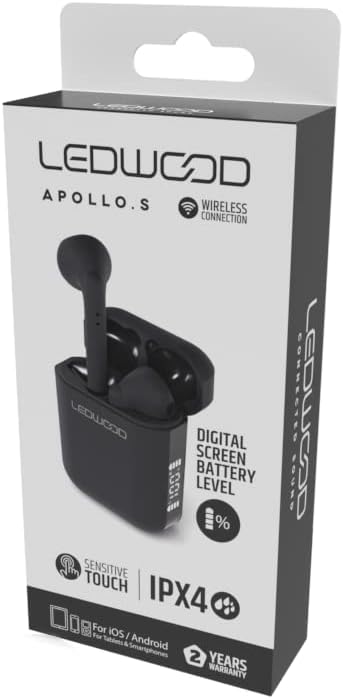
Image: Ledwood Apollo S TWS Earphones shown inside their open charging case. The earphones are black, and the case is also black with a sleek design. This image illustrates the product components.
2. Спалучэнне з прыладай Bluetooth
- крок 1: Ensure the earphones are charged. Open the charging case. The earphones will automatically enter pairing mode, indicated by a flashing LED light on one or both earphones.
- крок 2: На мабільнай прыладзе (смартфоне, планшэце і г.д.) перайдзіце ў налады Bluetooth.
- крок 3: Уключыце Bluetooth. Пошук даступныя прылады.
- крок 4: Select "Ledwood Apollo S" from the list of available devices.
- крок 5: Once connected, the LED indicator on the earphones will stop flashing, and you will hear a confirmation tone.
- Note: The earphones will automatically reconnect to the last paired device when taken out of the case, if Bluetooth is enabled on the device.
Інструкцыя па эксплуатацыі
Нашэнне навушнікаў
Gently insert the earphones into your ears, ensuring a comfortable and secure fit. Adjust them slightly to achieve optimal sound quality and passive noise isolation.
Сэнсарныя элементы кіравання
The Ledwood Apollo S earphones feature sensitive touch controls on each earbud. The functions may vary slightly depending on your device and operating system.
- Прайграванне/Паўза: Адзін націск на любы навушнік.
- Наступны трэк: Двойчы націсніце на правы навушнік-ўкладыш.
- Папярэдні трэк: Двойчы націсніце на левы навушнік-ўкладыш.
- Адказ/завяршэнне выкліку: Адно націсканне на любы навушнік падчас уваходнага або актыўнага званка.
- Адхіліць выклік: Падчас уваходнага званка націсніце і ўтрымлівайце любы з навушнікаў на працягу 2 секунд.
- Актываваць галасавы памочнік: Тройчы націсніце на любы з навушнікаў (напрыклад, Siri, Google Assistant).
- Уключэнне/выключэнне харчавання: Earphones power on automatically when removed from the case and power off when placed back into the case. Manual power on/off may be available by pressing and holding the touch area for an extended period (refer to specific device behavior).
Тэхнічнае абслугоўванне
- Уборка: Для чысткі навушнікаў і зараднага футляра выкарыстоўвайце мяккую, сухую тканіну без ворса. Не выкарыстоўвайце абразіўныя ачышчальнікі або растваральнікі.
- захоўванне: Калі навушнікі не выкарыстоўваюцца, захоўвайце іх у зарадным чахле, каб абараніць і падтрымліваць зараджанасць.
- Воданепранікальнасць: The earphones are rated IPX4, meaning they are resistant to splashing water from any direction. They are not waterproof and should not be submerged in water. Avoid exposure to heavy rain or sweat for extended periods.
- тэмпература: Пазбягайце ўздзеяння экстрэмальных тэмператур (высокіх або нізкіх) або высокай вільготнасці навушнікаў.
Ліквідацыю непаладак
- Навушнікі не спалучаюцца:
- Пераканайцеся, што абодва навушнікі зараджаныя.
- Выключыце Bluetooth на прыладзе і зноў уключыце яго.
- Forget "Ledwood Apollo S" from your device's Bluetooth list and try pairing again.
- Змясціце навушнікі назад у чахол, зачыніце вечка, пачакайце некалькі секунд, а затым зноў адкрыйце, каб перазагрузіць.
- Няма гуку з аднаго навушніка:
- Пераканайцеся, што абодва навушнікі зараджаны.
- Паспрабуйце зноў уставіць абодва навушнікі ў чахол і выняць іх.
- Праверце налады балансу гуку вашай прылады.
- Чахол для зарадкі не зараджаецца:
- Пераканайцеся, што зарадны кабель надзейна падключаны як да корпуса, так і да крыніцы харчавання.
- Паспрабуйце іншы кабель USB або адаптар сілкавання.
- Сэнсарныя элементы кіравання не рэагуюць:
- Пераканайцеся, што вашы пальцы чыстыя і сухія.
- Перазапусціце прыладу і паўтарыце спробу.
Тэхнічныя характарыстыкі
| Марка | Ледвуд |
| Назва мадэлі | APOLLO S (LD-APOLLO-S-BLK) |
| Формаў-фактар | У вуха |
| Тэхналогія падлучэння | Бесправадная сувязь (Bluetooth) |
| Метад кантролю | Дакранацца |
| Рэйтынг воданепранікальнасці | IPX4 |
| Убудаваны медыя | Чахол для бесправадной зарадкі |
| Дадатковыя магчымасці | Хуткая зарадка |
| Матэрыял | Пластыкавыя |
| Колер | Чорны |
| Сумяшчальнасць | For iOS / Android (Tablets & Smartphones) |
Гарантыя і падтрымка
The Ledwood Apollo S TWS Earphones come with a Гарантыя 2 год з даты пакупкі. Гэтая гарантыя распаўсюджваецца на вытворчыя дэфекты. Калі ласка, захавайце пацвярджэнне пакупкі для прэтэнзій па гарантыі.
For technical support or warranty inquiries, please contact your retailer or visit the official Ledwood website for customer service information. Ensure you have your model number (LD-APOLLO-S-BLK) and purchase details ready.