
Уводзіны
This manual provides instructions for the proper setup, operation, and maintenance of your Comix C-2031 Desk Calculator. This calculator is designed for general arithmetic tasks in home, office, or school environments, featuring a large 12-digit LCD display and dual power sources.

Асноўныя характарыстыкі
The Comix C-2031 Desk Calculator is equipped with several features designed for ease of use and reliability:
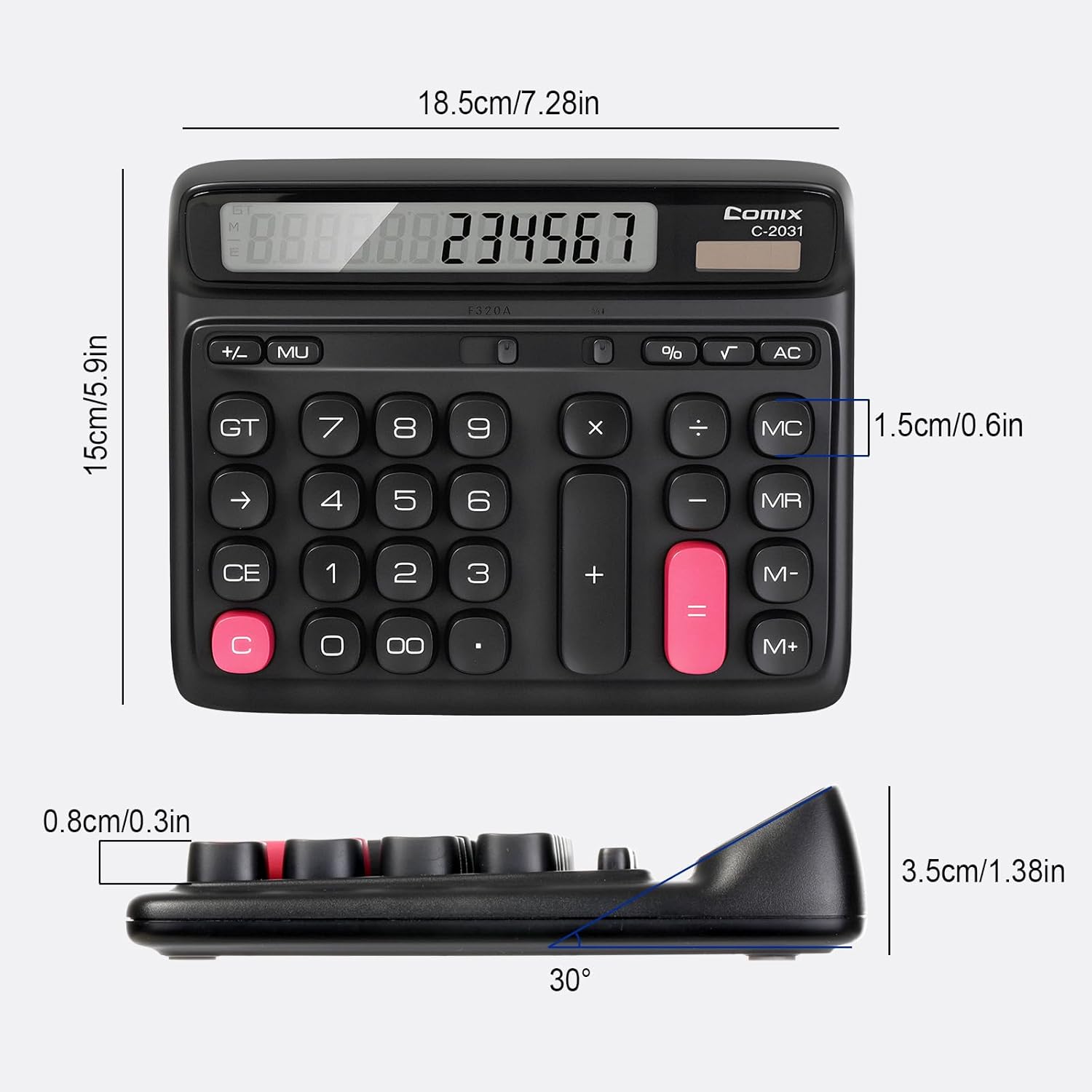
- 12-значны вялікі ВК-дысплей: Provides clear and accurate readings with a 30° tilt for comfortable viewінж.
- Ergonomic Computer Key Design: Features round keys for comfortable touch and clear feedback, designed for efficient data entry.
- Двайная крыніца харчавання: Operates on solar energy in well-lit conditions and includes a 1 AA battery for consistent performance, especially in low light.
- Ногі супраць слізгацення: Equipped with four non-slip feet to ensure stability on your desk during use.
- Кампактны памер: Measures 7.28 x 5.9 x 1.38 inches, fitting conveniently on any desk.

Настройка
Крыніца харчавання
The Comix C-2031 calculator utilizes a dual power system, operating on both solar energy and a single AA battery. For optimal display clarity and consistent operation, especially in environments with varying light conditions, using the AA battery is recommended.
- Сонечная энергія: The calculator will automatically use solar power when sufficient light is available. Ensure the solar panel (located above the display) is exposed to light for operation without battery power.
- Ўстаноўка батарэі:
- Знайдзіце батарэйны адсек на задняй панэлі калькулятара.
- Адкрыйце крышку батарэйнага адсека.
- Устаўце адну батарэйку тыпу АА, сачыце за правільнай палярнасцю (+/-).
- Надзейна зачыніце крышку батарэйнага адсека.

Інструкцыя па эксплуатацыі
Familiarize yourself with the calculator's key functions for efficient use.

Асноўныя аперацыі
- Увод нумара: Press the number keys (0-9) to input digits.
- Дзесяткавая кропка: Press the "." key for decimal values.
- Складанне (+), Адніманне (-), Множанне (×), Дзяленне (÷): Press the corresponding operator key after entering the first number, then enter the second number, and press "=" for the result.
- Раўна (=): Displays the result of a calculation.
Clear Functions
- C (Clear the Screen): Clears the current entry on the display without affecting memory or ongoing calculations.
- CE (чысты запіс): Clears the last entered number or operation.
- AC (Clear All): Clears all entries, operations, and memory content, resetting the calculator to its initial state.
- Backspace (→): Deletes the last digit entered.
Функцыі памяці
- M+ (Memory Plus): Adds the displayed number to the memory.
- M- (памяць мінус): Subtracts the displayed number from the memory.
- MR (адкліканне памяці): Выводзіць на дысплей значэнне, захаванае ў памяці.
- MC (Ачыстка памяці): Clears the memory content.
Пашыраныя функцыі
- % (працэнтtagд): Выкарыстоўваецца для працэнтаўtagэлектронныя разлікі. Напрыкладample, to calculate 10% of 200, enter 200 × 10 %, which will display 20.
- √ (Квадратны корань): Вылічвае квадратны корань з адлюстраванага ліку.
- GT (агульны вынік): Accumulates the results of all calculations. Pressing GT displays the grand total.
- MU (Mark-Up): Used for profit margin calculations.
Прадукт скончаныview Відэа
Тэхнічнае абслугоўванне
- Уборка: Wipe the calculator with a soft, dry cloth. Do not use liquid cleaners or abrasive materials.
- Замена батарэі: If the display becomes dim or unresponsive, replace the AA battery in the compartment on the back of the unit. Ensure proper polarity.
- захоўванне: Store the calculator in a cool, dry place away from direct sunlight and extreme temperatures.
Ліквідацыю непаладак
| праблема | Магчымая прычына | Рашэнне |
|---|---|---|
| Дысплей пусты або цьмяны. | Недастаткова святла для сонечнай энергіі або нізкі зарад батарэі. | Move the calculator to a brighter area or replace the AA battery. |
| Клавішы не рэагуюць. | Temporary software glitch or low power. | Press the AC button to reset. If the issue persists, replace the battery. |
| Няправільныя вынікі разлікаў. | Incorrect key sequence or function usage. | Review the operating instructions for the specific function. Press AC to clear all previous entries and start a new calculation. |
Тэхнічныя характарыстыкі
- мадэль: С-2031
- Дысплей: 12-значны вялікі ВК-дысплей
- Крыніца харчавання: Solar and 1 x AA Battery (included)
- Памеры прадукту: 7.28 х 5.9 х 1.38 цалі (18.5 х 15 х 3.5 см)
- Вага прадмета: 10.5 унцыі (297.67 грам)
- Тып ключа: Ergonomic Computer Keys
- Асаблівасці: 30° Tilt Display, Non-Slip Feet
Гарантыя і падтрымка
Comix products are manufactured with quality and reliability in mind. For any questions, technical support, or warranty inquiries, please refer to the contact information provided with your purchase or visit the official Comix webсайт. Калі ласка, захавайце пацвярджэнне пакупкі для прэтэнзій па гарантыі.