
1. Уводзіны
This manual provides essential information for the installation, operation, and maintenance of your Montech Titan Gold 850W ATX 3.0 Power Supply. This high-end power supply is designed for gaming systems, featuring 80 Plus Gold and Cybenetics Gold certifications, fully modular cabling, and readiness for PCIe 5.0 with a new 12VHPWR connector. Please read this manual thoroughly before installation and use to ensure proper functionality and safety.

Figure 1: Montech Titan Gold 850W Power Supply and its retail packaging.
2. Інфармацыя па бяспецы
Always observe the following safety precautions to prevent injury or damage to your power supply and system components:
- Перад устаноўкай або эксплуатацыяй пераканайцеся, што блок харчавання адключаны ад разеткі пераменнага току.
- Не адкрывайце блок харчавання casinг. Высокі аб'ёмtagУнутры ёсць дэталі, і няма дэталяў, якія можа абслугоўваць карыстальнік.
- Усталюйце блок харчавання ў добра вентыляваным памяшканні, удалечыні ад крыніц цяпла, прамых сонечных прамянёў і вільгаці.
- Выкарыстоўвайце толькі модульныя кабелі, якія пастаўляюцца ў камплекце з гэтым блокам харчавання. Выкарыстанне несумяшчальных кабеляў можа прывесці да пашкоджанняў.
- Перад уключэннем сістэмы пераканайцеся, што ўсе раздымы надзейна падключаны.
3. Змесціва ўпакоўкі
Праверце наяўнасць усіх прадметаў у камплекце:
- Montech Titan Gold 850W Power Supply Unit
- Modular Cable Set (including 12VHPWR cable)
- Шнур сілкавання
- Крапежныя шрубы
- Кабельныя сцяжкі/ліпучкі
- Кіраўніцтва карыстальніка (гэты дакумент)

Figure 2: Included modular cables and accessories for the power supply.
4. Настройка і ўстаноўка
Выканайце наступныя дзеянні, каб усталяваць блок харчавання:
- Падрыхтуйце корпус вашага ПК: Ensure your PC case is compatible with ATX power supplies.
- Усталюйце блок харчавання: Secure the power supply into the designated PSU bay in your PC case using the provided mounting screws. Ensure the fan is oriented correctly for optimal airflow (typically facing downwards if your case has a bottom vent).
- Падключэнне модульных кабеляў: Identify the necessary cables for your motherboard, CPU, graphics card(s), and storage devices. Connect these cables to the corresponding ports on the power supply. The fully modular design allows you to connect only the cables you need, reducing clutter.
- Падключэнне да кампанентаў: Route the connected cables through your case's cable management channels and connect them to your motherboard (24-pin ATX, 8-pin EPS/CPU), graphics card(s) (PCIe, including the 12VHPWR for compatible GPUs), and storage drives (SATA, Molex).
- Бяспечныя злучэнні: Double-check all connections to ensure they are firm and properly seated.

Малюнак 3: Закончанаview of the modular cable connection ports on the power supply.
5. Інструкцыя па эксплуатацыі
Пасля ўстаноўкі выканайце наступныя дзеянні, каб запусціць блок харчавання:
- Падключыце сетку пераменнага току: Plug the AC power cord into the power supply's AC inlet and then into a wall outlet or surge protector.
- Выключальнік сілкавання: Locate the main power switch on the rear of the power supply and flip it to the 'ON' (I) position.
- Уключэнне сістэмы: Press the power button on your PC case to start your computer.
- Smart Zero Fan Feature: This power supply includes a 'Smart Zero Fan' switch. When enabled (ON), the fan will remain off under low load conditions for silent operation. The fan will automatically activate when the load increases to maintain optimal temperatures. If disabled (OFF), the fan will operate continuously.

Figure 4: Rear panel with main power switch and Smart Zero Fan control.
6. Тэхнічнае абслугоўванне
Каб забяспечыць даўгавечнасць і аптымальную прадукцыйнасць вашай крыніцы харчавання, рэкамендуецца перыядычна праводзіць тэхнічнае абслугоўванне:
- Ачыстка ад пылу: Regularly clean dust from the power supply's fan intake and exhaust vents using compressed air. Ensure the power supply is turned off and unplugged before cleaning.
- Праверка кабеля: Periodically check all modular cable connections for looseness or damage. Re-seat any loose cables.
- Умовы навакольнага асяроддзя: Maintain a clean, dry, and cool environment for your PC to prevent excessive heat and dust buildup.

Малюнак 5: Верх view of the power supply, highlighting the fan grill for cleaning.
7. Выпраўленне непаладак
Калі ў вас узніклі праблемы з блокам харчавання, звярніцеся да наступных распаўсюджаных праблем і іх рашэнняў:
- Няма харчавання:
- Пераканайцеся, што шнур харчавання пераменнага току надзейна падключаны як да крыніцы харчавання, так і да разеткі.
- Verify the main power switch on the PSU is in the 'ON' (I) position.
- Check all modular cable connections, especially the 24-pin ATX and 8-pin EPS/CPU cables, for secure seating.
- Праверце разетку з дапамогай іншай прылады, каб пераканацца, што ў ёй ёсць напружанне.
- Сістэма нечакана выключаецца:
- This could indicate an overload or overheating. Ensure your system's power consumption does not exceed the PSU's 850W capacity.
- Check for proper ventilation around the PSU and inside the PC case. Clean any dust buildup.
- Ensure the 'Smart Zero Fan' is functioning correctly or try disabling it to force continuous fan operation.
- Fan Not Spinning (under low load):
- If the 'Smart Zero Fan' feature is enabled, the fan will not spin under low loads. This is normal operation. The fan will activate when the system load increases.
- If the fan never spins even under high load with 'Smart Zero Fan' disabled, contact customer support.
8. Тэхнічныя характарыстыкі
Detailed technical specifications for the Montech Titan Gold 850W Power Supply:
| Асаблівасць | Спецыфікацыя |
|---|---|
| Марка | Montech |
| Назва мадэлі | Titan Gold 850W (TIS0124) |
| Ватtage | 850 ват |
| Выхад ватtage | 750 Watts (Note: Product title states 850W, specifications list 750W. Please verify with manufacturer if discrepancy is critical.) |
| Сертыфікацыя эфектыўнасці | 80 Plus Gold, Cybenetics Gold |
| Формаў-фактар | ATX |
| Дызайн блока харчавання | Поўны модульны |
| Тып раздыма | ATX, PCIe 5.0 (12VHPWR) |
| Спосаб астуджэння | Air (1 Fan) |
| Вага прадмета | 7.52 фунта |
| Дата першай даступнасці | 13 снежня 2022 г |
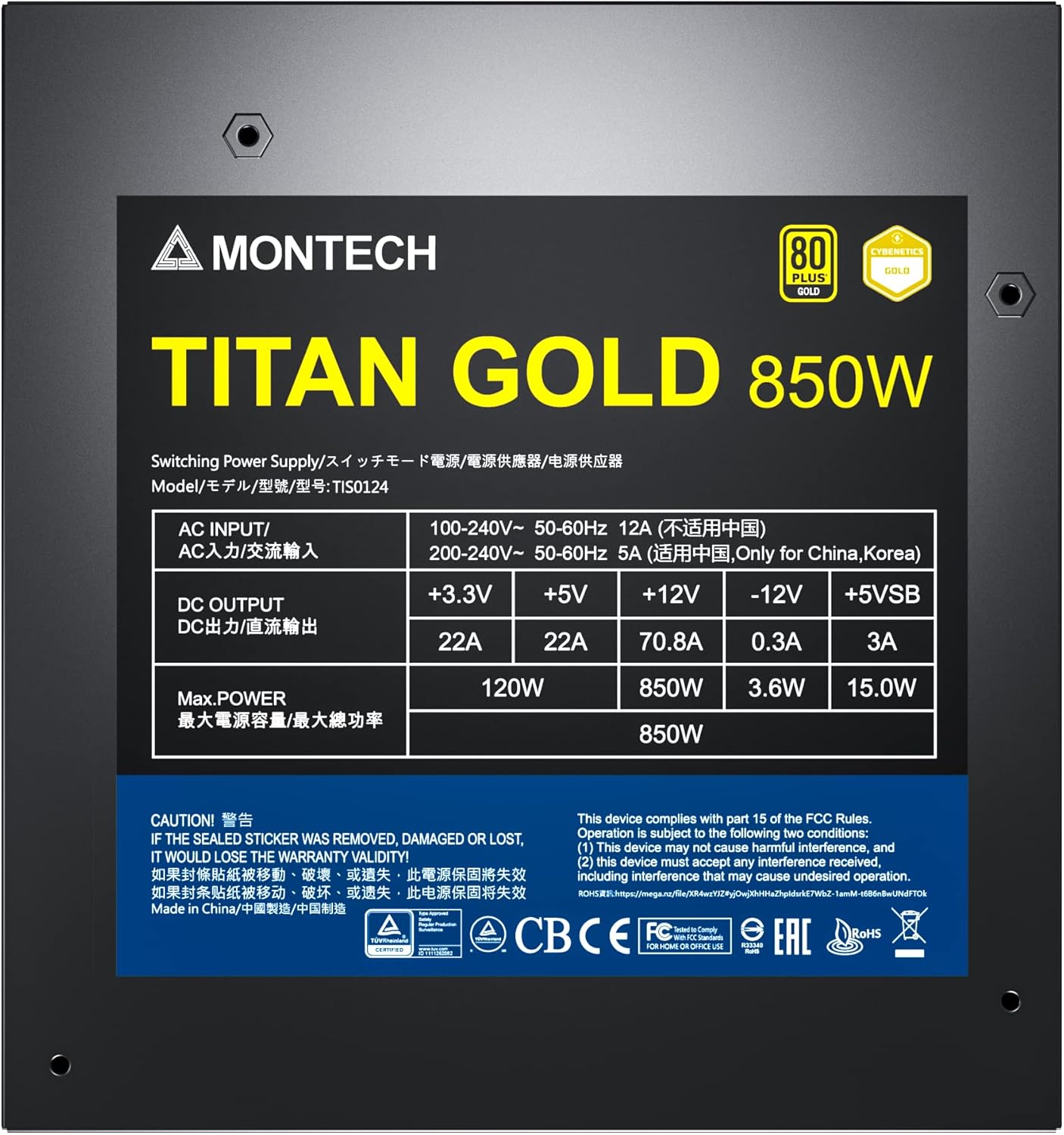
Figure 6: Product label displaying electrical specifications and certifications.
9. Гарантыя і падтрымка
The Montech Titan Gold 850W Power Supply comes with a Гарантыя 10 год, ensuring long-term reliability and peace of mind. For technical support, warranty claims, or further assistance, please visit the official Montech webсайт або звярніцеся ў іх аддзел абслугоўвання кліентаў.
Калі ласка, захавайце пацвярджэнне пакупкі для пацверджання гарантыі.