
1. Уводзіны
This manual provides essential information for the safe and effective use of the Mitutoyo Digital Indicator ID-C112GXB2. Please read this manual thoroughly before operating the instrument and retain it for future reference. This instrument is designed for precise internal diameter measurements and features advanced functions for data analysis.
2. Прадукт скончыўсяview
The Mitutoyo Digital Indicator ID-C112GXB2 is a high-precision digital measuring instrument. It incorporates minimum value detection and tolerance judgment functions, making it ideal for internal diameter measurements when used with compatible Mitutoyo cylinder gauges. The device features a wide LCD screen, an analog bar display for easy peak finding, and a user-friendly interface with five buttons, status icons, and key assist display.
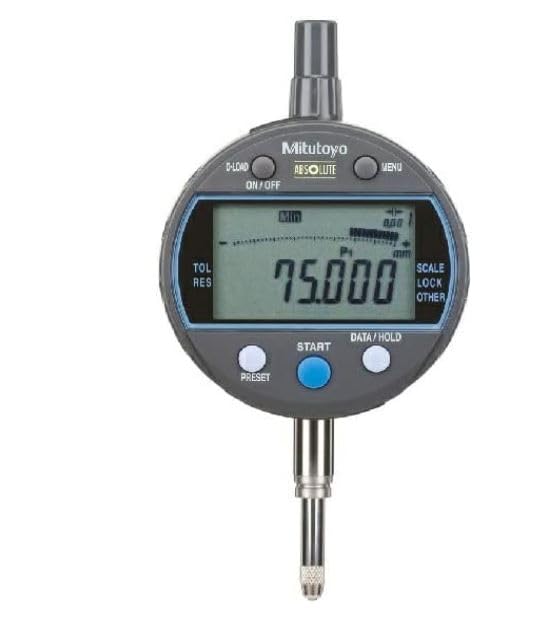
Figure 1: Mitutoyo Digital Indicator ID-C112GXB2. This image shows the front view of the digital indicator, highlighting its large LCD screen and control buttons.
Асноўныя функцыі ўключаюць у сябе:
- Minimum value detection for internal diameter measurements.
- Tolerance judgment function.
- Simple operation via five buttons and key assist display.
- Large LCD screen and analog bar display.
- Memory for up to 3 sets of master reference values and tolerance settings.
- PC connectivity for parameter settings via optional kit and software.
3. Настройка
3.1 Распакаванне і праверка
- Carefully remove the digital indicator and its accessories from the packaging.
- Verify that all components are present: Digital Indicator ID-C112GXB2, Carbide ball contact point (7.3mm), Flat back cover (for 55.6/57mm outer frame diameter), and Lithium-ion battery (pre-installed or included).
- Inspect the instrument for any visible damage. If damage is found, do not use the instrument and contact your supplier.
3.2 Battery Installation/Activation
The ID-C112GXB2 uses one Lithium-ion battery. If the battery is not pre-installed or needs replacement:
- Locate the battery compartment cover on the back of the indicator.
- Use a suitable tool to open the cover.
- Insert the Lithium-ion battery, ensuring correct polarity (+/-).
- Надзейна зачыніце крышку батарэйнага адсека.
3.3 Прымацаванне аксесуараў
To prepare the indicator for measurement:
- Attach the appropriate contact point (e.g., the included carbide ball contact point) to the spindle.
- Secure the flat back cover if required for your measurement setup.
- Mount the digital indicator onto a compatible Mitutoyo cylinder gauge or other measuring stand. Ensure it is firmly secured to prevent movement during measurement.
4. Інструкцыя па эксплуатацыі
4.1 Уключэнне/выключэнне сілкавання
- Каб уключыць: націсніце кнопку ВКЛ/ВЫКЛ кнопка.
- Каб выключыць: націсніце і ўтрымлівайце ВКЛ/ВЫКЛ кнопку, пакуль дысплей не выключыцца.
4.2 Устаноўка нуля
Before measurement, set the zero point:
- Bring the contact point into contact with the master reference surface or object.
- Націсніце НУЛЬ button to set the current position as zero.
4.3 Measurement Mode Selection
The indicator supports various measurement modes. Refer to the key assist display for guidance.
- Minimum Value Detection: Activate this mode to automatically detect and hold the minimum measured value, crucial for internal diameter measurements.
- Tolerance Judgment: Set upper and lower tolerance limits. The indicator will display an alert if the measurement falls outside these limits.
4.4 Вывад дадзеных
The ID-C112GXB2 can output measurement data to external devices. Use the data output port and compatible cables (sold separately) to connect to a PC or data processor. Refer to the optional parameter setup kit manual for detailed PC connectivity instructions.
5. Тэхнічнае абслугоўванне
5.1 Ачыстка
- Wipe the instrument with a soft, dry cloth after each use.
- Для ўстойлівага бруду выкарыстоўвайце анучу, злёгку працёртуюampened with a neutral detergent. Do not use organic solvents (e.g., thinner, benzene) as they may damage the instrument.
- Ensure no liquids enter the display or button areas.
5.2 Захоўванне
- Store the indicator in a clean, dry place, away from direct sunlight, high temperatures, humidity, and dust.
- Avoid storing in areas with strong vibrations or magnetic fields.
- Пры працяглым захоўванні выміце батарэйку, каб прадухіліць уцечку.
5.3 Замена батарэі
When the battery indicator appears on the display, replace the battery promptly to ensure accurate operation. Follow the battery installation steps in Section 3.2.
6. Выпраўленне непаладак
| праблема | Магчымая прычына | Рашэнне |
|---|---|---|
| Дысплей не ўключаецца | Акумулятар разраджаны або няправільна ўсталяваны | Replace or re-install battery correctly. |
| Няправільныя паказанні |
|
|
| Кнопкі не рэагуюць | Часовы збой праграмнага забеспячэння | Remove and re-insert battery to reset the device. |
| Data output not working |
|
|
7. Тэхнічныя характарыстыкі
| Параметр | Каштоўнасць |
|---|---|
| Нумар мадэлі | ID-C112GXB2 |
| Дыяпазон вымярэння | 12.7 мм |
| Мінімальнае значэнне адлюстравання | 0.001 мм, 0.01 мм |
| Maximum Measuring Force | 1.5 Н |
| Памылка гістэрэзісу | 0.002 мм |
| Indication Error (Full Range) | 0.003 мм |
| Паўтараемасць | 0.002 мм |
| Узровень абароны | IP42 |
| Дыяметр сцябла | φ8 мм |
| Position Detection Method | Electrostatic Capacitance Type Absolute Linear Encoder |
| Імша | 170 г |
| Product Weight (packaged) | 350 г |
| Памеры ўпакоўкі | 18.9 х 11.2 х 7.7 см |
| Тып батарэі | Літый-іённы (1 у камплекце) |
| Аксэсуары ў камплекце | Carbide ball contact point (7.3mm) x1, Flat back cover (for 55.6/57mm outer frame diameter) x1 |
8. Гарантыя і падтрымка
8.1 Інфармацыя аб гарантыі
Mitutoyo products are manufactured to high standards and are warranted against defects in materials and workmanship. The specific warranty period and terms may vary by region and product. Please refer to the warranty card included with your product or contact your local Mitutoyo distributor for detailed warranty information.
8.2 Тэхнічная падтрымка
For technical assistance, troubleshooting beyond this manual, or inquiries regarding repairs and spare parts, please contact your authorized Mitutoyo dealer or the Mitutoyo customer service center in your region. When contacting support, please have your product model number (ID-C112GXB2) and serial number ready.
You can find contact information for Mitutoyo worldwide at their official webсайт: www.mitutoyo.co.jp/eng/