
1. Уводзіны
Thank you for choosing the Vetroo 1000W Black Power Supply. This power supply unit (PSU) is designed to provide stable and efficient power to your personal computer, especially for high-performance gaming and workstation builds. It features 80 Plus Gold certification for energy efficiency, full modular cabling for easy management, and is compliant with the latest ATX 3.1 and PCIe 5.1 standards. This manual provides essential information for safe installation, operation, and maintenance of your PSU.
2. Інфармацыя па бяспецы
Please read and understand all safety warnings before installing or operating this product. Failure to follow these instructions may result in electric shock, fire, or serious injury.
- Высокі кнtage: The PSU contains high voltage components. Do not open the PSU casing. Унутры няма дэталяў, якія можа абслугоўваць карыстальнік.
- Прафесійная ўстаноўка: Installation should be performed by qualified personnel. Incorrect installation can damage your system or the PSU.
- Адключэнне сілкавання: Always disconnect the AC power cord from the wall outlet before installing, removing, or cleaning the PSU or any other components in your computer.
- Зазямленне: Ensure the PSU is properly grounded. Use only the provided power cord.
- Асяроддзе: Operate the PSU in a dry, well-ventilated environment. Avoid exposure to moisture, extreme temperatures, or direct sunlight.
- Вентыляцыя: Do not block the ventilation openings of the PSU. Ensure adequate airflow around the unit.
- Кабельнае кіраванне: Ensure all cables are securely connected and routed to prevent interference with cooling fans or other components.
3. Змесціва ўпакоўкі
Праверце, ці ёсць усе прадметы ў вашай упакоўцы:
- Vetroo 1000W Black Power Supply Unit
- Modular Cable Set (including 24-pin ATX, 8-pin CPU, PCIe 5.1 12+4-pin, PCIe 6+2-pin, SATA, Molex, FDD cables)
- Шнур сілкавання
- Крапежныя шрубы
- Кабельныя сцяжкі/ліпучкі
- Кіраўніцтва карыстальніка (гэты дакумент)


4. Асаблівасці прадукту
- 80 Plus Gold Certified: Ensures high energy efficiency, reducing power consumption and heat generation.
- Fully Compliant with ATX 3.1 Specifications: Designed to meet the latest power delivery standards for modern PC components.
- Падтрымка PCIe пакалення 5.1: Equipped with dedicated 12+4-pin connectors for the latest PCIe 5.1 graphics cards, offering up to 600W power delivery. Also backwards compatible with PCIe 4.0 and 3.0.
- Premium 105° C Capacitors: Utilizes high-quality Japanese capacitors for enhanced stability, reliability, and extended lifespan.
- Поўная модульная канструкцыя: Allows users to connect only the necessary cables, improving airflow and simplifying cable management within the PC case.
- Eco Mode with 120mm FDB Fan: Features a fluid dynamic bearing (FDB) fan that operates silently under low loads, with an Eco Mode switch to stop the fan entirely when power consumption is below 50%.
- Кампактны памер: Designed to fit comfortably in various PC chassis types.
- Комплексная абарона: Уключае Over Voltage Protection (OVP), Over Current Protection (OCP), Over Power Protection (OPP), Short Circuit Protection (SCP), Under Voltage Protection (UVP), and Over Temperature Protection (OTP).
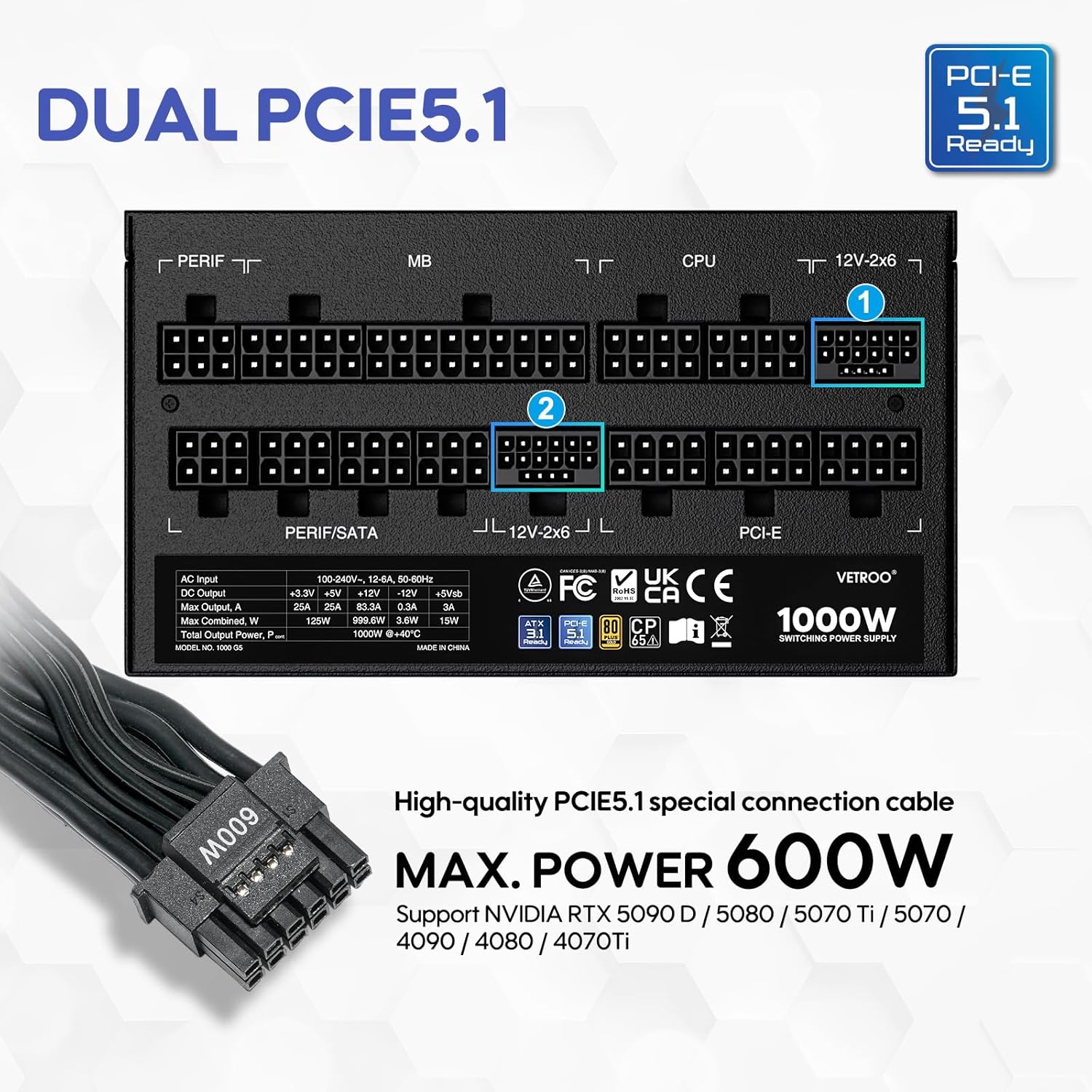

5. Тэхнічныя характарыстыкі
| Асаблівасць | Дэталь |
|---|---|
| Назва мадэлі | 1000G5 |
| Выхад ватtage | 1000 ват |
| Формаў-фактар | ATX |
| Дызайн блока харчавання | Поўны модульны |
| Сертыфікацыя эфектыўнасці | 80 плюс золата |
| Стандарт ATX | Гатовы ATX 3.1 |
| Стандарт PCIe | PCIe 5.1 Ready (Dual) |
| Спосаб астуджэння | Air (120mm FDB Fan) |
| Памеры прадукту (Д х Ш х У) | 5.9 х 5.5 х 3.4 цалі |
| Вага прадмета | 5.83 фунта |
| Сумяшчальныя прылады | Персанальны кампутар |
| Тып раздыма | ATX & PCIE |

6. Настройка і ўстаноўка
Follow these steps to install your Vetroo 1000W Power Supply:
- Падрыхтуйце сваю сістэму: Пераканайцеся, што камп'ютар цалкам выключаны і адключаны ад разеткі. Адкрыйце корпус камп'ютара, каб атрымаць доступ да месца мацавання блока харчавання.
- Зняць стары блок харчавання (калі ёсць): Disconnect all cables from your old power supply and remove it from the chassis.
- Усталюйце новы блок харчавання: Carefully slide the Vetroo 1000W PSU into the designated power supply bay in your PC case. Secure it with the provided mounting screws.
- Падключэнне модульных кабеляў: Identify the necessary cables for your motherboard, CPU, graphics card(s), and storage devices. Connect these cables to the corresponding ports on the PSU first, then route them to your components.
- Матчына плата: Падключыце 24-кантактны кабель ATX да матчынай платы.
- працэсар: Connect the 8-pin (or 4+4-pin) CPU power cable(s) to your motherboard.
- Graphics Card(s): For modern GPUs, use the PCIe 5.1 12+4-pin cable. For older or additional GPUs, use the PCIe 6+2-pin cables.
- Storage/Peripherals: Падключыце кабелі харчавання SATA да SSD/HDD і кабелі Molex для іншых перыферыйных прылад па меры неабходнасці.
- Кабельнае кіраванне: Use the included cable ties or Velcro straps to organize cables, ensuring optimal airflow and a tidy build.
- Канчатковыя злучэнні: Close your PC case. Connect the AC power cord to the PSU and then to a wall outlet or surge protector.

7. Інструкцыя па эксплуатацыі
- Уключэнне/выключэнне харчавання: After all connections are secure, flip the main power switch on the back of the PSU to the 'ON' position. Your computer can now be powered on via its front panel button. To power off, shut down your computer normally, then flip the PSU switch to 'OFF' for complete power disconnection.
- Экарэжым: The Vetroo 1000W PSU features an Eco Mode switch on the rear panel.
- Eco Mode ON: When the Eco Mode switch is in the 'ON' position, the PSU fan will remain off under low to moderate loads (typically below 50% load) for silent operation. The fan will automatically activate when the load increases or internal temperature rises.
- Eco Mode OFF: When the Eco Mode switch is in the 'OFF' position, the PSU fan will spin continuously regardless of the load, providing constant cooling.

8. Тэхнічнае абслугоўванне
Proper maintenance ensures the longevity and optimal performance of your PSU:
- Ачыстка ад пылу: Periodically clean the PSU fan and ventilation grilles to prevent dust buildup, which can hinder cooling performance. Use compressed air to gently blow dust away. Always disconnect power before cleaning.
- Праверка кабеля: Рэгулярна правярайце ўсе злучэнні модульных кабеляў, каб пераканацца ў іх надзейнасці і адсутнасці пашкоджанняў.
- Умовы навакольнага асяроддзя: Maintain a clean, dry, and well-ventilated environment for your PC to prevent excessive heat and moisture exposure to the PSU.
9. Выпраўленне непаладак
If you encounter issues with your Vetroo 1000W Power Supply, try the following steps:
- Няма харчавання:
- Пераканайцеся, што шнур харчавання пераменнага току надзейна падключаны як да блока харчавання, так і да разеткі.
- Verify the main power switch on the PSU is in the 'ON' position.
- Check all modular cable connections, especially the 24-pin ATX and 8-pin CPU cables, to ensure they are fully seated.
- Праверце разетку з дапамогай іншай прылады, каб пераканацца, што ў ёй ёсць напружанне.
- Нестабільнасць сістэмы/выпадковыя адключэнні:
- Пераканайцеся, што ваш блок харчаванняtage is sufficient for all your components, especially high-power GPUs.
- Праверце належную вентыляцыю ўнутры корпуса ПК, каб пазбегнуць перагрэву.
- Verify that all PCIe power cables to your graphics card(s) are correctly connected.
- If Eco Mode is enabled, try disabling it to see if continuous fan operation resolves the issue.
- Незвычайныя шумы:
- If you hear a fan noise, ensure the PSU fan is not obstructed by cables or dust.
- If a 'coil whine' noise is present, it is often harmless but can sometimes indicate a component under stress. Ensure your system is not drawing excessive power.
If problems persist after performing these checks, please contact Vetroo customer support for further assistance.
10. Гарантыя і падтрымка
The Vetroo 1000W Black Power Supply comes with a Гарантыя 10 год з дня пакупкі. Гэтая гарантыя распаўсюджваецца на дэфекты матэрыялаў і вырабу пры звычайным выкарыстанні.
Гарантыя не распаўсюджваецца на:
- Шкода, выкліканая аварыяй, злоўжываннем, няправільным выкарыстаннем, паводкай, пажарам, землятрусам або іншымі знешнімі прычынамі.
- Damage caused by operating the product outside the permitted or intended uses described by Vetroo.
- Damage caused by service (including upgrades and expansions) performed by anyone who is not a representative of Vetroo.
- Products or parts that have been modified to alter functionality or capability without the written permission of Vetroo.
For warranty claims or technical support, please visit the official Vetroo website or contact their customer service department with your product model and proof of purchase.