
1. Уводзіны
The SCULPFUN Laser Rotary Roller is a Y-axis rotary module designed for laser engraving machines. It enables 360-degree engraving on cylindrical objects such as pens, thermos flasks, and other round items. This module is pre-installed and designed for plug-and-play functionality, requiring no complex software adjustments for most compatible laser engravers.
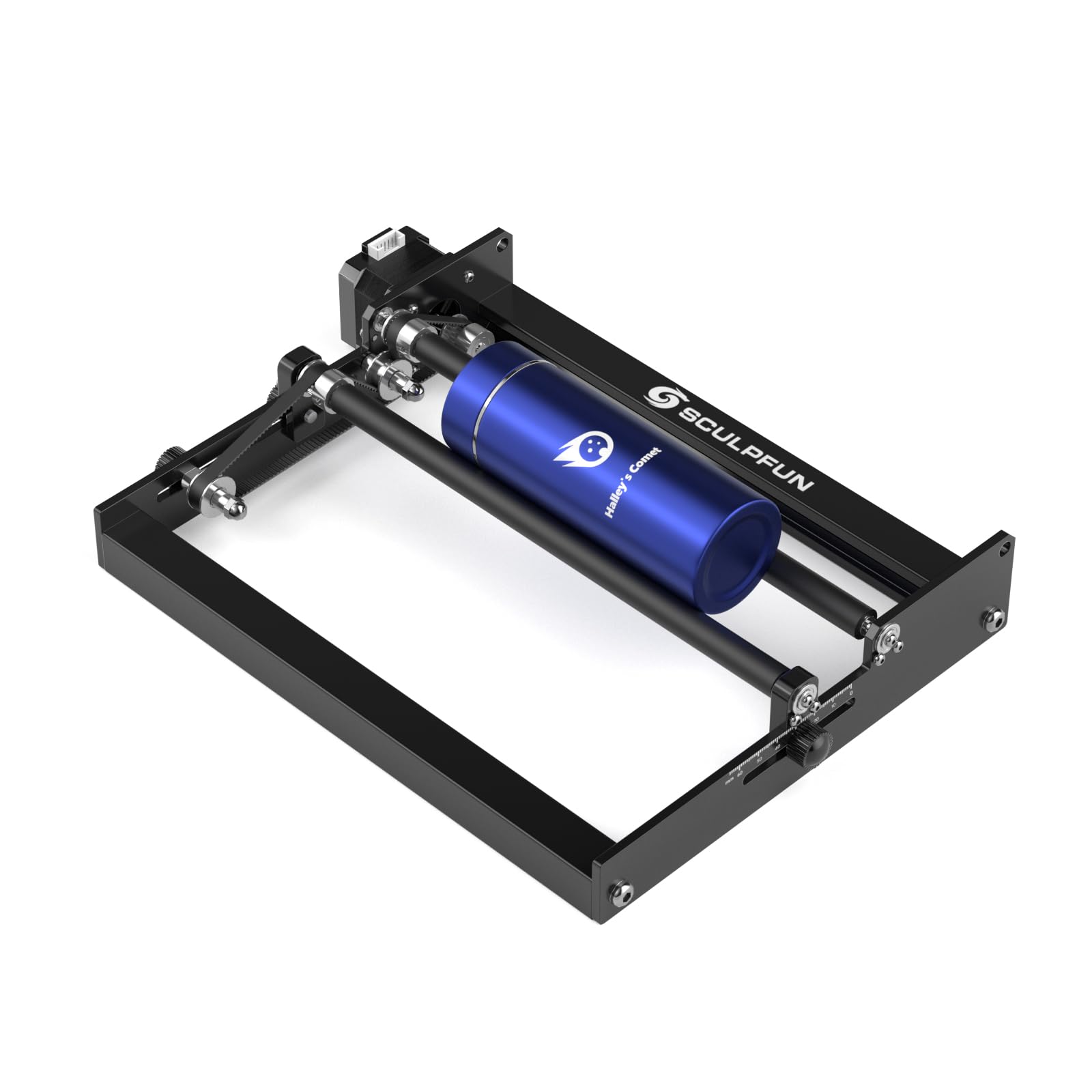
Figure 1: SCULPFUN Laser Rotary Roller, designed for engraving cylindrical objects.
2. Настройка
2.1 Распакоўка і першапачатковы агляд
The SCULPFUN Laser Rotary Roller comes 100% pre-assembled. Carefully remove the unit from its packaging and inspect for any visible damage. Ensure all components, including the adapter cable and elevating feet, are present.
2.2 Connecting to the Laser Engraver
- Disconnect Y-axis Motor Wiring: Locate and disconnect the Y-axis motor wiring from your laser engraver.
- Connect Rotary Roller Cable: Use the provided adapter cable. Connect one end to the Y-axis cable of your laser engraver.
- Plug into Rotary Roller: Plug the other end of the adapter cable into the SCULPFUN Laser Rotary Roller.

Figure 2: The rotary roller connects directly to the Y-axis motor wiring of the laser engraver.
2.3 Adjusting Engraving Area and Stability
The rotary roller features a sliding adjustment design for quick and easy changes to the roller distance, accommodating various object diameters. It also includes four sturdy metal elevating feet to increase the engraving area and enhance stability during operation.
- Рэгуляванне слізгальнай формы: Adjust the distance between the rollers by sliding them along the base. Secure the distance using the hand screws. This allows for engraving objects with diameters from 6mm to 150mm.
- Elevating Feet: Attach the four metal elevating feet to the laser engraver's frame using the provided screws and nuts. This raises the engraver, providing clearance for larger cylindrical objects.

Figure 3: The sliding adjustment design allows for quick changes to roller spacing.

Figure 4: The rotary roller supports a wide range of cylindrical object diameters, from 6mm to 150mm.
3. Інструкцыя па эксплуатацыі
3.1 Сумяшчальнасць праграмнага забеспячэння
The SCULPFUN Laser Rotary Roller is compatible with various engraving software, including LightBurn and LaserGRBL. It can be used directly without needing to adjust software parameters, as the surface linear speed of the roller is precisely designed to match the original Y-axis speed of the engraver. It is compatible with 95% of laser engraving machines on the market that use 42 stepper motors.

Figure 5: The rotary roller works with popular engraving software like LightBurn and LaserGRBL without additional settings.
3.2 Працэс гравіроўкі
- Размясціць аб'ект: Position the cylindrical object securely on the rotary roller. Ensure it is centered and stable.
- Adjust Roller Distance: If necessary, adjust the roller distance to firmly hold the object.
- Пачаць гравіроўку: Initiate the engraving process through your chosen software. The roller will rotate the object, allowing the laser to engrave continuously around its surface.
The roller uses 70A high-friction rubber shafts to prevent slipping, ensuring high-precision full-scale engraving. The image will be engraved in 100% scale without enlargement or reduction.
Video 1: Demonstration of the SCULPFUN Laser Rotary Roller in action, showing setup and engraving on various cylindrical objects like pens, flowerpots, and thermos bottles.
4. Тэхнічнае абслугоўванне
To ensure optimal performance and longevity of your SCULPFUN Laser Rotary Roller, follow these maintenance guidelines:
- Рэгулярная ўборка: Keep the rollers and the base free from dust, debris, and engraving residue. Use a soft, dry cloth for cleaning.
- Праверка рамяня: Periodically check the drive belt for wear and tear. Ensure it is properly tensioned. If the belt appears loose or damaged, adjust or replace it as needed.
- змазка: Apply a small amount of appropriate lubricant to moving parts, such as bearings, if you notice any friction or unusual noise during operation.
- захоўванне: When not in use, store the rotary roller in a clean, dry environment to prevent corrosion or damage.
5. Выпраўленне непаладак
If you encounter issues with your SCULPFUN Laser Rotary Roller, refer to the following common troubleshooting steps:
- Roller Not Rotating:
- Check the cable connection between the rotary roller and the laser engraver's Y-axis. Ensure it is secure.
- Verify that the laser engraver's Y-axis motor is functioning correctly.
- Inspect the drive belt for proper tension and ensure it hasn't slipped off the pulleys.
- Engraving Slipping or Inaccurate:
- Ensure the cylindrical object is placed firmly and securely on the rollers. Adjust the roller distance to provide adequate grip.
- Clean the rubber shafts of the rollers to remove any dust or debris that might reduce friction.
- Check the stability of the entire laser engraving setup, including the elevating feet.
- Software Not Recognizing Roller:
- Confirm that your laser engraver is compatible with the rotary module (uses a 42 stepper motor).
- Ensure the software (e.g., LightBurn, LaserGRBL) is up-to-date.
- Restart both the laser engraver and the computer running the software.
6. Тэхнічныя характарыстыкі
| Асаблівасць | Дэталь |
|---|---|
| Памеры прадукту | 10.63 х 8.66 х 1.97 цалі |
| Нумар мадэлі тавару | laser rotary roller |
| Вага прадмета | 3.19 фунта |
| Вытворца | СКУЛЬФФАН |
| Minimum Engraving Diameter | 6 мм |
| Максімальны дыяметр гравіроўкі | 150 мм |
| Папярэдняя ўстаноўка | 100% Pre-installed |
| Ролікавы матэрыял | 70A high-friction rubber shafts |
| Сумяшчальнасць | 95% of laser engraving machines using 42 stepper motors (e.g., LightBurn, LaserGRBL, ORTUR, Neje) |
7. Гарантыя і падтрымка
For warranty information and technical support, please refer to the documentation provided with your original laser engraving machine or contact SCULPFUN customer service directly. Specific warranty terms for accessories may vary.