
Уводзіны
Thank you for choosing the sonoro Primus Internet Radio with Bluetooth. This manual provides essential information for setting up, operating, and maintaining your device to ensure optimal performance and longevity. Please read it thoroughly before use.
Важныя інструкцыі па бяспецы
- Крыніца харчавання: Выкарыстоўвайце толькі пазначаны адаптар сілкавання. Пераканайцеся, што гучнасцьtage адпавядае вашай мясцовай крыніцы харчавання.
- Вентыляцыя: Не блакуйце вентыляцыйныя адтуліны. Забяспечце дастатковую прастору вакол прылады для належнай цыркуляцыі паветра.
- Вада і вільгаць: Do not expose the unit to rain, moisture, dripping, or splashing. Keep liquids away from the device.
- Цяпло: Не ўстанаўлівайце побач з крыніцамі цяпла, такімі як радыятары, абагравальнікі, пліты або іншыя прылады (у тым ліку ampLifiers), якія вырабляюць цяпло.
- Уборка: Unplug the unit before cleaning. Use a dry cloth only.
- Абслугоўванне: Не спрабуйце самастойна абслугоўваць гэты прадукт. Звярніцеся да ўсіх абслугоўванняў кваліфікаванага абслуговага персаналу.
- Лазерны прадукт: This product contains a Class 1 laser. Do not open the casing.
Змест пакета
Калі ласка, праверце наяўнасць усіх прадметаў:
- sonoro Primus Internet Radio Unit
- Адаптар сілкавання
- Пульт дыстанцыйнага кіравання (з батарэйкамі)
- Кіраўніцтва карыстальніка (гэты дакумент)
Настройка
1. Распакаванне і размяшчэнне
Carefully remove the unit from its packaging. Place the sonoro Primus on a stable, flat surface, ensuring adequate ventilation around the device. Avoid placing it near strong magnetic fields or direct sunlight.
2. Падключэнне сілкавання
Connect the provided power adapter to the AC IN port on the rear of the unit. Plug the other end into a suitable wall outlet. The unit will enter standby mode.
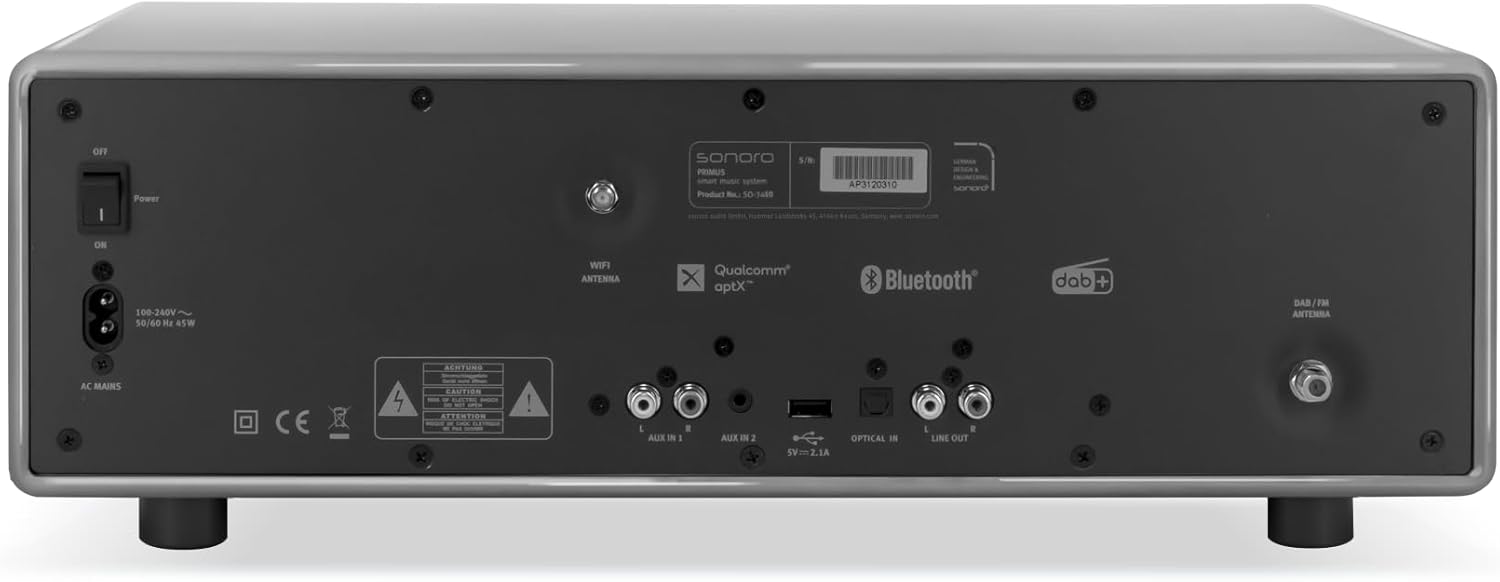
выява: Rear panel of the sonoro Primus, highlighting the power input and other connectivity options like AUX-in, Optical-in, and antenna connections.
3. Падключэнне антэны
For optimal FM and DAB+ reception, connect the included antenna to the appropriate antenna input on the rear panel. Extend the antenna fully for best signal quality.
4. Пачатковае ўключэнне
Press the Power button on the front panel or the remote control to turn on the unit. Follow the on-screen instructions for initial setup, including language selection and network configuration.

выява: Фронт view of the sonoro Primus, displaying the central screen, control knobs, and various buttons for media playback and source selection.
Інструкцыя па эксплуатацыі
Асноўныя элементы кіравання
The sonoro Primus features intuitive controls on the front panel and a comprehensive remote control. Key controls include:
- Кнопка харчавання: Turns the unit on/off or into standby mode.
- Рэгулятар гучнасці: Рэгулюе агульны ўзровень гучнасці.
- Tune/Select Knob: Навігацыя па меню і выбар опцый.
- Кнопкі крыніц: Selects input sources (Internet Radio, DAB+, FM, Bluetooth, CD, AUX-in, Optical-in).
- Элементы кіравання прайграваннем: Play/Pause, Skip Forward/Backward for CD and streaming.
Internet Radio and Podcasts
Access over 25,000 internet radio stations and numerous podcasts worldwide. Ensure your device is connected to a stable Wi-Fi network. Navigate through the menu using the Tune/Select knob to find and save your favorite stations.
DAB+ and FM Radio
Switch to DAB+ or FM mode using the source buttons. The unit will automatically scan for available stations. You can manually tune or save presets for quick access to your preferred channels.
Злучэнне Bluetooth
To connect a Bluetooth device (smartphone, tablet, laptop):
- Select the Bluetooth source on the sonoro Primus.
- Уключыце Bluetooth на знешнім прыладзе.
- Пошук "sonoro Primus" in your device's Bluetooth settings and pair.
- Пасля падключэння вы можаце перадаваць аўдыё на прыладу па бесправадной сеткі.
Прайграванне кампакт-дыскаў
Insert an audio CD into the CD slot. The unit will automatically detect and begin playback. Use the playback controls to manage your music.
Streaming Services (Spotify Connect, Amazon Music, Deezer)
The sonoro Primus supports various streaming services. To use Spotify Connect, Amazon Music, or Deezer, ensure your device is connected to Wi-Fi and you have an active subscription to the respective service. Follow the instructions within the service's app to connect to your sonoro Primus.
AUX-in and Optical-in
Connect external audio devices using the AUX-in (3.5mm jack) or Optical-in ports on the rear panel. Select the corresponding source on the unit to play audio from these inputs.
Тэхнічнае абслугоўванне
Ачыстка прылады
To clean the exterior of the unit, unplug it from the power source. Use a soft, dry, lint-free cloth. Do not use abrasive cleaners, waxes, or solvents as they may damage the finish.
Сыход за CD-плэерам
Handle CDs by their edges to avoid fingerprints. If a CD is dirty, wipe it gently with a soft, dry cloth from the center outwards. Do not use solvents or abrasive cleaners on CDs.
Абнаўлення праграмнага забеспячэння
Periodically check for software updates via the unit's menu (if available). Updates can improve performance and add new features. Ensure a stable internet connection during updates.
Ліквідацыю непаладак
| праблема | Магчымая прычына | Рашэнне |
|---|---|---|
| Няма ўлады | Сеткавы кабель не падключаны; разетка няспраўная. | Праверце падключэнне кабеля харчавання; паспрабуйце іншую разетку. |
| Няма гуку | Volume too low; wrong input source selected; mute activated. | Increase volume; select correct input source; deactivate mute. |
| Дрэнны прыём радыё | Антэна няправільна падключана або падоўжана; перашкоды. | Adjust antenna position; move unit away from other electronic devices. |
| Спалучэнне Bluetooth не атрымалася | Device too far; Bluetooth not enabled on external device; unit not in pairing mode. | Ensure devices are close; enable Bluetooth; put sonoro Primus in pairing mode. |
| Кампакт-дыск не прайграваецца | Няправільна ўстаўлены кампакт-дыск; кампакт-дыск брудны або падрапаны; непадтрымоўваны фармат дыска. | Устаўце кампакт-дыск правільна; ачысціце або заменіце кампакт-дыск; пераканайцеся, што гэта аўдыё-дыск. |
| Праблемы з падключэннем да Wi-Fi | Няправільны пароль; маршрутызатар занадта далёка; перашкоды ў сетцы. | Verify Wi-Fi password; move unit closer to router; restart router. |
Калі праблема не знікне, звярніцеся ў службу падтрымкі кліентаў.
Тэхнічныя характарыстыкі
- Марка: сонора
- мадэль: e60a53a9-4d44-4a55-b129-3386e8f3e186
- Тэхналогія цюнэра: FM, DAB+
- Рэжым вываду гуку: Стэрэа
- Падтрымліваюцца аўдыяфарматы: MP3, AAC, WAV
- Канфігурацыя дынамікаў: 2.1 (Two coaxial speakers and a powerful 5.25 inch subwoofer)
- Падключэнне: Optical, Auxiliary, Bluetooth, WLAN
- Сумяшчальныя прылады: Laptop, MP3 player, Smartphone, Tablet
- Крыніца харчавання: Правадная электрычная
- Тып дысплея: LCD або LED
- Уключаныя кампаненты: Power adapter, Remote control (with Lithium-metal batteries)
- Памеры (пакет): 52.6 х 33.2 х 27.4 см
- Вага (упакоўкі): 9.45 кг
- колер: Chalk Grey (Note: Other colors may be available for different models)
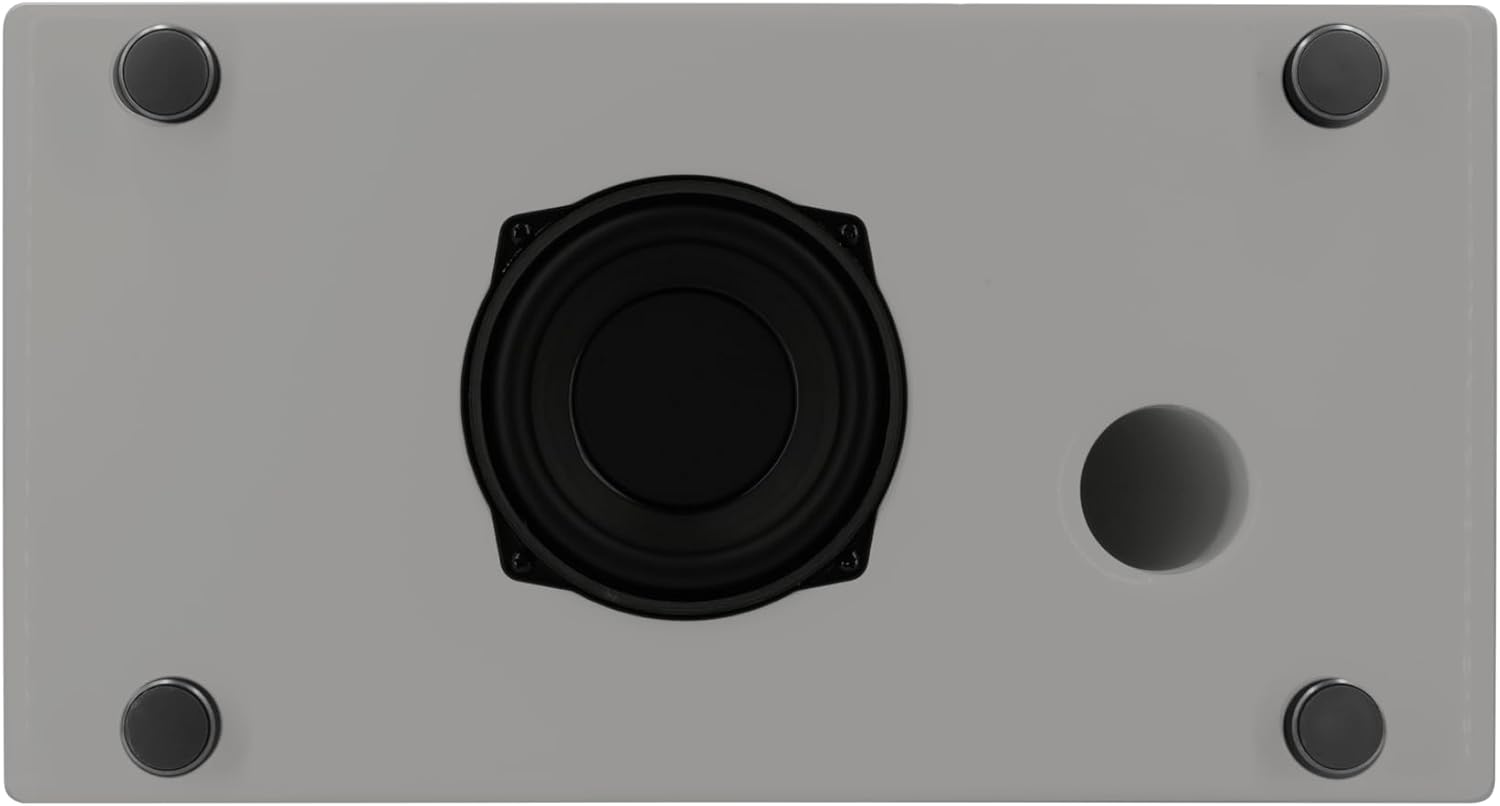
выява: Underside of the sonoro Primus, revealing the integrated 5.25-inch subwoofer for enhanced bass performance.
Гарантыя і падтрымка
The sonoro Primus comes with a standard manufacturer's warranty. Please refer to the warranty card included in your package for specific terms and conditions. For technical support, service, or warranty claims, please contact sonoro audio GmbH customer service through their official webсайт або кантактную інфармацыю, прадастаўленую пры пакупцы.
вытворца: sonoro audio GmbH
Першая даступная дата: 2 студзеня 2023 г