
1. Уводзіны
Thank you for choosing the Inwa Bluetooth Portable Speaker MZ509. This manual provides essential information for setting up, operating, and maintaining your speaker to ensure optimal performance.
Асаблівасці прадукту
- Кампактны і партатыўны дызайн: Weighing approximately 244g (0.4 lbs) with dimensions of 7.62 x 7.62 x 7.62 cm, designed for easy transport.
- Subwoofer Enhancement Technology: Delivers deep bass and clear treble with a frequency response range of 20Hz-20kHz.
- Падключэнне Bluetooth 5.1: Provides a stable wireless connection up to 33 feet (10 meters).
- Wireless Stereo Pairing (TWS): Link two MZ509 speakers for an enhanced stereophonic sound experience.
- Убудаваны мікрафон: Дазваляе рабіць званкі ў рэжыме hands-free.
- Падтрымка TF-карт: Play music directly from a TF (MicroSD) card up to 32GB.
- Воданепранікальнасць IP67: Designed to withstand immersion in water up to 1 meter for 30 minutes, making it suitable for various environments.
- Зарадка тыпу C: Сучасны і зручны інтэрфейс зарадкі.

Image: The Inwa MZ509 speaker demonstrating its compact size and versatility for use in different environments, including outdoor activities and wet areas.

Image: The Inwa MZ509 speaker showcasing its IP67 waterproof capability, suitable for use near water.
2. Настройка
2.1 Зарадка дынаміка
- Connect the provided USB-A to USB-C charging cable to the speaker's Type-C port.
- Connect the USB-A end of the cable to a compatible USB power adapter (DC 5V/1A recommended).
- A red indicator light near the charging port will illuminate, indicating that the speaker is charging.
- The red indicator light will turn off once the speaker is fully charged. A full charge typically takes 2-4 hours.
Заўвага: The speaker is designed to charge only with a USB-A to USB-C cable. USB-C to USB-C cables may not initiate charging.
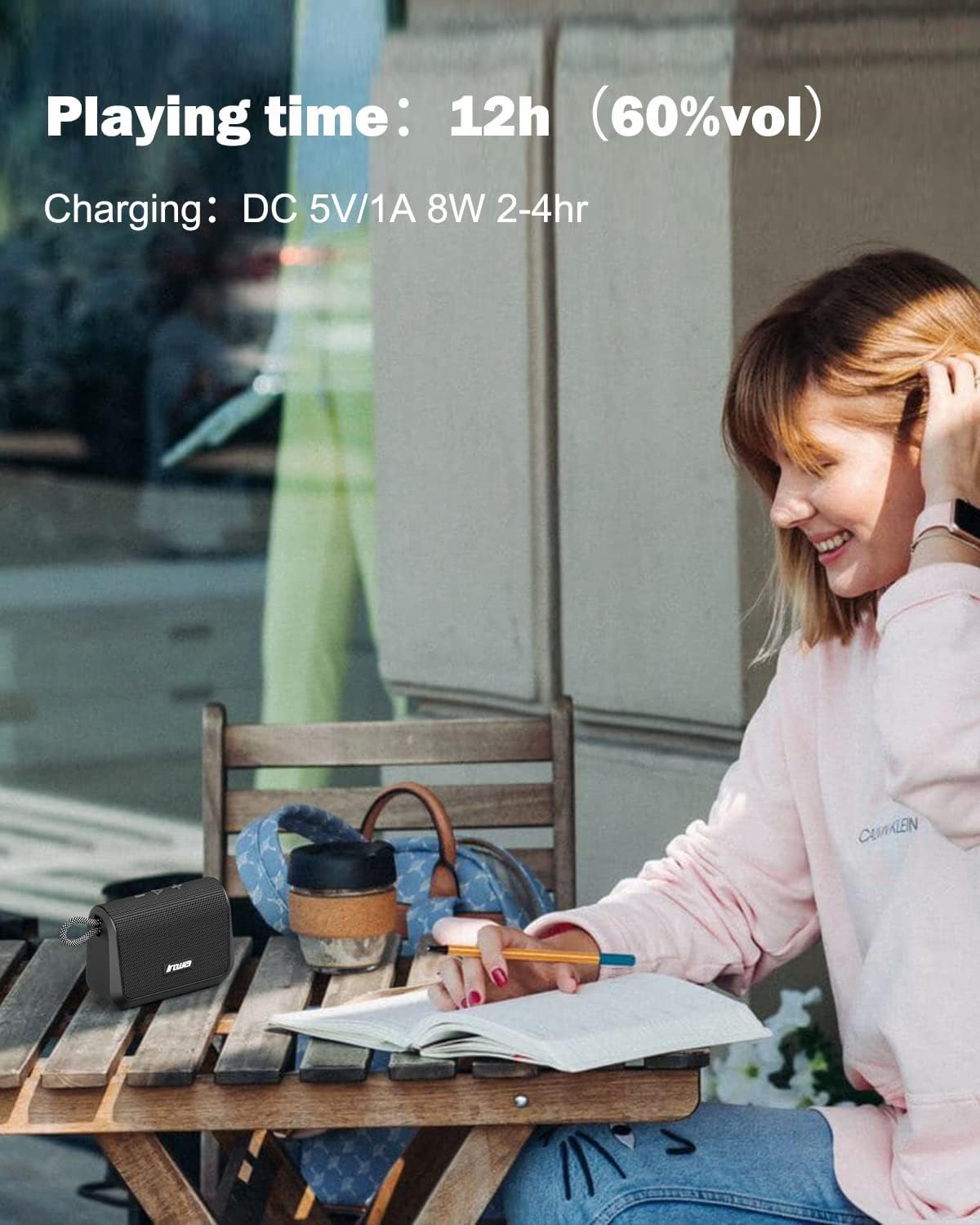
Image: Visual representation of the speaker's battery performance, indicating 12 hours of playing time at 60% volume and a charging duration of 2-4 hours.
2.2 Уключэнне/выключэнне
- To power on, press and hold the power button (usually the play/pause button) until you hear an audible "power on" prompt, followed by "Bluetooth mode".
- Каб выключыць дынамік, зноў націсніце і ўтрымлівайце кнопку харчавання, пакуль ён не выключыцца.
2.3 Спалучэнне па Bluetooth
- Ensure the speaker is powered on and in "Bluetooth mode". The indicator light will typically flash, indicating it's ready for pairing.
- На мабільнай прыладзе (смартфоне, планшэце і г.д.) уключыце Bluetooth і знайдзіце даступныя прылады.
- Select "Inwa MZ509" from the list of found devices.
- Once paired, you will hear a confirmation tone or voice prompt, and the indicator light will typically become solid.
- The speaker will attempt to automatically reconnect to the last paired device when powered on. If you move out of range and return, manual reconnection may be required.
2.4 Wireless Stereo Pairing (TWS Function)
To achieve a stereophonic sound experience, you can pair two Inwa MZ509 speakers together.
- Ensure both MZ509 speakers are powered off.
- Power on both speakers simultaneously. They will enter Bluetooth pairing mode.
- On one of the speakers, double-press the power/play button. The speakers will attempt to connect to each other.
- Once successfully paired, you will hear a confirmation. One speaker will act as the master (left channel) and the other as the slave (right channel).
- Цяпер падключыце мабільную прыладу да галоўнага дынаміка праз Bluetooth, як апісана ў раздзеле 2.3.
The TWS function allows for a maximum range of 33 feet (10 meters) between the two linked speakers.

Image: Two Inwa MZ509 speakers demonstrating wireless stereo pairing with a laptop and smartphone, also highlighting the built-in microphone.

Image: The TWS feature in action, with two speakers providing stereophonic sound in an outdoor setting.
3. Аперацыя
3.1 Функцыі кнопак
The Inwa MZ509 speaker features intuitive buttons for controlling playback and functions.
| Кнопка/Дзеянне | Функцыя |
|---|---|
| Power/Play/Pause Button (Long Press) | Уключэнне/выключэнне харчавання |
| Power/Play/Pause Button (Short Press) | Play/Pause music; Answer/End calls |
| Volume Up (+) Button (Short Press) | Павялічыць гучнасць |
| Volume Up (+) Button (Long Press) | Наступны трэк |
| Volume Down (-) Button (Short Press) | Паменшыць гучнасць |
| Volume Down (-) Button (Long Press) | Папярэдні трэк |
| Mode Button (if available) | Switch between Bluetooth mode and TF card mode. |
3.2 Званкі ў рэжыме гучнай сувязі
With the built-in microphone, you can answer calls directly through the speaker when connected via Bluetooth to your smartphone.
- Адказаць на званок: Кароткачасова націсніце кнопку прайгравання/паўзы пры паступленні званка.
- Завяршыць выклік: Кароткачасова націсніце кнопку прайгравання/паўзы падчас размовы.
- Адхіліць выклік: Доўга націсніце кнопку прайгравання/паўзы, калі паступае званок.
Прайграванне з карты TF 3.3
Insert a TF (MicroSD) card with your music files into the designated slot. The speaker will automatically switch to TF card mode and begin playing music. Use the control buttons to manage playback.
4. Тэхнічнае абслугоўванне
4.1 Ачыстка
- Працярыце дынамік мяккім, damp тканіна.
- Не выкарыстоўвайце абразіўныя ачышчальнікі, спірт або хімічныя растваральнікі, бо яны могуць пашкодзіць паверхню.
- Перад чысткай або ўздзеяннем вады пераканайцеся, што вечка зараднага порта шчыльна зачынена.
4.2 Захоўванне
- Захоўвайце дынамік у прахалодным, сухім месцы, удалечыні ад прамых сонечных прамянёў і экстрэмальных тэмператур.
- Калі вы захоўваеце прыладу працяглы час, зараджайце яе прыкладна да 50% кожныя некалькі месяцаў, каб падоўжыць тэрмін яе службы.
4.3 Воданепранікальнасць (IP67)
- The speaker is IP67 rated, meaning it is protected from dust and can withstand immersion in water up to 1 meter for 30 minutes.
- Заўсёды пераканайцеся, што вечка зараднага порта цалкам герметычна закрыта, перш чым падвяргаць дынамік кантакту з вадой.
- After exposure to water, dry the speaker thoroughly, especially the charging port, before charging.
- Do not intentionally submerge the speaker in saltwater or other liquids, as this may cause damage not covered by warranty.
5. Выпраўленне непаладак
| праблема | Магчымая прычына | Рашэнне |
|---|---|---|
| Дынамік не ўключаецца. | Нізкі акумулятар. | Charge the speaker for 2-4 hours using a USB-A to USB-C cable and a 5V/1A adapter. |
| Немагчыма падключыцца праз Bluetooth. | Дынамік не ў рэжыме спалучэння; Bluetooth прылады выключаны; Па-за зонай дзеяння. | Ensure speaker is powered on and flashing (pairing mode). Enable Bluetooth on your device. Move device closer to speaker (within 33ft). Forget device and re-pair. |
| Няма гуку або нізкі ўзровень гучнасці. | Volume too low on speaker or device; Paused playback; Incorrect source. | Increase volume on both speaker and connected device. Ensure music is playing. Check if TF card is inserted if trying to play from card. |
| Памылка спалучэння TWS. | Дынамікі не ў рэжыме спалучэння TWS; занадта далёка адна ад адной. | Ensure both speakers are powered off, then power them on and double-press the power button on one speaker to initiate TWS pairing. Keep speakers within 33ft of each other. |
| Charging not working with USB-C to USB-C cable. | Speaker design requires specific cable type. | Use the provided USB-A to USB-C charging cable. |
6. Тэхнічныя характарыстыкі
| Асаблівасць | Дэталь |
|---|---|
| Нумар мадэлі | MZ509 |
| Марка | Інва |
| Тэхналогія падлучэння | Bluetooth 5.1 |
| Дыяпазон Bluetooth | Да 33 футаў (10 метраў) |
| Рэжым выхаду гуку | Стэрэа (са спалучэннем TWS) |
| АЧХ | 20 Гц-20 кГц |
| Час прайгравання | Да 12 гадзін (пры гучнасці 60%) |
| Уваход для зарадкі | Пастаянны ток 5 В/1 А (тып C) |
| Час зарадкі | 2-4 гадзін |
| Рэйтынг воданепранікальнасці | IP67 |
| Памеры (Д х Ш х У) | 7.62 х 7.62 х 7.62 см (3 х 3 х 3 цалі) |
| Вага | 244 г (0.4 фунта) |
| Падтрымка карты TF | Да 32 ГБ |
| Асаблівасці | Built-in Mic, TWS (True Wireless Stereo) Function |

Выява: Унутраная view of the Inwa MZ509 speaker, illustrating the components responsible for its subwoofer enhancement technology and wide frequency response.
7. Гарантыя і падтрымка
Inwa provides a Гарантыя 1 год covering parts and labor for the MZ509 Bluetooth Portable Speaker, ensuring high quality and reliability.
For customer service and support, please contact Inwa through the following platforms:
- Amazon
- YouTube
- Інсtagбаран
Our customer service team is available to assist with any inquiries or issues you may encounter.