
Прадукт скончаныview
The Zendure SuperBase Pro 1500 is a portable power station designed to provide reliable power for various applications, from outdoor adventures to emergency home backup. It features a 1440 Wh capacity and a 1500W output, capable of powering a wide range of electronic devices and appliances.

Малюнак 1: Спераду view of the Zendure SuperBase Pro 1500, showing the main display and control buttons.
Кіраўніцтва па ўстаноўцы
1. Распакаванне і першапачатковы агляд
Carefully remove the SuperBase Pro 1500 from its packaging. Inspect the unit for any signs of damage during transit. Ensure all accessories listed in the packing list are present.
2. Пачатковая зарадка
Before first use, it is recommended to fully charge the SuperBase Pro 1500. Connect the provided AC charging cable to the AC input port on the unit and then to a standard wall outlet. The display will indicate the charging status and battery percentage.
- Charging time may vary based on the input power source.
- Для аптымальнага тэрміну службы акумулятара не разраджайце яго цалкам перад зарадкай.

Малюнак 2: бок view of the SuperBase Pro 1500, highlighting the AC output ports and DC output port.
Інструкцыя па эксплуатацыі
1. Уключэнне / выключэнне харчавання
To power on the unit, press and hold the main power button for approximately 3 seconds. The display will illuminate. To power off, press and hold the main power button again until the display turns off.
2. Разуменне дысплея
The LCD display provides real-time information about the power station's status:
- Узровень батарэі: Паказвае бягучы працэнт акумулятараtage.
- Уваходная магутнасць: Indicates the power (in Watts) being drawn into the unit during charging.
- Выходная магутнасць: Shows the power (in Watts) being consumed by connected devices.
- Remaining Runtime/Recharge Time: Ацэньвае, як доўга прылада можа забяспечваць працу прылад або колькі часу яна можа зарадзіцца цалкам.
- Port Status Indicators: Icons for AC, DC, USB, and other ports indicate if they are active.
3. Падключэнне прылад
The SuperBase Pro 1500 offers various output ports:
- Выхад пераменнага току: Press the AC power button to enable the AC outlets. Connect your AC-powered devices (e.g., laptops, small appliances) to these ports. Ensure the total power consumption does not exceed 1500W.
- Выход пастаяннага току: Press the DC power button to enable the DC output ports. These are suitable for devices requiring 12V DC power.
- Выхад USB: Connect USB-powered devices (e.g., smartphones, tablets) to the USB-A or USB-C (PD 100W, PD 20W) ports. These ports are typically always active when the unit is on.
4. Charging the SuperBase Pro 1500
The unit can be charged using multiple methods:
- Разетка пераменнага току: Connect the AC charging cable to a standard wall outlet.
- Сонечныя панэлі (неабавязкова): Connect compatible solar panels to the solar input port. Ensure the solar panel voltage і ток знаходзяцца ў зададзеных межах.
- Аўтамабільная зарадная прылада (дадаткова): Use a car charger adapter to charge the unit from your vehicle's 12V cigarette lighter port.
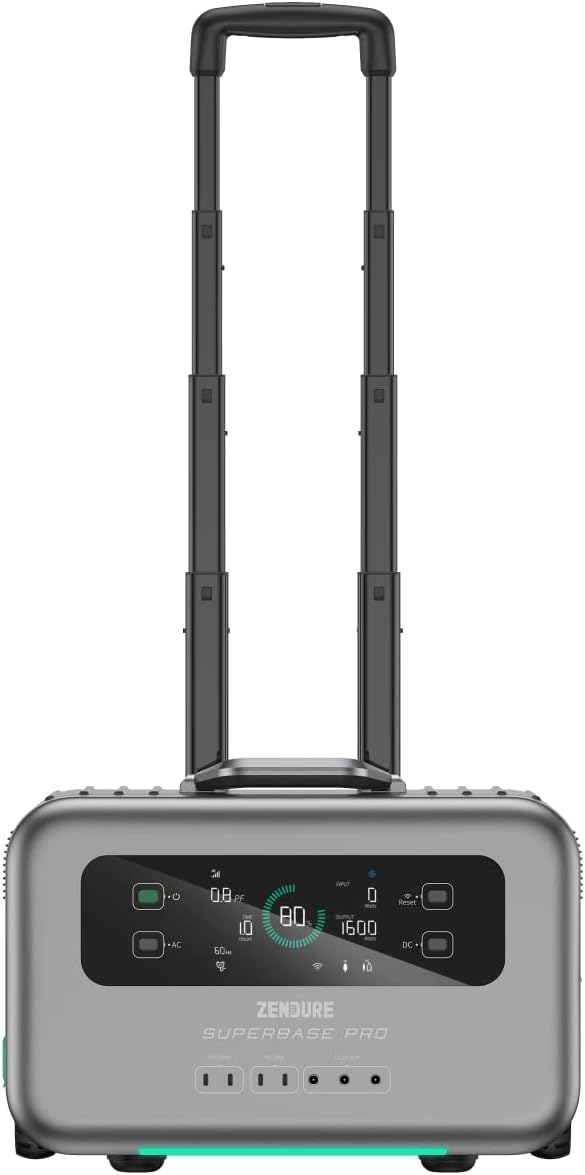
Figure 3: The SuperBase Pro 1500 with its retractable handle extended for easy transport.
Тэхнічнае абслугоўванне
1. Уборка
Regularly clean the exterior of the unit with a soft, dry cloth. Do not use abrasive cleaners or solvents. Ensure all ports are free of dust and debris.
2. Захоўванне
When storing the SuperBase Pro 1500 for extended periods, ensure it is charged to approximately 50-80% capacity. Store it in a cool, dry place, away from direct sunlight and extreme temperatures. Recharge the unit every 3-6 months to maintain battery health.
3. Сыход за батарэяй
The SuperBase Pro 1500 uses a lithium-ion battery. To maximize its lifespan:
- Avoid frequent full discharges.
- Do not expose the unit to temperatures below -10°C (14°F) or above 45°C (113°F) for prolonged periods.
- If the unit will not be used for a long time, charge it to 80% every 3 months.
Ліквідацыю непаладак
| праблема | Магчымая прычына | Рашэнне |
|---|---|---|
| Прылада не ўключаецца. | Акумулятар цалкам разраджаны. | Connect to an AC outlet and charge for at least 10 minutes before attempting to power on. |
| Няма выхаду пераменнага току. | AC output not enabled; Overload protection activated. | Press the AC power button to enable. Reduce the load on AC outlets; restart the unit. |
| Няма выхаду пастаяннага току. | DC output not enabled; Overload protection activated. | Press the DC power button to enable. Reduce the load on DC outlets; restart the unit. |
| Прылада не зараджаецца. | Charging cable not properly connected; Input source issue. | Ensure all charging cables are securely connected. Verify the wall outlet or solar panel is functioning correctly. |
| На дысплеі адлюстроўваецца код памылкі. | Унутраная сістэмная памылка. | Note the error code and refer to the Zendure support webсайт або звярніцеся ў службу падтрымкі па дапамогу. |
Тэхнічныя характарыстыкі
| Асаблівасць | Дэталь |
|---|---|
| мадэль | SUPERBASE PRO |
| Ёмістасць | 1440 Wh |
| Выхадная магутнасць пераменнага току | 1500 Watts (Rated) |
| Тып батарэі | Літый-іённы |
| Памеры (Д х Ш х У) | 50 х 50 х 28 см |
| Вага | 10.89 кг |
| тtage | 1.5E+3 вольта (пастаянны ток) |
| Колер | Чорны |
| UPC | 850020422692 |
Інфармацыя аб гарантыі
Zendure products typically come with a limited warranty. For detailed information regarding the warranty period, coverage, and terms and conditions for your SuperBase Pro 1500, please refer to the warranty card included with your product or visit the official Zendure webсайт.
Захоўвайце доказы пакупкі для прэтэнзій па гарантыі.
Падтрымка кліентаў
For technical assistance, troubleshooting not covered in this manual, or service inquiries, please contact Zendure customer support.
Contact information and support resources can typically be found on the official Zendure webсайт:
- Zendure Official Support Page (Напрample link, actual URL можа адрознівацца)
- Refer to the product packaging or included documentation for specific regional contact details.