
1. Уводзіны
Thank you for choosing the DELTACO Gaming PM80 Wireless Optical Gaming Mouse. This manual provides essential information for setting up, operating, and maintaining your new gaming mouse. Please read these instructions carefully before use to ensure optimal performance and longevity of your device.
2. Змесціва ўпакоўкі
- DELTACO Gaming PM80 Wireless Optical Gaming Mouse
- Бесправадны USB-прыёмнік
- USB-кабель для зарадкі
- Кіраўніцтва карыстальніка
3. Прадукт скончыўсяview
The DELTACO Gaming PM80 is a high-performance wireless optical gaming mouse designed for precision and comfort. It features 7 programmable buttons, adjustable DPI up to 4800, and customizable illumination. The mouse is rechargeable, ensuring uninterrupted gaming sessions.
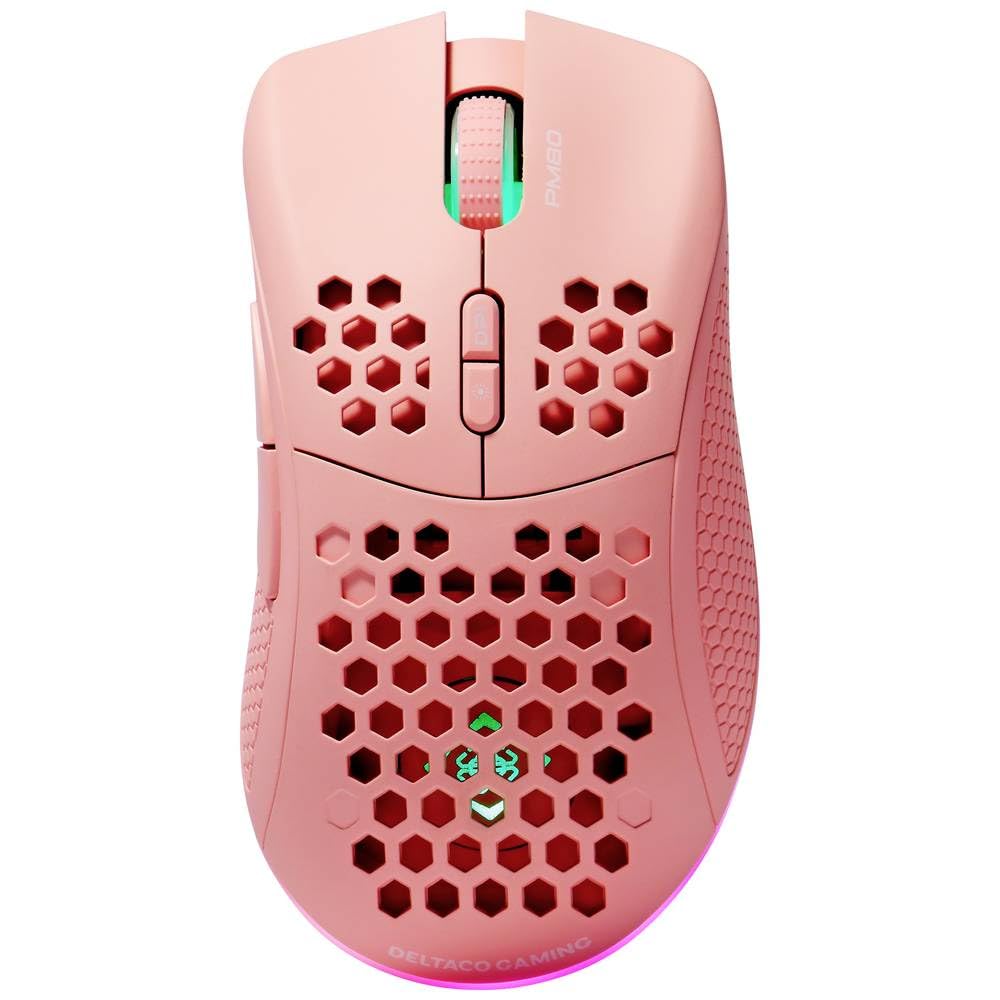
Image: DELTACO Gaming PM80 Wireless Optical Gaming Mouse. This image displays the mouse from a top-down perspective, highlighting its ergonomic design, the central scroll wheel, and the arrangement of its seven buttons.
Функцыі кнопак:
- Левая кнопка мышы: Стандартная функцыя асноўнага кліку.
- Правая кнопка мышы: Стандартная функцыя другаснага кліку.
- Кола пракруткі: Пракручвае ўверх/уніз і дзейнічае як сярэдняя кнопка мышы.
- Кнопка пераключэння DPI: Changes the mouse's sensitivity (DPI).
- Кнопка "Наперад": Перамяшчаецца наперад web браўзэры або file даследчыкі.
- Кнопка "Назад": Пераходзіць назад у web браўзэры або file даследчыкі.
- Illumination Mode Button: Cycles through different lighting effects or turns illumination on/off.
4. Настройка
4.1. Зарадка мышы
- Падключыце меншы канец USB-кабеля для зарадкі да порта зарадкі на пярэдняй панэлі мышы.
- Connect the larger end of the USB charging cable to an available USB port on your computer or a USB wall adapter.
- The mouse's illumination will indicate charging status (e.g., breathing effect, specific color). A full charge typically takes 2-3 hours.
- Once fully charged, the illumination may change or turn off. Disconnect the charging cable.
4.2. Падключэнне бесправаднога прыёмніка USB
- Locate the USB wireless receiver, usually stored in a compartment on the underside of the mouse.
- Remove the receiver from its storage slot.
- Падключыце бесправадны прыёмнік USB да даступнага порта USB на вашым кампутары.
- Ваш камп'ютар павінен аўтаматычна выявіць і ўсталяваць неабходныя драйверы. Гэта можа заняць некалькі хвілін.
4.3. Уключэнне / выключэнне харчавання
- Знайдзіце выключальнік харчавання на ніжняй частцы мышы.
- Slide the switch to the 'ON' position to power on the mouse. The illumination will light up.
- To conserve battery life, slide the switch to the 'OFF' position when the mouse is not in use for extended periods.
5. Інструкцыя па эксплуатацыі
5.1. Асноўнае выкарыстанне
Once connected and powered on, the mouse is ready for use. Move the mouse on a flat surface to control the cursor on your screen. Use the left and right click buttons for primary and secondary actions, and the scroll wheel for navigation.
5.2. Рэгуляванне DPI
The DPI (Dots Per Inch) setting determines the sensitivity of your mouse. The DELTACO Gaming PM80 offers multiple DPI levels up to 4800 DPI. To adjust the DPI:
- Націсніце Кнопка цыклу DPI (typically located behind the scroll wheel).
- Each press will cycle through the available DPI settings. The mouse's illumination may change color or flash to indicate the current DPI level.
- Select the DPI setting that best suits your preference for gaming or general use.
5.3. Кіраванне асвятленнем
The DELTACO Gaming PM80 features customizable illumination. To change the lighting effects:
- Націсніце Illumination Mode Button (гл. раздзел "Прадукт"view для размяшчэння).
- Each press will cycle through different lighting modes, such as static colors, breathing effects, or off.
6. Тэхнічнае абслугоўванне
6.1. Уборка
- Перад чысткай пераканайцеся, што мыш выключана.
- Выкарыстоўвайце мяккую, сухую тканіну без ворса, каб праціраць паверхню мышы.
- Для ўстойлівага бруду злёгку ачысціцеampПрацярыце тканіну вадой або мяккім неабразіўным ачышчальнікам. Пазбягайце празмернай вільготнасці.
- Не выкарыстоўвайце агрэсіўныя хімікаты, растваральнікі або абразіўныя матэрыялы, бо яны могуць пашкодзіць пакрыццё мышы.
- Выкарыстоўвайце ватовы тампон або сціснутае паветра для ачысткі вакол кола пракруткі і шчылін кнопак.
6.2. Захоўванне
When not in use for extended periods, store the mouse in a cool, dry place away from direct sunlight and extreme temperatures. Ensure the power switch is in the 'OFF' position to preserve battery life.
7. Выпраўленне непаладак
- Мышка не рэагуе:
- Пераканайцеся, што мыш уключана.
- Check if the USB wireless receiver is securely plugged into a working USB port.
- Verify the mouse battery is charged. Connect the charging cable and try again.
- Паспрабуйце падключыць прыёмнік да іншага USB-порта.
- Перазагрузіце кампутар.
- Затрымка або перарывістае падключэнне:
- Ensure the mouse is within close proximity to the USB receiver (ideally within 10 meters).
- Avoid placing the receiver near other wireless devices or sources of interference (e.g., Wi-Fi routers, cordless phones).
- Пераканайцеся, што мыш цалкам зараджана.
- Рух курсора няўстойлівы або недакладны:
- Працярыце аптычны датчык на ніжняй частцы мышы мяккай сухой тканінай.
- Пераканайцеся, што вы выкарыстоўваеце мыш на адпаведнай паверхні (напрыклад, кілімку для мышы). Пазбягайце моцна бліскучых або празрыстых паверхняў.
- Знізіце адчувальнасць DPI, калі курсор рухаецца занадта хутка.
- Illumination not working:
- Пераканайцеся, што мыш уключана.
- Press the Illumination Mode Button to cycle through modes, ensuring it's not set to 'off'.
- Check battery level; low battery might disable illumination.
8. Тэхнічныя характарыстыкі
| Асаблівасць | Дэталь |
|---|---|
| Марка | DELTACO GAMING |
| Нумар мадэлі | ГАМ-120-П |
| Сувязь | Бесправадная сувязь (прыёмнік USB) |
| Тып датчыка | Аптычны |
| DPI | Да 4800 DPI (рэгуляванае) |
| Колькасць кнопак | 7 |
| Рука арыентацыі | правільна |
| Ілюмінацыя | так |
| Акумулятарная | так |
| Патрабуюцца батарэі | No (Internal Rechargeable) |
9. Гарантыя і падтрымка
For warranty information and technical support, please refer to the warranty card included with your product or visit the official DELTACO Gaming webсайт. Захоўвайце пацвярджэнне пакупкі для любых гарантыйных прэтэнзій.