
Уводзіны
Thank you for choosing the DELUX GM905 Ergonomic Wireless Keyboard. This manual provides detailed instructions for setting up, operating, and maintaining your keyboard to ensure optimal performance and comfort. Please read this manual thoroughly before using the product.

Асаблівасці прадукту
- Ergonomic Split and Curved Design: Engineered to promote a natural arm and wrist posture, reducing strain and discomfort during extended typing sessions.
- Падключэнне некалькіх прылад: Supports 2.4G wireless (via USB receiver) and Bluetooth 5.0 (BT1 + BT2 channels), allowing connection to up to three devices simultaneously with easy switching.
- Integrated Padded Wrist Rest: Features a skin-friendly synthetic leather wrist rest to provide comfortable support for your palms and wrists.
- Full-Size Layout with Multimedia Keys: Includes a standard 112-key layout with a number pad, 12 FN function keys, and dedicated multimedia controls for enhanced productivity.
- Adjustable Front and Palm Supports: Equipped with four adjustable kickstands to customize the keyboard angle for both seated and standing postures.
- Шырокая сумяшчальнасць з сістэмамі: Compatible with Microsoft Windows (7/8/10/11), Mac OS 10.12 or higher, and Android 4.3 or higher.


Змест пакета
Калі ласка, праверце змесціва пакета пасля распакавання:
- DELUX GM905 Ergonomic Wireless Keyboard
- USB-прыёмнік 2.4G
- Кабель USB
- Кіраўніцтва карыстальніка (гэты дакумент)
Настройка
1. Усталюйце батарэі
The keyboard requires two AAA batteries (not included). Locate the battery compartment on the underside of the keyboard. Open the cover, insert two AAA batteries according to the polarity indicators, and close the cover.
2. Падключыцеся да прылады
The DELUX GM905 keyboard offers three connection modes: 2.4G Wireless and two Bluetooth 5.0 channels (BT1, BT2).
2.1. Бесправадное злучэнне 2.4G
- Locate the 2.4G USB receiver, usually stored in a compartment on the keyboard or included in the package.
- Падключыце USB-прыёмнік да вольнага порта USB на вашым кампутары.
- На клавіятуры націсніце 2.4G key to switch to 2.4G wireless mode. The indicator light will illuminate.
- Your computer should automatically detect and install the keyboard.
2.2. Падключэнне Bluetooth (BT1 / BT2)
- На клавіятуры націсніце і ўтрымлівайце адну з BT1 or BT2 key for 3-5 seconds until the corresponding indicator light flashes rapidly. This indicates pairing mode.
- On your device (computer, tablet, smartphone), go to Bluetooth settings and enable Bluetooth.
- Пошук new devices. You should see "DELUX GM905" or a similar name appear in the list.
- Select the keyboard to pair. The indicator light on the keyboard will stop flashing and remain solid once connected.
- Repeat these steps for the other Bluetooth channel (BT2 or BT1) to connect a second device.


3. Adjust Keyboard Angle
The keyboard features adjustable kickstands at the front and palm rest area. You can adjust these to find the most comfortable typing angle for your seated or standing posture. Experiment with different angles to reduce wrist and arm strain.

Інструкцыя па эксплуатацыі
Пераключэнне паміж прыладамі
Once multiple devices are paired, you can switch between them by simply pressing the corresponding connection key: 2.4G, BT1, або BT2. The keyboard will connect to the selected device almost instantly.
Using Function (FN) Keys
The keyboard features 12 FN function keys (F1-F12) with secondary multimedia functions. To activate the secondary function, hold down the Fn key (located near the left Ctrl key) and then press the desired F-key.
Common FN key combinations include:
- Fn+F1: Выразаць
- Fn+F2: Копія
- Fn+F3: Уставіць
- Fn+F4: пошук
- Fn+F5: Папярэдні трэк
- Fn+F6: Прайграванне/Паўза
- Fn+F7: Наступны трэк
- Fn+F8: Адключыць гук
- Fn+F9: Памяншэнне гучнасці
- Fn+F10: Павялічыць гучнасць
- Fn+F11: Экран блакіроўкі
- Fn+F12: Калькулятар

Dedicated Multimedia Controls
The central circular dial provides quick access to multimedia functions:
- Цэнтральная кнопка: Прайграванне/Паўза
- Кнопкі налева/направа: Папярэдні/наступны трэк
- Кнопкі ўверх/ўніз: Павялічыць/паменшыць гучнасць
- Top/Bottom Buttons (Sun icons): Brightness Up/Down (System dependent)

Тэхнічнае абслугоўванне
Чыстка клавіятуры
- Адключыце клавіятуру ад прылады перад чысткай.
- Выкарыстоўвайце мяккую безворсовую тканіну, злёгку dampпрамыйце вадой або мяккім ачышчальным растворам, каб працерці паверхню клавіятуры.
- For stubborn dirt between keys, use compressed air or a soft brush.
- Пазбягайце выкарыстання агрэсіўных хімікатаў, абразіўных ачышчальнікаў або празмернай вільгаці, бо яны могуць пашкодзіць клавіятуру.
- Clean the wrist rest with a damp cloth and mild soap if necessary, then wipe dry.
Замена батарэі
When the keyboard's performance degrades or the connection becomes unstable, it may be time to replace the batteries. Follow the "Install Batteries" steps in the Setup section to replace the two AAA batteries.
Ліквідацыю непаладак
| праблема | Магчымая прычына | Рашэнне |
|---|---|---|
| Клавіятура не адказвае | Low batteries; Incorrect connection mode; USB receiver not plugged in (2.4G); Bluetooth not paired. | Replace batteries. Ensure the correct connection mode (2.4G, BT1, BT2) is selected. For 2.4G, ensure the USB receiver is securely plugged in. For Bluetooth, re-pair the keyboard. |
| Затрымка або перарывістае падключэнне | Interference; Distance from device; Low batteries. | Move closer to your device. Remove potential sources of interference (other wireless devices). Replace batteries. |
| Keys not typing correctly or double typing | Software issue; Keyboard defect; Low batteries. | Restart your computer. Ensure keyboard drivers are up to date. Replace batteries. If the issue persists, contact customer support. |
| Мультымедыйныя клавішы не працуюць | System compatibility; Software conflict. | Ensure your operating system supports multimedia key functions. Check for any conflicting software or drivers. |
Тэхнічныя характарыстыкі
- Марка: DELUX
- мадэль: GM905
- Падключэнне: 2.4G Wireless, Bluetooth 5.0 (BT1, BT2)
- Сумяшчальныя прылады: PC, Laptop, Smart TV, Smartphone, Tablet
- Тып клавіятуры: Ergonomic, Split, Wireless, Full-Size
- Колькасць клавіш: 112
- Раскладка клавіш: QWERTY
- Тып пераключальніка: Націсніце
- Падстаўка для запясцяў: Integrated, Padded (Synthetic Leather)
- Рэгуляваны кут: Yes (Front and Palm Kickstands)
- Крыніца харчавання: 2 х ААА батарэі
- матэрыял: Пластыкавыя
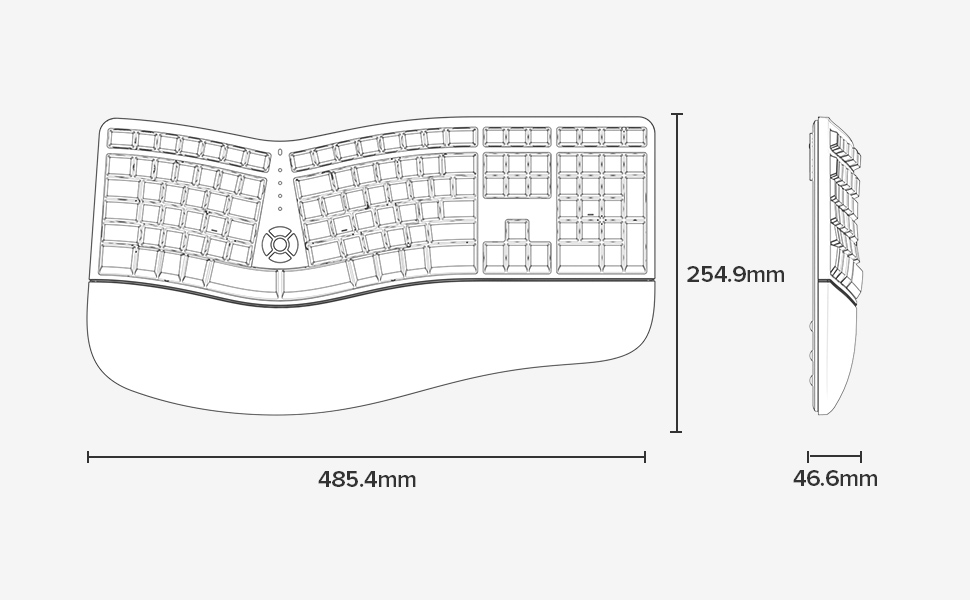
- Памеры (Д х Ш х У): 48.5 см x 25.5 см x 4.7 см (19.1 x 10.0 x 1.85 цалі)
- Воданепранікальнасць: Не ўстойлівы да вады
- Змест скрынкі: Keyboard, 2.4G USB Receiver, USB Cable


Інфармацыя аб гарантыі
Specific warranty details for the DELUX GM905 Ergonomic Wireless Keyboard are not provided in the available product data. Please refer to the product packaging or the manufacturer's official webсайт для ўмоў гарантыі.
Падтрымка
For further assistance, technical support, or inquiries regarding your DELUX GM905 keyboard, please visit the official DELUX website or contact their customer service department. Contact information is typically found on the product packaging or the manufacturer's webсайт.
You can also visit the DELUX store on Amazon for more information: DELUX Amazon Store