
Уводзіны
This manual provides comprehensive instructions for the GMKtec G10 Mini PC, a compact desktop computer featuring an AMD Ryzen 5 3500U processor. It is designed for various applications including office work, home entertainment, and light gaming. This guide covers initial setup, operational procedures, maintenance tips, troubleshooting common issues, and detailed product specifications to ensure optimal performance and user experience.
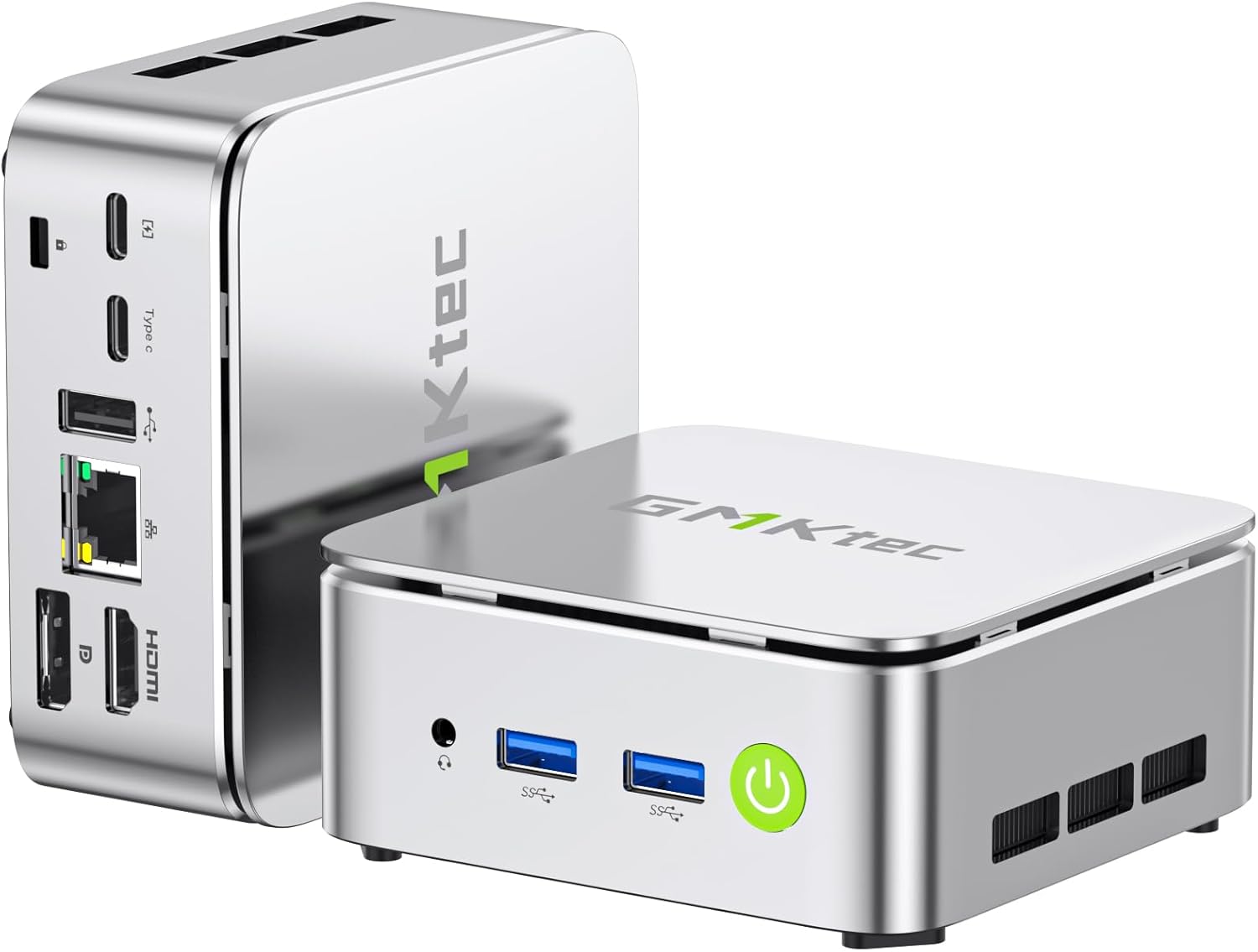
Image: The GMKtec G10 Mini PC, showcasinдзякуючы кампактнаму дызайну і розным партам.
Што ў скрынцы
Upon opening the GMKtec G10 Mini PC package, you should find the following items:
- Міні-ПК GMKtec Nucbox G10 з працэсарам Ryzen 5 3500U
- Кабель HDMI
- Крыніца харчавання Type-C
- VESA Mount
- Кіраўніцтва карыстальніка
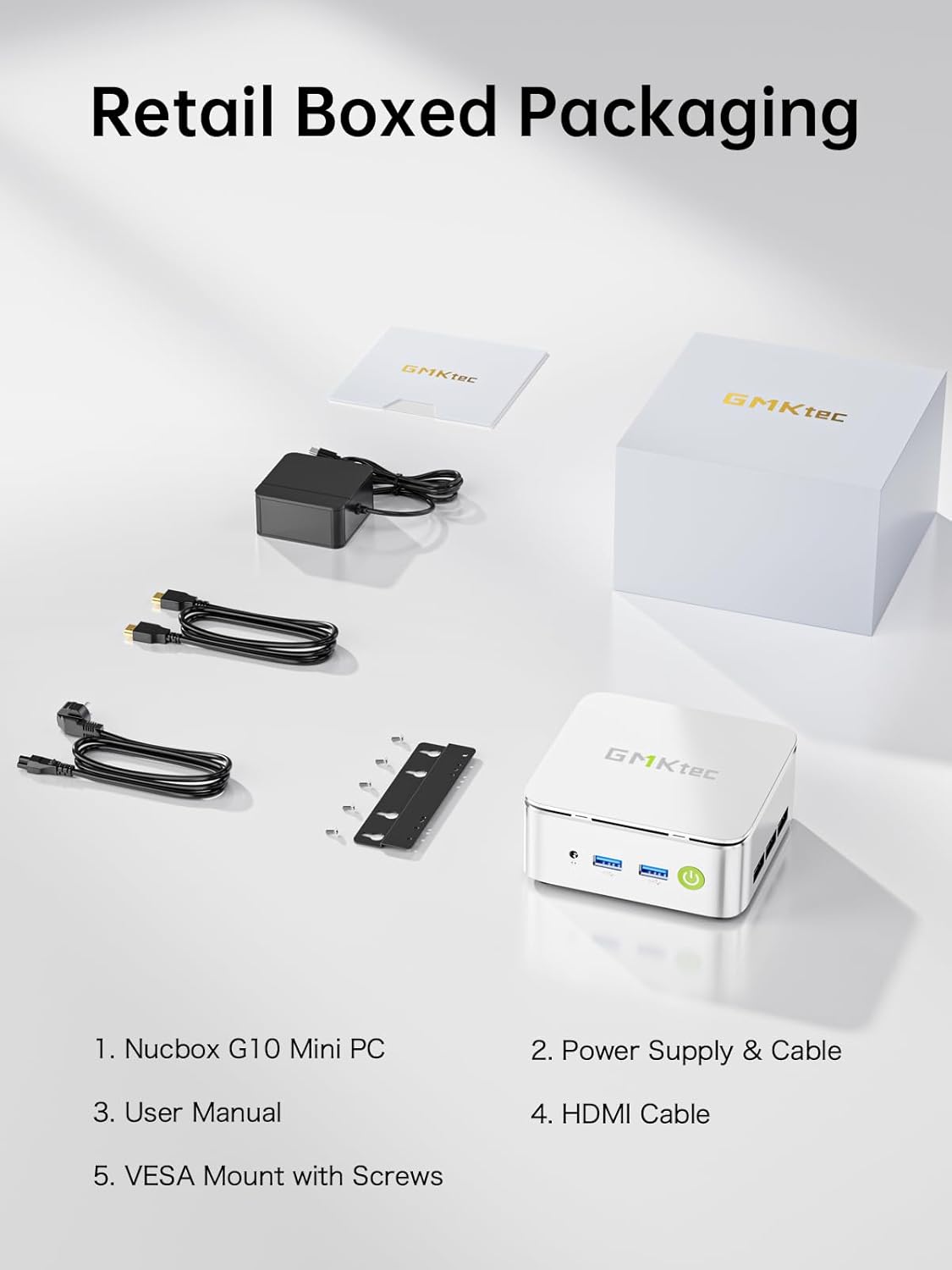
Image: All components included in the GMKtec G10 Mini PC retail packaging.
Кіраўніцтва па ўстаноўцы
Follow these steps to set up your GMKtec G10 Mini PC:
- Падключэнне перыферыйных прылад: Connect your keyboard, mouse, and monitor(s) to the available USB and display ports (HDMI, DisplayPort, or USB-C).
- Падключэнне сілкавання: Connect the Type-C power supply to the designated power input port on the mini PC and then plug it into a power outlet.
- Уключэнне: Press the power button located on the front of the device. The power indicator light will illuminate.
- Initial Operating System Setup: If this is the first boot, follow the on-screen instructions to complete the operating system setup (e.g., Windows 11 Pro).

Выява: Падрабязная view of the GMKtec G10 Mini PC's front and rear ports, including USB, HDMI, DisplayPort, and LAN.
Інструкцыя па эксплуатацыі
Базавая аперацыя
- Уключэнне/выключэнне харчавання: Press the power button to turn the device on. To turn off, use the operating system's shutdown function or press and hold the power button for 5 seconds.
- Перазапуск: Скарыстайцеся функцыяй перазагрузкі аперацыйнай сістэмы.
Налада дысплея
The GMKtec G10 supports triple 4K@60Hz display output via HDMI 2.1, DisplayPort 1.4, and a full-function USB-C port. Connect up to three monitors for extended desktop or mirrored display configurations.

Image: A GMKtec G10 Mini PC powering a triple monitor setup for enhanced productivity.
Сеткавыя сувязі
The device features a 2.5GbE RJ45 LAN port for high-speed wired internet, WiFi 5 for wireless connectivity, and Bluetooth 5.2 for connecting wireless peripherals.

Image: The GMKtec G10 Mini PC demonstrating its wireless and wired networking capabilities.
Storage and Memory Expansion
The GMKtec G10 comes with 16GB dual-channel DDR4 RAM and a 512GB M.2 PCIe 3.0 SSD. Both are upgradeable:
- Аператыўная памяць: Expandable up to 32GB DDR4.
- захоўванне: Features dual M.2 2280 PCIe 3.0 slots, supporting up to 2x 8TB SSDs for a total of 16TB.

Выява: Разабраная view of the GMKtec G10's internal components, highlighting the dual SO-DIMM DDR4 and M.2 SSD slots for upgrades.
Прадукт скончаныview Відэа
Відэа: Оверview of the GMKtec G10 Mini PC, detailing its features, ports, and internal components.
Тэхнічнае абслугоўванне
Правільнае абслугоўванне забяспечвае даўгавечнасць і аптымальную прадукцыйнасць вашага міні-ПК.
- Уборка: Regularly clean the exterior of the mini PC with a soft, dry cloth. Use compressed air to gently clear dust from the ventilation grilles to prevent overheating. Ensure the device is powered off and unplugged before cleaning.
- Абнаўленні праграмнага забеспячэння: Абнаўляйце аперацыйную сістэму і драйверы да апошніх версій. Гэта паляпшае бяспеку, стабільнасць і прадукцыйнасць.
- Сістэма астуджэння: The G10 features an advanced cooling system designed for quiet operation. Ensure the vents are not obstructed to allow for proper airflow.

Image: A graph demonstrating the low noise output of the G10 Mini PC's silent cooling system compared to typical office and outdoor noise levels.

Image: An exploded diagram illustrating the internal structure of the GMKtec G10, highlighting the cooling components.
Ліквідацыю непаладак
If you encounter issues with your GMKtec G10 Mini PC, refer to the following common solutions:
- Няма харчавання:
- Пераканайцеся, што адаптар сілкавання надзейна падключаны як да міні-ПК, так і да спраўнай разеткі.
- Праверце працаздольнасць разеткі, падключыўшы да яе іншую прыладу.
- Няма дысплея:
- Check all display cable connections (HDMI, DisplayPort, USB-C) between the mini PC and the monitor(s).
- Пераканайцеся, што манітор уключаны і настроены на правільную крыніцу ўваходнага сігналу.
- Паспрабуйце падключыцца да іншага дысплея або выкарыстаць іншы кабель.
- Няма падключэння да Інтэрнэту:
- For wired connection, ensure the Ethernet cable is properly connected to the 2.5GbE LAN port and your router/modem. Check router status.
- For Wi-Fi, verify that Wi-Fi is enabled in the operating system and you are connected to the correct network with the correct password.
- Нізкая прадукцыйнасць:
- Зачыніце непатрэбныя праграмы, якія працуюць у фонавым рэжыме.
- Ensure the cooling vents are clear of obstructions to prevent thermal throttling.
- Check for and install any available operating system or driver updates.
If these steps do not resolve your issue, please contact GMKtec customer support for further assistance.
Тэхнічныя характарыстыкі
Detailed technical specifications for the GMKtec G10 Mini PC:
| Асаблівасць | Спецыфікацыя |
|---|---|
| Працэсар | AMD Ryzen 5 3500U (4C/8T, да 3.7 ГГц) |
| Графіка | Графіка AMD Radeon Vega 8 (1200 МГц) |
| АЗП | 16GB DDR4 (Dual-channel, expandable up to 32GB) |
| Захоўванне | 512GB M.2 PCIe 3.0 SSD (Dual M.2 2280 slots, expandable up to 2x 8TB) |
| Аперацыйная сістэма | OS Pro (Windows 11 Pro compatible) |
| Відэавыхад | HDMI 2.1, DisplayPort 1.4, USB-C (Triple 4K@60Hz display support) |
| лакальная сетка | 1x 2.5GbE RJ45 |
| Бесправоднае падключэнне | WiFi 5, Bluetooth 5.2 |
| Парты USB | 2x USB 3.2 Gen1, 1x USB 2.0, 1x USB-C (Full-Function: PD/DP/Data) |
| Аўдыё | 3.5 мм аўдыяраздым |
| Памеры | 3.86 х 1.65 х 4.06 цалі |
| Вага | 2.03 фунта |
Гарантыя і падтрымка
GMKtec імкнецца прадастаўляць надзейную прадукцыю і выдатнае абслугоўванне кліентаў.
Інфармацыя аб гарантыі
The GMKtec G10 Mini PC includes a full Гарантыя 1 год from the date of purchase. This warranty covers all hardware faults due to manufacturing defects or workmanship. Please retain your proof of purchase for warranty claims.
Падтрымка кліентаў
For any questions, technical assistance, or warranty claims, please contact our professional after-sales team:
- Падтрымка па электроннай пошце: support@gmktec.com
- Інтэрнэт-падтрымка: Visit the GMKtec store on Amazon and navigate to the 'Contact Seller' option through your order history.

Image: GMKtec customer support details, including email and online contact methods.