
1. Уводзіны
This manual provides detailed instructions for the amazon basics Wired Gaming Mouse, Model ABIM03. This mouse is designed to enhance your gaming and computing experience with its adjustable DPI, customizable RGB lighting, and programmable buttons. Please read this manual thoroughly before use to ensure proper operation and longevity of your device.
2. Асаблівасці прадукту
- Рэгуляваны DPI: Up to 6400 DPI for precise cursor control and quick movements.
- Наладжвальнае RGB асвятленне: Personalize your mouse with various RGB lighting modes and driver customization options for PC.
- Праграмуемыя кнопкі: Equipped with multiple programmable buttons for assigning custom functions or macros.
- Gaming-Grade Sensor: Ensures accurate tracking and rapid response for gaming.
- Трывалы дызайн: Features extra durable switches and enhanced build quality for extended use.
- Honeycomb Grip: Ergonomic honeycomb design provides a comfortable and secure grip.

Image: The amazon basics Wired Gaming Mouse highlighting its adjustable DPI settings, ranging from 1200 to 7200 (though product states up to 6400).
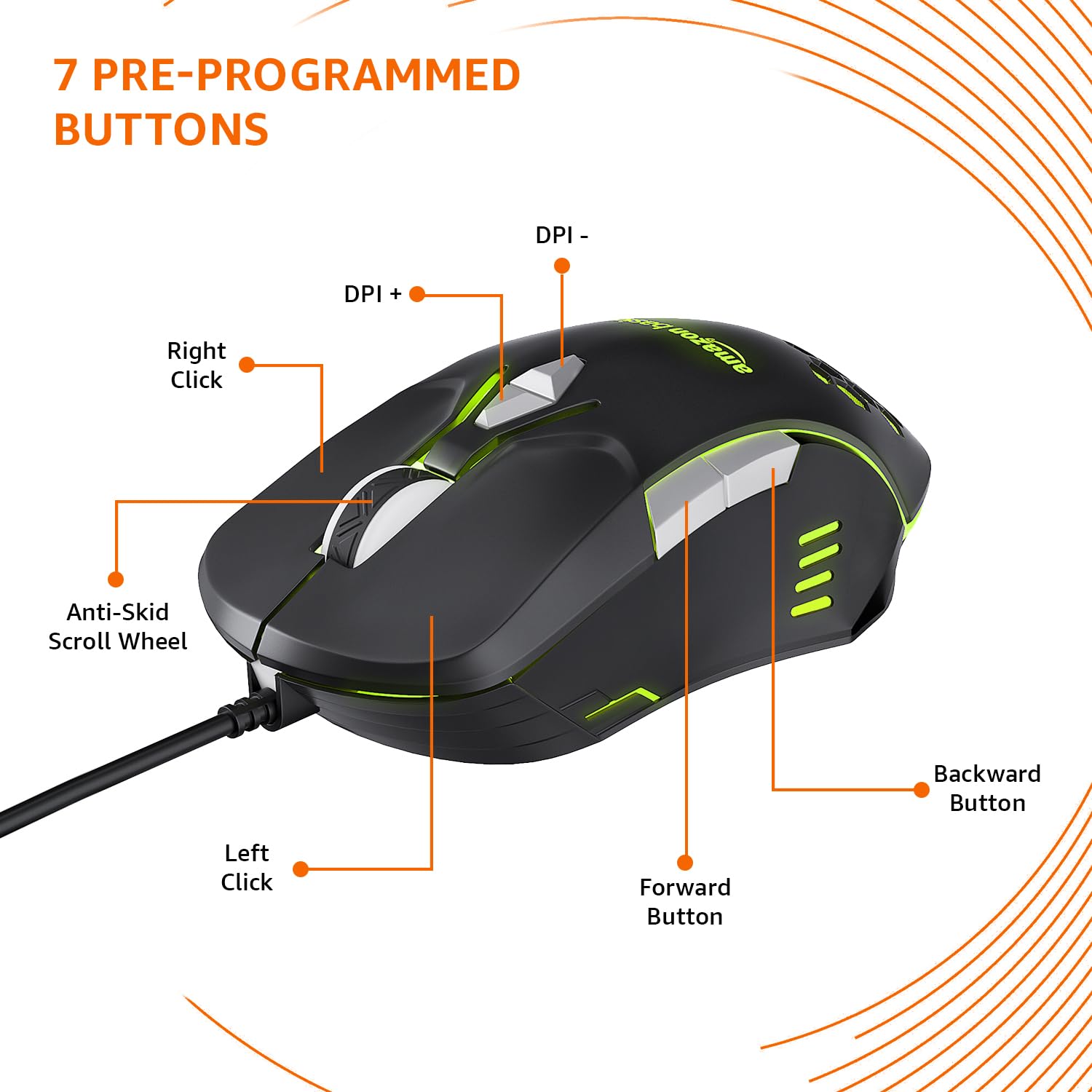
Image: The amazon basics Wired Gaming Mouse showing its 7 pre-programmed buttons, including Left Click, Right Click, Anti-Skid Scroll Wheel, DPI+, DPI-, Forward Button, and Backward Button.

Выява: зверху ўніз view of the amazon basics Wired Gaming Mouse, emphasizing its honeycomb-designed surface for improved grip and airflow.

Image: The amazon basics Wired Gaming Mouse illuminated with red RGB lighting, showcasing its light and comfortable design.
3. Інструкцыі па ўсталёўцы
- Распакуйце мыш: Carefully remove the gaming mouse from its packaging.
- Падключэнне да ПК: Падключыце раз'ём USB мышы да вольнага порта USB на вашым кампутары.
- Ўстаноўка драйвера: Your operating system (Windows, Linux) should automatically detect and install the necessary drivers. If prompted, follow the on-screen instructions. For advanced customization of RGB and programmable keys, refer to the manufacturer's website for specific driver software.
- Размяшчэнне: Place the mouse on a flat, clean surface or a mouse pad for optimal performance.
4. Інструкцыя па эксплуатацыі
4.1 Асноўныя функцыянальныя магчымасці
- Пстрычка левай кнопкай мышы: Першаснае дзеянне, выбар.
- Пстрыкніце правай кнопкай мышы: Secondary action, context menus.
- Кола пракруткі: Scroll up/down pages. Pressing the scroll wheel often acts as a middle click.
- Кнопкі наперад/назад: Звычайна выкарыстоўваецца для навігацыі ў web браўзэры або file даследчыкі.
4.2 Рэгуляванне DPI (кропак на цалю)
The mouse features dedicated DPI adjustment buttons (DPI+ and DPI-) to change cursor sensitivity on the fly. Press these buttons to cycle through different DPI levels up to 6400. A higher DPI setting results in faster cursor movement across the screen with less physical mouse movement.
4.3 Customizing RGB Lighting
The mouse includes customizable RGB lighting. Specific lighting modes can often be cycled through using a dedicated button (if present) or through the optional driver software. Refer to the driver software for advanced customization options, including color selection, effects, and brightness.
4.4 Programming Buttons
The mouse is equipped with programmable buttons. To assign custom functions, macros, or key combinations to these buttons, you will need to install and use the specific driver software provided by the manufacturer. This software typically allows you to create profileдля розных праграм або гульняў.
Video: A short product highlight video demonstrating the key features of the amazon basics Wired Gaming Mouse, including adjustable DPI, RGB lighting, programmable buttons, and durable design.
5. Тэхнічнае абслугоўванне
- Уборка: Для чысткі вонкавага боку мышы выкарыстоўвайце мяккую сухую тканіну. Для выдалення ўстойлівага бруду злёгкуamp можна выкарыстоўваць тканіну, сачыце за тым, каб вадкасць не патрапіла ўнутр мышы.
- Ачыстка датчыка: Occasionally, use a cotton swab lightly dampened with isopropyl alcohol to gently clean the optical sensor on the underside of the mouse. Ensure the mouse is disconnected before cleaning.
- Пазбягайце вадкасці: Do not immerse the mouse in water or any cleaning solutions.
- захоўванне: Захоўвайце мыш у прахалодным, сухім месцы, удалечыні ад прамых сонечных прамянёў і экстрэмальных тэмператур.
6. Выпраўленне непаладак
| праблема | Рашэнне |
|---|---|
| Мышка не рэагуе. |
|
| Рух курсора няўстойлівы або скачковы. |
|
| Programmable buttons are not working. |
|
| RGB-падсветка не працуе або завісла. |
|
7. Тэхнічныя характарыстыкі
| Асаблівасць | Дэталь |
|---|---|
| Марка | асновы амазонкі |
| Нумар мадэлі | АБІМ03 |
| Тэхналогія падлучэння | Правадной (USB) |
| Тэхналогія выяўлення руху | Аптычны |
| Дыяпазон DPI | Да 6400 DPI |
| Праграмуемыя ключы | 4 (in addition to standard left/right click and scroll) |
| Асвятленне | RGB |
| Колер | Чорны |
| Вага прадмета | 145 г |
| Памеры прадукту (ДxШxВ) | 15.8 х 10.4 х 5.4 см |
| Апаратная платформа | PC |
| Сумяшчальнасць аперацыйнай сістэмы | Linux, Windows 7 and above |
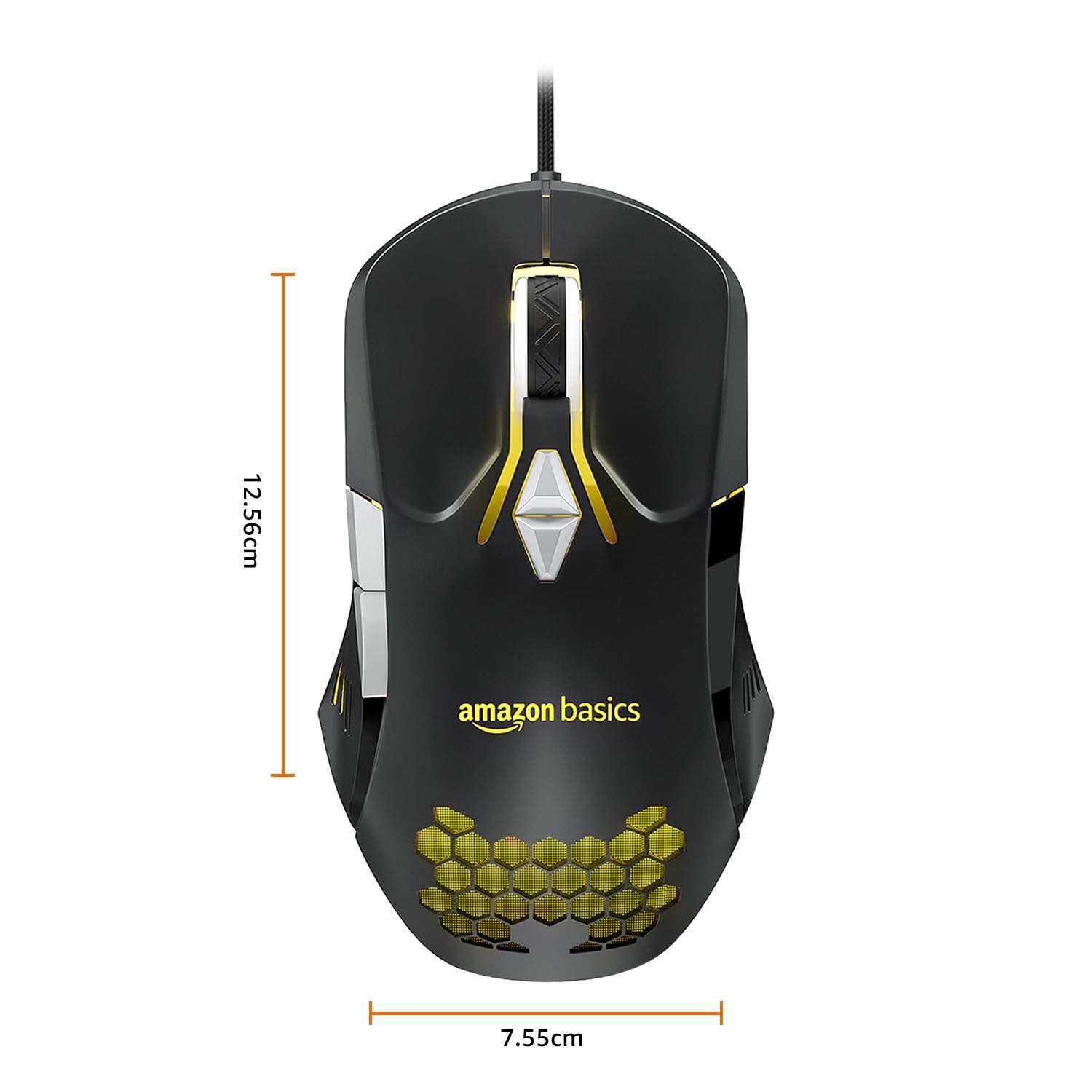
Image: The amazon basics Wired Gaming Mouse with its length (12.56cm) and width (7.55cm) dimensions indicated.
8. Інфармацыя аб гарантыі
This amazon basics Wired Gaming Mouse comes with a 1 год гарантыі from the date of purchase. This warranty covers manufacturing defects and issues arising from normal use. It does not cover damage caused by misuse, accidents, unauthorized modifications, or normal wear and tear. Please retain your proof of purchase for warranty claims.
9. Падтрымка
For further assistance, technical support, or warranty claims, please visit the official amazon basics support page or contact customer service through your purchase platform. Ensure you have your product model number (ABIM03) and proof of purchase ready when contacting support.
Інтэрнэт-рэсурсы:
- Старонка прадукту: amazon.in/dp/B0BTD2YN6Y
- amazon basics Store: amazon basics Store