
1. Уводзіны
This manual provides detailed instructions for the setup, operation, and maintenance of your Adler AD 1196B Digital Alarm Clock. Please read this manual thoroughly before using the device to ensure proper function and longevity.
2. Прадукт скончыўсяview
2.1 Асноўныя магчымасці
- Digital time display with 12/24 hour format.
- Падсветлены дысплей для зручнасці viewing, automatically turns off after 4 seconds.
- Three independent alarm time settings.
- Three alarm activation settings: 5 days (weekday), 6 days (weekday + Saturday), 7 days (every day).
- Displays current time, date, indoor temperature, and humidity.
- Battery-powered for portability and backup during power outagэс.
2.2 Змест пакета
- Adler AD 1196B Digital Alarm Clock Unit
- Кіраўніцтва карыстальніка
Заўвага: Патрабуюцца 2 батарэйкі тыпу АА, яны не ўваходзяць у камплект.

Малюнак 1: Спераду view of the Adler AD 1196B Digital Alarm Clock, displaying 12:00, 26°C, 56% humidity, and the current date.
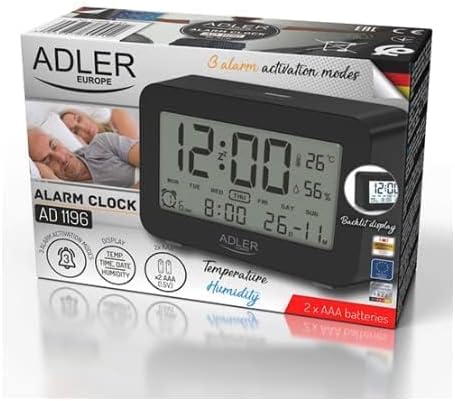
Figure 2: The Adler AD 1196B Digital Alarm Clock shown in its retail packaging, highlighting key features.
3. Настройка
3.1 Устаноўка батарэі
- Знайдзіце вечка батарэйнага адсека на задняй панэлі будзільніка.
- Зрушыце або падніміце вечка, каб адкрыць адсек.
- Устаўце дзве (2) батарэйкі тыпу АА, сочачы за правільнай палярнасцю (+ і -), як паказана ўнутры адсека.
- Надзейна заменіце крышку батарэйнага адсека.
The clock will power on automatically once batteries are inserted. The display will show default settings or begin flashing.
3.2 Першапачатковае ўключэнне
Upon successful battery installation, the display will illuminate. You may need to press a button (e.g., "MODE" or "SET") to activate the display if it remains blank after battery insertion. The backlight will activate briefly and then turn off.
4. Інструкцыя па эксплуатацыі
Familiarize yourself with the control buttons, typically located on the back or top of the device. Common buttons include: MODE, SET, UP/+, DOWN/-, ALARM.
4.1 Настройка часу
- Націсніце і ўтрымлівайце НАБОР кнопка (ці РЭЖЫМ button, depending on model) until the hour digits begin to flash.
- Выкарыстоўвайце УВЕРХ/+ or УНІЗ/- кнопкі для рэгулявання гадзіны.
- Прэса НАБОР (або РЭЖЫМ) again to move to the minute setting.
- Выкарыстоўвайце УВЕРХ/+ or УНІЗ/- кнопкі для налады хвілін.
- Працягвайце націскаць НАБОР (або РЭЖЫМ) to cycle through 12/24 hour format, and then to exit time setting mode.
4.2 Усталяванне даты
- З звычайнага адлюстравання часу націсніце кнопку РЭЖЫМ button repeatedly until the date display starts flashing or you enter date setting mode.
- The year digits may flash first. Use УВЕРХ/+ or УНІЗ/- наладзіць год.
- Прэса РЭЖЫМ to move to the month setting, then adjust with УВЕРХ/+ or УНІЗ/-.
- Прэса РЭЖЫМ to move to the day setting, then adjust with УВЕРХ/+ or УНІЗ/-.
- Прэса РЭЖЫМ again to confirm and exit date setting.
4.3 Setting Alarms (Alarm 1, Alarm 2, Alarm 3)
The AD 1196B features three independent alarms. The process is similar for each.
- Націсніце ТРЫВОГА кнопку адзін раз view Alarm 1. Press again for Alarm 2, and a third time for Alarm 3.
- Пакуль viewing the desired alarm (e.g., AL1), press and hold the НАБОР кнопку, пакуль не замігаюць лічбы гадзін будзільніка.
- Выкарыстоўвайце УВЕРХ/+ or УНІЗ/- каб усталяваць будзільнік.
- Прэса НАБОР to move to the alarm minute setting.
- Выкарыстоўвайце УВЕРХ/+ or УНІЗ/- to set the alarm minutes.
- Прэса НАБОР again to confirm the alarm time.
- Каб уключыць/выключыць будзільнік, націсніце кнопку ТРЫВОГА button repeatedly until the alarm icon (e.g., bell symbol) appears or disappears next to the corresponding alarm number (AL1, AL2, AL3).
4.4 Alarm Activation Modes (5, 6, 7 Days)
After setting an alarm time, you can choose its activation frequency:
- While in alarm setting mode (after setting minutes for an alarm), press НАБОР one more time. The display will show a day indicator (e.g., "5 DAY", "6 DAY", "7 DAY").
- Выкарыстоўвайце УВЕРХ/+ or УНІЗ/- to cycle through the options:
- 5 ДЗЕНЬ: Сігналізацыя гучыць з панядзелка па пятніцу.
- 6 ДЗЕНЬ: Alarm sounds Monday to Saturday.
- 7 ДЗЕНЬ: Сігналізацыя гучыць кожны дзень тыдня.
- Прэса НАБОР to confirm your selection and exit alarm setting for that specific alarm.
4.5 Функцыя падсветкі
The display features a backlight for improved visibility in low light conditions. The backlight automatically activates when a button is pressed and turns off after approximately 4 seconds to conserve battery power.
4.6 Адлюстраванне тэмпературы і вільготнасці
The alarm clock continuously displays the current indoor temperature (in Celsius) and relative humidity percentage. No specific action is required to view these readings; they are shown on the main display.
5. Тэхнічнае абслугоўванне
5.1 Ачыстка
To clean the alarm clock, gently wipe the surface with a soft, dry cloth. Do not use abrasive cleaners, solvents, or chemical sprays, as these may damage the display or casing.
5.2 Замена батарэі
When the display becomes dim or the clock functions erratically, it is time to replace the batteries. Follow the battery installation steps in Section 3.1. Always replace both batteries with new AA batteries of the same type. Dispose of old batteries responsibly according to local regulations.
6. Выпраўленне непаладак
| праблема | Магчымая прычына | Рашэнне |
|---|---|---|
| Дысплей пусты або цьмяны. | Батарэйкі разраджаныя або няправільна ўсталяваныя. | Замяніце батарэйкі новымі батарэйкамі тыпу АА, сачыце за правільнай палярнасцю. |
| Сігналізацыя не гучыць. | Сігналізацыя не ўключана або настроена няправільна. | Ensure the alarm icon is visible on the display. Verify the alarm time and activation mode (5, 6, or 7 days) are set correctly. |
| Час/дата няправільныя. | Time/Date was not set or reset after battery change. | Follow instructions in Section 4.1 and 4.2 to set the correct time and date. |
| Паказчыкі тэмпературы/вільготнасці здаюцца недакладнымі. | Clock is placed near a heat source, vent, or in direct sunlight. | Relocate the clock to a stable environment away from extreme temperature or humidity fluctuations. Allow time for readings to stabilize. |
7. Тэхнічныя характарыстыкі
- мадэль: AD 1196B
- Крыніца харчавання: 2 батарэйкі АА (не ўключаны)
- Тып дысплея: Лічбавы ВК-дысплей з падсветкай
- Функцыі: Time, Date, Day of Week, Temperature (°C), Humidity (%), 3 Alarms with 3 Activation Modes
- Працягласць падсветкі: Прыкладна 4 секунд
- матэрыял: Пластыкавыя
- Памеры (Ш х Г х У): 11 см х 3.81 см х 5 см
- Вага: 1.6 кг
8. Гарантыя і падтрымка
Каб атрымаць інфармацыю аб гарантыі або тэхнічную падтрымку, звярніцеся да гарантыйнага талона, які пастаўляецца з вашым прадуктам, або звярніцеся непасрэдна да вытворцы. Захоўвайце чэк аб куплі як пацверджанне пакупкі.
Manufacturer: Adler