
Уводзіны
Thank you for choosing the Setty 10000 mAh Solar Power Bank. This portable charger is designed to provide reliable power for your mobile devices, featuring a high-capacity battery, integrated charging cables, and a solar panel for emergency charging. Please read this manual carefully to ensure proper use and maintenance of your device.
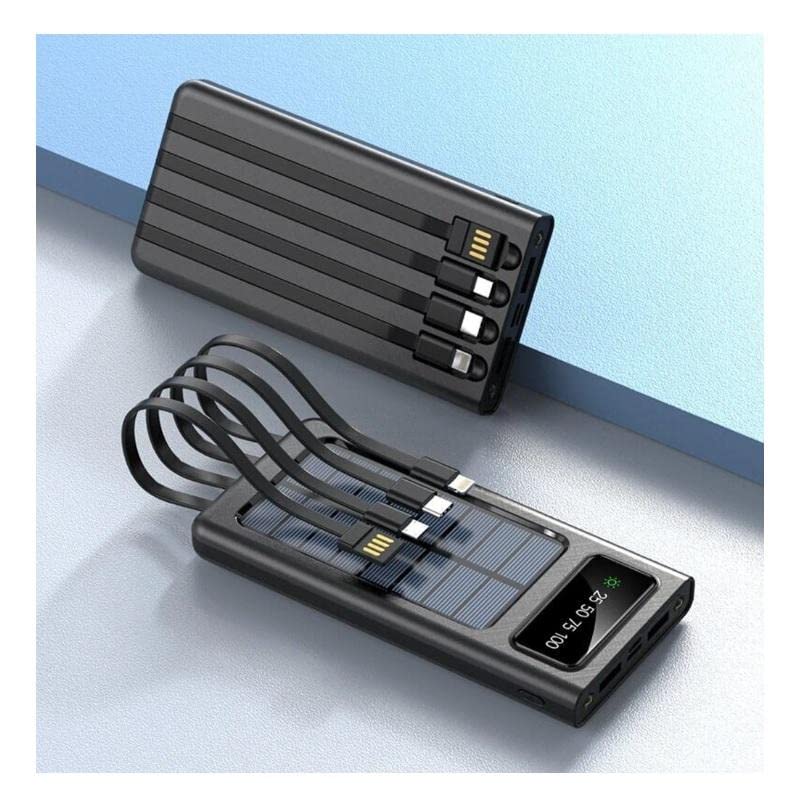
Асаблівасці прадукту
- 10000 mAh High Capacity: Забяспечвае некалькі зарадаў для большасці смартфонаў.
- Integrated Charging Cables: Includes built-in USB, USB-C, MicroUSB, and Lightning cables for universal compatibility.
- Магчымасць сонечнай зарадкі: Equipped with a solar panel for emergency power replenishment when conventional power sources are unavailable.
- Некалькі выхадных партоў: Features a standard USB output port for charging various mobile devices.
- ВК-дысплей: Digital screen indicates battery charge level.
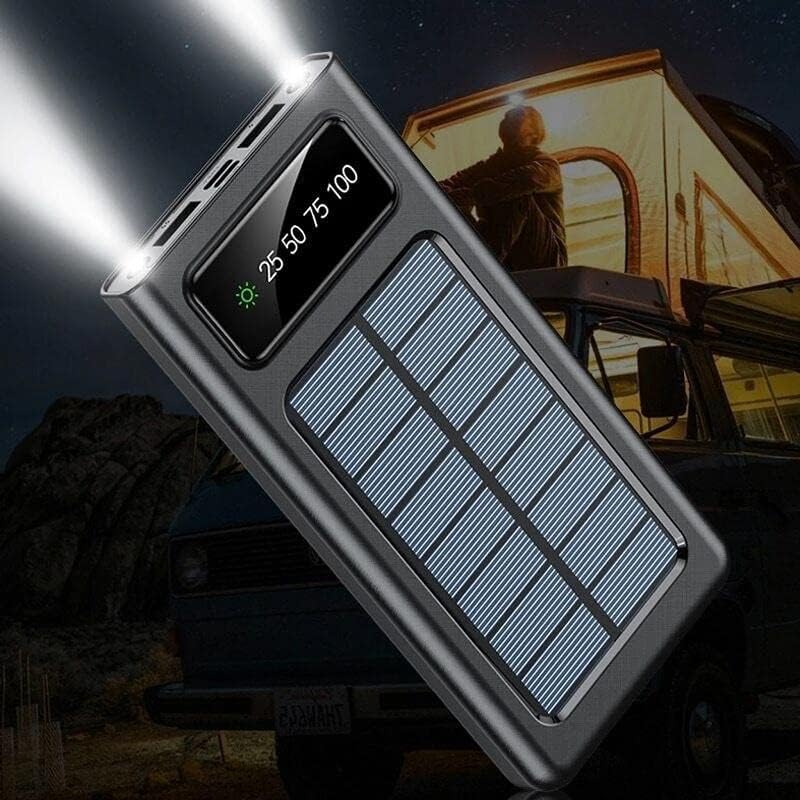
- Святлодыёдны ліхтарык: Built-in flashlight for convenience in low-light conditions.
Змест пакета
- Setty 10000 mAh Solar Power Bank (Model 84730235)
- Кіраўніцтва карыстальніка
Ідэнтыфікацыя кампанентаў

- Панэль сонечных батарэй: For emergency solar charging.
- ВК-дысплей: Паказвае працэнт батарэіtage і стан зарадкі.
- Убудаваныя кабелі: USB, USB-C, MicroUSB, Lightning output cables.
- Выхадны порт USB-A: Standard USB port for connecting external cables.
- Уваходны порт USB-C: Для зарадкі паўэрбанка.
- MicroUSB Input Port: Для зарадкі паўэрбанка.
- Кнопка харчавання: To turn on/off the device and activate the flashlight.
- Святлодыёдны ліхтарык: Інтэграваная крыніца святла.
Настройка
Першапачатковая зарадка
Before first use, fully charge the power bank using a wall adapter. This ensures the internal battery is properly calibrated and ready for optimal performance.
- Connect a USB-C or MicroUSB cable to the corresponding input port on the power bank.
- Connect the other end of the cable to a USB wall adapter (not included).
- Падключыце адаптар да электрычнай разеткі.
- The LCD display will show the charging progress. Charge until the display shows 100%.
Інструкцыя па эксплуатацыі
Зарадка Power Bank
The power bank can be charged via a wall adapter or its solar panel.
Via Wall Adapter (Recommended for fastest charge)
- Use the USB-C or MicroUSB input port with a compatible cable and wall adapter.
- The LCD display will show the charging percentage.
Via Solar Panel (Emergency Charging)

- Place the power bank in direct sunlight. Ensure the solar panel faces the sun.
- The solar charging indicator on the LCD display will illuminate when charging via solar energy.
- Solar charging is slower than wall charging and is intended for emergency use to extend battery life, not as a primary charging method.
Зарадка знешніх прылад
The power bank can charge up to four devices simultaneously using its integrated cables and USB-A output port.
- Identify the correct integrated cable (USB, USB-C, MicroUSB, or Lightning) for your device.
- Connect the appropriate integrated cable to your device's charging port.
- Alternatively, use your device's original charging cable and connect it to the USB-A output port on the power bank.
- Паўэрбанк аўтаматычна пачне зараджаць вашу прыладу. Калі не, націсніце кнопку харчавання адзін раз.
- The LCD display will show the remaining battery level of the power bank.
Выкарыстанне святлодыёднага ліхтарыка
- Каб уключыць ліхтарык, націсніце і ўтрымлівайце кнопку харчавання прыблізна 3 секунды.
- Каб выключыць ліхтарык, зноў націсніце і ўтрымлівайце кнопку харчавання прыблізна 3 секунды.
Інфармацыя пра ВК-дысплей

- Дысплей паказвае ўзровень зарада батарэі ў працэнтахtage (e.g., 25, 50, 75, 100).
- A sun icon will appear when the power bank is actively charging via its solar panel.
Тэхнічнае абслугоўванне
- Уборка: Працірайце знешні акумулятар мяккай сухой тканінай. Не выкарыстоўвайце агрэсіўныя хімічныя рэчывы або абразіўныя матэрыялы.
- захоўванне: Захоўвайце знешні акумулятар у прахалодным, сухім месцы, удалечыні ад прамых сонечных прамянёў і экстрэмальных тэмператур.
- Сыход за батарэяй: Каб падоўжыць тэрмін службы батарэі, цалкам зараджайце знешні акумулятар хаця б раз на тры месяцы, калі ён не выкарыстоўваецца рэгулярна. Пазбягайце частай поўнай разрадкі батарэі.
- Ўздзеянне вады: Гэта прылада не воданепранікальная. Пазбягайце кантакту з вадой або празмернай вільгаццю.
Ліквідацыю непаладак
| праблема | Магчымая прычына | Рашэнне |
|---|---|---|
| Power bank не зараджаецца | Кабель падключаны няправільна; няспраўны кабель/адаптар; знешні акумулятар цалкам зараджаны. | Ensure cables are securely connected. Try a different cable or wall adapter. Check LCD display for 100% charge. |
| Прылада не зараджаецца ад Power Bank | Power bank battery low; incorrect cable; device not compatible; power bank not activated. | Charge the power bank. Use the correct integrated cable or a known good external cable. Press the power button to activate output. |
| Solar charging is slow or not working | Insufficient sunlight; solar panel obstructed; solar charging is inherently slow. | Place the power bank in direct, unobstructed sunlight. Solar charging is supplementary; use wall charging for faster results. |
| Не працуе святлодыёдны ліхтарык | Power bank battery low; incorrect operation. | Charge the power bank. Press and hold the power button for 3 seconds to activate/deactivate. |
Тэхнічныя характарыстыкі
| Асаблівасць | Дэталь |
|---|---|
| Нумар мадэлі | 84730235 |
| Марка | Setty |
| Вытворца | TelForceOne |
| Ёмістасць батарэі | 10000 мАг |
| Тып батарэі | Lithium-polymer (1 Lithium-ion battery included) |
| Уваходныя парты | USB Type C, MicroUSB |
| Выхадныя парты | USB Type A, Integrated USB, USB-C, MicroUSB, Lightning cables |
| тtage | 5 вольт |
| Ampэраж | 2.1 А |
| Колер | Чорны |
| Рэкамендуемае выкарыстанне | Мабільныя тэлефоны |
| Сумяшчальныя прылады | Мабільныя тэлефоны |
Інфармацыя па бяспецы
- Do not expose the power bank to extreme temperatures, direct sunlight for prolonged periods (especially when not charging), or fire.
- Do not immerse the power bank in water or expose it to rain or excessive moisture.
- Не разбірайце, не мадыфікуйце і не спрабуйце адрамантаваць прыладу самастойна.
- Захоўваць у месцах, недаступных дзецям.
- Выкарыстоўвайце толькі сумяшчальныя зарадныя кабелі і адаптары.
- Пазбягайце падзення і моцных удараў павербанка.
- If the power bank swells, overheats, or shows any other abnormal behavior, discontinue use immediately.
Гарантыя і падтрымка
This product is covered by a standard manufacturer's warranty. For specific warranty terms and conditions, please refer to the documentation provided at the time of purchase or contact your retailer. For technical support or inquiries, please visit the official Setty webсайт або звярніцеся ў іх аддзел абслугоўвання кліентаў.