
Уводзіны
The Roland SH-4d Synthesizer is a desktop powerhouse designed for sound creation with a hands-on workflow and deep synthesis tools. It allows users to create spontaneous musical moments using 11 OSC Models, a multitimbral pattern sequencer, extensive effects, and ample polyphony. Its loaded panel, dynamic controls, and motion recording capabilities enable rapid crafting of evolving sounds and compositions. The SH-4d is versatile, suitable for studio, stage, and travel, inspiring creativity from the moment it's powered on.
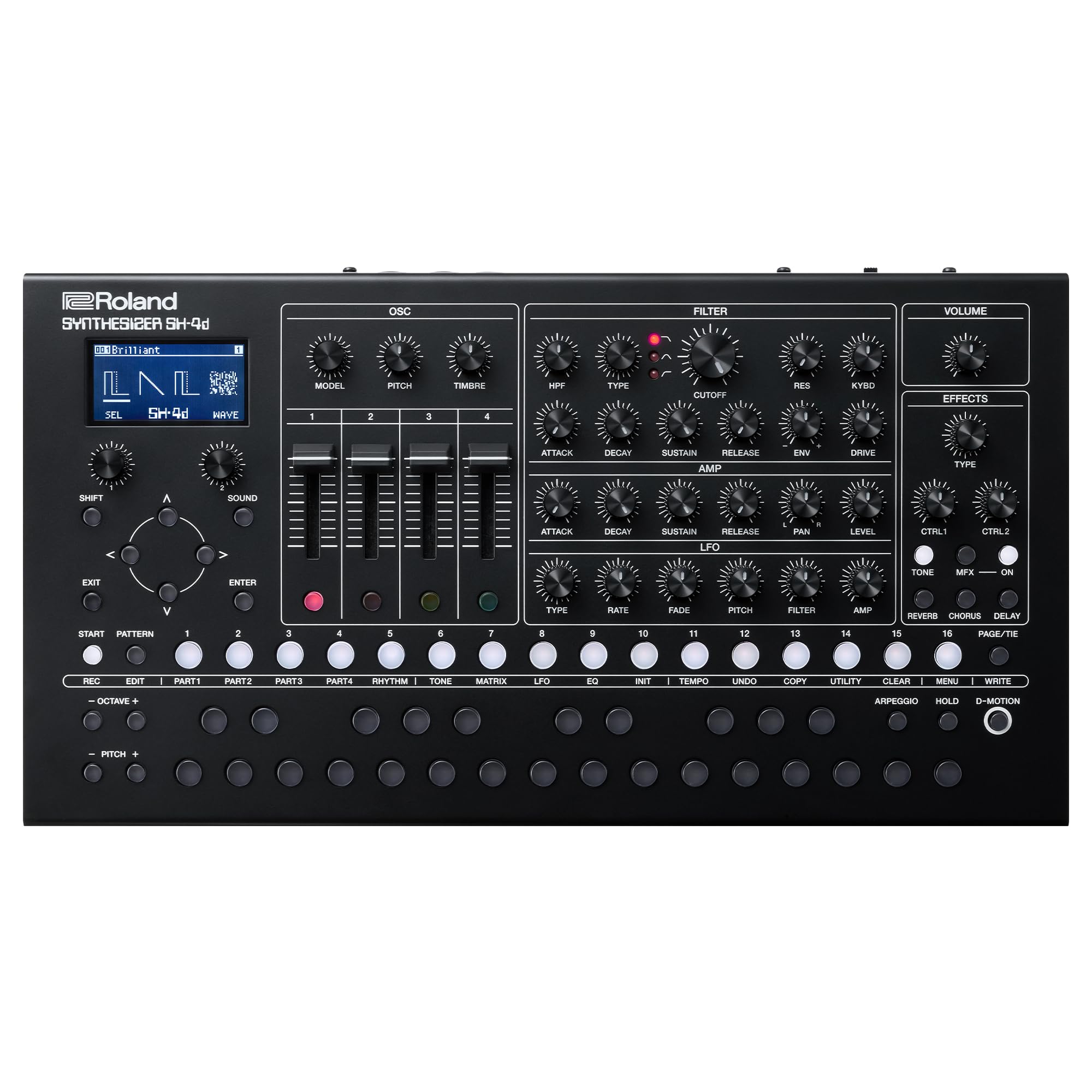
Малюнак 1: Спераду view of the Roland SH-4d Compact Desktop Synthesizer.
Асноўныя характарыстыкі
- 11 OSC Models for diverse sound design.
- Four independent synth parts and a dedicated rhythm part with up to 60 voices of total polyphony.
- Multitimbral sequencer with 128 patterns, real-time recording, two step-entry modes, and motion recording.
- Fully loaded direct-access panel with 32 knobs, four sliders, and a massive array of buttons.
- Extensive onboard sound processing with MFX for each Tone plus global MFX, reverb, chorus, delay, and more.
- Integrated USB-C audio/MIDI interface for recording 12 discrete audio channels directly into a DAW.
Настройка
Распакоўка

Figure 2: The Roland SH-4d package contents.
The Roland SH-4d package includes the synthesizer unit, a USB Type-C to USB Type-A cable, 4 AA (LR6) alkaline batteries, and this Owner's Manual.
Харчаванне агрэгата

Figure 3: Rear panel of the SH-4d with power and connection ports.
The SH-4d can be powered via a 5V USB-C cable (using a portable battery or phone charging adapter) or by 4 AA alkaline or rechargeable batteries. Connect the provided USB-C cable to the unit's USB port for power or data transfer. Alternatively, insert 4 AA batteries into the battery compartment located on the underside of the unit.
Сувязі
The SH-4d features 1/4" jacks for audio inputs and outputs, a headphone jack, and full-sized 5-pin DIN MIDI jacks for external keyboard connectivity. An integrated USB-C audio/MIDI interface allows for recording 12 discrete audio channels directly into a Digital Audio Workstation (DAW).
Інструкцыя па эксплуатацыі
Скончанаview
Video 1: Roland SH-4d OverviewГэта відэа дае поўны аглядview of the Roland SH-4d Synthesizer's features and functionalities.
Sound Design with OSC Models

Figure 4: The 11 OSC Models for sound creation.
The SH-4d offers 11 Oscillator (OSC) Models for diverse sound creation, ranging from classic analog tones to modern digital textures. Explore classic synth voices like the SH-101 and JUNO-106, or craft unique waveforms with Cross FM and Wavetable models.
Multitimbral Pattern Sequencer

Figure 5: Hands-on workflow with the SH-4d.
The multitimbral pattern sequencer allows for creating complex loops and full tracks with four synth parts and a dedicated rhythm part, supporting up to 60 voices of total polyphony. Utilize real-time recording, two step-entry modes, and motion recording to dynamically shape your compositions.
Extensive Effects

Figure 6: Control panel highlighting the effects section.
Each sequencer part has its own Multi-Effects (MFX) processor with 95 types, complemented by shared chorus, delay, reverb, and mastering tools for professional sound shaping. Adjust parameters using the 32 knobs and four sliders for immediate sound manipulation.
Тэхнічнае абслугоўванне
Уборка
To clean the Roland SH-4d, use a soft, dry cloth. Avoid abrasive cleaners, solvents, or waxes, as these can damage the finish and internal components.
Захоўванне
Store the unit in a cool, dry place away from direct sunlight, extreme temperatures, and high humidity. If storing for extended periods, remove batteries to prevent leakage.
Ліквідацыю непаладак
Агульныя праблемы
- Няма гуку: Check all audio connections, volume levels on the SH-4d and connected devices, and ensure the unit is powered on.
- MIDI Connectivity Problems: Verify MIDI cable connections, MIDI channel settings on the SH-4d and external devices, and ensure USB-MIDI drivers are correctly installed if using a computer.
- Нечаканая паводзіна: Perform a factory reset if the unit behaves unexpectedly. Refer to the full owner's manual for instructions on performing a factory reset.
For more detailed troubleshooting steps, please consult the comprehensive owner's manual available on the Roland webсайт.
Тэхнічныя характарыстыкі
| Асаблівасць | Дэталь |
|---|---|
| Марка | Раланд |
| Назва мадэлі | Ш-4Д |
| Памеры прадмета Д х Ш х У | 16.7 х 9.8 х 5.5 цалі |
| Вага прадмета | 5.63 фунта |
| Матэрыял | Легаваная сталь |
| Тып раздыма | USB тыпу C |
| UPC | 761294519554 |
| ASIN | B0BVBZ5L7D |
Што ў скрынцы
Figure 7: The Roland SH-4d package contents.
- Integrated USB-C audio/MIDI interface
- Раз'ём PHONES
- Раздымы OUTPUT
- Раз'ём MIX IN
- Раз'ём EXT CLK IN
- MIDI раздымы
Гарантыя і падтрымка
Інфармацыя аб гарантыі
Каб атрымаць падрабязную інфармацыю аб гарантыі, звярніцеся да афіцыйнага прадстаўніка вытворцы webсайт.
Планы аховы
Optional protection plans are available for extended coverage. These include:
- 4-гадовы план абароны: $104.99 (one-time payment)
- Поўная абарона: $16.99 (monthly billing) - Covers all eligible past and future purchases.
For more details on protection plans, please visit the product page or contact your retailer.