
1. Уводзіны
This manual provides detailed instructions for the installation, operation, and maintenance of your TP-Link Deco X50-Outdoor AX3000 Whole Home Mesh WiFi 6 Unit. The Deco X50-Outdoor is designed to extend your mesh WiFi network to outdoor and indoor spaces, providing robust and stable wireless connectivity. Please read this manual thoroughly before using the device to ensure proper setup and optimal performance.
2. Інфармацыя па бяспецы
Заўсёды выконвайце гэтыя асноўныя меры бяспекі, каб знізіць рызыку пажару, паражэння электрычным токам і траўмаў:
- Не падвяргайце прыладу ўздзеянню вады ці вільгаці.
- Не спрабуйце разабраць, адрамантаваць або мадыфікаваць прыладу.
- Выкарыстоўвайце толькі адаптар сілкавання, які пастаўляецца з прыладай.
- Ensure the device is installed in a stable location to prevent it from falling.
- Трымайце прыладу далей ад крыніц цяпла і прамых сонечных прамянёў.
- For outdoor installation, ensure all cable connections are properly sealed to prevent water ingress.
3. Змесціва ўпакоўкі
Пераканайцеся, што ваш пакет змяшчае наступныя элементы:
- 1 x TP-Link Deco X50-Outdoor Unit
- 1 х адаптар сілкавання
- 1 х Ethernet кабель
- Mounting Kit (includes mounting bracket, screws, and wall plugs)
- Кіраўніцтва па хуткай ўстаноўцы

Image: The retail packaging for the TP-Link Deco X50-Outdoor unit, showing the device and its key features.
4. Прадукт скончыўсяview
The Deco X50-Outdoor is a cylindrical, white unit designed for both outdoor and indoor use. It features an IP65 rating for waterproof and dustproof protection, making it suitable for various weather conditions.
4.1 Макет прылады

Выява: спераду view of the TP-Link Deco X50-Outdoor unit, showcasing its sleek, cylindrical design and 'deco outdoor' branding.

Image: The bottom of the Deco X50-Outdoor unit, revealing the port cover and the attachment point for the mounting bracket.
4.2 Парты і кнопкі
Under the protective cover at the bottom of the unit, you will find the following:
- Порт PoE: Used for Power over Ethernet (PoE) connection, providing both power and data through a single Ethernet cable.
- LAN Ports (2): For connecting wired devices or for backhaul connection to other Deco units.
- Порт харчавання: For connecting the included power adapter when not using PoE.
- Кнопка скіду: A small button to reset the device to factory settings.

Выява: буйны план view of the PoE and AC power supply ports located at the base of the Deco X50-Outdoor unit, with labels indicating their functions.
5. Настройка
Follow these steps to set up your Deco X50-Outdoor unit. It is recommended to use the TP-Link Deco app for a guided setup process.
5.1 Download the Deco App
- Scan the QR code in the Quick Installation Guide or search for "TP-Link Deco" in the App Store or Google Play.
- Спампуйце і ўсталюйце праграму Deco на свой смартфон або планшэт.
5.2 Фізічная ўстаноўка
The Deco X50-Outdoor can be mounted on a pole, wall, or placed on a tabletop.
- Выберыце месца: Select a location that provides optimal WiFi coverage and is within range of your existing Deco network (if extending). For outdoor use, ensure it's protected from direct impact and accessible for power/Ethernet.
- Мантаж:
- Мацаванне на слупе: Use the provided straps to secure the mounting bracket to a pole.
- Насценны мацаванне: Drill holes, insert wall plugs, and screw the mounting bracket to the wall.
- Стальніца: Simply place the unit on a flat, stable surface.
- Падключыце харчаванне:
- Выкарыстанне адаптара харчавання: Connect the provided power adapter to the power port and plug it into an electrical outlet.
- Выкарыстанне PoE: Connect an Ethernet cable from a PoE-enabled switch or injector to the PoE port on the Deco unit.
- Connect to Existing Network (Optional): If you are using the Deco X50-Outdoor as a satellite unit, it will connect wirelessly to your main Deco unit. For a wired backhaul, connect an Ethernet cable from one of the LAN ports to your main Deco unit or network switch.

Image: The Deco X50-Outdoor unit securely mounted on an outdoor pole, demonstrating a typical installation scenario.
5.3 Налада з дапамогай праграмы
- Open the Deco app and log in with your TP-Link ID. If you don't have one, create an account.
- Tap the "+" icon in the top right corner to add a new Deco unit.
- Select your Deco model (X50-Outdoor) and follow the on-screen instructions to complete the setup. The app will guide you through connecting the unit and integrating it into your existing Deco mesh network.
6. Аперацыйная
Once set up, your Deco X50-Outdoor unit will automatically integrate into your mesh network, providing seamless WiFi coverage. You can manage your network using the TP-Link Deco app.
6.1 Deco App Features
The Deco app allows you to:
- View падлучаныя прылады і іх стан.
- Наладзьце гасцявую сетку.
- Manage parental controls.
- Прыярытэзацыя прылад для аптымальнай прадукцыйнасці (QoS).
- Access HomeShield Security features.
- Абнавіць прашыўку.
- Monitor network health and usage.
6.2 Статус святлодыёднага індыкатара
The LED on your Deco unit indicates its status:
- Цвёрды зялёны: Дэко працуе належным чынам.
- Пульсуючы зялёны: Дэко запускаецца.
- Суцэльны чырвоны: У Deco ёсць праблема (напрыклад, няма падключэння да Інтэрнэту).
- Пульсуючы чырвоны: Deco адключаны ад асноўнага блока Deco.
- Суцэльны сіні: Deco гатовы да наладкі.
- Пульсуючы сіні: Deco is pairing via Bluetooth.
7. Тэхнічнае абслугоўванне
Regular maintenance ensures the longevity and optimal performance of your Deco X50-Outdoor unit.
7.1 Абнаўленне прашыўкі
Keep your Deco's firmware updated to benefit from the latest features, security enhancements, and bug fixes. You can check for and install updates via the Deco app.
7.2 Ачыстка
Wipe the device with a soft, dry cloth. Do not use liquid cleaners or chemical sprays.
7.3 Экалагічныя меркаванні
Despite its outdoor rating, avoid placing the unit in locations where it is constantly submerged in water or exposed to extreme physical impact.
8. Выпраўленне непаладак
If you encounter issues with your Deco X50-Outdoor, try the following solutions:
8.1 Няма падключэння да Інтэрнэту
- Check the LED status. If solid red, ensure your main Deco unit has an internet connection.
- Verify that the Ethernet cable (if used) is securely connected.
- Restart your modem, main Deco unit, and then the X50-Outdoor unit.
8.2 Deco X50-Outdoor Disconnected
- Ensure the unit is within range of your main Deco or another satellite Deco.
- Праверце падключэнне сілкавання.
- Try relocating the unit to a closer position to the main Deco.
8.3 Павольная хуткасць Wi-Fi
- Ensure the unit is placed in an open area, free from obstructions.
- Праверце наяўнасць абнаўленняў прашыўкі.
- Use the Deco app to run a network optimization test.
8.4 Скід да заводскіх налад
If issues persist, you may need to perform a factory reset. With the Deco unit powered on, use a pin to press and hold the Reset button until the LED turns solid red (approximately 1 second), then release. The unit will restart with factory default settings.
9. Тэхнічныя характарыстыкі
Technical details for the TP-Link Deco X50-Outdoor unit:
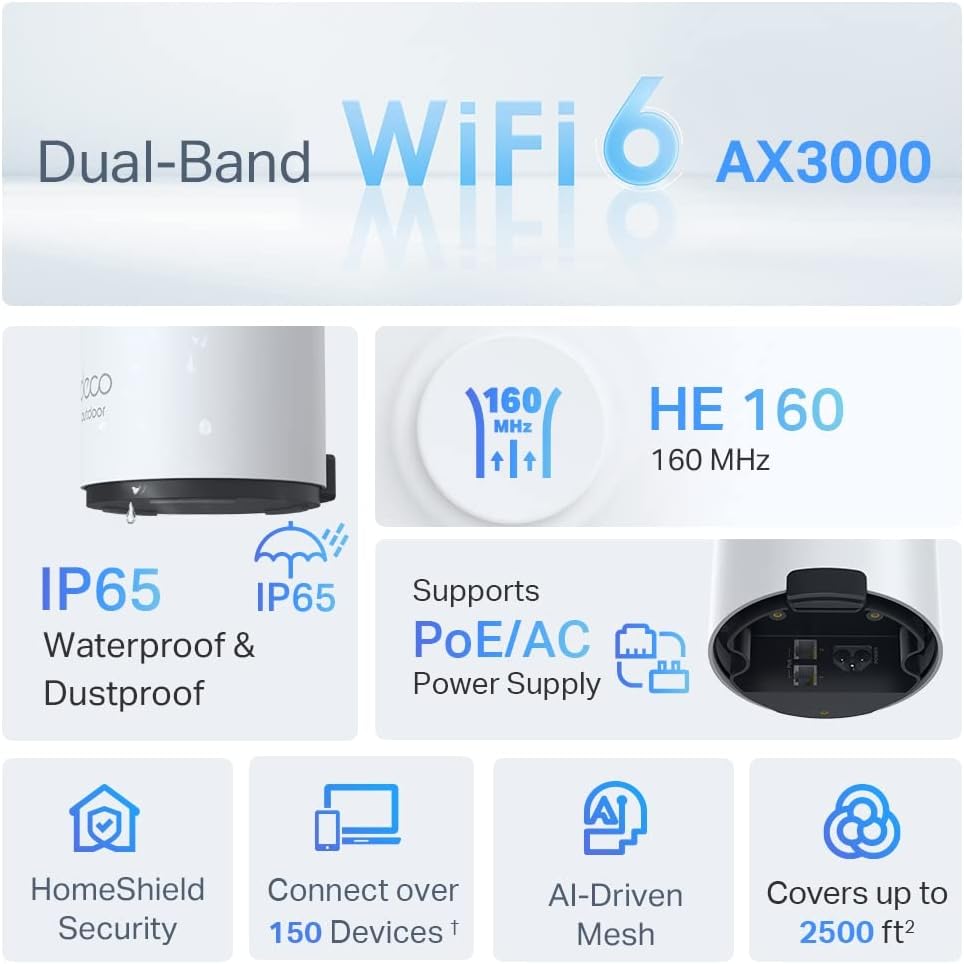
Image: An infographic highlighting key features of the Deco X50-Outdoor, including Dual-Band WiFi 6, AX3000 speeds, IP65 rating, PoE/AC power support, HomeShield Security, support for over 150 devices, AI-Driven Mesh, and up to 2500 sq ft coverage.
| Асаблівасць | Дэталь |
|---|---|
| Назва мадэлі | AX3000 Outdoor Whole Home Mesh WiFi 6 Unit |
| бесправадной стандарт | Wi-Fi 6 (802.11ax) |
| Клас дыяпазону частот | Двухдыяпазонны |
| Хуткасць перадачы даных | Да 2402 Мбіт/с (5 ГГц) + 574 Мбіт/с (2.4 ГГц) |
| Дыяпазон падключэння | Up to 2000 Square Feet (per unit) |
| Парты | 2 x Gigabit Ethernet Ports (Auto-sensing WAN/LAN) |
| Электразабеспячэнне | PoE (802.3at) or AC Power Adapter (240V AC) |
| Ўстойлівасць да надвор'я | IP65 (воданепранікальнасць і пыланепранікальнасць) |
| Пратакол бяспекі | WPA, WPA2, WPA3 |
| Метад кантролю | TP-Link Deco App |
| Вага прадмета | 0.9 кілаграма |
10. Гарантыя і падтрымка
Каб атрымаць інфармацыю аб гарантыі і тэхнічнай падтрымцы, звярніцеся да афіцыйнага сайта TP-Link. webсайт або звярніцеся ў службу падтрымкі кліентаў.
- Афіцыйны прадстаўнік TP-Link Webсайт: www.tp-link.com
- Тэхнічная падтрымка: Visit the support section on the TP-Link webсайт для адказаў на часта задаваныя пытанні, інструкцый па ліквідацыі непаладак і кантактнай інфармацыі.