
1. Уводзіны
Thank you for choosing the FLEXISPOT EF1 Basic Plus Electric Height-Adjustable Desk. This manual provides essential information for the safe and efficient assembly, operation, and maintenance of your new desk. Please read these instructions thoroughly before use and retain them for future reference.
Папярэджанні аб бяспецы
- Always follow the assembly instructions carefully to prevent accidents and ensure proper function.
- Do not exceed the maximum load capacity of 70 kg (154 lbs) on the desktop. Overloading can compromise stability and cause damage.
- To prevent tipping, especially when the desk is at its maximum height (121 cm), ensure the desk is anchored correctly to a stable wall.
- Трымайце дзяцей і хатніх жывёл далей ад стала падчас працы, каб пазбегнуць траўмаў ад рухомых частак.
- Ensure there are no obstructions in the desk's path during height adjustment.
- Не сядзіце і не стойце на стале.
- Адключыце электрычнасць перад чысткай або любым тэхнічным абслугоўваннем.
2. Налада і зборка
The FLEXISPOT EF1 Basic Plus desk requires assembly. Please ensure all components are present before beginning. Refer to the included assembly guide for detailed step-by-step instructions.
Распакоўка і праверка кампанентаў
Carefully unpack all parts and lay them out on a soft, clean surface to prevent scratches. Verify that all components listed in the packing list are present.
Зборка скончанаview
- Attach the lifting columns to the desk feet.
- Злучыце перакладзіну з пад'ёмнымі калонамі.
- Secure the desktop to the assembled frame.
- Install the control panel and cable management tray (if included).
- Connect all motor and control cables according to the wiring diagram.
- Падключыце шнур харчавання да заземленай разеткі.

Малюнак 1: The FLEXISPOT EF1 Basic Plus Electric Height-Adjustable Desk with a black tabletop and white frame, set up in a home office environment.

Малюнак 2: This image illustrates the smooth, single-piece desktop construction of the FlexiSpot desk, contrasting it with typical multi-piece desktops that may have uneven surfaces.

Малюнак 3: An illustrative diagram detailing various desktop size and color options, along with key specifications for the desk frame, including adjustable height range, static and dynamic load capacities, and lifting noise levels.
3. Інструкцыя па эксплуатацыі
Панэль кіравання скончыласяview

Малюнак 4: Падрабязны view of the desk's Smart Control Panel, highlighting the LED display, the up and down adjustment buttons, and four numbered buttons for memory presets.
The desk is equipped with an advanced all-in-one keypad for easy height adjustment and memory functions.
- Святлодыёдны дысплей: Паказвае бягучую вышыню стала ў сантыметрах.
- Up/Down Buttons (⌃ / ⌄): Press and hold to manually adjust the desk height upwards or downwards. Release the button to stop at the desired height.
- Папярэднія налады памяці (1, 2, 3, 4): Four programmable buttons to save and recall your preferred sitting and standing heights.
Налада прэсетаў памяці
- Адрэгулюйце вышыню стала на патрэбную вышыню з дапамогай кнопак «Уверх»/«Уніз».
- Press the "M" or "SET" button (if available, otherwise proceed to step 3) to activate memory mode.
- Press one of the numbered preset buttons (1, 2, 3, or 4) within 3 seconds. The LED display will show "S-1", "S-2", etc., indicating the height has been saved to that preset.
Recalling Memory Presets
Simply press the desired numbered preset button (1, 2, 3, or 4). The desk will automatically move to the saved height.
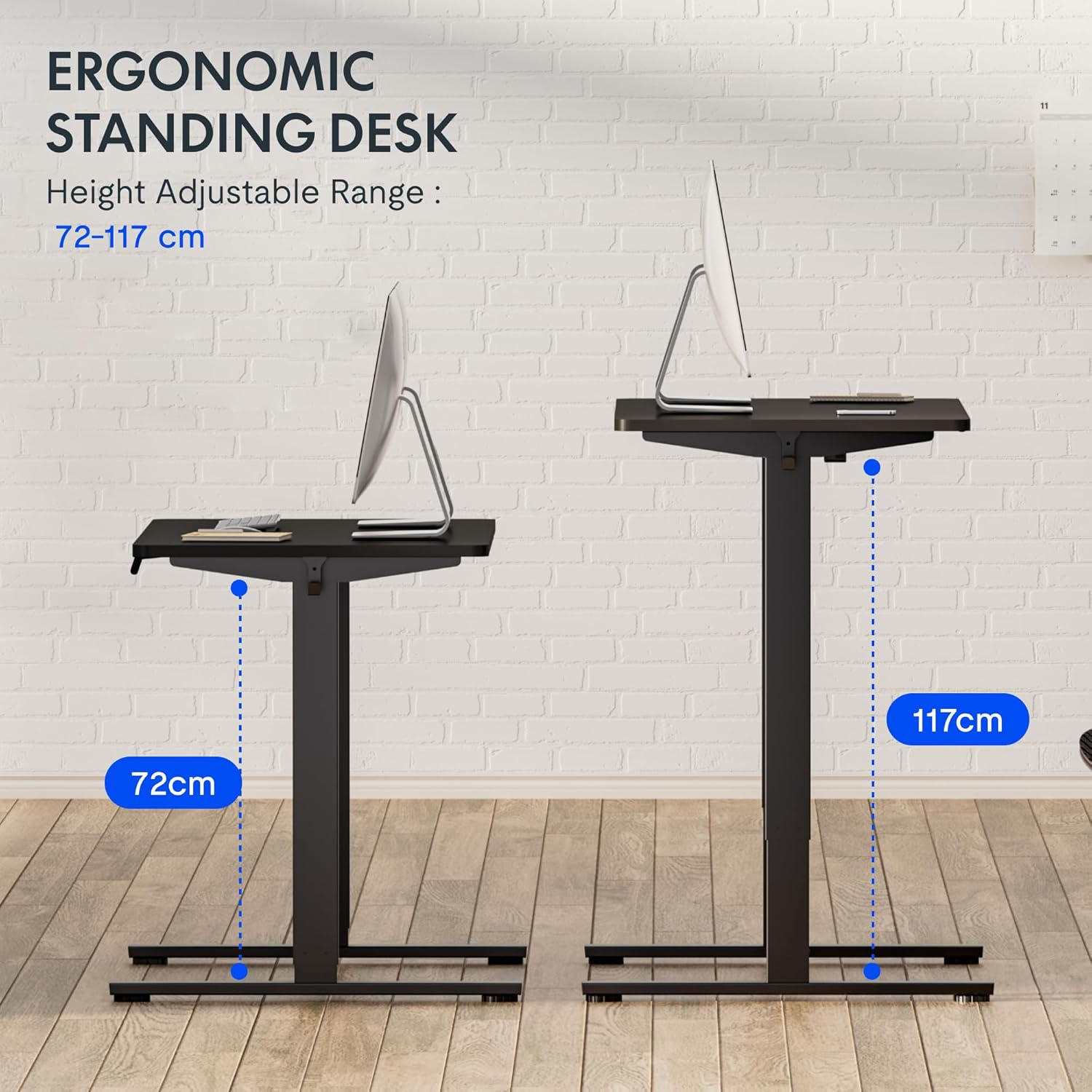
Малюнак 5: This image demonstrates the height adjustment capabilities of the desk, showing a range from 72 cm (sitting height) to 117 cm (standing height). Note that the full adjustable range for this model is 71 cm to 121 cm.
4. Тэхнічнае абслугоўванне
Regular maintenance ensures the longevity and optimal performance of your FLEXISPOT desk.
- Уборка: Працярыце працоўны стол і рамку мяккай губкайamp тканінай. Пазбягайце абразіўных ачышчальнікаў або агрэсіўных хімічных рэчываў, якія могуць пашкодзіць пакрыццё.
- Кабельнае кіраванне: Перыядычна правярайце і арганізоўвайце кабелі, каб прадухіліць іх заблытванне і забяспечыць бесперабойную працу.
- агляд: Regularly inspect all screws and bolts to ensure they are tight. Retighten if necessary.
- змазка: The lifting columns are generally maintenance-free. Do not attempt to lubricate internal components unless specifically instructed by customer support.
5. Выпраўленне непаладак
Калі ў вас узнікнуць якія-небудзь праблемы са сталом, звярніцеся да наступных распаўсюджаных праблем і рашэнняў.
| праблема | Магчымая прычына | Рашэнне |
|---|---|---|
| Стол не рухаецца. |
|
|
| Стол рухаецца няроўна або выдае незвычайныя гукі. |
|
|
| Error code displayed on LED. |
|
|
Працэдура скіду
If the desk is not functioning correctly, a reset may resolve the issue.
- Press and hold the "Down" button until the desk reaches its lowest position and slightly retracts, then releases.
- If this does not initiate a reset, unplug the desk from the power outlet for at least 10 seconds, then plug it back in.
- Repeat step 1. The desk should now be reset.
6. Тэхнічныя характарыстыкі
| Марка | ФЛЕКСІСПОТ |
| Нумар мадэлі | HU-XI-201 |
| Desktop Dimensions (L x W x Thickness) | 120 х 80 х 2.5 см |
| Adjustable Height Range (without tabletop) | 71 см - 121 см |
| Max Lifting Speed | 2.5 см/с |
| Максімальная грузападымальнасць | 70 кг (154 фунтаў) |
| Lifting Noise Level | <50 дБ |
| Матэрыял для працоўнага стала | Engineered Wood (MDF) with High-Pressure Laminate |
| Матэрыял каркаса | Сталь з парашковым пакрыццём |
| Колер | Black tabletop + White frame |
| Асаблівасці | Electric height adjustment, 4 memory presets |
7. Гарантыя і падтрымка
Інфармацыя аб гарантыі
FLEXISPOT stands behind the quality of its products. Your EF1 Basic Plus desk comes with the following warranty:
- 3-гадовая гарантыя: Covers controllers and motors.
- 5-гадовая гарантыя: Covers the desk frame.
Please retain your proof of purchase for warranty claims. The warranty covers manufacturing defects under normal use. It does not cover damage caused by misuse, accidents, unauthorized modifications, or failure to follow the instructions in this manual.

Малюнак 6: An image outlining the warranty coverage for FlexiSpot desks, specifically mentioning a 3-year warranty for controllers and motors, and a 5-year warranty for the desk frame.
Падтрымка кліентаў
For technical assistance, warranty claims, or any questions regarding your FLEXISPOT EF1 Basic Plus desk, please contact FLEXISPOT customer support.
Webсайт: www.flexispot.com (or regional equivalent)
электронная пошта: Refer to your purchase documentation or the official FlexiSpot webсайт для кантактнай электроннай пошты.
тэлефон: Refer to your purchase documentation or the official FlexiSpot webсайт для кантактнага нумара тэлефона.