
1. Уводзіны
This manual provides instructions for the Beyution RMT-V504A replacement infrared remote control. This remote is designed to operate various Sony DVD VCR Combo Player models without requiring any programming or setup. Simply insert batteries, and it is ready for use.
Compatible Models include:
- RMT-V501A, RMT-V501, RMT-V501C, RMT-V501D, RMT-V501E, RMT-V501F
- SLV-D100, SLV-D281P, SLV-D380P, YSP-4000BL, HT-V1000D, HT-V1000DP, HT-V3000DP
- SLV-D201, SLV-D201P, SLV-D251, SLV-D251P, SLV-D261, SLV-D261P, SLV-D271, SLV-D271P
- SLV-D281, SLV-D300, SLV-D300P, SLV-D350, SLV-D350P, SLV-D360P, SLV-D370P, SLV-D380
- SLV-D550P, SLV-D560P, SLV-D570H, SLVD-100, SLVD100, SLVD281P, SLVD380P, YSP4000BL
- SLVD271P, SLVD500P, SLVD506P, SLV-D500, SLV-D506P, SLVD560P, SLVD570H, SLVD360
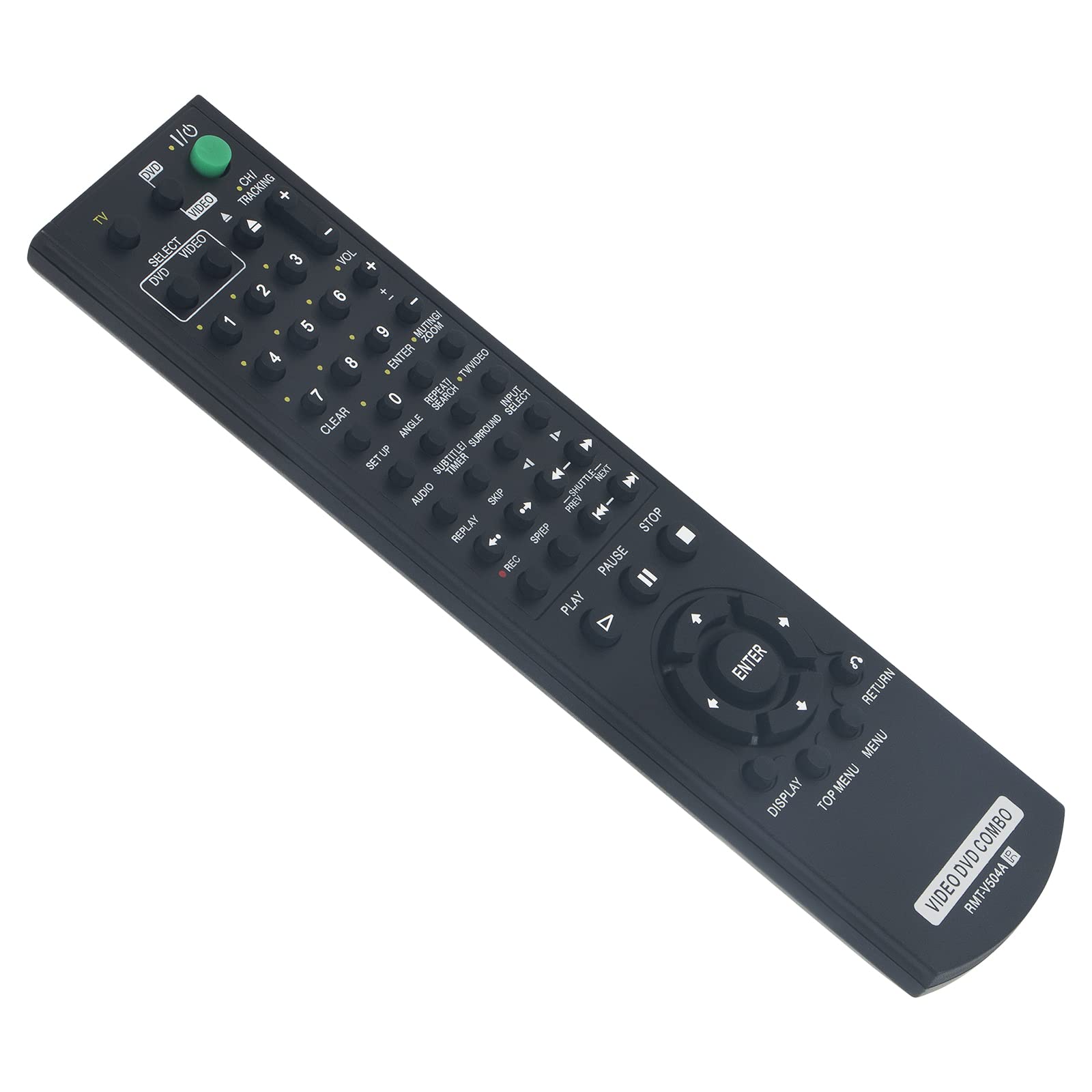
Figure 1: Beyution RMT-V504A Replacement Remote Control
2. Настройка
2.1 Устаноўка батарэі
The Beyution RMT-V504A remote control requires two (2) AAA batteries (not included) for operation.
- Знайдзіце крышку батарэйнага адсека на задняй частцы пульта дыстанцыйнага кіравання.
- Зрушыце вечка ўніз або націсніце на зашчапку (калі ёсць), каб адкрыць адсек.
- Устаўце дзве новыя шчолачныя батарэйкі тыпу AAA, пераканаўшыся, што станоўчая (+) і адмоўная (-) клемы супадаюць з дыяграмамі ўнутры адсека.
- Зачыніце вечка батарэйнага адсека, зрушыўшы яго назад да пстрычкі.

Малюнак 2: Устаноўка батарэі
2.2 Першапачатковае выкарыстанне
This replacement remote control is pre-programmed and does not require any additional setup or coding. Once batteries are installed, it is ready to operate your compatible Sony DVD VCR Combo Player.
3. Інструкцыя па эксплуатацыі
Point the remote control directly at the infrared receiver on your Sony DVD VCR Combo Player. The effective operating distance is approximately 8 to 10 meters (26 to 33 feet).

Малюнак 3: Функцыі дыстанцыйнага кіравання
3.1 Асноўныя функцыі
- POWER (TV I/O): Уключае або выключае падлучаную прыладу.
- SELECT DVD/VIDEO: Пераключэнне паміж рэжымамі DVD і відэамагнітафона.
- Лічбавыя кнопкі (0-9): Выкарыстоўваецца для прамога выбару трэка/раздзела або ўводу канала.
- ГУЧНАСЦЬ (+/-): Рэгулюе ўзровень гучнасці.
- CH/TRACKING (+/-): Changes channels or adjusts VCR tracking.
- ГУЛЬНЯ (►): Пачынае прайграванне.
- PAUSE (▮▮): Прыпыняе прайграванне.
- СТОП (■): Спыняе прайграванне.
- ЗАПІС (●): Initiates recording (VCR function).
- REW/FF (◀◀ / ►►): Перамотка назад або наперад.
- SKIP (◀► / ►►): Skips tracks/chapters.
- УВОД: Пацвярджае выбар у меню.
- DISPLAY: Паказвае інфармацыю на экране.
- TOP MENU/MENU: Accesses the main menu or disc menu.
- ВЯРТАННЕ: Вяртаецца да папярэдняга экрана або меню.
- Other buttons (SET UP, ANGLE, SUBTITLE, AUDIO, TIME, SEARCH, etc.) function according to your specific player's capabilities.
4. Тэхнічнае абслугоўванне
4.1 Ачыстка
Для чысткі пульта дыстанцыйнага кіравання выкарыстоўвайце мяккую сухую тканіну. Не выкарыстоўвайце вадкія ачышчальнікі, спрэі або абразіўныя матэрыялы, бо яны могуць пашкодзіць паверхню пульта дыстанцыйнага кіравання або ўнутраныя кампаненты.
4.2 Замена батарэі
Replace batteries when the remote's response becomes sluggish or it stops functioning. Always replace both batteries at the same time with new AAA alkaline batteries. Do not mix old and new batteries or different types of batteries.
4.3 Захоўванне
Захоўвайце пульт дыстанцыйнага кіравання ў прахалодным, сухім месцы, удалечыні ад прамых сонечных прамянёў і экстрэмальных тэмператур. Калі пульт не будзе выкарыстоўвацца працяглы час, выміце батарэйкі, каб прадухіліць уцечку.
5. Выпраўленне непаладак
- Пульт не адказвае:
- Ensure batteries are correctly inserted with the correct polarity.
- Замяніце старыя батарэйкі новымі шчолачнымі батарэйкамі тыпу AAA.
- Check for any obstructions between the remote control and the device's infrared receiver.
- Ensure you are within the effective operating range (8-10 meters) and pointing the remote directly at the device.
- Some functions are not working:
- Verify that your Sony DVD VCR Combo Player model is listed as compatible. While this remote is designed for broad compatibility, some specific functions may vary depending on the original remote's layout and your player's capabilities.
- Clean the remote's infrared emitter (the LED at the front) to ensure a clear signal.
- Remote received damaged or not working upon arrival:
- Неадкладна звярніцеся ў службу падтрымкі кліентаў па дапамогу.
6. Тэхнічныя характарыстыкі
| Нумар мадэлі | RMT-V504A |
| Тэхналогія падлучэння | Інфрачырвоны (ВК) |
| Матэрыял | АБС-пластык |
| Максімальная працоўная адлегласць | Прыкладна 10 метраў (33 футы) |
| Патрабуюцца батарэі | 2 x AAA (не ўключаны) |
| Памеры прадукту | 6.3 х 1.57 х 0.39 цалі (16 х 4 х 1 см) |
| Вага прадмета | 2.82 унцыі (80 грам) |

Figure 4: Remote Control Dimensions and Material
7. Гарантыя і падтрымка
7.1 Інфармацыя аб гарантыі
This Beyution RMT-V504A remote control comes with a Гарантыйны тэрмін 6 месяцаў з даты пакупкі. Гэтая гарантыя распаўсюджваецца на вытворчыя дэфекты і няспраўнасці пры нармальным выкарыстанні.
7.2 Падтрымка кліентаў
If you encounter any issues with your remote control, have questions about compatibility, or require assistance, please contact our customer service team. We aim to provide a satisfactory solution within 24 hours.
Спосаб сувязі: Please refer to your purchase documentation or the seller's contact information provided at the time of purchase (e.g., via email).