
Уводзіны
The HUBBLE CONNECTED Nursery Pal Deluxe is a smart baby monitor system designed to provide comprehensive monitoring of your child. It includes a portable baby unit camera and a 5-inch HD color touchscreen parent unit, offering both local and remote viewing capabilities via the HubbleClub app.
This manual provides detailed instructions for setting up, operating, and maintaining your Nursery Pal Deluxe monitor, along with troubleshooting tips and product specifications.
Што ў скрынцы
Калі ласка, праверце змесціва пакета, каб пераканацца ў наяўнасці ўсіх прадметаў:
- Бацькоўская адзінка
- Дзіцячы блок (камера)
- Адаптар сілкавання x2
- Кароткае кіраўніцтва
- HubbleGrip (Flexible mounting accessory)
Настройка
1. Зарадка прылад
Before initial use, fully charge both the Parent Unit and the Baby Unit using the provided power adapters. The Parent Unit has a built-in battery for portability, and the Baby Unit also features a built-in rechargeable battery for flexible placement.
2. Positioning the Baby Unit (Camera)
Размясціце дзіцячы блок у месцы, якое забяспечвае добра прагляд view of your baby. Ensure it is at least 3 feet (1 meter) away from your baby to avoid potential hazards. The included HubbleGrip allows for versatile mounting options, such as clamping to a crib rail or standing on a flat surface.

Image: Parent unit on a table next to a crib, with the baby unit camera clamped to the crib rail.

Image: Close-up of the baby unit camera clamped securely to a crib rail using the HubbleGrip accessory.

Image: The baby unit camera mounted on a wall above a baby's crib, providing an overhead view.
3. Спалучэнне прылад
The Parent Unit and Baby Unit are typically pre-paired. If they lose connection or you need to re-pair them, refer to the Quick Start Guide or the troubleshooting section for specific instructions.
4. Downloading the HubbleClub App
Для аддаленага viewing and advanced features, download the free HubbleClub app from the iOS App Store or Google Play Store. Follow the in-app instructions to connect your Baby Unit to your Wi-Fi network and link it to your account.

Image: A smartphone displaying the HubbleClub app interface, showing a live feed from the baby monitor camera and various control options.
Інструкцыя па эксплуатацыі
Бацькоўская адзінка Viewer
- Жывая стужка: View your baby in HD on the 5-inch color touchscreen.
- Дыстанцыйнае панарамаванне, нахіл і маштабаванне: Адрэгулюйце параметры камеры view directly from the Parent Unit.
- Двухбаковая размова: Communicate with your baby or partner through the monitor.
- Маніторынг тэмпературы ў памяшканні: Сачыце за тэмпературай у дзіцячым пакоі.
- Начное бачанне: Automatically activates in low light conditions for clear viewінж.
- Preloaded Content: The Parent Unit includes preloaded lullabies, audiobooks, and soothing sounds to comfort your baby.
- Hubble Baby Mode: The Parent Unit doubles as an interactive viewer for children, offering educational videos, picture books, and games.

Image: The 5-inch parent unit displaying a live video feed of a baby in a crib.

Image: The parent unit screen displaying the 'Hubble Baby Mode' interface with options for videos, stories, and games.
Baby Unit (Camera) Features
- Партатыўны дызайн: Built-in rechargeable battery allows for flexible placement.
- Дыстанцыйнае панарамаванне, нахіл і маштабаванне: Control the camera's perspective from the Parent Unit or HubbleClub app.
- Высокаадчувальны мікрафон: Clearly pick up sounds from the nursery.
- Рэжым прыватнасці: Manually close the camera lens for privacy when not in use.

Image: The baby unit camera with its lens manually covered, indicating privacy mode is active.
HubbleClub App Features
The HubbleClub app enhances your monitoring experience with additional functionalities:
- Жывая трансляцыя: View the camera feed from your smartphone or tablet with private end-to-end encryption.
- Апавяшчэнні аб актыўнасці: Receive alerts for motion, sound, and temperature changes.
- Video Recordings & Images: Manually capture precious moments or review motion-activated video footage.
- BabyZone: Access personalized audio recordings, routine management, and more.
- Baby Growth Tracker: Log and track your baby's milestones, growth, feeding patterns, and diaper changes.
- Sleep & Parenting Tips: Access expert advice and articles.
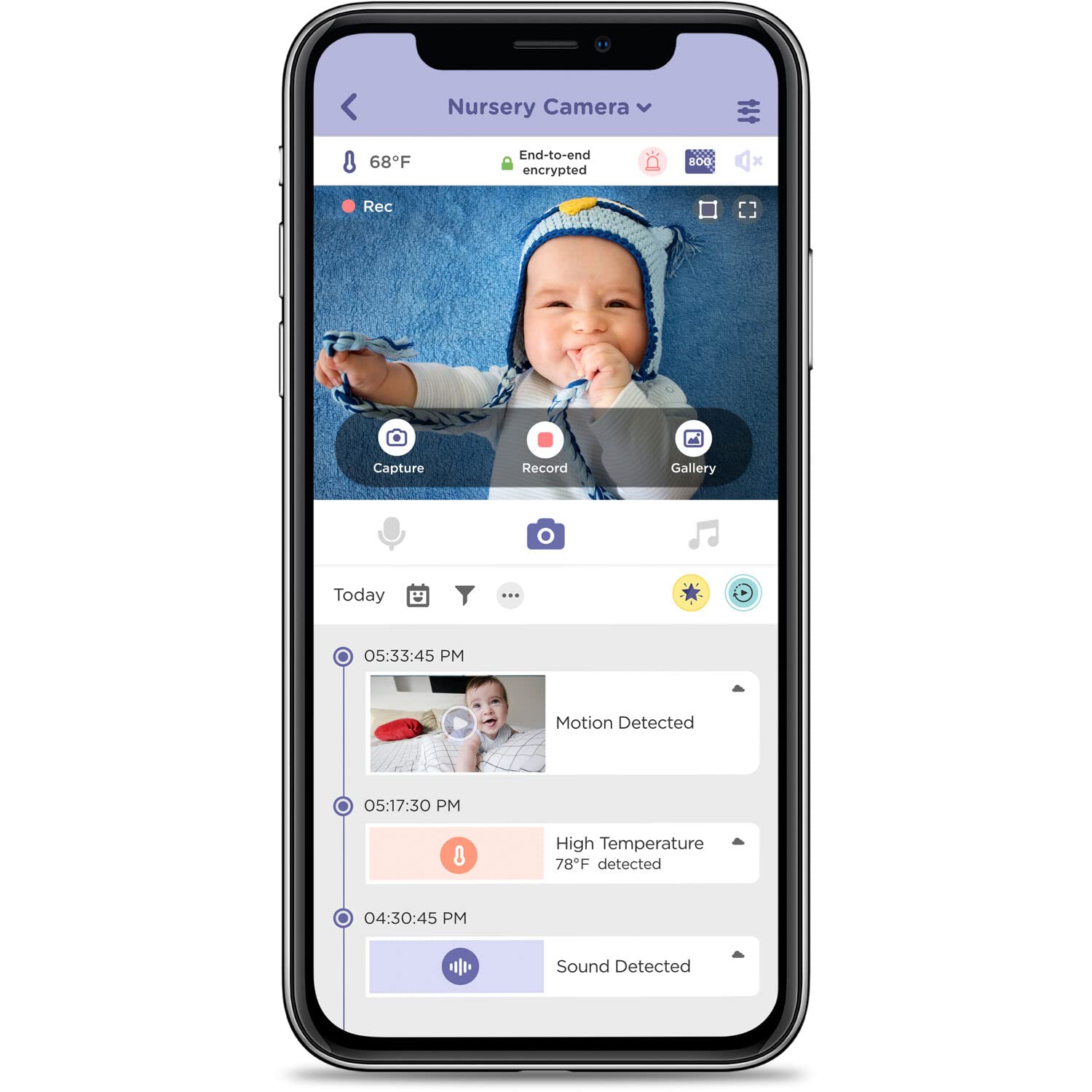
Image: A smartphone screen displaying the HubbleClub app, showing a live video feed of a baby and a timeline of detected events like motion, sound, and temperature alerts.
Video: An official product video demonstrating the features of the Nursery Pal Deluxe Smart Wireless, Wi-Fi Enabled Baby Monitor, including the parent unit, portable camera, and HubbleClub app functionalities.
Тэхнічнае абслугоўванне
Уборка
To clean your monitor units, use a soft, dry, lint-free cloth. Do not use cleaning agents or abrasive materials. Avoid getting moisture into any openings.
Сыход за батарэяй
To prolong battery life, avoid exposing the units to extreme temperatures. If storing for an extended period, ensure the batteries are partially charged.
Ліквідацыю непаладак
- Няма выявы/гуку на бацькоўскім блоку: Ensure both units are powered on and within range. Re-pair the units if necessary (refer to the Quick Start Guide).
- Poor Connection/Frequent Disconnects: Check your Wi-Fi signal strength if using the app. Ensure the Baby Unit is not too far from the router or the Parent Unit. Obstacles like thick walls can interfere with the signal.
- Parent Unit Screen Too Bright at Night: Adjust the brightness settings on the Parent Unit.
- Touch Screen Not Locking: Ensure the Parent Unit is in the correct mode or setting to prevent accidental touches.
- Audio Too Loud: Adjust the volume settings on both the Parent Unit and within the HubbleClub app.
- Camera Not Responding to Pan/Tilt/Zoom: Check the connection. If using the app, ensure a stable internet connection.
Тэхнічныя характарыстыкі
| Асаблівасць | Дэталь |
|---|---|
| Назва мадэлі | Nursery Pal Deluxe Smart Connected, Wireless, Wi-Fi Enabled Baby Monitor with Parent Unit Viewer |
| Нумар мадэлі | HCTNPDLX |
| Выкарыстанне ў памяшканні/на вуліцы | У памяшканні |
| Сумяшчальныя прылады | Смартфон, планшэт |
| Крыніца харчавання | Харчаванне ад батарэі |
| Пратакол злучэння | 2.4 ГГц FHSS |
| Тып кантролера | Android (App compatibility) |
| Тып мацавання | Насценнае мацаванне, мацаванне на стол |
| Дазвол відэазахопу | 1280 x 720 (HD 720p) |
| Колер | Белы |
| Колькасць элементаў | 2 (Parent Unit, Baby Unit) |
| Колькасць каналаў | 2 |
| Тэхналогія бесправадной сувязі | 2.4 ГГц FHSS |
| Матэрыял | Акрыланітрылбутадыенстырол (АБС) |
| Ватtage | 5 ват |
| Памеры прадмета (Д х Ш х У) | 6 х 0.8 х 3.5 цалі |
| Патрабуюцца батарэі? | Так (1 літый-іённы акумулятар уключаны) |
| Вага прадмета | 1.03 фунта |
| Тып фокусу | Аўтафокус |
| Тэхналогія нізкай асветленасці | Начны колер |
| Тып абвесткі | Аўдыё і рух |
| Тып нумара | Гадавальнік |
| Фармат захопу відэа | MPEG-4 |
| Міжнародны рэйтынг абароны | IP54 |
| Метад кантролю | Дакранацца |
Інфармацыя аб гарантыі
HUBBLE CONNECTED products typically come with a limited manufacturer's warranty. Please refer to the warranty card included in your product packaging or visit the official HUBBLE CONNECTED website for detailed warranty terms and conditions specific to the Nursery Pal Deluxe model.
Падтрымка
For further assistance, technical support, or to access additional resources, please visit the official HUBBLE CONNECTED webсайт на www.hubbleconnected.com. You can also find FAQs and contact information for customer service there.
For app-related queries, refer to the help section within the HubbleClub app.