
Уводзіны
This manual provides essential information for the safe and efficient use of your ONN 42-Inch Full HD LED Smart TV, Model 100018254. Please read these instructions thoroughly before operating your television and retain them for future reference.
Што ў скрынцы
Перад тым, як працягнуць наладу, пераканайцеся, што ўсе кампаненты наяўныя.
- ONN 42-Inch Full HD LED Smart TV
- Пульт дыстанцыйнага кіравання
- Тумба пад тэлевізар (2 штукі)
- Шрубы для падстаўкі пад тэлевізар
- Шнур харчавання
- Кароткае кіраўніцтва карыстальніка (не ўваходзіць у гэты дапаможнік)

Выява: спераду view of the ONN 42-inch Smart TV displaying the Roku TV home screen with various streaming app icons like Netflix, Disney+, Apple TV, Hulu, Peacock, and Roku Channel. The TV is black with slim bezels and two stand feet.
Настройка
1. Мацаванне падстаўкі для тэлевізара
- Асцярожна пакладзеце тэлевізар экранам уніз на мяккую, чыстую паверхню, каб пазбегнуць пашкоджанняў.
- Сумясціце кожную частку падстаўкі з адпаведнымі адтулінамі для шруб у ніжняй частцы тэлевізара.
- Замацуйце кожную частку падстаўкі з дапамогай шруб, якія ўваходзяць у камплект. Пераканайцеся, што яны надзейна зацягнуты.

Image: A diagram illustrating the dimensions of the ONN 42-inch TV, showing its width as 43 inches and height as 37 inches when placed on its stand.
2. Насценнае мацаванне (неабавязкова)
This TV is compatible with VESA standard wall mounts. Refer to your wall mount's instructions for proper installation. Ensure the wall mount can support the weight of the television.

Выява: Задняя частка view of the ONN 42-inch TV, highlighting the VESA mounting screw holes in a square pattern and various input ports on the side and bottom right.
3. Падключэнне прылад
Падключыце знешнія прылады, такія як кабельныя прыстаўкі, гульнявыя прыстаўкі або прайгравальнікі Blu-ray, да ўваходных партоў тэлевізара.
- HDMI: For high-definition audio and video. Use an HDMI cable to connect devices like set-top boxes, game consoles, or streaming sticks.
- USB: Для падключэння USB-назапашвальнікаў для прайгравання медыяфайлаў files.
- Wi-Fi: For internet connectivity to access smart TV features and streaming services.
4. Пачатковае ўключэнне і майстар налады
- Падключыце шнур харчавання да тэлевізара, а затым да разеткі.
- Націсніце кнопку харчавання на пульце дыстанцыйнага кіравання або на самым тэлевізары.
- Follow the on-screen instructions to complete the initial setup, including language selection, network connection (Wi-Fi), channel scanning, and linking to your Roku account (if applicable).
Эксплуатацыя тэлевізара
1. Пульт дыстанцыйнага кіраванняview
Пульт дыстанцыйнага кіравання дазваляе перамяшчацца па інтэрфейсе тэлевізара і кіраваць рознымі функцыямі.
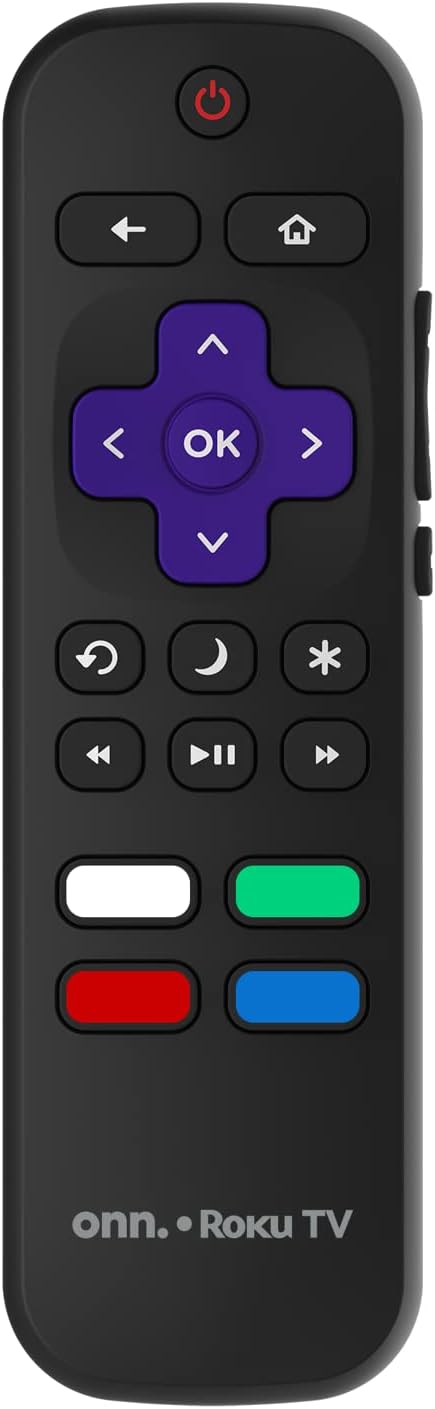
Image: The ONN Roku TV remote control, featuring a power button, directional pad, OK button, home button, back button, volume controls, and dedicated buttons for popular streaming services.
- Кнопка харчавання: Уключае або выключае тэлевізар.
- Directional Pad (D-Pad) & OK: Навігацыя па меню і пацвярджэнне выбару.
- Кнопка дадому: Вяртаецца на галоўны экран Roku TV.
- Кнопка "Назад": Вяртанне да папярэдняга экрана або меню.
- Павялічыць/паменшыць гучнасць: Рэгулюе гучнасць гуку.
- Кнопка адключэння: Адключэнне або ўключэнне гуку.
- Канал уверх/уніз: Changes channels (for antenna/cable inputs).
- Спецыяльныя кнопкі праграмы: Quick access to popular streaming services like Netflix, Hulu, etc.
2. Функцыі Smart TV
Your ONN Smart TV provides access to a wide range of streaming content and smart functionalities.
- Сэрвісы струменевай перадачы: Access pre-installed apps like Netflix, YouTube, and many more through the Roku Channel Store.
- Галасавое кіраванне: Compatible with Alexa and Google Assistant for hands-free control (requires a separate compatible voice assistant device).
- Аўтаматычныя абнаўленні праграмнага забеспячэння: The TV will automatically update its software when connected to the internet, ensuring you have the latest features and security.
3. Выбар уводу
To switch between connected devices (e.g., cable box, game console), use the Увод button on your remote or select the desired input from the Roku TV home screen.
4. Налады выявы і гуку
Каб наладзіць параметры выявы і гуку, перайдзіце ў меню налад тэлевізара. Налады > Налады выявы тэлевізара or Налады > Аўдыё to adjust options like brightness, contrast, color, sound mode, and equalizer settings.
Тэхнічнае абслугоўванне
1. Ачыстка экрана
- Always turn off the TV and unplug it before cleaning.
- Выкарыстоўвайце мяккую тканіну без ворса, злёгкуampвадой або спецыяльным сродкам для чысткі экранаў.
- Не распыляйце ачышчальнік непасрэдна на экран. Спачатку нанясіце яго на тканіну.
- Avoid using abrasive cleaners, alcohol, benzene, or thinners, as these can damage the screen.
2. Абнаўленне праграмнага забеспячэння
Ensure your TV is connected to the internet to receive automatic software updates. These updates improve performance, add features, and enhance security. You can manually check for updates in the Налады > Сістэма > Абнаўленне сістэмы меню.
Ліквідацыю непаладак
Калі ў вас узніклі праблемы з тэлевізарам, звярніцеся да наступных распаўсюджаных рашэнняў:
Няма сілы
- Праверце, ці шнур сілкавання надзейна падключаны як да тэлевізара, так і да разеткі.
- Праверце працаздольнасць разеткі, падключыўшы да яе іншую прыладу.
- Паспрабуйце націснуць кнопку харчавання на самым тэлевізары, а не толькі на пульце дыстанцыйнага кіравання.
Няма выявы / Скажоная выява
- Пераканайцеся, што выбрана правільная крыніца ўваходнага сігналу (напрыклад, HDMI 1, HDMI 2).
- Праверце ўсе кабельныя злучэнні паміж тэлевізарам і знешнімі прыладамі.
- Try a different HDMI cable if possible.
- Adjust picture settings (brightness, contrast) in the TV menu.
Няма гуку / Ціхі гук
- Check if the TV is muted or if the volume is turned down.
- Ensure external audio devices (soundbars, receivers) are properly connected and powered on.
- Праверце налады гуку ў меню тэлевізара.
Праблемы з падключэннем да сеткі
- Verify your Wi-Fi router is powered on and functioning.
- Перазагрузіце маршрутызатар і мадэм.
- Перайсці да Налады > Сетка > Праверыць падключэнне на вашым тэлевізары, каб дыягнаставаць праблему.
- Пераканайцеся, што вы ўводзіце правільны пароль Wi-Fi.
Тэхнічныя характарыстыкі
| Асаблівасць | Дэталь |
|---|---|
| Нумар мадэлі | 100018254 |
| Памер экрана | 42 цалі |
| Тэхналогія адлюстравання | святлодыёд |
| дазвол | 1080p (поўны HD) |
| Частата абнаўлення | 60 Гц |
| Сувязь | USB, Wi-Fi |
| Падтрымліваюцца інтэрнэт-сэрвісы | Netflix, YouTube (and others via Roku platform) |
| Метад кантролю | Voice (via Alexa & Google Assistant compatible devices), Remote Control |
| Тып мацавання | Насценнае мацаванне (сумяшчальнае з VESA) |
| Колер | Чорны |
| UPC | 671227025567 |

Image: Energy Guide label for Television Model 100018254, indicating an estimated yearly energy cost of $11 based on 12 cents per kWh and 5 hours use per day.
Гарантыя і падтрымка
For warranty information and technical support, please refer to the documentation included with your purchase or visit the official ONN support webсайт. Захоўвайце чэк аб пакупцы на выпадак прэтэнзій па гарантыі.