
1. Уводзіны
This manual provides detailed instructions for the ENDORFY Thock Wireless Mechanical Keyboard, model EY5A078. It covers setup, operation, maintenance, and troubleshooting to ensure optimal performance and longevity of your device. Please read this manual thoroughly before using the keyboard.

Image 1.1: The ENDORFY Thock Wireless Mechanical Keyboard EY5A078. This image displays the full QWERTY layout with illuminated keys, showcasing the keyboard's design and RGB capabilities.
2. Змесціва ўпакоўкі
Праверце наяўнасць усіх прадметаў у камплекце:
- ENDORFY Thock Wireless Mechanical Keyboard EY5A078
- Кабель USB-C - USB-A (здымны)
- USB-прыёмнік 2.4 ГГц
- Здымальнік клавішнай шапкі
- Пераключальнік
- Кіраўніцтва карыстальніка (гэты дакумент)
3. Налада і падключэнне
The ENDORFY Thock Wireless Mechanical Keyboard offers three connection modes: wired, 2.4 GHz wireless, and Bluetooth.
3.1. Правадное падключэнне
- Locate the USB-C port on the keyboard (typically on the back or top edge).
- Connect the provided USB-C to USB-A cable to the keyboard.
- Падключыце канец кабеля USB-A да даступнага порта USB на вашым кампутары.
- Клавіятура будзе аўтаматычна выяўлена і гатовая да выкарыстання.
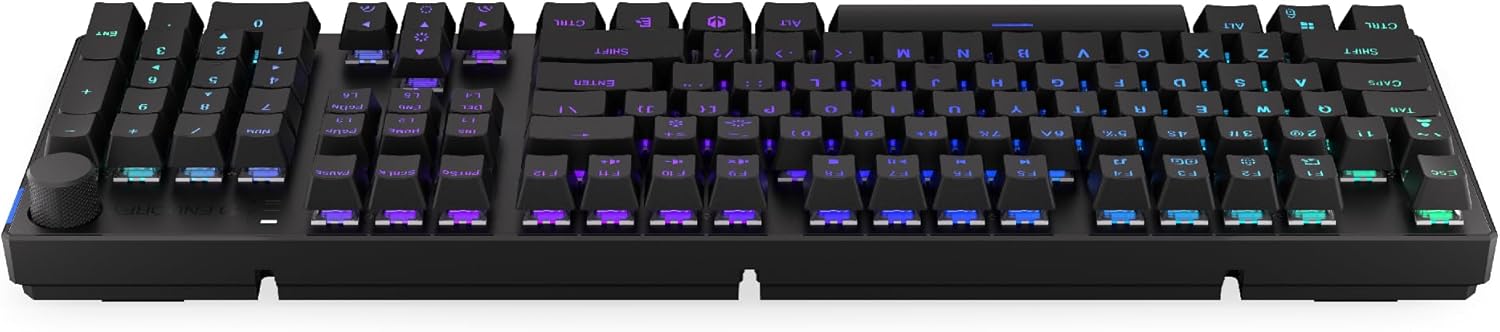
Малюнак 3.1: Збоку view of the keyboard, highlighting the USB-C port for wired connection and charging.
3.2. Бесправадное злучэнне 2.4 ГГц
- Locate the 2.4 GHz USB receiver. It may be stored in a compartment on the underside of the keyboard.
- Plug the 2.4 GHz USB receiver into an available USB port on your computer.
- On the keyboard, locate the mode switch (usually on the back or side) and set it to the 2.4 GHz wireless mode (often indicated by a specific icon or "2.4G").
- The keyboard should automatically connect. An indicator light may confirm the connection.

Image 3.2: Underside of the keyboard, showing the compartment for storing the 2.4 GHz USB receiver and adjustable feet.
3.3. Злучэнне Bluetooth
- On the keyboard, set the mode switch to Bluetooth mode (often indicated by a Bluetooth icon or "BT").
- The keyboard may have multiple Bluetooth profiles (e.g., BT1, BT2, BT3). Select one by pressing Fn + 1, Fn + 2, or Fn + 3. The corresponding indicator light will flash.
- На камп'ютары або прыладзе адкрыйце налады Bluetooth і знайдзіце новыя прылады.
- Select "ENDORFY Thock Wireless" (or similar name) from the list of available devices.
- Выконвайце любыя падказкі на экране, каб завяршыць працэс спалучэння.
- Пасля спалучэння індыкатар на клавіятуры перастане міргаць і будзе гарэць пастаянна.
4. Аперацыя
4.1. Key Functions and Shortcuts
The keyboard features various function key combinations (Fn + Key) for multimedia control, lighting adjustments, and other settings.
- Fn + F1-F12: Multimedia and system functions (e.g., volume control, media playback, calculator). Refer to the keycap legends for specific functions.
- Fn + клавішы са стрэлкамі: Adjust RGB lighting effects (e.g., brightness, speed, direction).
- Fn + 1/2/3: Пераключэнне паміж Bluetooth profiles.
- Fn + 4: Switch to 2.4 GHz wireless mode.
- Fn + 5: Пераключыцеся ў правадны рэжым.
4.2. Кіраванне RGB-падсветкай
The ENDORFY Thock keyboard features programmable RGB backlighting. Use the following combinations to customize the lighting:
- Fn + стрэлка ўправа: Change lighting effect.
- Fn + стрэлка ўлева: Change lighting effect direction.
- Fn + стрэлка ўверх: Павялічыць яркасць.
- Fn + стрэлка ўніз: Паменшыць яркасць.
- Fn + Ins: Змяніць колер.
- Fn + Del: Adjust effect speed.
4.3. Ручка гучнасці
The dedicated volume knob located on the top right of the keyboard allows for quick audio adjustments.
- Паварот па гадзіннікавай стрэлцы: Павялічыць гучнасць.
- Павярнуць супраць гадзіннікавай стрэлкі: Паменшыць гучнасць.
- Націсніце ўніз: Уключыць/выключыць гук.

Image 4.1: Detail of the volume knob and status indicator lights, located on the upper right side of the keyboard.
4.4. Камутатары з магчымасцю гарачай замены
The ENDORFY Thock keyboard features hot-swappable switches, allowing you to change mechanical switches without soldering. This enables customization of typing feel.
- Зняць каўпачок клавішы: Выкарыстоўвайце прадугледжаны здымнік для клавіш, каб акуратна зняць патрэбную клавішу.
- Зняць перамыкач: З дапамогай прадастаўленага здымніка перамыкача асцярожна вазьміцеся за верхні і ніжні заціскі перамыкача і пацягніце яго вертыкальна ўверх.
- Уставіць новы перамыкач: Сумясціце кантакты новага перамыкача з адтулінамі на друкаванай плаце. Моцна націсніце на перамыкач, пакуль ён не зафіксуецца са шчоўкам. Пераканайцеся, што кантакты не сагнутыя.
- Замяніць каўпачок клавішы: Устаўце каўпачок клавішы назад на новы шток перамыкача.

Малюнак 4.2: Крупны план view of the Kailh Box Brown mechanical switches, demonstrating the hot-swappable design.
5. Тэхнічнае абслугоўванне
5.1. Чыстка клавіятуры
Рэгулярная чыстка дапамагае падтрымліваць прадукцыйнасць і знешні выгляд клавіятуры.
- Адключыце клавіятуру ад кампутара перад чысткай.
- Каб старанна ачысціць клавішы, выкарыстоўвайце здымнік.
- Выкарыстоўвайце сціснутае паветра, каб выдаліць пыл і смецце паміж клавішамі.
- Wipe keycaps and the keyboard surface with a soft, damp тканіна. Пазбягайце рэзкіх хімікатаў.
- Перад паўторным падключэннем пераканайцеся, што клавіятура цалкам сухая.
5.2. Замена клавішы і перамыкача
Refer to Section 4.4 for detailed instructions on replacing keycaps and switches. Use only compatible keycaps and switches to avoid damage.
6. Выпраўленне непаладак
| праблема | Магчымая прычына | Рашэнне |
|---|---|---|
| Клавіятура не рэагуе (правадная) | Слабае падключэнне кабеля, няспраўны порт USB. | Ensure USB-C cable is securely connected. Try a different USB port or cable. |
| Клавіятура не рэагуе (бесправадная) | Low battery, incorrect mode, receiver not plugged in, pairing issue. | Charge the keyboard. Ensure mode switch is set correctly (2.4G or BT). Re-pair Bluetooth or re-insert 2.4 GHz receiver. |
| Не працуе RGB-асвятленне | Lighting turned off, low battery, software issue. | Check lighting controls (Fn + Arrow keys). Charge the keyboard. Restart computer. |
| Keys double-typing or not registering | Dust/debris under switch, faulty switch. | Clean under keycaps with compressed air. If issue persists, replace the switch (refer to Section 4.4). |
7. Тэхнічныя характарыстыкі
- мадэль: EY5A078
- Марка: ЭНДАРФІЯ
- Падключэнне: Wired (USB-C), 2.4 GHz Wireless, Bluetooth
- Тып пераключальніка: Kailh Box Brown (Hot-swappable)
- Клавішы: PBT Double Shot
- Макет: Поўнапамерная QWERTY
- Падсвятленне: Праграмуемы RGB
- Аперацыйныя сістэмы: Linux, Mac OS X 10.12 Sierra, Windows 10
- колер: Чорны
- матэрыял: Полібутылентэрэфталат (PBT)
- Асаблівасці: Detachable cable, Volume knob with mute, Hot-swappable switches
- акумулятар: Літый-іённы (у камплекце)
8. Гарантыя і падтрымка
ENDORFY products are covered by a manufacturer's warranty. For detailed warranty information, please refer to the warranty card included with your product or visit the official ENDORFY website. For technical support, product inquiries, or service requests, please contact ENDORFY customer support through their official channels.
Афіцыйны Webсайт: www.endorfy.com
9. Інфармацыя па бяспецы
- Трымайце клавіятуру далей ад вадкасцей і празмернай вільгаці.
- Пазбягайце ўздзеяння на клавіятуру экстрэмальных тэмператур.
- Do not attempt to disassemble or modify the keyboard beyond hot-swapping switches and keycaps, as this may void the warranty and cause damage.
- Выкарыстоўвайце толькі прадастаўлены або рэкамендаваны зарадны кабель.
- Dispose of the battery and electronic components responsibly according to local regulations.