
ELECOM DE-NEST15000A
ELECOM NESTOUT Portable Charger User Manual
Model: DE-NEST15000A
1. Уводзіны
Дзякуй за пакупкуasing the ELECOM NESTOUT Portable Charger. This rugged 15000 mAh power bank is designed for outdoor enthusiasts, offering IP67 waterproof and dustproof ratings, shock resistance, and fast charging capabilities. Please read this manual carefully before use to ensure proper operation and maintenance.
2. Інфармацыя па бяспецы
Каб забяспечыць бяспечную працу і прадухіліць пашкоджанні, калі ласка, выконвайце наступныя меры засцярогі:
- Do not disassemble, open, or attempt to repair the device.
- Берагчы ад экстрэмальных тэмператур, прамых сонечных прамянёў і адкрытага агню.
- Do not immerse the device in water beyond its IP67 rating (1 meter for 30 minutes). Ensure port covers are securely closed before exposure to water or dust.
- Нягледзячы на ўдаратрывалую канструкцыю, пазбягайце падзення прылады або моцных удараў.
- Use only approved charging cables and adapters. A USB power adapter of 18W or more is recommended for charging the power bank.
- Захоўваць у месцах, недаступных дзецям.
- Утылізуйце батарэйку адказна ў адпаведнасці з мясцовымі правіламі.
3. Змесціва ўпакоўкі
Праверце, ці ёсць усе прадметы ў вашай упакоўцы:
- ELECOM NESTOUT Portable Charger (15000 mAh)
- USB-кабель для зарадкі
- Кіраўніцтва па эксплуатацыі прадукту (гэты дакумент)
Note: Tripod and lights are not included and must be purchased separately.
4. Прадукт скончыўсяview
Familiarize yourself with the components and features of your NESTOUT Portable Charger.
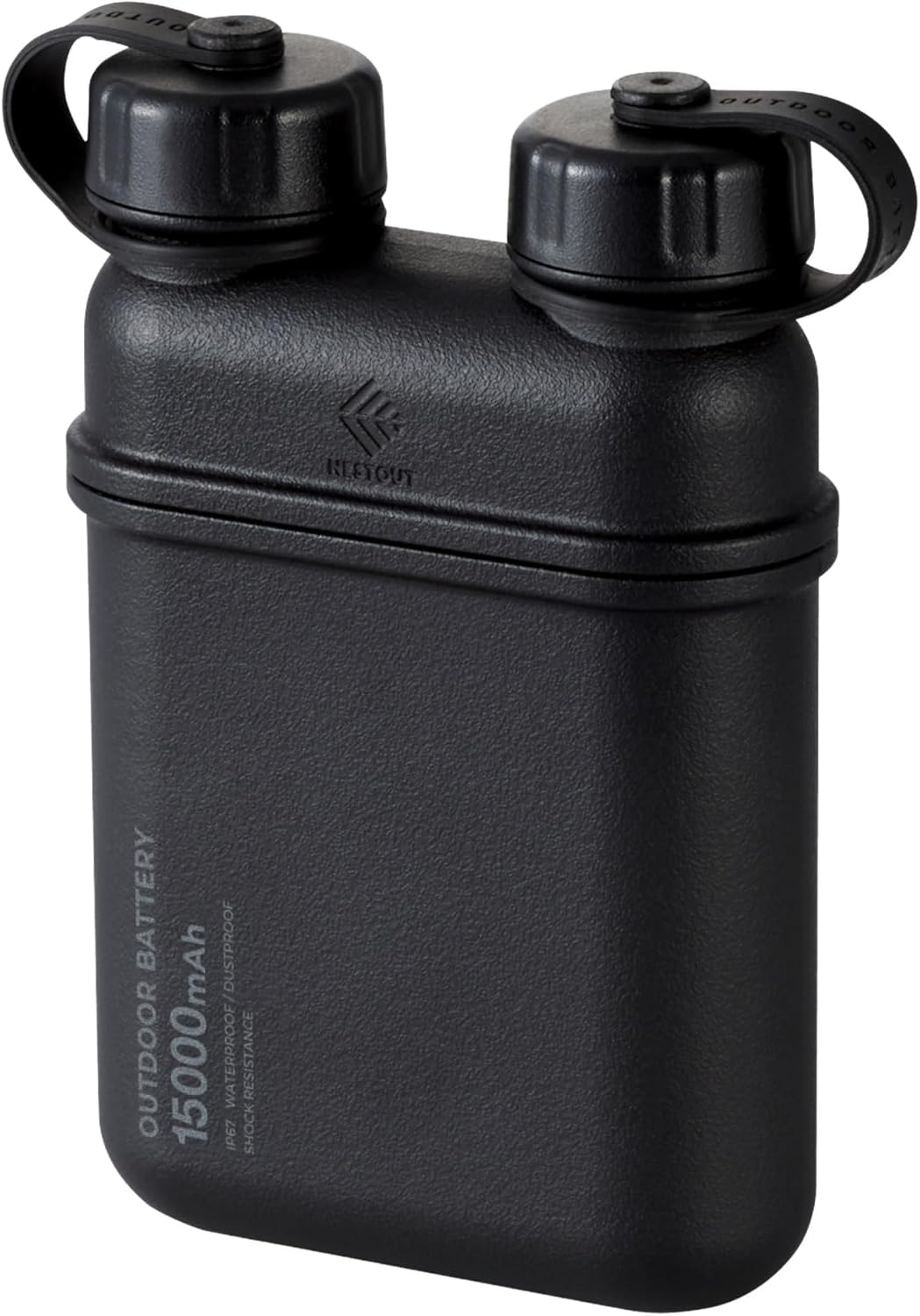
Малюнак 4.1: Спераду view of the ELECOM NESTOUT Portable Charger.
Асноўныя характарыстыкі:
- Хуткая зарадка USB-C PD: Equipped with USB-C ports for rapid charging of electronic devices.
- Smart Power Delivery: Automatically detects and allocates optimal power to connected devices.
- Воданепранікальнасць і пыланепранікальнасць IP67: Designed for outdoor activities, resistant to water immersion (up to 1m for 30 mins) and dust.
- Shock-Resistant Hard Shell: Lithium-ion batteries are protected by a silicone cushion and robust casing, tested to MIL-STD 810G 516.7.
- Built-in Tripod Thread: Standard ¼-inch thread on the bottom for attaching tripods or other accessories.
- Modular Accessories: Compatible with NESTOUT accessories like LAMP-1 lantern and FLASH-1 LED panel (sold separately).

Figure 4.2: Multiple device charging capability.

Figure 4.3: Smart USB Power Delivery functionality.

Figure 4.4: IP67 waterproof design.

Figure 4.5: Dustproof design with sealed ports.

Figure 4.6: Internal shock absorbent cushion for durability.

Figure 4.7: Built-in tripod thread for versatile attachments.

Малюнак 4.8: Выпample of versatile threading attachments.

Figure 4.9: Wide device compatibility and portability.
5. Настройка
Пачатковая зарадка паўэрбанка:
- Open the protective cap covering the USB-C input port on the power bank.
- Connect the provided USB charging cable to the USB-C input port of the NESTOUT power bank.
- Connect the other end of the USB cable to a compatible USB power adapter (18W or higher recommended for optimal charging speed).
- The LED indicators on the power bank will illuminate to show the charging status. Charge the power bank fully before first use.
- Once fully charged, disconnect the cable and securely close the protective cap to maintain IP67 rating.
6. Інструкцыя па эксплуатацыі
Зарадка вашых прылад:
- Open the protective cap covering the desired USB output port (USB-A or USB-C) on the power bank.
- Connect your device's charging cable to the appropriate output port on the NESTOUT power bank.
- Connect the other end of the cable to your device (e.g., smartphone, tablet, earbuds).
- Паўэрбанк аўтаматычна пачне зараджаць вашу прыладу. Святлодыёдныя індыкатары будуць паказваць пакінуты ўзровень зараду батарэі.
- Once your device is charged, disconnect the cable and securely close the protective cap.

Малюнак 6.1: Адначасовая зарадка некалькіх прылад.
Using Modular Accessories:
The NESTOUT power bank is designed to integrate with optional modular accessories like the LAMP-1 lantern and FLASH-1 LED panel. These accessories typically snap directly onto the top of the power bank, utilizing its power output for operation.

Figure 6.2: NESTOUT power bank with optional lantern accessory.
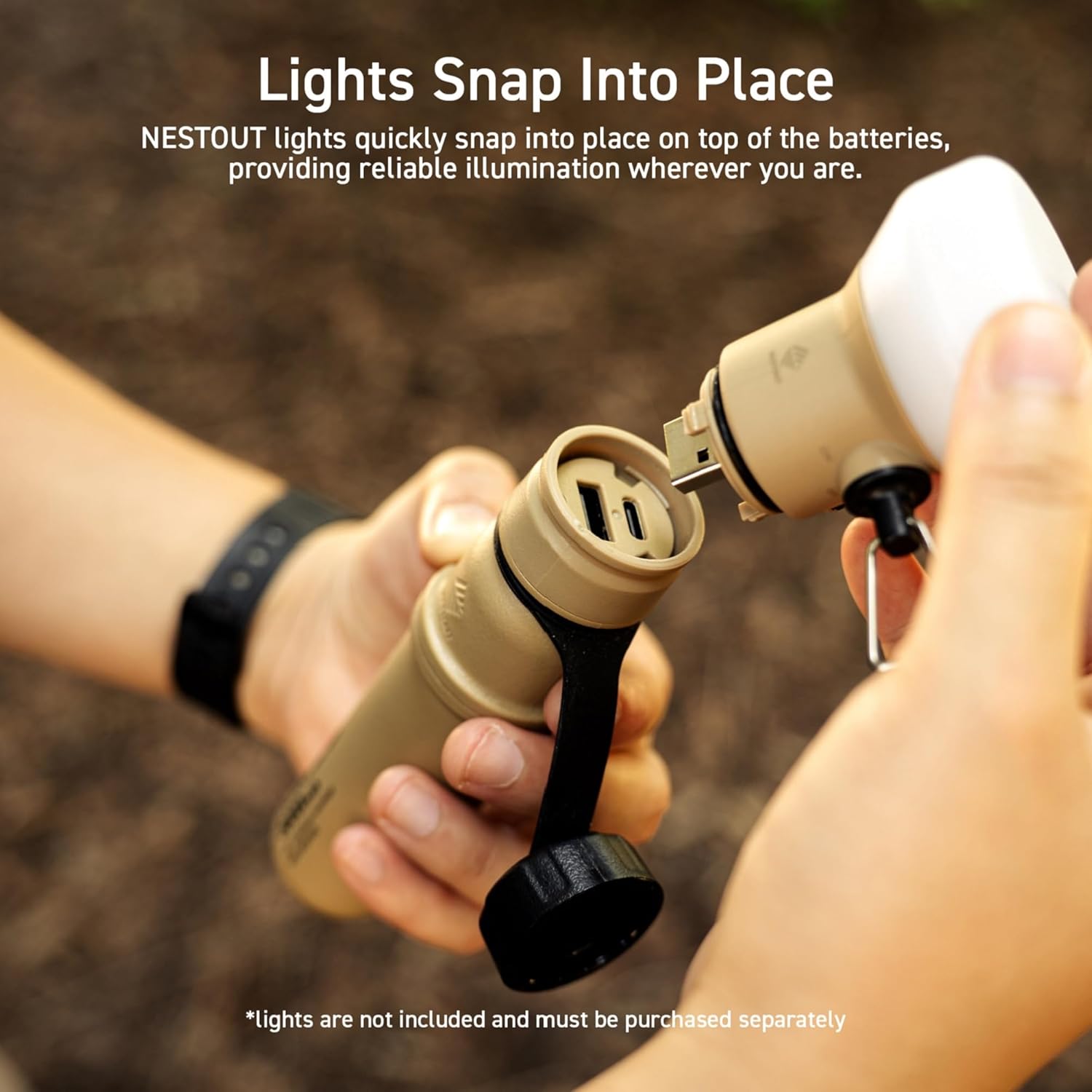
Figure 6.3: Attaching a modular light accessory.
7. Тэхнічнае абслугоўванне
- Уборка: Працярыце знешні выгляд мяккай, damp cloth. Do not use harsh chemicals or abrasive cleaners. Ensure port covers are closed during cleaning.
- захоўванне: Store the power bank in a cool, dry place away from direct sunlight and extreme temperatures. For long-term storage, charge the power bank to about 50-70% capacity every 3-6 months to preserve battery health.
- Абарона порта: Always ensure the protective caps for the USB ports are securely closed when not in use, especially in dusty or wet environments, to maintain the IP67 rating.
8. Выпраўленне непаладак
| праблема | Магчымая прычына | Рашэнне |
|---|---|---|
| Паўэрбанк не зараджаецца. | Няспраўны кабель або адаптар зарадкі; знешні акумулятар цалкам зараджаны; праблема з падключэннем. | Try a different USB cable and/or power adapter. Ensure connections are secure. Verify power adapter is 18W or higher. |
| Прылада не зараджаецца ад паўэрбанка. | Power bank battery low; device cable faulty; incompatible device. | Charge the power bank. Try a different charging cable for your device. Ensure your device is compatible with USB charging. |
| Павольная зарадка. | Low power input for power bank; high power demand from device; cable quality. | Use an 18W or higher USB power adapter to charge the power bank. Ensure the cable used for charging your device supports fast charging. |
| Water or dust inside ports. | Protective caps not securely closed. | Immediately power off the device. Do not use until completely dry. Ensure caps are always securely closed before exposure to elements. |
9. Тэхнічныя характарыстыкі
| Асаблівасць | Дэталь |
|---|---|
| Назва мадэлі | DE-NEST15000A |
| Марка | ЭЛЕКАМ |
| Ёмістасць батарэі | 15000 мАг |
| Тып раздыма | USB тыпу A, USB тыпу C |
| Асаблівасці | Automatic Stop, Fast Charge, LED Indicators |
| тtage | 3.6 вольт |
| Склад батарэі | Літый-іённы |
| Рэкамендуемае выкарыстанне | iPhone, Tablet, Tablets |
| Крыніца харчавання | Працуе ад акумулятара, электрычны |
| Колер | Чорны |
10. Гарантыя і падтрымка
This ELECOM NESTOUT Portable Charger comes with a 1-гадовая гарантыя на прадукт from the date of purchase. In the unlikely event of a product defect or quality issue, ELECOM offers a product warranty for your convenience.
For warranty claims, returns, or exchanges, please visit the ELECOM USA website and use the return/exchange request form. For more detailed information regarding the warranty policy, please refer to the official ELECOM webсайт.
Webсайт: elecomusa.com
Ask a question about this manual
Ask about setup, troubleshooting, compatibility, parts, safety, or missing instructions. Manuals+ will review the question and use this page’s manual context to help answer it.