
1. Прадукт скончыўсяview
The Onforu 5-Head 70W Motion Sensor Outdoor Flood Light (Model BDBS70G-5) is a hardwired LED security light designed for outdoor use. It features five adjustable light heads, a built-in motion sensor, and provides 7000 lumens of daylight white illumination. The robust IP65 waterproof design ensures durability in various weather conditions, making it suitable for driveways, garages, gardens, and other outdoor areas.
2. Інфармацыя па бяспецы
- Электрабяспека: Installation must be performed by a qualified electrician or a person with sufficient electrical knowledge. Ensure power is turned off at the circuit breaker before installation, wiring, or maintenance.
- Зазямленне: This fixture must be properly grounded to prevent potential electrical shock.
- тtage: Пераканайцеся, што аб'ём блока харчаванняtagадпавядае патрабаванням прыбора (120 вольт).
- Выкарыстанне на адкрытым паветры: Designed for outdoor use. Ensure all connections are sealed and waterproofed according to local electrical codes.
- Цяпло: LED lights can generate heat. Do not touch the light heads immediately after operation.
- Абарона вачэй: Avoid looking directly into the LED light source when illuminated, as it can cause eye strain or damage.
3. Змесціва ўпакоўкі
Перад пачаткам усталёўкі пераканайцеся, што ўсе кампаненты наяўныя:
- Onforu 5-Head Motion Sensor Flood Light (x1)
- Мантажны кранштэйны (x1)
- Мантажныя шрубы і насценныя анкеры
- Драцяныя гайкі (x3)
- Кіраўніцтва карыстальніка (x1)
- LED Lens (Included as part of the fixture)
4. Настройка і ўстаноўка
This flood light is designed for hardwired installation. Follow these steps carefully:
- Выключыць харчаванне: Перад пачаткам працы пераканайцеся, што электраэнергія ў зоне ўстаноўкі адключана галоўным выключальнікам.
- Падрыхтуйце праводку: Identify the Live (Black), Neutral (White), and Ground (Green/Bare Copper) wires from your electrical box.
- Мантажны кранштэйн: Secure the mounting bracket to the desired surface (wall, soffit, or pillar) using the provided screws and anchors. Ensure it is firmly attached.
- Правадныя злучэнні: Connect the fixture's wires to your household wiring using the provided wire nuts:
- Black (Fixture) to Black (Household - Live)
- White (Fixture) to White (Household - Neutral)
- Green (Fixture) to Green/Bare Copper (Household - Ground)
- Бяспечнае прыстасаванне: Carefully tuck the wires into the junction box and attach the light fixture to the mounting bracket. Ensure a tight seal to prevent water ingress.
- Адрэгулюйце галоўкі святла: Once mounted, adjust the five individual light heads to cover the desired area. Each head can be rotated to direct light as needed.
- Аднавіць сілу: Зноў уключыце сілкаванне на аўтаматычным выключальніку.
Рэкамендуемая вышыня ўстаноўкі: 6.5 - 13.1 feet (2 - 4 meters) above the ground for optimal motion detection and lighting coverage.

Figure 4.1: Hardwired Installation Diagram. This image illustrates the wiring connections (Live, Neutral, Ground) and how the fixture attaches to the mounting bracket on a wall.

Figure 4.2: Various Mounting Options. The image displays the flood light installed in three common configurations: under a soffit, on a wall, and on a pillar, demonstrating its versatility.
5. Інструкцыя па эксплуатацыі
The Onforu flood light is designed for automatic operation based on motion detection and ambient light levels.
- Актывацыя руху: The built-in PIR motion sensor detects movement within its sensing range. When motion is detected, the light will automatically turn on for the set duration.
- Рэгуляваныя галоўкі святла: The five light heads can be independently adjusted to direct light precisely where needed, providing broad and customizable illumination.

Figure 5.1: Wide Area Illumination. This image demonstrates the extensive coverage area (up to 1230 sq.ft.) provided by the adjustable 5-head design, illuminating a large backyard at night.

Figure 5.2: Motion Activated Lighting. The image illustrates the motion sensor's functionality, showing a person triggering the light within its 180-degree sensing angle and up to 72.17ft detection distance.
6. Налады датчыка руху
The motion sensor features adjustable controls for customization:
- Дыяпазон выяўлення: Adjustable from approximately 19 feet to 72 feet (6 meters to 22 meters).
- Рэжымы працы:
- "+" Mode: Light will be triggered both day and night when motion is detected.
- "-" Mode: Light will only be triggered at night when motion is detected.
- Таймер: Adjustable duration for how long the light stays on after motion detection, typically from 1 to 10 minutes.

Figure 6.1: Motion Sensor Controls. This image shows the three adjustment knobs on the motion sensor for setting detection range, operating mode (day/night), and illumination duration (timer).

Figure 6.2: Flexible Light Panels and Adjustable Motion Sensor. This image highlights the design features, including the ability to adjust the angle of the five light panels and the motion sensor for optimal coverage.
7. Тэхнічнае абслугоўванне
Рэгулярнае абслугоўванне забяспечвае аптымальную прадукцыйнасць і даўгавечнасць вашага пражэктара.
- Уборка: Перыядычна чысціце галоўкі лямпаў і лінзу датчыка руху мяккай губкайamp cloth to remove dirt, dust, or debris that may obstruct light output or sensor function. Do not use abrasive cleaners.
- агляд: Annually inspect the wiring and mounting for any signs of wear, damage, or loosening. Ensure all seals remain intact to maintain IP65 waterproof rating.
- Няма частак, якія абслугоўваюцца карыстальнікам: The LED components are integrated and not user-replaceable. Do not attempt to disassemble the light heads.

Figure 7.1: IP65 Waterproof Design. This image visually confirms the light's resistance to water, snow, heat, and dust, highlighting its suitability for outdoor environments.
8. Выпраўленне непаладак
If you encounter issues with your Onforu flood light, refer to the following common troubleshooting steps:
- Святло не ўключаецца:
- Check if the power supply is active at the circuit breaker.
- Праверце, ці ўсе злучэнні правадоў надзейныя і правільныя.
- Ensure the motion sensor is set to the correct working mode (e.g., "+" for day/night, "-" for night only).
- Adjust the ambient light sensor sensitivity if the light is not activating in low light conditions.
- Light Stays On Continuously:
- Check if the motion sensor is detecting constant movement (e.g., tree branches, pets). Adjust the sensor angle or sensitivity.
- Ensure the timer setting is not set to its maximum duration or a continuous mode if available.
- Light Flashes or Cycles On/Off:
- This could indicate an unstable power supply or a faulty connection. Recheck wiring.
- Пераканайцеся, што лінза датчыка руху чыстая і не перакрываецца.
- Датчык руху не выяўляе:
- Increase the detection range setting on the sensor.
- Ensure the sensor is not obstructed and is facing the desired detection area.
- Verify the installation height is within the recommended range for optimal detection.
If these steps do not resolve the issue, please contact Onforu customer support for further assistance.
9. Тэхнічныя характарыстыкі
| Асаблівасць | Спецыфікацыя |
|---|---|
| Марка | Нафору |
| Назва мадэлі | BDBS70G-5 |
| Крыніца харчавання | Правадная электрычная |
| Ватtage | 70 ват |
| Яркасць | 7000 люмен |
| Каляровая тэмпература | 6500 кельвінаў (белы дзённай свет) |
| Матэрыял | Метал, пластык |
| Узровень воданепранікальнасці | Воданепранікальны IP65 |
| Асаблівасці | 5 Heads Adjustable, Anti-Rust, Energy Efficient, Motion Sensor, Waterproof |
| Памеры прадукту | 16.4 см Д х 4.7 см Ш х 5.7 см В |
| Вага прадмета | 4.51 фунта |
| тtage | 120 вольт |
| Тып мацавання | Wall Mount, Soffit Mount, Pillar Mount |
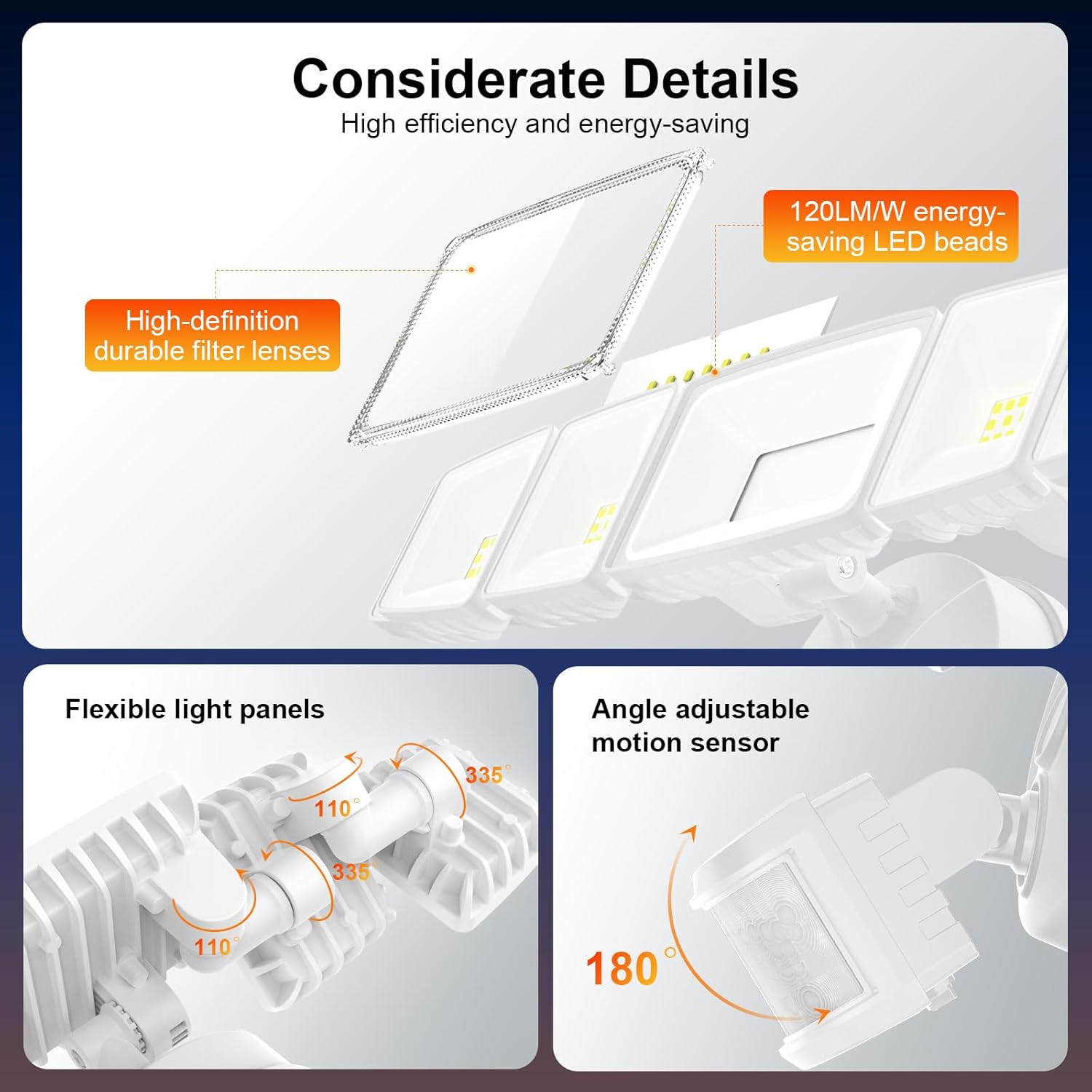
Figure 9.1: Product Dimensions. This image provides a detailed view of the flood light with its key measurements in both millimeters and inches.
10. Гарантыя і падтрымка
This Onforu product comes with a limited warranty. For specific warranty details, please refer to the documentation included with your purchase or visit the official Onforu webсайт.
For technical support, troubleshooting assistance, or any questions regarding your product, please contact Onforu customer service. Contact information can typically be found on the product packaging or the official Onforu webсайт.