
1. Уводзіны
Thank you for choosing the EasyAcc F18 Portable Handheld Fan. This device is designed to provide personal cooling with its five-speed settings, a clear LED display for battery and speed indication, and a versatile 180° foldable design. It also functions as a power bank for charging other devices. Please read this manual thoroughly before use to ensure proper operation and maintenance.
2. Змесціва ўпакоўкі
- EasyAcc F18 Portable Handheld Fan
- Зарадны кабель USB-C
- Шнурок
- Кіраўніцтва карыстальніка (гэты дакумент)
3. Асаблівасці прадукту
- 5 рэгуляваныя хуткасці: Customize airflow from a gentle breeze to a strong wind.
- Святлодыёдны лічбавы дысплей: Shows current fan speed (1-5) and battery percentagе (1-100%).
- Складаны дызайн на 180°: Allows use as a handheld fan, a desk fan, or for hanging.
- USB-C акумулятарная: Зручная і хуткая зарадка.
- Функцыя Power Bank: Can charge other USB-powered devices via its USB-A output port.
- Здымная пярэдняя вечка: Facilitates easy cleaning of fan blades.
- Ціхая праца: Operates at a low noise level, approximately 18 decibels.

Figure 3.1: EasyAcc F18 fan in handheld and desk modes, demonstrating its ability to charge a smartphone.
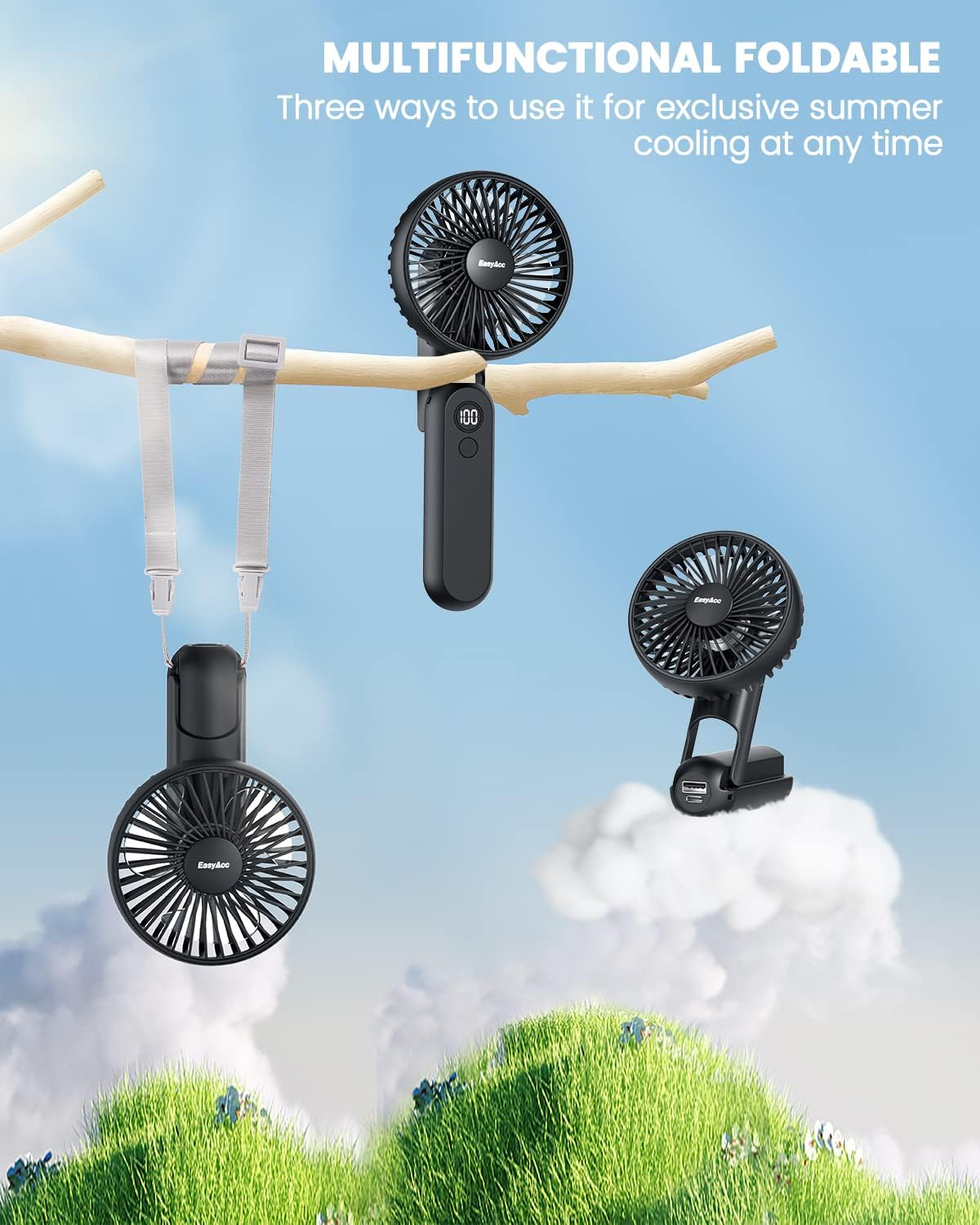
Figure 3.2: The fan's multifunctional foldable design allows for handheld, desk, or hanging use.
4. Тэхнічныя характарыстыкі
| Асаблівасць | Спецыфікацыя |
|---|---|
| Марка | EasyAcc |
| Назва мадэлі | F18 |
| Ёмістасць батарэі | Літый-палімерны 2600 мАг |
| Увод | USB-C, 5 В/2 А |
| Выхад | USB-A, 5V/2A (Power Bank Function) |
| Колькасць хуткасцяў | 5 |
| Узровень шуму | 18 Decibels (approx.) |
| Памеры | 20"Г х 10"Ш х 5"В (прыблізна) |
| Вага прадмета | 160 грам (5.6 унцый) |
| Сертыфікаты | CE, FCC, RoHS |
5. Настройка
5.1 Першапачатковая зарадка
Before first use, fully charge the fan using the provided USB-C cable and a compatible 5V/2A power adapter (not included). The LED display will show the battery percentage, indicating 100% when fully charged.
5.2 Lanyard Installation
To attach the lanyard for hands-free use:
- Separate the lanyard ports.
- Pass the thin wire loop of the lanyard through the designated hole on the fan's handle.
- Knot and straighten the lanyard.
- Snap on the buckle to secure the lanyard.

Figure 5.1: Visual instructions for attaching the lanyard to the fan.
6. Інструкцыя па эксплуатацыі
6.1 Уключэнне/выключэнне харчавання і рэгуляванне хуткасці
The fan features a single power button for control:
- Уключэнне: Press the power button once to turn on the fan at speed 1.
- Адрэгуляваць хуткасць: Each subsequent press of the power button will cycle through speeds 1 to 5.
- Выключэнне: To turn off the fan, press and hold the power button for 3 seconds at any speed setting.
6.2 святлодыёдны дысплей
The integrated LED display shows two types of information:
- Хуткасць вентылятара: When adjusting the speed, the display will temporarily show the current speed level (1-5).
- Працэнт зарада батарэіtage: After a few seconds, the display will switch to show the remaining battery charge as a percentagе (1-100%).

Figure 6.1: The fan's LED display shows current speed and battery level, and it can charge a phone.
6.3 Функцыя знешніх зарадных прылад
The EasyAcc F18 can act as a portable power bank:
- Connect your device's charging cable to the USB-A output port on the fan.
- The fan will begin charging your device.
- Note that using the power bank function will consume the fan's battery.
Video 6.1: A demonstration of the EasyAcc F18 fan's operation, including power on, speed adjustment, and LED display functionality.
7. Тэхнічнае абслугоўванне
7.1 Cleaning the Fan Blades
To ensure optimal performance and hygiene, regularly clean the fan blades:
- Ensure the fan is powered off.
- Gently twist the front cover counter-clockwise to detach it from the fan body. No tools are required.
- Wipe the fan blades and the inside of the cover with a soft, dry cloth. For stubborn dust, a slightly damp можна выкарыстоўваць тканіну, а затым высушыць.
- Reattach the front cover by aligning it and twisting clockwise until secure.
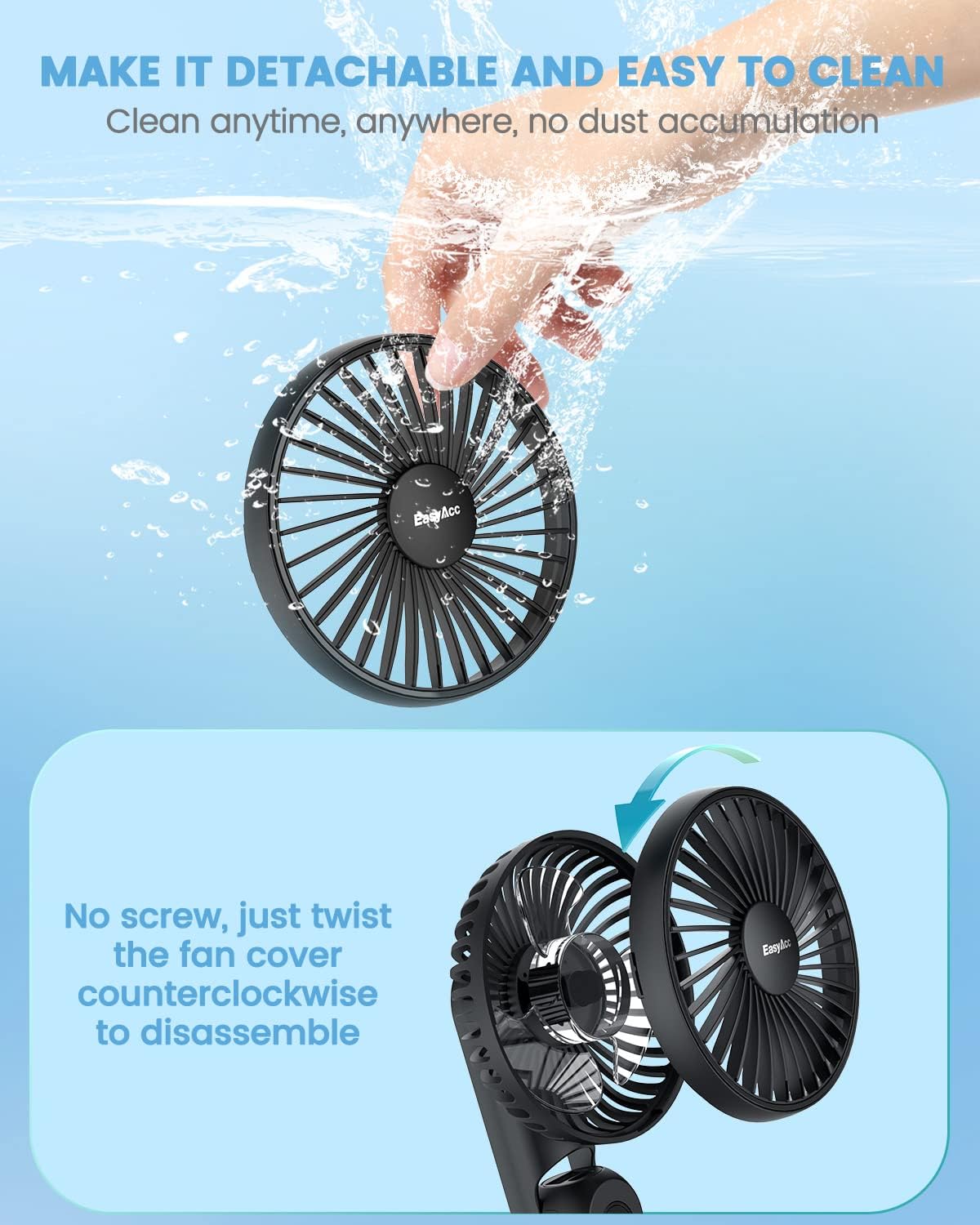
Figure 7.1: Instructions for detaching the fan cover for cleaning.
8. Тэхніка бяспекі
- Не ўстаўляйце пальцы або староннія прадметы ў рашотку вентылятара.
- Keep the fan away from water and excessive humidity.
- Пазбягайце падзення вентылятара або моцных удараў.
- Do not attempt to disassemble or repair the fan yourself, as this may void the warranty and pose safety risks.
- Выкарыстоўвайце для зарадкі толькі кабель USB-C, які ўваходзіць у камплект, або сертыфікаваны эквівалент.
- Папярэджанне аб зарадцы: This device may not have an internal charge controller to prevent overcharging. To prolong battery life and prevent potential damage, disconnect the fan from the charger once it is fully charged (LED display shows 100%). Avoid leaving it plugged in for extended periods after reaching full charge. Use lower wattage USB ports for charging if possible to prevent overheating.
- Захоўвайце вентылятар у прахалодным сухім месцы, калі ён не выкарыстоўваецца.
9. Выпраўленне непаладак
- Вентылятар не ўключаецца:
- Check if the battery is charged. Recharge the fan if the LED display shows a low percentage.
- Ensure the power button is pressed correctly (single press for on, long press for off).
- Fan stops working unexpectedly:
- The battery might be depleted. Recharge the fan.
- If the fan was recently charged, refer to the charging warning in Section 8.
- Слабы паток паветра:
- Increase the fan speed using the power button.
- Clean the fan blades as described in Section 7.1 to remove any obstructions.
- LED display is not working:
- Ensure the fan is powered on.
- Калі праблема не знікне, звярніцеся ў службу падтрымкі.
10. Гарантыя і падтрымка
EasyAcc products are covered by a limited warranty. For detailed warranty information, product support, or to report any issues, please visit our official webсайт або звязацца з нашай службай падтрымкі кліентаў.
Афіцыйны Webсайт: http://easyacc.com