
AWEI S1 Ultra
AWEI S1 Ultra Wireless Earbuds User Manual
Model: S1 Ultra
Brand: AWEI
1. Кіраўніцтва па наладцы
1.1 Змест пакета
Перад пачаткам пераканайцеся, што ў камплекце ёсць усе неабходныя рэчы:
- AWEI S1 Ultra Wireless Earbuds
- Чахол для зарадкі
- Зарадны кабель USB-C
- Кіраўніцтва карыстальніка
- Наканечнікі S/M/L
1.2 Initial Charging & Protective Film Removal
Upon first use, ensure the earbuds are fully charged. It is crucial to remove the blue insulation film from the charging contacts on the earbuds before placing them in the charging case. Failure to do so will prevent charging.

Remove the protective film from the earbud charging contacts before first use.
Place both earbuds into the charging case. The indicator lights on the earbuds will illuminate to confirm charging. Connect the USB-C cable to the charging case and a power source. A full charge for the earbuds takes approximately 1.5 hours, and the charging case takes 1 hour.

The charging case provides up to 24 hours of total playtime, with 6 hours on a single earbud charge.
1.3 Спалучэнне па Bluetooth
The AWEI S1 Ultra earbuds utilize advanced Bluetooth 5.3 technology for stable and efficient connection.
- Пераканайцеся, што навушнікі зараджаныя і змешчаныя ў зарадны кейс.
- Адкрыйце вечка зараднага футляра. Навушнікі аўтаматычна пяройдуць у рэжым спалучэння.
- На вашай прыладзе (смартфоне, планшэце і г.д.) перайдзіце ў налады Bluetooth.
- Пошук "AWEI S1 Ultra" in the list of available devices.
- Select "AWEI S1 Ultra" to connect. A voice prompt will confirm successful pairing.
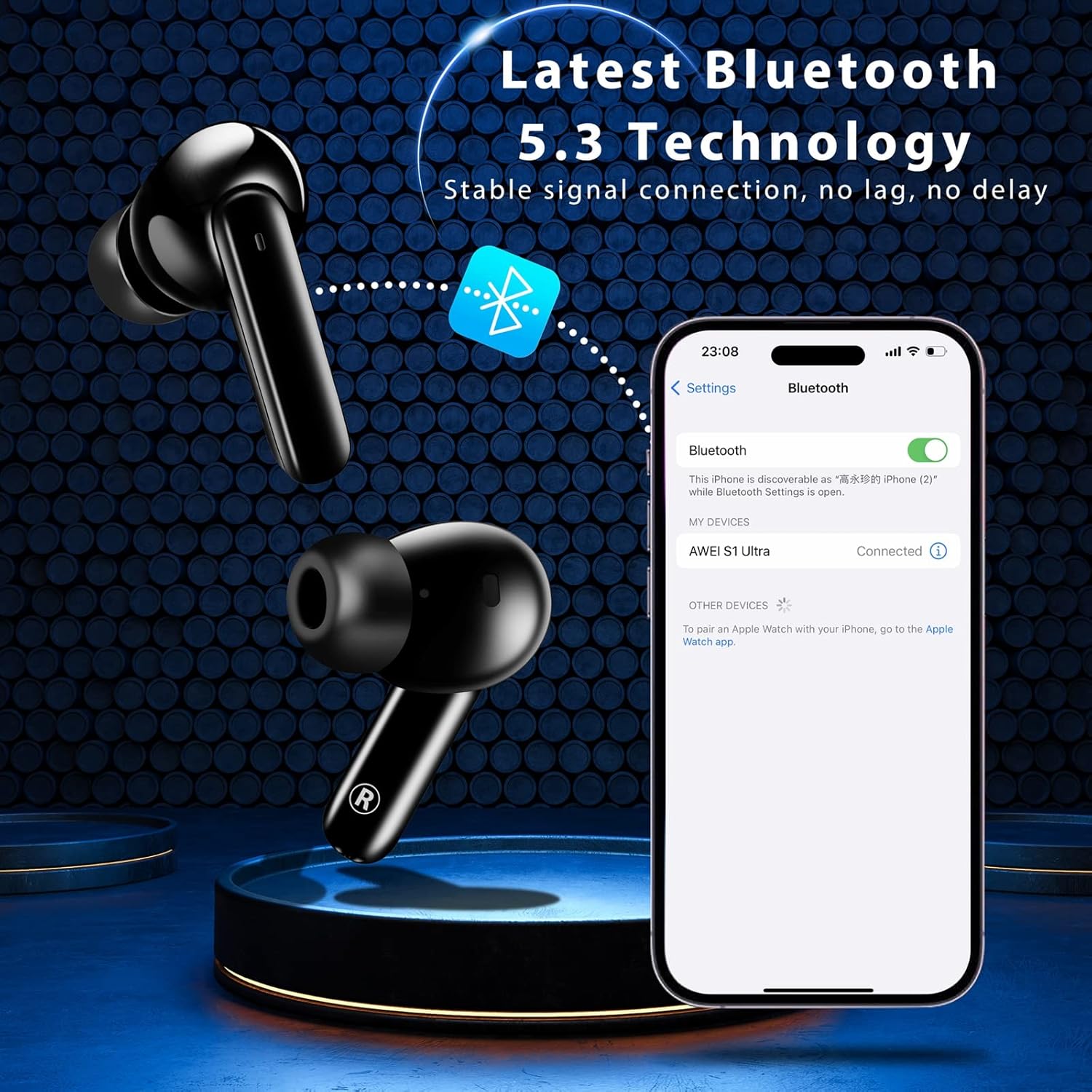
Pairing the earbuds with your device via Bluetooth 5.3.
2. Інструкцыя па эксплуатацыі
2.1 Інтэлектуальнае сэнсарнае кіраванне
The AWEI S1 Ultra earbuds feature intuitive touch controls for managing calls, music, and voice assistant functions.
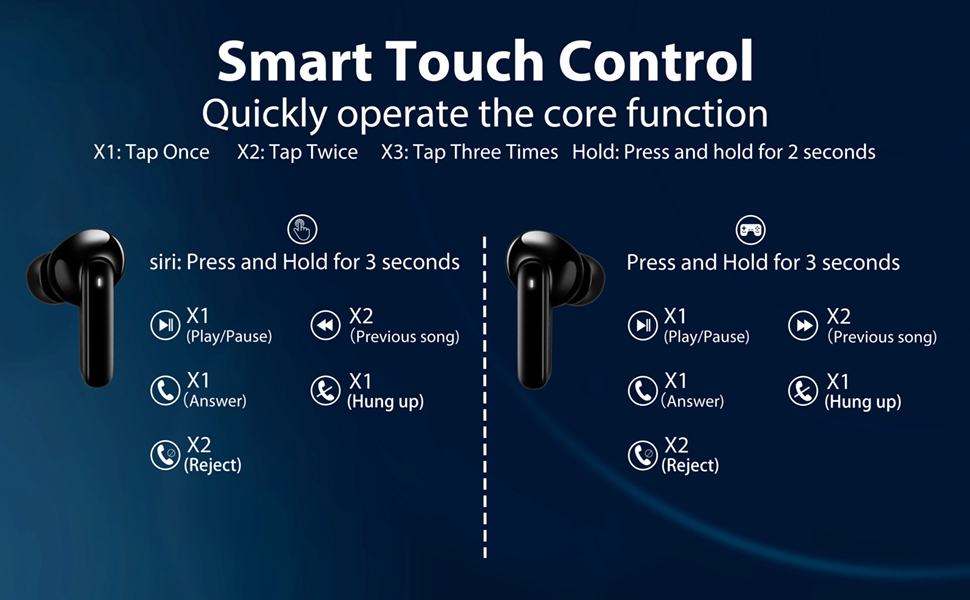
Refer to this diagram for detailed touch control commands.
- Прайграванне/Паўза: Tap once (X1) on either L/R earbud.
- Папярэдняя песня: Tap twice (X2) on the Left earbud.
- Наступная песня: Tap twice (X2) on the Right earbud.
- Павялічыць гучнасць: Long press the Right earbud for 2 seconds.
- Паменшыць гучнасць: Long press the Left earbud for 2 seconds.
- Галасавы памочнік: Long press the Left earbud for 3 seconds.
- Гульнявы рэжым укл./выкл.: Tap three times (X3) on either L/R earbud.
2.2 Кіраванне выклікамі
Manage your calls directly from the earbuds:
- Адказаць на званок: Tap once (X1) on either L/R earbud.
- Тэлефонны званок: Tap once (X1) on either L/R earbud during a call.
- Адхіліць выклік: Long press either L/R earbud for 2 seconds.
This video demonstrates how to answer, hang up, and reject calls using the earbud touch controls.
2.3 Music and Game Dual-Mode
The earbuds offer a dual-mode function to optimize your audio experience for either music or gaming. In Game Mode, the earbuds provide low latency for improved audio-video synchronization, which is beneficial for gaming where precise sound cues are important.
3. Тэхнічнае абслугоўванне
3.1 Воданепранікальнасць (IPX7)
The AWEI S1 Ultra earbuds feature an IPX7 waterproof nano-coating, providing protection against heavy rain and sweat. This makes them suitable for intense workouts and various weather conditions. However, they are not designed for swimming or prolonged submersion.

IPX7 rating ensures protection against sweat and splashes.
3.2 Ачыстка
Regularly clean your earbuds and charging case to maintain optimal performance and hygiene. Use a soft, dry, lint-free cloth. Avoid using abrasive materials, solvents, or aerosol sprays.
3.3 Eartip Selection and Replacement
The earbuds come with S/M/L eartips to ensure a comfortable and secure fit. Experiment with different sizes to find the best seal for your ears, which is crucial for optimal sound quality and noise isolation.

Choose the eartip size that provides the best fit and comfort.
4. Выпраўленне непаладак
4.1 Праблемы з падключэннем
If your earbuds are not connecting to your device:
- Ensure the earbuds are fully charged and the protective film has been removed from the charging contacts.
- Verify Bluetooth is enabled on your device and the earbuds are in pairing mode (open case lid).
- Try forgetting "AWEI S1 Ultra" from your device's Bluetooth list and re-pairing.
- Падыдзіце бліжэй да прылады, каб пераканацца, што вы знаходзіцеся ў радыусе дзеяння Bluetooth 10 метраў.
4.2 Праблемы з зарадкай
If your earbuds or charging case are not charging:
- Confirm the blue protective film has been removed from the earbud charging contacts.
- Check that the USB-C cable is securely connected to both the case and the power source.
- Паспрабуйце выкарыстоўваць іншы кабель USB-C або адаптар сілкавання.
- Пераканайцеся, што кантакты зарадкі на навушніках і ў футляры чыстыя і без смецця.
4.3 Праблемы з якасцю гуку
If you experience intermittent sound or poor audio quality:
- Ensure the earbuds are properly seated in your ears and you are using the correct eartip size for a good seal.
- Праверце перашкоды ад іншых бесправадных прылад.
- Паўторна спалучыце навушнікі-ўкладышы з прыладай.
4.4 Touch Control Sensitivity
If the touch controls are too sensitive or unresponsive:
- Пераканайцеся, што вашы пальцы чыстыя і сухія пры выкарыстанні сэнсарнага кіравання.
- Practice the touch gestures as per the diagram in Section 2.1. Some users may require a brief period to adapt to the sensitivity.
5. Тэхнічныя характарыстыкі
| Асаблівасць | Дэталь |
|---|---|
| Назва мадэлі | S1 Ultra Earbud |
| Тэхналогія падлучэння | Bluetooth 5.3 |
| Тып аўдыё драйвера | Дынамічны драйвер |
| Памер аўдыё драйвера | 13 міліметра |
| Тэрмін службы батарэі (навушнікі) | 6 гадзін (адной зарадкі) |
| Агульны час прайгравання (з кейсам) | 24 гадзін |
| Час зарадкі (навушнікі) | 1.5 гадзін |
| Час зарадкі (чахол) | 1 гадзіна |
| Узровень воданепранікальнасці | IPX7 |
| Дыяпазон Bluetooth | 10 метраў |
| Тып кіравання | Сэнсарнае кіраванне |
| Вага прадмета | 170 грам (6 унцый) |
| Матэрыял | Пластыкавыя |
| Колер | Чорны |
6. Гарантыя і падтрымка
For warranty information, product support, or to explore other AWEI products, please visit the official AWEI store or contact their customer service directly.
Ask a question about this manual
Ask about setup, troubleshooting, compatibility, parts, safety, or missing instructions. Manuals+ will review the question and use this page’s manual context to help answer it.