
1. Уводзіны і большview
This manual provides detailed instructions for the installation, operation, and maintenance of your Yansoo 3-Channel Dash Cam. Please read this manual thoroughly before using the device to ensure proper functionality and safety.
Асаблівасці прадукту:
- 3-канальны запіс: Simultaneously captures video from the front (170° wide-angle), rear (165°), and inside (140°) of your vehicle.
- Відэа высокай выразнасці: Supports 1080P Front video + AHD-720P Rear video + AHD-720P Inside video.
- Палепшанае начное бачанне: Features 4 unique infrared LED fill lights, F1.8 aperture, and WDR technology for optimal performance in low light.
- Аварыйная блакіроўка (G-сенсор): Automatically detects sudden shocks or collisions and locks the current video footage, каб прадухіліць перазапіс.
- цыклічны запіс: Continuously records and automatically overwrites the oldest unlocked video files, калі карта памяці поўная.
- Манітор паркоўкі: Activates recording when motion or shocking is detected while parked (requires separate hardwire kit for 24/7 monitoring).
- Adjustable Interior Camera: The interior lens can be rotated 60° for flexible positioning.
Змест пакета:
- Yansoo 3-Channel Dash Cam Unit
- Задняя камера з кабелем
- Мацаванне прысоскі
- Car Charger (Type-C)
- USB-кабель для даных
- Кіраўніцтва карыстальніка
- Mounting Hardware for Rear Camera
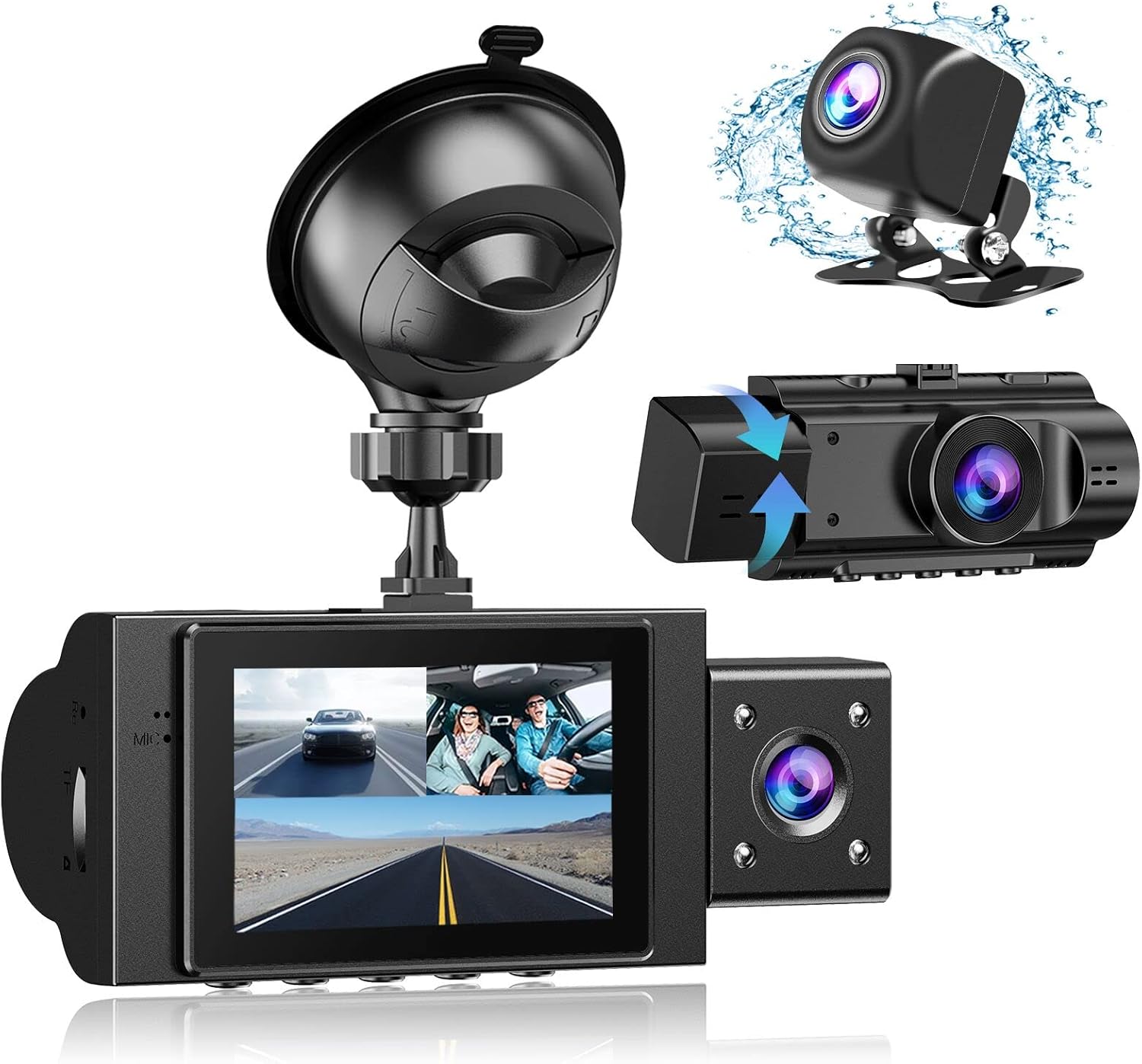
Image: The Yansoo 3-Channel Dash Cam unit with its suction cup mount and the separate rear camera, illustrating the complete package.
2. Настройка
2.1 Устаўка карты памяці
The dash cam supports Micro Memory cards up to 64GB (Class 10 or above recommended, not included). Please format the card in the camera menu before first use.
- Locate the memory card slot on the side of the dash cam.
- Insert the Micro Memory card into the slot until it clicks into place.
- Каб выняць, акуратна націсніце на карту, пакуль яна не выскочыць.

Image: A four-panel illustration showing the steps to insert a Micro SD card into the dash cam's slot.
2.2 Устаноўка відэарэгістратара
Mount the main dash cam unit to your windshield using the provided suction cup mount. Choose a location that does not obstruct your view падчас руху.
- Старанна ачысціце выбраную вобласць лабавога шкла.
- Прымацуйце прысоску да блока відэарэгістратара.
- Моцна прыцісніце прысоску да лабавога шкла і павярніце рычаг, каб зафіксаваць яе.
- Адрэгулюйце кут камеры, каб забяспечыць выразны view дарогі наперадзе.

Image: The Yansoo 3-Channel Dash Cam mounted on a car's windshield, showing its position relative to the driver's view.
2.3 Устаноўка задняй камеры
The rear camera provides a view of the vehicle's rear. It can be installed inside the rear window or externally above the license plate.
- Падключыце кабель задняй камеры да галоўнага блока відэарэгістратара.
- Route the cable neatly along the vehicle's interior trim to the rear.
- Mount the rear camera in the desired location, ensuring a clear view.

Image: A diagram illustrating the recommended cable routing path for the dash cam and rear camera within a car's interior.
2.4 Падключэнне харчавання
Connect the dash cam to your vehicle's cigarette lighter socket using the provided car charger. The camera will automatically power on and begin recording when the vehicle starts.

Image: The Yansoo 3-Channel Dash Cam connected to a power source, indicating its readiness for operation.
3. Інструкцыя па эксплуатацыі
3.1 Асноўныя аперацыі
- Уключэнне/выключэнне харчавання: The camera powers on/off automatically with your vehicle's ignition. You can also manually power on/off by pressing and holding the power button.
- Пачаць/спыніць запіс: Recording starts automatically when the camera powers on. Press the "OK" button to manually stop or start recording.
- Пераключыце дысплей Views: Press the "Up" button to cycle through different display modes (Front, Inside, Rear, Picture-in-Picture combinations).
Video: Demonstration of the Yansoo X88 Dash Cam's recording capabilities, showcasing its ability to capture clear video footage.
Video: Footage from the Yansoo X88 Dash Cam demonstrating its clear day and night recording capabilities.
Video: A demonstration of the Yansoo X88 Dash Cam's 1080P Full HD recording quality.
3.2 Налады меню
To access the menu settings, stop recording (if active) by pressing the "OK" button, then press the "M" button twice.
- дазвол: Adjust video resolution for front, inside, and rear cameras.
- цыклічны запіс: Усталюйце працягласць відэасегментаў (напрыклад, 1, 3, 5 хвілін).
- Адчувальнасць G-сэнсара: Adjust the sensitivity of the emergency lock feature.
- Манітор паркоўкі: Enable or disable the parking monitoring function.
- Дата/час: Усталюйце правільную дату і час для дакладнага часуamps на запісах.
- мова: Выберыце патрэбную мову для меню.
Video: A step-by-step guide on how to set the date and time on the Yansoo Dash Cam.
4. Тэхнічнае абслугоўванне
- Звычайнае фарматаванне: Format the memory card regularly (e.g., once a month) to prevent data corruption and ensure optimal recording performance.
- Ачыстка аб'ектыва: Keep the camera lenses clean using a soft, lint-free cloth. Avoid abrasive materials that could scratch the lens.
- Абнаўленні прашыўкі: Check the official Yansoo webсайт для атрымання даступных абнаўленняў прашыўкі для паляпшэння прадукцыйнасці і дадання новых функцый.
- Меркаванні па тэмпературы: Пазбягайце працяглага ўздзеяння экстрэмальных тэмператур на відэарэгістратар.
5. Выпраўленне непаладак
| праблема | Магчымая прычына | Рашэнне |
|---|---|---|
| Камера не ўключаецца. | Няма харчавання ад прыпальвальніка; няшчыльнае злучэнне. | Check car charger connection; ensure vehicle ignition is on. |
| Запіс нечакана спыняецца. | Memory card full or corrupted; G-Sensor triggered. | Format memory card; adjust G-Sensor sensitivity. |
| Відэа фуtagе размытае. | Protective film on lens; dirty lens. | Remove protective film; clean lenses with a soft cloth. |
| Date/Time is incorrect. | Date/Time not set or battery low. | Set Date/Time in menu; ensure continuous power supply. |
| Камера завісае або працуе няспраўна. | Праграмны збой. | Use a needle to press the "RE" (Reset) button. |
6. Тэхнічныя характарыстыкі
| Асаблівасць | Дэталь |
|---|---|
| Памеры прадукту | 4.13 х 1.57 х 1.77 цалі |
| Вага прадмета | 1.23 фунта |
| Дазвол відэазахопу | 1080p (спераду), 720p (унутры і ззаду) |
| Поле View | 170° (Front), 140° (Inside), 165° (Rear) |
| Тэхналогія падлучэння | USB |
| Асаблівасць | G-Sensor, Loop Recording, Parking Monitor, Night Vision |
| Тып мацавання | Мацаванне ўсмоктвання |
| Вытворца | Янсу |
7. Гарантыя і падтрымка
Yansoo offers comprehensive after-sales support for your dash cam.
- Гарантыя: 1-YEAR warranty from the date of purchase.
- Тэхнічнае абслугоўванне: 7*24 hours technical service is available.
- Кантакты: For any questions or issues, please contact our customer service team via Amazon or the after-sales email provided in the original product packaging.
- Кіраўніцтва карыстальніка (PDF): Лічбавая версія кіраўніцтва карыстальніка даступная для запампоўкі тут.