
1. Уводзіны
Thank you for choosing the Vamav Sync 15 Professional Amplified Speaker. This manual provides essential information for the safe and efficient operation of your device. Please read it thoroughly before use and retain it for future reference.
2. Інструкцыі па тэхніцы бяспекі
- Крыніца харчавання: Ensure the speaker is connected to a power source that matches the voltage паказана на прыладзе.
- Вентыляцыя: Do not block ventilation openings. Maintain adequate space around the speaker for proper airflow.
- Вада і вільгаць: Keep the speaker away from water, rain, and excessive humidity. Do not operate with wet hands.
- Цяпло: Пазбягайце размяшчэння дынаміка побач з крыніцамі цяпла, такімі як радыятары, абагравальнікі, пліты або іншыя прыборы, якія выпрацоўваюць цяпло.
- Уборка: Адключыце прыладу ад сеткі перад чысткай. Выкарыстоўвайце сухую мяккую тканіну. Не выкарыстоўвайце вадкія ачышчальнікі або аэразолі.
- Абслугоўванне: Не спрабуйце самастойна абслугоўваць гэты прадукт. Звярніцеся да ўсіх абслугоўванняў кваліфікаванага абслуговага персаналу.
- Размяшчэнне: Пастаўце дынамік на ўстойлівую, роўную паверхню, каб ён не ўпаў.
3. Змесціва ўпакоўкі
Праверце наяўнасць усіх прадметаў у камплекце:
- Vamav Sync 15 Ampліфічны спікер
- Сілавы кабель
- Кіраўніцтва карыстальніка (гэты дакумент)
4. Прадукт скончыўсяview
Familiarize yourself with the various components of your Vamav Sync 15 speaker.
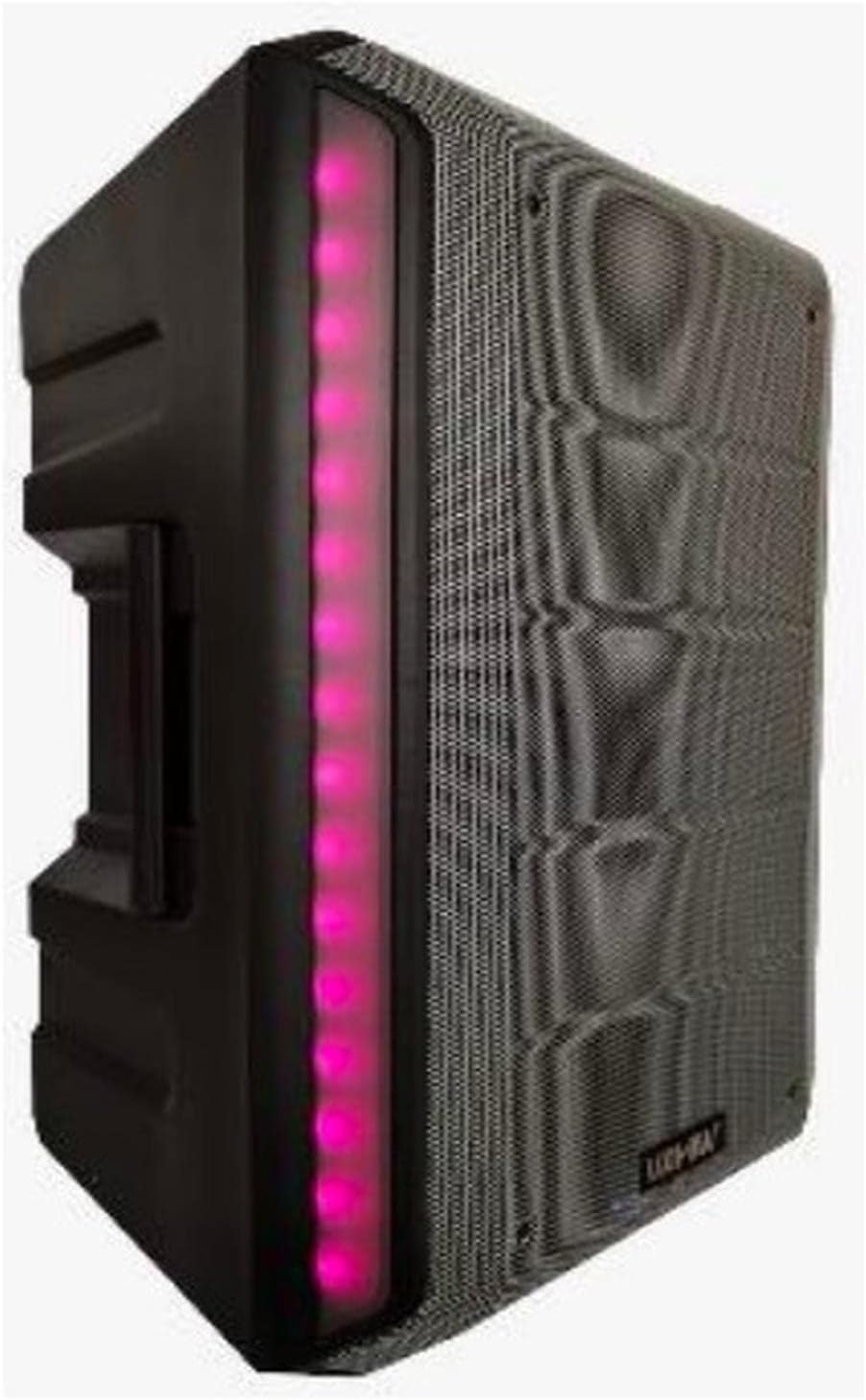
Малюнак 4.1: Спераду View. This image displays the front of the Vamav Sync 15 speaker, featuring a protective grille over the speaker cone and an illuminated LED strip along the side, indicating power and operational status.
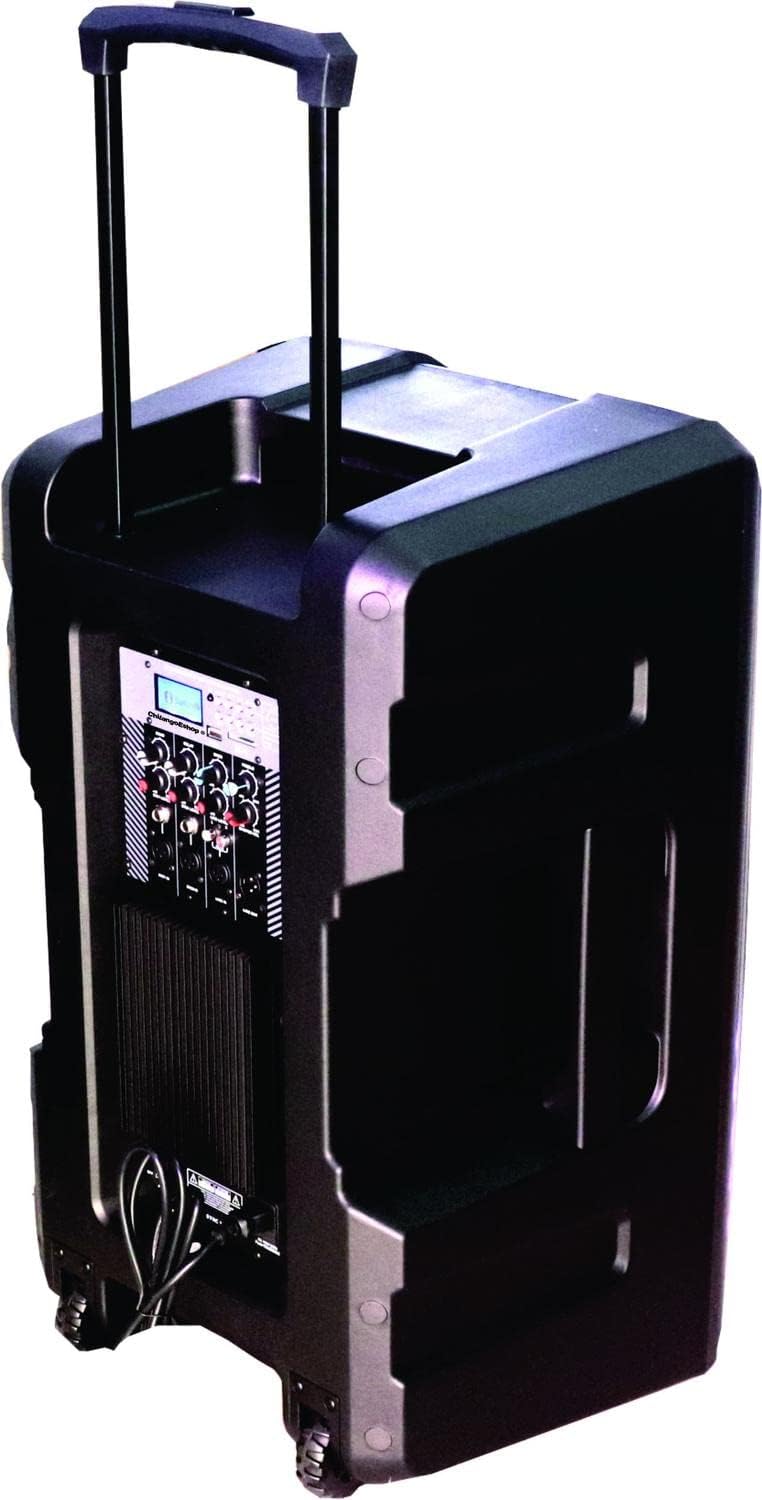
Малюнак 4.2: Задняя частка View. The rear of the speaker is shown, highlighting the retractable handle for portability and integrated wheels at the base, designed for easy transport.

Малюнак 4.3: Панэль кіравання. Падрабязны view of the control panel, featuring an MP3 digital display, Bluetooth connectivity indicator, USB and SD card slots, various input ports (XLR, 6.3mm Jack, RCA), and control knobs for Echo, Delay, Bass, Treble, Microphone Levels, Line Level, and Master Volume.

Малюнак 4.4: унізе View. This image illustrates the bottom of the speaker, showing the robust wheels for mobility and a central socket designed for mounting the speaker on a stand.

Малюнак 4.5: Памеры дынаміка. An illustration indicating the approximate dimensions of the Vamav Sync 15 speaker: 70 cm in height, 35 cm in depth, and 40 cm in width.
5. Настройка
- Распакаванне: Асцярожна дастаньце дынамік і ўсе аксэсуары з упакоўкі.
- Размяшчэнне: Position the speaker on a stable, flat surface or mount it on a compatible speaker stand using the bottom pole mount socket. Ensure adequate space for ventilation.
- Падключэнне сілкавання: Connect the provided power cable to the speaker's power input and then to a suitable electrical outlet.
- Першапачатковае ўключэнне: Turn the Master Volume knob to its minimum setting before powering on the unit to avoid sudden loud sounds. Press the power switch to turn on the speaker.
6. Інструкцыя па эксплуатацыі
6.1. Уключэнне/выключэнне харчавання
- To power on, ensure the Master Volume is low, then flip the power switch located on the control panel.
- To power off, turn the Master Volume to minimum, then flip the power switch.
6.2. Злучэнне Bluetooth
- Turn on the speaker. The display will show the current mode.
- Press the 'MODE' button on the control panel until 'Bluetooth' is selected. The Bluetooth indicator will flash, signifying it is ready for pairing.
- На мабільнай прыладзе (смартфоне, планшэце і г.д.) уключыце Bluetooth і знайдзіце даступныя прылады.
- Select 'CHSYNC 15' from the list of devices. Once connected, the Bluetooth indicator will stop flashing and remain solid.
- You can now play audio from your device through the speaker. The effective Bluetooth range is approximately 10 meters.
6.3. Прайграванне з USB/SD-карты
- Insert a USB flash drive or SD card into the respective slot on the control panel.
- Дынамік аўтаматычна пераключыцца ў рэжым USB/SD і пачне прайграваць аўдыё files. If not, press the 'MODE' button to select USB or SD.
- Use the playback controls (Play/Pause, Next, Previous) on the control panel to manage your audio.
6.4. Connecting Microphones and Line-in Devices
- Мікрафоны: Connect microphones to the 'MIC 1 IN' or 'MIC 2 IN' XLR or 6.3mm Jack inputs. Adjust individual microphone levels using the 'MIC 1 LEVEL' and 'MIC 2 LEVEL' knobs.
- Line-in Devices: Connect external audio sources (e.g., mixer, CD player) to the 'LINE IN' RCA inputs or the 6.3mm Jack input. Adjust the input level using the 'LINE LEVEL' knob.
- Лінейны выхад: Use the 'LINE OUT' 6.3mm Jack to connect to another amplified speaker or recording device.
6.5. Элементы кіравання аўдыё
- РЭХА: Рэгулюе эфект рэха для мікрафонаў.
- ЗАТРЫМКА: Controls the delay time of the echo effect.
- БАС: Рэгулюе нізкачастотны аўдыёвыхад.
- ТРЭБЛЯ: Рэгулюе гучнасць высокачастотнага гуку.
- MASTER VOL: Рэгулюе агульную гучнасць выхаднога гуку дынаміка.
7. Тэхнічнае абслугоўванне
- Уборка: Regularly wipe the speaker's exterior with a soft, dry cloth. Do not use abrasive cleaners or solvents.
- захоўванне: Калі дынамік не выкарыстоўваецца працяглы час, захоўвайце яго ў прахалодным, сухім месцы, удалечыні ад прамых сонечных прамянёў і экстрэмальных тэмператур.
- Сыход за кабелем: Inspect power and audio cables periodically for damage. Replace any frayed or damaged cables immediately.
8. Выпраўленне непаладак
| праблема | Магчымая прычына | Рашэнне |
|---|---|---|
| Няма ўлады | Power cable not connected; Power outlet faulty; Power switch off. | Ensure power cable is securely connected; Test outlet with another device; Turn power switch on. |
| Няма выхаду гуку | Master Volume too low; Input source not selected; Input device not connected or faulty; Mute activated. | Increase Master Volume; Select correct input mode (Bluetooth, USB, Line In); Check connections of input device; Ensure no mute function is active. |
| Bluetooth не падключаецца | Speaker not in Bluetooth mode; Device too far; Bluetooth not enabled on source device; Already connected to another device. | Press MODE button to select Bluetooth; Move device closer (within 10m); Enable Bluetooth on your device; Disconnect from other devices. |
| USB/SD-карта не прайграваецца | Няправільна file format; USB/SD card faulty or improperly inserted; Speaker not in USB/SD mode. | Забяспечце аўдыё files are compatible (e.g., MP3); Reinsert USB/SD card; Press MODE button to select USB/SD. |
9. Тэхнічныя характарыстыкі
| Асаблівасць | Спецыфікацыя |
|---|---|
| Назва мадэлі | CHSYNC 15 |
| Тып дынаміка | Манітор, Amplified (Active) |
| Памер дынаміка | 15 цалі |
| сістэма | Двухбаковая сістэма |
| Галасавая шпулька | 2" KSV |
| Кіроўца | 34 мм |
| Выходная магутнасць RMS | 150 ват |
| Бесправадныя тэхналогіі | Bluetooth (10 meters distance) |
| Тэхналогія падлучэння | Bluetooth, USB |
| Прайграванне мультымедыя | Порт USB, слот для SD-карты |
| аўдыё Controls | Bass, Treble, Echo, Delay, Master Volume, Mic Levels, Line Level |
| Уваходы | XLR, 6.3mm Jack (x1), RCA |
| Выхад | Гняздо 6.3 мм |
| Крыніца харчавання | акумулятар |
| Метад кантролю | Тактыльны |
| Матэрыял | Пластыкавыя |
| Колер | Чорны |
| Памеры прадукту | 13.8" Г х 15.8" Ш х 27.6" В (35 см Г х 40 см Ш х 70 см В) |
| Сумяшчальныя прылады | Desktop computer, Laptop, Projector, MP3 player, Smartphone, Tablet, Television, Video game console |
10. Гарантыя і падтрымка
Каб атрымаць інфармацыю аб гарантыі і тэхнічнай падтрымцы, звярніцеся да дакументацыі, прадстаўленай пры куплі, або звярніцеся да прадаўца. Захоўвайце пацвярджэнне пакупкі для любых гарантыйных прэтэнзій.