
1. Уводзіны
Thank you for choosing the Vamav Nova12 12-inch Professional Amplified Speaker with DSP. This manual provides essential information for the safe and efficient operation of your new audio equipment. Please read this manual thoroughly before use and retain it for future reference.
2. Інструкцыі па тэхніцы бяспекі
Каб забяспечыць бяспечную працу і прадухіліць пашкоджанні, выконвайце наступныя меры засцярогі:
- Крыніца харчавання: Connect the speaker only to a power supply specified in the specifications section. Ensure the power cable is not damaged or pinched.
- Вентыляцыя: Не блакуйце вентыляцыйныя адтуліны. Забяспечце дастатковую цыркуляцыю паветра вакол прылады, каб прадухіліць перагрэў.
- Вільготнасць: Do not expose the speaker to rain, moisture, or excessive humidity. This product is not waterproof.
- Размяшчэнне: Place the speaker on a stable, level surface. Avoid placing it near heat sources or in direct sunlight.
- Уборка: Адключыце прыладу ад сеткі перад чысткай. Выкарыстоўвайце сухую мяккую тканіну. Не выкарыстоўвайце вадкія ачышчальнікі або аэразолі.
- Абслугоўванне: Не спрабуйце самастойна абслугоўваць гэты прадукт. Звярніцеся да ўсіх абслугоўванняў кваліфікаванага абслуговага персаналу.
3. Змесціва ўпакоўкі
Праверце наяўнасць усіх прадметаў у камплекце:
- Vamav Nova12 12-inch Professional Amplified Speaker with DSP
- Сілавы кабель
- Кіраўніцтва карыстальніка (гэты дакумент)
4. Прадукт скончыўсяview
The Vamav Nova12 is a professional amplified speaker featuring a 12-inch woofer and integrated Digital Signal Processing (DSP) for optimized audio performance. It is designed for various applications, including home theater systems, televisions, and game consoles.
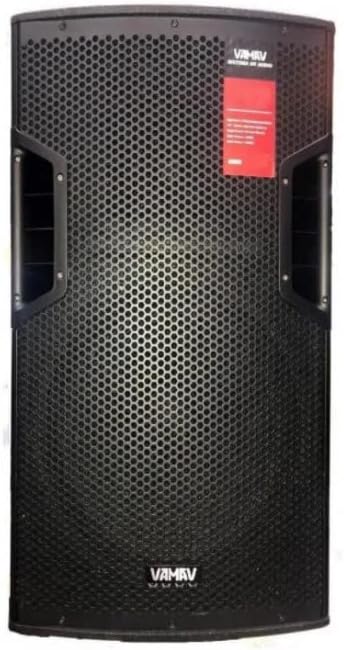
Малюнак 4.1: Спераду View
This image displays the front of the Vamav Nova12 speaker, featuring a robust metal grille protecting the 12-inch woofer and tweeters. The Vamav logo is visible at the bottom, and handles are integrated on the sides for portability.

Малюнак 4.2: Задняя частка View
This image shows the rear panel of the Vamav Nova12 speaker, which houses the DSP control interface, various input and output connections (including RCA), and the power input. The cooling vents are also visible.
5. Настройка
Follow these steps to set up your Vamav Nova12 speaker:
- Размяшчэнне: Position the speaker on a stable, flat surface. Ensure there is sufficient space around the unit for proper ventilation. The speaker is designed for floor mounting.
- Падключэнне сілкавання: Connect the provided power cable to the power input on the rear panel of the speaker, then plug the other end into a suitable electrical outlet.
- Аўдыё ўваход: Connect your audio source (e.g., home theater system, television, game console) to the RCA input ports on the rear panel of the speaker using an RCA cable (not included). Ensure correct left/right channel connections if applicable.
6. Інструкцыя па эксплуатацыі
Once the speaker is set up, follow these instructions for operation:
- Уключэнне: Locate the power switch on the rear panel and switch it to the 'ON' position. The DSP display should illuminate.
- Рэгуляванне гучнасці: Use the master volume control knob on the rear panel to adjust the overall output level of the speaker. Start with a low volume and gradually increase it to a comfortable listening level.
- DSP Controls: The integrated DSP (Digital Signal Processor) allows for fine-tuning of the audio characteristics. Refer to the DSP interface on the rear panel to navigate menus and adjust settings such as equalization, crossover points, and other audio parameters. Specific DSP functions are controlled via the tactile interface.
- Прайграванне аўдыя: Begin playing audio from your connected source. Adjust the source volume and speaker volume as needed.
- Выключэнне: When finished, switch the power button on the rear panel to the 'OFF' position.
7. Тэхнічнае абслугоўванне
Proper maintenance ensures the longevity and optimal performance of your speaker:
- Уборка: Regularly wipe the exterior of the speaker with a soft, dry, lint-free cloth. Do not use abrasive cleaners, waxes, or solvents.
- Вентыляцыя: Periodically check that the ventilation openings are free from dust and debris. Use a soft brush or compressed air to clear any blockages.
- захоўванне: If storing the speaker for an extended period, disconnect it from power, clean it, and store it in a cool, dry place, preferably in its original packaging.
8. Выпраўленне непаладак
If you encounter issues with your Vamav Nova12 speaker, refer to the following common problems and solutions:
| праблема | Магчымая прычына | Рашэнне |
|---|---|---|
| Няма ўлады | Power cable not connected; Power outlet not active; Power switch off | Ensure power cable is securely connected; Check power outlet with another device; Turn power switch to 'ON' |
| Няма гуку | Audio cable not connected; Source device not playing; Speaker volume too low; DSP settings incorrect | Check RCA cable connections; Verify audio playback on source device; Increase speaker volume; Reset DSP settings if necessary |
| Скажоны гук | Volume too high (speaker or source); Damaged audio cable; DSP settings incorrect | Reduce volume on both speaker and source; Try a different audio cable; Adjust DSP settings |
9. Тэхнічныя характарыстыкі
Detailed technical specifications for the Vamav Nova12 speaker:
| Асаблівасць | Спецыфікацыя |
|---|---|
| мадэль | Новая12 |
| Тып дынаміка | НЧ-дынамік |
| Асаблівасць | Tweeters, DSP |
| Рэкамендуемае выкарыстанне | Гульнявыя прыстаўкі, хатнія кінатэатры, тэлевізары |
| Сумяшчальныя прылады | Home Theater, Television, Game Console |
| Дыяметр сабвуфера | 12 цалі |
| Колер | Чорны |
| Воданепранікальны | Хлусня |
| Метад кантролю | Тактыльны |
| Памер дынаміка | 12 цалі |
| Крыніца харчавання | Правадная электрычная |
| Сярэдні тэрмін службы батарэі | 5 Hours (if applicable, for internal components) |
| Вага прадукту | 25 кг |
| Тэхналогія падлучэння | RCA |
| Рэжым выхаду гуку | Мона |
| Тып мацавання | Падлогавае мацаванне |
10. Гарантыя і падтрымка
Vamav products are designed for reliability and performance. For specific warranty details, please refer to the warranty card included with your purchase or contact your retailer. Keep your proof of purchase for any warranty claims.
For technical support or service inquiries, please contact the retailer where you purchased the product or visit the official Vamav webсайт для кантактнай інфармацыі.