
1. Уводзіны
The ETOE Smart Projector D2 Pro is a compact and versatile home entertainment device designed to deliver a high-quality viewing experience. Featuring Android TV 10.0, built-in Chromecast, and a native 1080P resolution with 4K support, it provides access to a wide range of streaming content and connectivity options. This manual provides essential information for setting up, operating, and maintaining your projector.

Image: The ETOE Smart Projector D2 Pro, showcasing its compact design, included remote control, and a projection of the Android TV interface with Netflix and other apps.
2. Што ў скрынцы
Калі ласка, праверце змесціва пакета пасля распакавання, каб пераканацца ў наяўнасці ўсіх прадметаў:
- ETOE D2 Pro Projector (x1)
- Remote Control (x1, batteries not included)
- DC 19V Adapter (x1)
- Шнур сілкавання (x1)
- User Manual + Quick Guide (x1)
3. Фізічны канецview
Familiarize yourself with the projector's ports and controls for optimal use.

Выява: Задняя частка view of the ETOE D2 Pro Projector, highlighting the DC power input, USB port, HDMI port, and Aux audio output.
Парты і падключэнні:
- DC for Power: Падключыце сюды прадастаўлены адаптар сілкавання.
- USB: For connecting USB drives to play media or connect compatible accessories.
- HDMI: For connecting external devices such as laptops, gaming consoles (PS5/PS4, X-Box ONE), TV boxes, or Fire TV sticks.
- Дапаможнік: For connecting external audio devices like headphones or speakers via a 3.5mm audio cable.
4. Настройка
4.1 Размяшчэнне і памер экрана
Position the projector on a stable, flat surface. The optimal projection distance will vary based on your desired screen size. The projector supports screen sizes from 40 inches to 120 inches, with 100 inches being the recommended size for a balanced viewвопыту.
4.2 Уключэнне
- Connect the DC 19V adapter to the projector's DC input port.
- Падключыце шнур сілкавання да насценнай разеткі.
- Націсніце кнопку харчавання на праектары або пульце дыстанцыйнага кіравання, каб уключыць прыладу.
4.3 Рэгуляванне фокусу і трапецападобнага скажэння
To ensure a clear and rectangular image, adjust the focus and keystone correction.

Image: Diagram illustrating the manual focus, digital 4D & 4P keystone correction, and digital zoom features of the ETOE D2 Pro Projector.
- Ручная факусоўка: Паварочвайце кольца факусоўкі на аб'ектыве праектара, пакуль выява не стане рэзкай і выразнай.
- Digital Keystone Correction (4D & 4P): If the projected image is trapezoidal or tilted, use the digital keystone correction feature to adjust it into a perfect rectangle. This can be done through the projector's settings menu.
- Digital Zoom (50% - 100%): Adjust the projection size without physically moving the projector using the digital zoom function in the settings.
5. Кіраванне праектарам
5.1 Android TV 10.0 Interface
The projector runs on Android TV 10.0, providing access to over 8000 apps from Google Play, including Netflix, YouTube, Disney+, HBO Max, and Spotify. Navigate the interface using the remote control.

Image: A comparison showing the rich Android TV 10.0 interface of the ETOE D2 Pro System on the left, with numerous app icons, versus a simpler, less feature-rich interface of other projectors on the right.
- Use the directional buttons on the remote to navigate through menus and select apps.
- Націсніце кнопку «ОК», каб пацвердзіць выбар.
- Utilize the voice control feature (Google Assistant) on the remote for hands-free content search and control.
5.2 Casting with Chromecast Built-in
The built-in Chromecast allows for seamless content casting from your Android, iOS devices, or laptops.
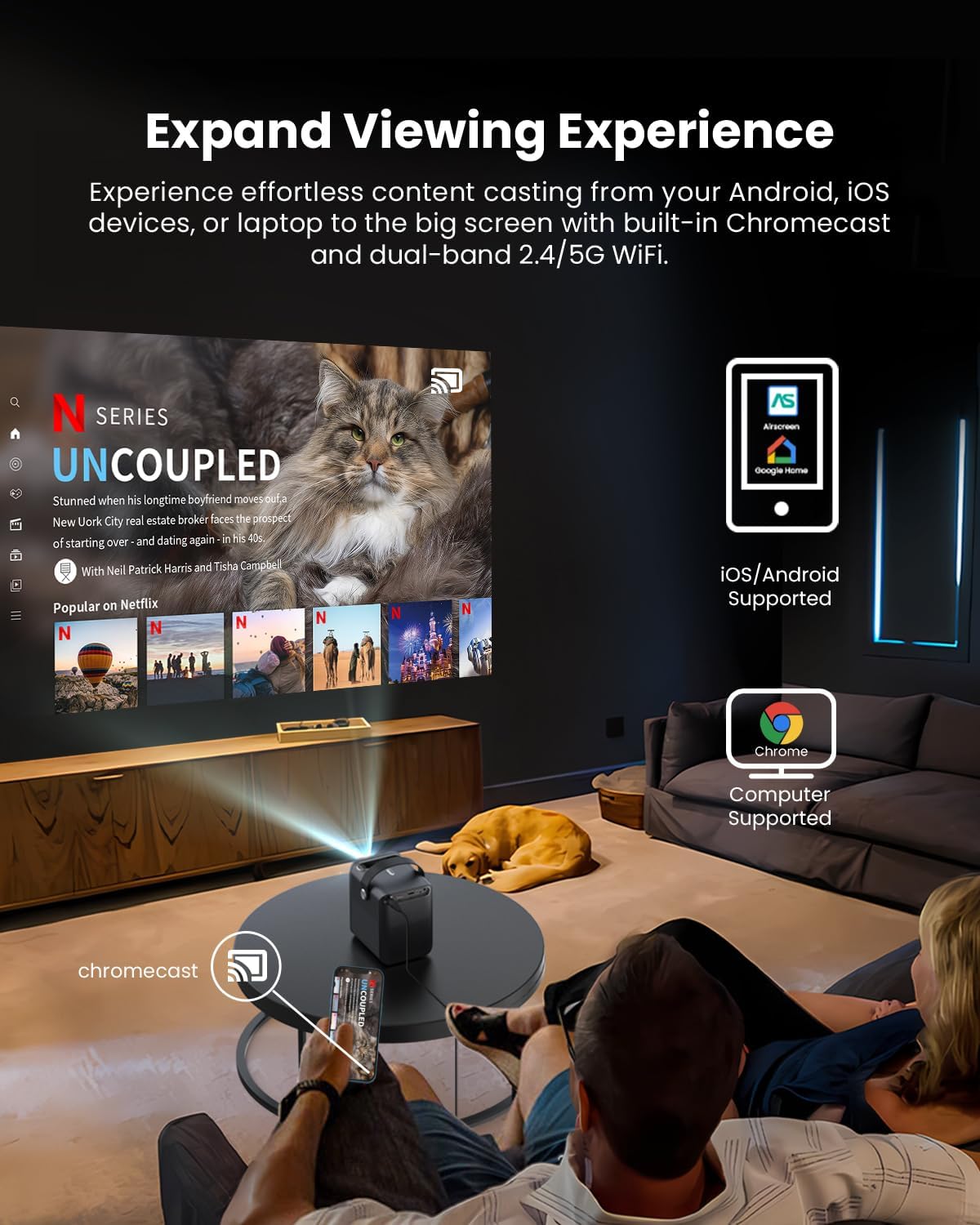
Image: A person relaxing on a couch, casting content from their smartphone to the ETOE D2 Pro Projector, demonstrating the Chromecast feature for an expanded viewвопыту.
- Ensure your mobile device or computer is connected to the same Wi-Fi network as the projector.
- Open a Chromecast-enabled app (e.g., YouTube, Netflix) on your device.
- Націсніце на значок трансляцыі (звычайна прастакутнік з сімвалам Wi-Fi) and select your ETOE D2 Pro Projector from the list of available devices.
5.3 Падключэнне знешніх прылад
Праектар прапануе некалькі варыянтаў падключэння для розных прылад.

Image: The ETOE D2 Pro Projector displayed with various compatible accessories, including a TV stick, USB stick, external speaker, and headphones, illustrating its versatile connectivity options.
- HDMI: Connect TV sticks, gaming consoles, laptops, or other HDMI-enabled devices to the HDMI port. Select the HDMI input source from the projector's menu.
- USB: Insert a USB drive into the USB port to play local media file(відэа, фота, музыка).
- Bluetooth: Pair Bluetooth speakers or headphones for wireless audio output. Go to the projector's Bluetooth settings to search for and connect to devices.
- Дапаможнік: Use a 3.5mm audio cable to connect wired headphones or external speakers to the Aux port.
5.4 Image and Audio Settings
Адрэгулюйце параметры выявы і гуку, каб аптымізаваць viewвопыту.

Image: The ETOE D2 Pro Projector projecting a vibrant city scene, highlighting its native 1080P Full HD resolution, 4K support, 400 ANSI lumens brightness, and HDR 10 compatibility for stunning image quality.
- Рэжым малюнка: Select from preset picture modes (e.g., Standard, Vivid, Movie) or customize settings like brightness, contrast, and color temperature.
- Рэжым гуку: Choose from various sound modes (e.g., Standard, Music, Movie) or adjust equalizer settings for the built-in dual 3W speakers or connected audio devices.
- Рэжым праекцыі: Adjust the projection mode (e.g., Front, Rear, Ceiling Front, Ceiling Rear) based on your projector's placement.
6. Тэхнічнае абслугоўванне
6.1 Dust-Free Design
The ETOE D2 Pro features a fully-sealed optical engine designed to prevent dust from entering the lens area, ensuring long-term performance and reducing the need for frequent internal cleaning.

Image: An illustration of the ETOE D2 Pro Projector's sealed optical engine, showing how it prevents dust from entering the internal components, ensuring long-lasting performance.
6.2 Генеральная ўборка
- Знешні выгляд: Wipe the exterior of the projector with a soft, dry, lint-free cloth. Do not use abrasive cleaners or solvents.
- Аб'ектыў: Gently clean the projector lens with a lens cleaning cloth or a soft brush designed for optical surfaces. Avoid touching the lens directly with your fingers.
- Ensure the projector is unplugged before cleaning.
7. Выпраўленне непаладак
Калі ў вас узніклі праблемы з праектарам, звярніцеся да наступных распаўсюджаных праблем і рашэнняў:
| праблема | Магчымая прычына | Рашэнне |
|---|---|---|
| Фотаздымка няма | Power cable loose; Incorrect input source; Device not connected | Check power connection; Select correct HDMI/USB input; Ensure external device is properly connected and powered on. |
| Размыты малюнак | Focus not adjusted; Keystone not corrected | Adjust the manual focus ring; Use digital keystone correction in settings. |
| Няма гуку | Volume too low; Muted; Incorrect audio output; External device audio issue | Increase volume; Unmute; Check audio output settings (internal speakers, Bluetooth, Aux); Verify audio settings on connected device. |
| Пульт дыстанцыйнага кіравання не працуе | Batteries low/dead; Obstruction between remote and projector | Замяніце батарэйкі; Забяспечце прамую бачнасць ІЧ-прыёмніка праектара. |
| Немагчыма падключыцца да Wi-Fi | Incorrect password; Router issue; Projector too far from router | Double-check Wi-Fi password; Restart router; Move projector closer to router. |
If the problem persists after trying these solutions, please contact ETOE customer support.
8. Тэхнічныя характарыстыкі
| Асаблівасць | Дэталь |
|---|---|
| мадэль | D2 Pro |
| Аперацыйная сістэма | Android TV 10.0 |
| Дазвол дысплея | Native 1920 x 1080 (1080P Full HD), 4K video supported |
| Яркасць | 400 прасветаў ANSI |
| Каэфіцыент кантраснасці | HDR 10 support |
| Памер праекцыі | 40" - 120" (100" recommended) |
| Карэкцыя Keystone | Digital 4D & 4P Keystone |
| Функцыя маштабавання | Digital Zoom (50% - 100%) |
| Сувязь | HDMI, USB, Chromecast, 5G WiFi, Bluetooth, Aux |
| Аўдыё | Падвойныя дынамікі магутнасцю 3 Вт |
| Аптычны рухавік | Fully-sealed (Dust-proof) |
| Вага прадмета | 3.58 фунта |
| Памеры прадукту | 5.31 х 4.45 х 5.83 цалі |
9. Гарантыя і падтрымка
ETOE provides comprehensive support for your D2 Pro projector:
- Гарантыя: A 12-month after-sales service is provided from the date of purchase.
- Тэхнічная падтрымка: Lifetime technical support is available for all ETOE D2 Pro users.
For any questions, technical assistance, or warranty claims, please contact ETOE customer support directly. There is no need to return the projector without prior contact.