
Vansky VS-TX01
Vansky Indoor Digital Amplified HDTV Antenna User Manual
Model: VS-TX01
Уводзіны
Thank you for choosing the Vansky Indoor Digital Amplified HDTV Antenna. This antenna is designed to provide you with free access to local over-the-air television channels in high definition. With its advanced signal amplification technology and flexible placement options, you can enjoy crystal clear picture quality and a wide range of programming, including news, weather, sports, and entertainment, without the need for monthly cable or satellite subscriptions.
This manual provides detailed instructions for setting up, operating, and maintaining your antenna to ensure optimal performance.
Змест пакета
Калі ласка, пераканайцеся, што ўсе прадметы прысутнічаюць у вашай упакоўцы:
- Vansky Indoor Digital AmpАнтэна HDTV
- Detachable Signal Amplifier (USB powered)
- 16.5-футавы кааксіяльны кабель (падлучаны да антэны)
- Кіраўніцтва карыстальніка (гэты дакумент)
Кіраўніцтва па ўстаноўцы
Follow these steps to set up your Vansky HDTV Antenna:
1. Connect the Antenna
Locate the "ANT IN" or "CABLE IN" port on the back of your television. Connect the coaxial cable from the Vansky antenna directly to this port.

Image: Connecting the antenna coaxial cable to the TV's ANT IN port.
Важная заўвага: Ensure your TV has a built-in HDTV tuner (most TVs manufactured after 2009 do). If your TV does not have an HDTV tuner, you will need an external digital converter box.
2. Power the Signal Amplifier (неабавязкова)
The detachable signal amplifier can boost reception, especially if you are far from broadcast towers.
- Падключыце amplifier's coaxial input to the antenna's coaxial cable.
- Падключыце amplifier's coaxial output to the "ANT IN" or "CABLE IN" port on your TV.
- Падключыце amplifier's USB power cable into an available USB port on your TV or a standard USB wall adapter (5V/1A). The amplifier has an indicator light that will illuminate when powered.
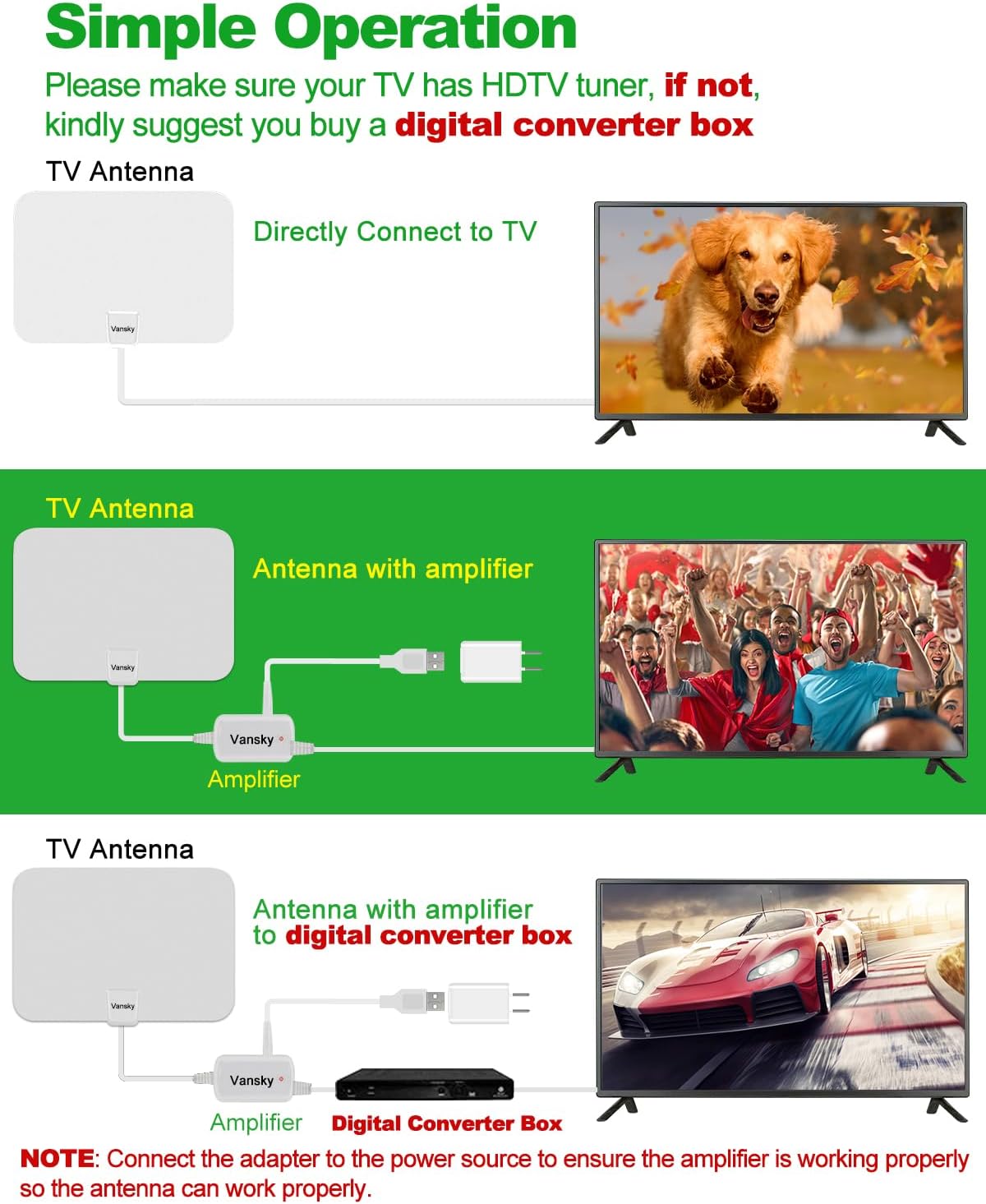
Image: Connection diagrams for the antenna, with and without the amplifier, and with a digital converter box.
Заўвага: If you experience signal issues with the amplifier, try removing it and connecting the antenna directly to the TV. In some cases, if you are very close to broadcast towers, the amplifier can over-amplify the signal, leading to poor reception.
3. Position the Antenna
Optimal antenna placement is crucial for good reception.
- Рэкамендуецца: Stick the antenna on a window. Windows often provide the clearest line of sight to broadcast towers.
- Stick on a wall.
- Place behind the TV.
- Lay flat on a table.

Image: Various installation methods for the Vansky antenna, including window, wall, behind TV, and flat on a table.
Generally, higher positions and locations closer to windows facing the direction of broadcast towers yield better results.
4. Scan for Channels
After connecting and positioning the antenna, perform a channel scan on your television.
- Turn on your TV and select the correct input source (usually "TV" or "Antenna").
- Access your TV's menu settings.
- Navigate to "Channel Scan," "Auto Program," "Auto Tune," or similar option.
- Select "Antenna" or "Air" as the signal source (not "Cable").
- Start the scan. This process may take several minutes.

Image: Visual guide for connecting the antenna, positioning it, and performing a channel scan on the TV.
Пасля завяршэння сканавання на вашым тэлевізары з'явяцца даступныя каналы.
Аперацыя
After successful setup, operating your Vansky antenna is straightforward. Simply use your TV remote to browse and select channels as you normally would.
Re-scanning Channels
It is recommended to re-scan for channels periodically (e.g., monthly) or if you notice a loss of channels or signal quality. This is especially important if you move the antenna to a new location or if new broadcast towers become active in your area.
Аптымізацыя прыёму
To maximize the number and quality of channels you receive:
- Check Local Broadcasts: Перад пакупкайasing or for optimal placement, visit dtv.gov/maps or антэнаweb.org. Enter your address or ZIP code to see available channels and the direction of broadcast towers in your area.
- Эксперыментуйце з размяшчэннем: Try different locations and orientations for the antenna. Even a few inches can make a difference.
- Мінімізаваць перашкоды: Walls, large furniture, and electronic devices can interfere with signals. Position the antenna away from large metal objects, microwaves, refrigerators, and other high-power electrical appliances.

Image: Avoid obstacles like large appliances, trees, and mountains for better signal reception.
- AmpВыкарыстанне выратавальніка: Выкарыстоўвайце amplifier if you are far from broadcast towers. If you are close to towers and experience pixelation or signal loss, try removing the ampзадымнік.
- Умовы надвор'я: Severe weather (heavy rain, snow, strong winds) can temporarily affect signal quality.
Ліквідацыю непаладак
| праблема | Рашэнне |
|---|---|
| No Signal or Few Channels |
|
| Pixelated Picture or Signal Drops |
|
| TV Does Not Detect Antenna |
|
Тэхнічныя характарыстыкі
| Асаблівасць | Дэталь |
|---|---|
| Нумар мадэлі | VS-TX01 |
| Марка | Ванскі |
| Колер | Белы |
| Падтрымліваюцца дазволы | 720p, 1080i, 1080p, 4K (depending on broadcast) |
| Дыяпазон частот | VHF (174-230MHz), UHF (470-862MHz) |
| Максімальны дыяпазон | Up to 250 Miles (signal strength varies by location) |
| Даўжыня кааксіяльнага кабеля | 16.5 футы |
| AmpLifier Крыніца харчавання | USB (5 В/1 А) |
| Памеры | Прыблізна 13.54 х 9.96 х 1.38 цалі (упакоўка) |
| Вага прадмета | 14.4 унцыі |

Image: Detail of the premium coaxial cable construction, highlighting its durability and signal clarity features.
Догляд і абслугоўванне
- Уборка: Wipe the antenna gently with a soft, dry cloth. Do not use liquid cleaners or abrasive materials.
- Размяшчэнне: Keep the antenna in a dry indoor environment. Avoid extreme temperatures and direct sunlight.
- Сыход за кабелем: Do not bend or crimp the coaxial cable excessively, as this can damage the internal wiring and affect signal quality.
- Абарона ад маланкі: The antenna is designed for indoor use and is lightning protected. However, for added safety during electrical storms, consider disconnecting the antenna from your TV.
Гарантыя і падтрымка
Vansky products are designed for reliability and performance. For specific warranty information or technical support, please refer to the warranty card included with your product or visit the official Vansky webсайт.
If you encounter any issues not covered in this manual, please contact Vansky customer support for assistance.
Ask a question about this manual
Ask about setup, troubleshooting, compatibility, parts, safety, or missing instructions. Manuals+ will review the question and use this page’s manual context to help answer it.