
1. Уводзіны
This document provides instructions for the Generic Replacement Remote Control. This remote is designed to function as a substitute for original remote controls for various devices, including Westinghouse WD40FB1530 and WD50FE2200 Smart 4K UHD LED LCD HDTVs, as well as other compatible audio/video players, home theater systems, set-top boxes, and projectors.
This is a dedicated replacement remote control and does not require programming or setup. Simply install the batteries to begin operation. Please note that as a replacement, some functions may differ or not be available compared to the original remote control.
2. Усталёўка: Усталёўка батарэі
The remote control requires two (2) AAA batteries for operation. Batteries are not included with the remote control.
- Знайдзіце батарэйны адсек на задняй частцы пульта дыстанцыйнага кіравання.
- Зрушыце вечка батарэйнага адсека ўніз або вонкі, каб адкрыць яго.
- Устаўце дзве батарэйкі тыпу AAA, пераканаўшыся, што станоўчая (+) і адмоўная (-) клемы правільна сумяшчаюцца з пазнакамі ўнутры адсека.
- Зачыніце вечка батарэйнага адсека, зрушыўшы яго назад да пстрычкі.
Важна: Do not mix old and new batteries, or different types of batteries. Remove batteries if the remote control will not be used for an extended period.
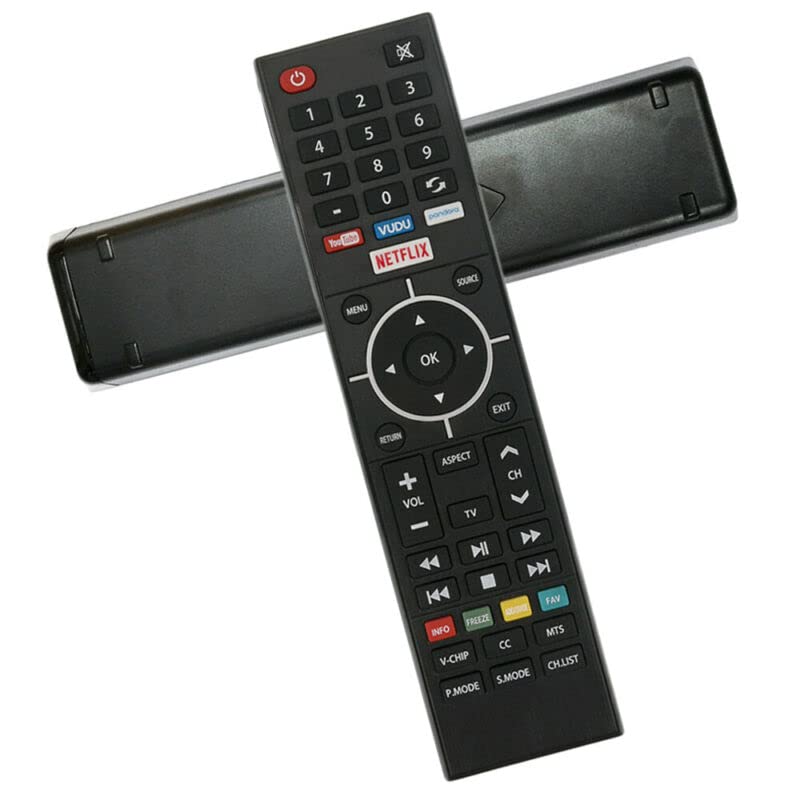
Малюнак 2.1: Спераду view of the Generic Replacement Remote Control. The remote features a black body with various function buttons, including a red power button, number pad, navigation cluster, volume and channel controls, media playback buttons, and dedicated app buttons for YouTube, VUDU, Netflix, and Pandora.
3. Інструкцыя па эксплуатацыі
Point the remote control directly at the infrared (IR) receiver on your device. The maximum effective range is approximately 5 meters (16 feet).
Функцыі кнопак:
- Харчаванне (чырвоная кнопка): Уключае або выключае прыладу.
- Mute (Crossed Speaker Icon): Адключэнне або ўключэнне гуку.
- Number Pad (0-9, -): Direct input for channel numbers or other numerical selections.
- Return/Refresh (Curved Arrow): Navigates back or refreshes content.
- App Buttons (YouTube, VUDU, Netflix, Pandora): Прамы доступ да праграм для струменевай перадачы.
- МЕНЮ: Opens the main menu of the device.
- КРЫНІЦА: Selects the input source (e.g., HDMI 1, AV).
- Стрэлкі навігацыі (уверх, уніз, налева, направа): Перамяшчае курсор або вылучэнне ў меню.
- OK: Пацвярджае выбар або ўваходзіць у пункт меню.
- ВЯРТАННЕ: Вяртаецца да папярэдняга экрана або меню.
- ВЫХОД: Закрывае бягучае меню або праграму.
- ГУЧНАСЦЬ (+/-): Павялічвае або памяншае ўзровень гучнасці.
- CH (Up/Down Arrows): Мяняе тэлеканал.
- тэлевізар: Switches to TV mode or input.
- АСПЕКТ: Змяняе суадносіны бакоў экрана.
- Media Controls (Rewind, Play/Pause, Fast Forward, Previous Track, Stop, Next Track): Кіруе прайграваннем медыякантэнту.
- INFO (Red): Адлюстроўвае інфармацыю аб бягучай праграме або змесце.
- FREEZE (Green): Pauses the current video frame.
- FAV (Teal): Доступ да любімых каналаў або кантэнту.
- V-ЧЫП: Accesses V-Chip parental control settings.
- CC (Схаваныя субтытры): Уключае або выключае схаваныя субтытры.
- MTS (Multi-channel Television Sound): Выбірае рэжымы гуку (напрыклад, стэрэа, SAP).
- P.MODE (Picture Mode): Cycles through picture presets (e.g., Standard, Movie, Vivid).
- S.MODE (Sound Mode): Cycles through sound presets (e.g., Standard, Music, Speech).
- CH.LIST (Channel List): Displays the list of available channels.
4. Тэхнічнае абслугоўванне
- Замена батарэі: Replace batteries when the remote's performance degrades or it stops responding. Always replace both batteries simultaneously with new AAA batteries.
- захоўванне: Калі пульт дыстанцыйнага кіравання не будзе выкарыстоўвацца працяглы час, выміце батарэйкі, каб прадухіліць уцечку і магчымыя пашкоджанні.
- Уборка: Працірайце пульт дыстанцыйнага кіравання мяккай сухой тканінай. Не выкарыстоўвайце вадкія ачышчальнікі або абразіўныя матэрыялы.
- Апрацоўка: Avoid dropping the remote control or exposing it to extreme temperatures or moisture.
5. Выпраўленне непаладак
- Пульт не адказвае:
- Пераканайцеся, што батарэйкі ўсталяваны правільна з захаваннем палярнасці.
- Замяніце старыя батарэйкі новымі батарэйкамі тыпу ААА.
- Check for any obstructions between the remote control and the device's IR receiver.
- Пераканайцеся, што вы знаходзіцеся ў межах эфектыўнай рабочай адлегласці (прыблізна 5 метраў).
- Некаторыя функцыі не працуюць:
- As a replacement remote control, some advanced or specific functions of the original remote may not be supported. This is not indicative of a defective product.
- Refer to your device's original manual for specific function compatibility.
- Кароткая адлегласць перадачы:
- Заменіце батарэі на новыя.
- Ensure there are no strong light sources or other IR devices interfering with the signal.
6. Тэхнічныя характарыстыкі
| Асаблівасць | Спецыфікацыя |
|---|---|
| Марка | Радавыя |
| Сумяшчальныя прылады | Westinghouse WD40FB1530, WD50FE2200 Smart 4K UHD LED LCD HDTVs, DVD/Blu-ray Player, Home Theater, Set Top Box, Stereo System, Television, Projector |
| Тэхналогія падлучэння | Інфрачырвоны (ВК) |
| Максімальны дыяпазон | 5 метраў |
| Крыніца харчавання | 2 х ААА батарэі (не ўключаны) |
| Матэрыял | ABS/Plastic |
| Асаблівасць | Эрганамічны дызайн |
7. Гарантыя і падтрымка
This replacement remote control is tested for functionality before delivery to ensure it is working correctly upon receipt. As a generic replacement item, specific warranty details may vary. For any issues or support inquiries, please contact the seller directly through your purchase platform.