
1. Уводзіны
This manual provides detailed instructions for the installation, operation, and maintenance of your VIMIN VM-GS1620 18-Port Gigabit Ethernet Switch. Please read this manual thoroughly before using the device to ensure proper setup and optimal performance. Keep this manual for future reference.
2. Прадукт скончыўсяview
The VIMIN VM-GS1620 is an unmanaged 18-port Gigabit Ethernet switch designed for high-speed network expansion. It features 16 Gigabit Ethernet ports (10/100/1000 Mbps) and 2 dedicated 1000Mbps uplink ports. The switch supports IEEE802.3af/at standards and includes a One Key VLAN function for enhanced network security and bandwidth management. Its durable metal housing allows for versatile desktop or rack-mount installation.
2.1 Пярэдняя і задняя панэлі

Малюнак 1: Front and Rear Panels of the VIMIN VM-GS1620 Switch. The front panel displays 16 Gigabit ports (1-16), 2 Uplink ports (17-18), LED indicators for Power and Data, and a VLAN switch. The rear panel shows the AC power input.
Асаблівасці пярэдняй панэлі:
- Парты 1-16: 10/100/1000 Mbps Gigabit Ethernet ports for connecting network devices.
- Ports 17-18 (Uplink): Dedicated 1000 Mbps Gigabit uplink ports for connecting to a router or main network.
- Святлодыёд харчавання: Паказвае стан харчавання.
- Data/Link/Act LEDs: Indicate data activity and link status for each port.
- VLAN Switch: Toggles the One Key VLAN function on or off.
Асаблівасці задняй панэлі:
- Улада пераменнага току: Connects to the provided power cord (AC/IN 100-240V).
2.2 Асноўныя магчымасці
- Высакахуткаснае злучэнне: 16 Gigabit Ethernet ports and 2 Gigabit uplink ports for fast data transfer.
- One Key VLAN: Enhances network security by isolating ports 1-16 while allowing communication with uplink ports.
- Надзейная абарона: Features 4KV lightning protection for device and network safety.
- Трывалы дызайн: Sturdy metal housing ensures longevity and efficient heat dissipation.
- Fanless Operation: Provides quiet operation, suitable for various environments.
- Plug and Play: No complex configuration required for basic network setup.
Малюнак 2: The VIMIN VM-GS1620 features a fanless, quiet design within a durable metal case for reliable performance.
3. Змесціва ўпакоўкі
Please verify the contents of your package. If any items are missing or damaged, contact VIMIN support immediately.
- VIMIN VM-GS1620 18-Port Gigabit Ethernet Switch
- Шнур сілкавання
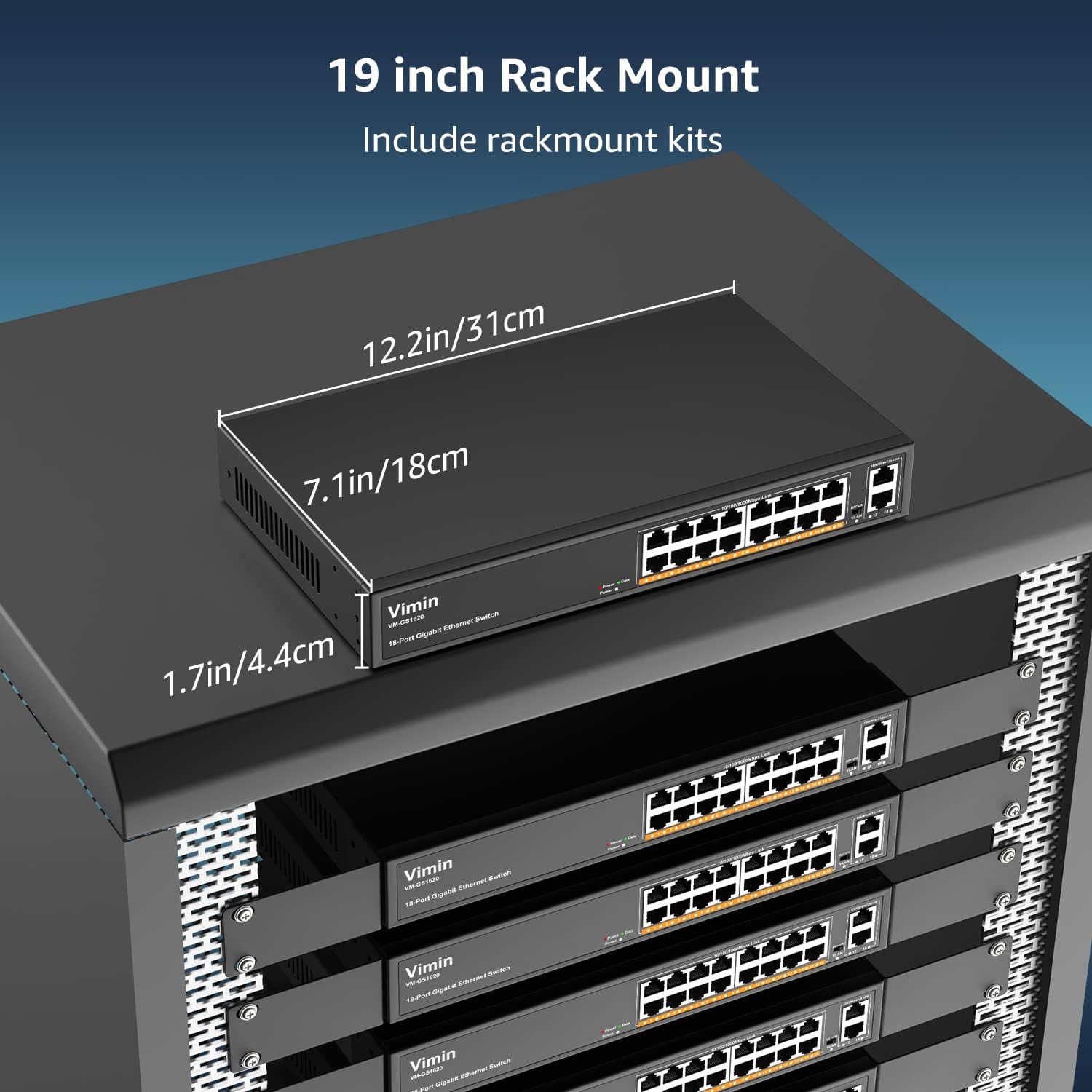
- Rack-Mount Kits (for 19-inch rack installation)
- Кіраўніцтва карыстальніка (гэты дакумент)
4. Інструкцыі па ўсталёўцы
4.1 Фізічная ўстаноўка
The VIMIN VM-GS1620 switch can be installed on a desktop or mounted in a 19-inch rack.
Размяшчэнне на працоўным стале:
- Пастаўце выключальнік на роўную ўстойлівую паверхню.
- Забяспечце належную вентыляцыю вакол прылады. Не блакуйце вентыляцыйныя адтуліны.
- Keep the switch away from heat sources, direct sunlight, and excessive moisture.
Усталёўка ў стойку:
- Attach the provided rack-mount brackets to the sides of the switch using the included screws.
- Secure the switch into a standard 19-inch equipment rack using appropriate rack screws (not included).
- Ensure proper airflow within the rack to prevent overheating.

Малюнак 3: The VIMIN VM-GS1620 switch can be installed in a 19-inch rack using the included rack-mount kits. Dimensions are approximately 12.2in (31cm) wide, 7.1in (18cm) deep, and 1.7in (4.4cm) high.
4.2 Падключэнне харчавання
- Connect one end of the AC power cord to the power input on the rear panel of the switch.
- Plug the other end of the power cord into a standard electrical outlet (AC 100-240V).
- The Power LED on the front panel should illuminate, indicating the switch is receiving power.
4.3 Сеткавыя злучэнні
The VIMIN VM-GS1620 is a Plug and Play device, requiring no software configuration for basic operation.
- Connect your network devices (e.g., computers, printers, IP cameras, access points) to any of the Gigabit Ports 1-16 using standard Ethernet cables.
- Connect your router or main network backbone to one of the Uplink Ports 17-18.
- Once a device is connected and powered on, the corresponding Link/Act LED for that port will illuminate, indicating a successful connection and activity.

Малюнак 4: Simple Plug and Play connection. Insert an Ethernet cable into any available port.

Малюнак 5: Connection diagram illustrating power connection, device connections to the switch, and the resulting network functionality.
5. Інструкцыя па эксплуатацыі
5.1 Асноўныя аперацыі
Once the switch is powered on and devices are connected, the VIMIN VM-GS1620 operates automatically. It functions as an unmanaged switch, forwarding data packets between connected devices at Gigabit speeds without requiring any user configuration.
5.2 One Key VLAN Mode
The switch features a physical VLAN switch on the front panel. This function allows you to quickly enable or disable VLAN isolation.
- VLAN OFF (Default): All ports (1-18) operate as a standard switch, allowing all connected devices to communicate with each other.
- VLAN ON: When the VLAN switch is set to ON, ports 1-16 are isolated from each other. Devices connected to ports 1-16 can only communicate with the uplink ports (17-18) and not directly with other devices on ports 1-16. This enhances network security and can improve bandwidth utilization by preventing broadcast storms within the isolated segments.

Малюнак 6: The One Key VLAN switch isolates ports 1-16 from each other, allowing them to communicate only with the uplink ports (17-18). This setup is useful for segmenting a network for security or performance.
6. Тэхнічнае абслугоўванне
The VIMIN VM-GS1620 switch is designed for minimal maintenance. Follow these guidelines to ensure its longevity:
- Уборка: Для чысткі вонкавага боку перамыкача выкарыстоўвайце мяккую сухую тканіну. Не выкарыстоўвайце вадкія або аэразольныя ачышчальнікі.
- Вентыляцыя: Ensure that the ventilation holes are not obstructed to allow for proper heat dissipation.
- Асяроддзе: Operate the switch within its specified environmental conditions (temperature, humidity).
- Кабельнае кіраванне: Трымайце сеткавыя кабелі акуратна ўкладзенымі і без перагібаў або празмерных выгібаў, каб прадухіліць пагаршэнне сігналу.
7. Выпраўленне непаладак
If you encounter issues with your VIMIN VM-GS1620 switch, refer to the following common troubleshooting steps:
- Няма харчавання:
- Check if the power cord is securely connected to both the switch and the electrical outlet.
- Праверце, ці працуе электрычная разетка.
- Ensure the Power LED on the front panel is illuminated.
- Няма спасылкі/актыўнасці на порце:
- Пераканайцеся, што кабель Ethernet надзейна падключаны як да порта камутатара, так і да падлучанай прылады.
- Паспрабуйце іншы кабель Ethernet, каб выключыць няспраўнасць кабеля.
- Падключыце прыладу да іншага порта на камутатары.
- Пераканайцеся, што падключаная прылада ўключана і працуе правільна.
- Павольная хуткасць сеткі:
- Пераканайцеся, што ўсе падлучаныя прылады і кабелі падтрымліваюць Gigabit Ethernet (Cat5e або вышэй).
- Праверце наяўнасць празмернага сеткавага трафіку або праграм, якія выкарыстоўваюць інтэнсіўную прапускную здольнасць.
- Consider enabling VLAN mode if network segmentation is desired to reduce broadcast domains.
- Devices Cannot Communicate (VLAN ON):
- If the VLAN switch is ON, devices on ports 1-16 are isolated from each other and can only communicate with uplink ports. This is expected behavior.
- If you require direct communication between all devices, ensure the VLAN switch is set to OFF.
If the problem persists after trying these steps, please contact VIMIN technical support.
8. Тэхнічныя характарыстыкі
| Асаблівасць | Апісанне |
|---|---|
| мадэль | VM-GS1620 |
| Парты | 16 x 10/100/1000Mbps RJ45 Ports, 2 x 1000Mbps Uplink RJ45 Ports |
| Хуткасць перадачы даных | 1000 мегабіт у секунду (гігабіт) |
| Камутацыйны патэнцыял | 36 Гбіт/с |
| Стандарты | IEEE 802.3, IEEE 802.3u, IEEE 802.3ab, IEEE 802.3x, IEEE 802.3af/at |
| Падтрымка VLAN | One Key VLAN (Port Isolation) |
| Абарона ад маланак | 4KV |
| Увод магутнасці | Пераменны ток 100-240 В |
| Матэрыял корпуса | Метал |
| Ўстаноўка | Desktop, 19-inch Rack-Mount |
| Памеры (прылада) | Прыбл. 12.2 х 7.1 х 1.7 цаляў (31 х 18 х 4.4 см) |
| Вага прадмета | 3.85 фунта (1.75 кг) |
| Сумяшчальныя прылады | Desktop, Gaming Console, Laptop, Printer, IP Camera, Access Point |
9. Гарантыя і падтрымка
VIMIN stands behind the quality and reliability of its products.
9.1 Інфармацыя аб гарантыі
This VIMIN VM-GS1620 switch comes with a адзін год гарантыі з даты пакупкі. Гэтая гарантыя распаўсюджваецца на вытворчыя дэфекты і няспраўнасці пры нармальным выкарыстанні. Яна не распаўсюджваецца на пашкоджанні, выкліканыя няправільным выкарыстаннем, аварыямі, несанкцыянаванымі мадыфікацыямі або стыхійнымі бедствамі.
9.2 Тэхнічная падтрымка
VIMIN provides пажыццёвая тэхнічная падтрымка for this product. If you have any questions, require assistance with installation, or encounter any issues not covered in the troubleshooting section, please contact our professional technical team.

Малюнак 7: VIMIN offers dedicated customer support.
Кантактная інфармацыя:
- электронная пошта: support@vimintech.com
- Our support team is available to provide 24-hour high-quality service.