
1. Уводзіны і большview
Welcome to the INMOTION CLIMBER Electric Scooter user manual. This document provides essential information for the safe and efficient operation, maintenance, and troubleshooting of your new electric scooter. The INMOTION CLIMBER is designed for adults, featuring dual 450W motors for powerful performance, an impressive range of up to 55km, and a top speed of 25km/h (limited) or 35km/h (on private terrain). It is equipped with an advanced SMART BSM battery system, a reliable braking system, and an efficient LED lighting system for enhanced safety and visibility.

Малюнак 1.1: Поўны view of the INMOTION CLIMBER Electric Scooter.

Малюнак 1.2: Спераду view of the INMOTION CLIMBER, highlighting the headlight and handlebar.
2. Інфармацыя па бяспецы
Your safety is paramount. Always adhere to local laws and regulations regarding electric scooter usage. Wear a helmet and appropriate protective gear. Avoid riding in adverse weather conditions or on slippery surfaces. Do not exceed the maximum weight limit of 130 kg. Familiarize yourself with the braking system before your first ride.
- Always wear a certified helmet and other protective gear (knee pads, elbow pads).
- Выконвайце ўсе мясцовыя законы і правілы дарожнага руху.
- Не катайцеся пад уздзеяннем алкаголю або наркотыкаў.
- Пазбягайце язды ў моцны дождж, снег або па абледзянелай паверхні.
- Ensure both electronic and disc brakes are functioning correctly before each ride.

Figure 2.1: Close-up of the rear disc brake mechanism, part of the dual braking system.
3. Што ў скрынцы
Upon unboxing your INMOTION CLIMBER Electric Scooter, please verify that all components are present and in good condition:
- INMOTION CLIMBER Electric Scooter (main unit)
- Кіраўніцтва карыстальніка (гэты дакумент)
- Зарадная прылада
4. Зборка і ўстаноўка
The INMOTION CLIMBER Electric Scooter comes partially assembled. Follow these steps to complete the setup:
- Асцярожна дастаньце самакат і ўсе кампаненты з упакоўкі.
- Lift the steering column until it locks into place. Ensure the folding mechanism is securely latched.
- Attach the handlebars to the steering column. Ensure all cables are properly connected and not pinched. Tighten any screws as indicated in the quick start guide (if provided separately).
- Fully charge the battery before first use. Connect the charger to the charging port and plug it into a power outlet. The indicator light on the charger will change when fully charged.
- Check tire pressure. Ensure tires are inflated to the recommended PSI for optimal performance and safety.

Малюнак 4.1: У разабраным выглядзе view of the main scooter parts, illustrating components for assembly.
5. Інструкцыя па эксплуатацыі
Familiarize yourself with the controls and features of your INMOTION CLIMBER before riding.
5.1. Уключэнне / выключэнне харчавання
Press and hold the power button on the LED display to turn the scooter on or off.
5.2. Riding and Speed Control
To start riding, kick off with one foot and then gently press the accelerator. The scooter features dual 450W motors for powerful acceleration and hill climbing. The maximum speed is limited to 25km/h for public roads, but can reach up to 35km/h on private property.

Figure 5.1: A rider demonstrating the INMOTION CLIMBER's ability to ascend steep inclines.
5.3. Тармазная сістэма
The CLIMBER is equipped with a dual braking system: Electronic Braking System (EBS) and disc brakes. Apply the brake lever gently to slow down, and firmly for emergency stops. The EBS provides stable and safe stopping power.

Малюнак 5.2: падрабязна view of the electronic and disc brake components working in tandem.
5.4. Lighting and Display
The scooter features an efficient front headlight that projects light up to 15 meters, along with rear lights and turn indicators for visibility. The integrated LED display shows real-time speed, battery level, and allows access to various settings. Press the appropriate button on the display to activate the headlight.

Figure 5.3: Close-up of the handlebar, brake lever, and the integrated LED display.

Figure 5.4: Detail of the integrated front headlight for improved visibility.

Figure 5.5: Close-up of the digital LED display showing key riding information.
6. Тэхнічнае абслугоўванне
Regular maintenance ensures the longevity and optimal performance of your INMOTION CLIMBER.
- Сыход за батарэяй: The SMART BSM system constantly monitors the battery to prevent aging and prolong its lifespan. Always use the original charger. Avoid fully draining the battery or leaving it uncharged for extended periods. Store the scooter in a cool, dry place.
- Ціск у шынах: Check tire pressure regularly and inflate to the recommended PSI (usually indicated on the tire sidewall or in specifications).
- Праверка тармазоў: Periodically inspect brake pads and discs for wear. Ensure brake levers operate smoothly and provide adequate stopping power.
- Уборка: Ачысціць скутэр з рэкламайamp cloth. Do not use high-pressure water jets or corrosive cleaners. Ensure the charging port is dry before charging.
- Агульны агляд: Regularly check all screws and fasteners for tightness. Inspect the frame for any signs of damage.

Малюнак 6.1: Разарваны view of the wheel, disc, and brake caliper components for maintenance reference.
7. Выпраўленне непаладак
If you encounter issues with your INMOTION CLIMBER, refer to the following common problems and solutions:
| праблема | Магчымая прычына | Рашэнне |
|---|---|---|
| Скутар не ўключаецца | Нізкі зарад батарэі; Слабае злучэнне; Няспраўнасць кнопкі харчавання | Зарадзіце акумулятар; праверце ўсе злучэнні; звярніцеся ў службу падтрымкі, калі праблема не знікне. |
| Reduced range/power | Low tire pressure; Battery degradation; Overload | Inflate tires to correct pressure; Ensure battery is fully charged; Do not exceed weight limit. |
| Тармазы не эфектыўныя | Worn brake pads; Loose brake cable; Air in hydraulic system (disc brakes) | Inspect and replace brake pads; Adjust brake cable tension; Seek professional service for hydraulic issues. |
| Незвычайныя гукі | Loose components; Debris in wheels/brakes; Motor issue | Check all fasteners; Clean wheels/brakes; Contact support for motor issues. |
If the problem persists after attempting these solutions, please contact INMOTION customer support.
8. Тэхнічныя характарыстыкі
Detailed technical specifications for the INMOTION CLIMBER Electric Scooter:
| Асаблівасць | Спецыфікацыя |
|---|---|
| Назва мадэлі | Альпініст |
| Памеры прадукту | 116 х 47 х 118.6 см |
| Вага | 20.8 кг |
| Максімальна падтрымоўваная вага | 130 кг |
| Магутнасць рухавіка | 2 x 450W (Dual Motors) |
| Тып батарэі | Літый-іённы (1 у камплекце) |
| Ёмістасць батарэі | 533 Вт-г / 15 А-г |
| Максімальны дыяпазон | Да 55 км |
| Maximum Speed (Limited) | 25 км/г |
| Maximum Speed (Private Terrain) | 35 км/г |
| Тып тормазу | Electronic Braking System (EBS) and Disc Brakes (Front & Rear) |
| Памер колы | 10 Centimeters (diameter) |
| Матэрыял каркаса | Метал |
| Рэкамендаваны ўзрост | Дарослыя |
| Асаблівасці | Wide Footboard, LED Display, Efficient Lighting, Turn Indicators |

Figure 8.1: Visual representation of key specifications for the INMOTION CLIMBER.

Малюнак 8.2: Разарваны view illustrating the internal components of the 450W motor.
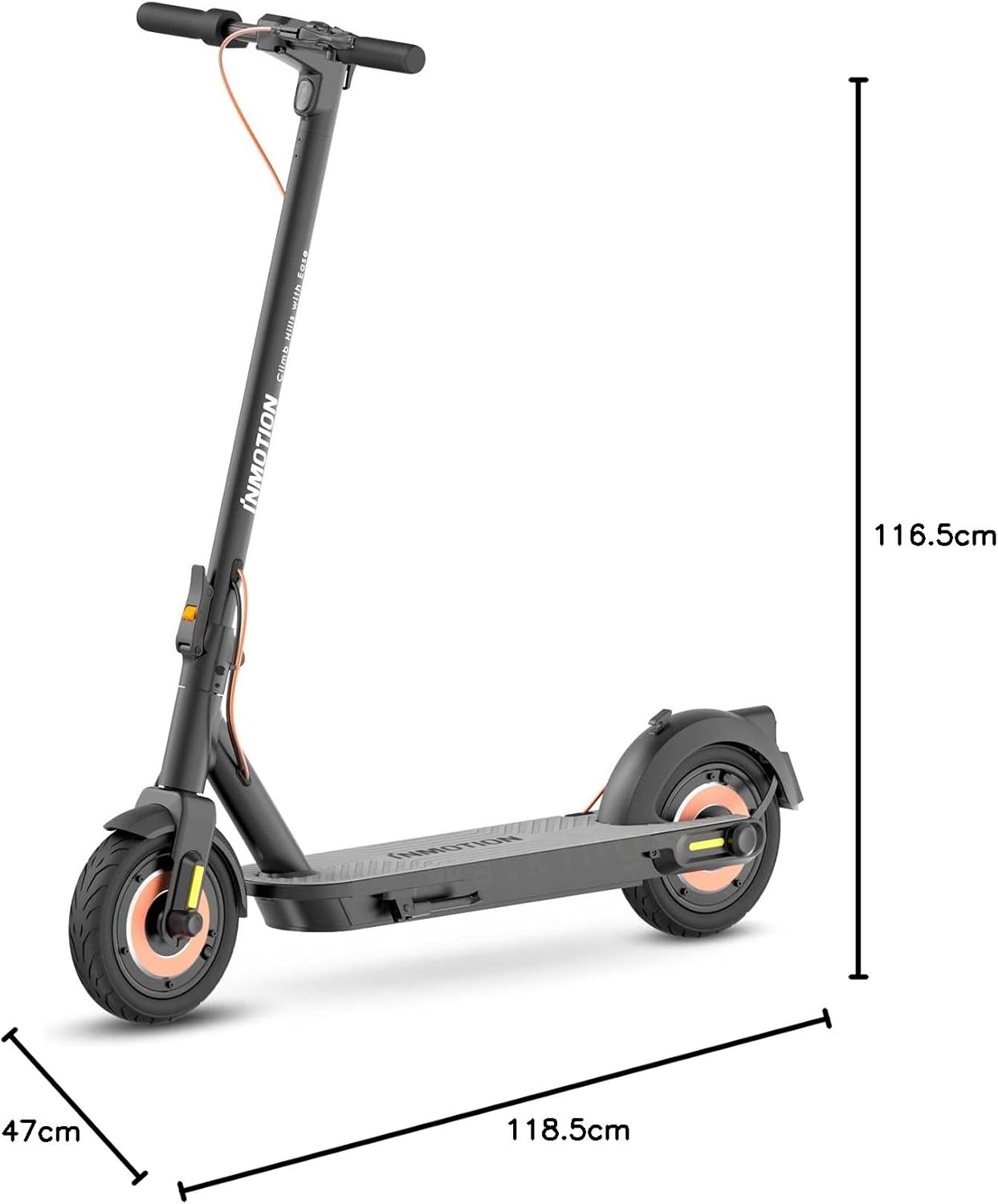
Figure 8.3: Diagram showing the overall dimensions of the INMOTION CLIMBER Electric Scooter.

Малюнак 8.4: бок view of the INMOTION CLIMBER in its folded configuration for easy storage and transport.
9. Гарантыя і падтрымка
Your INMOTION CLIMBER Electric Scooter comes with a standard manufacturer's warranty. Please refer to the warranty card included with your purchase for specific terms and conditions. For technical support, spare parts, or warranty claims, please contact INMOTION customer service through their official website or the retailer where you purchased the product. Keep your proof of purchase for warranty validation.