
Прадукт скончаныview
The Delton S12 Ergonomic Vertical Wireless Mouse is designed for comfort and efficiency, promoting a natural hand and wrist posture. It features a 2.4GHz wireless connection, six buttons, and three adjustable DPI levels for precise control. This manual provides instructions for setup, operation, maintenance, and troubleshooting.

Image: The Delton S12 Ergonomic Vertical Wireless Mouse, showcasing its vertical design.
Настройка
1. Распакаванне
Carefully remove the mouse and its accessories from the packaging. Ensure all components are present: the Delton S12 Vertical Wireless Mouse and the USB dongle.
2. Устаноўка батарэі
The Delton S12 mouse requires two (2) AAA batteries (not included). Follow these steps to install them:
- Знайдзіце батарэйны адсек на ніжняй баку мышы.
- Gently slide open the battery compartment cover.
- Устаўце дзве батарэйкі тыпу ААА, сачыце за правільнай палярнасцю (+/-).
- Зачыняйце вечка батарэйнага адсека, пакуль яно надзейна не зафіксуецца на месцы.
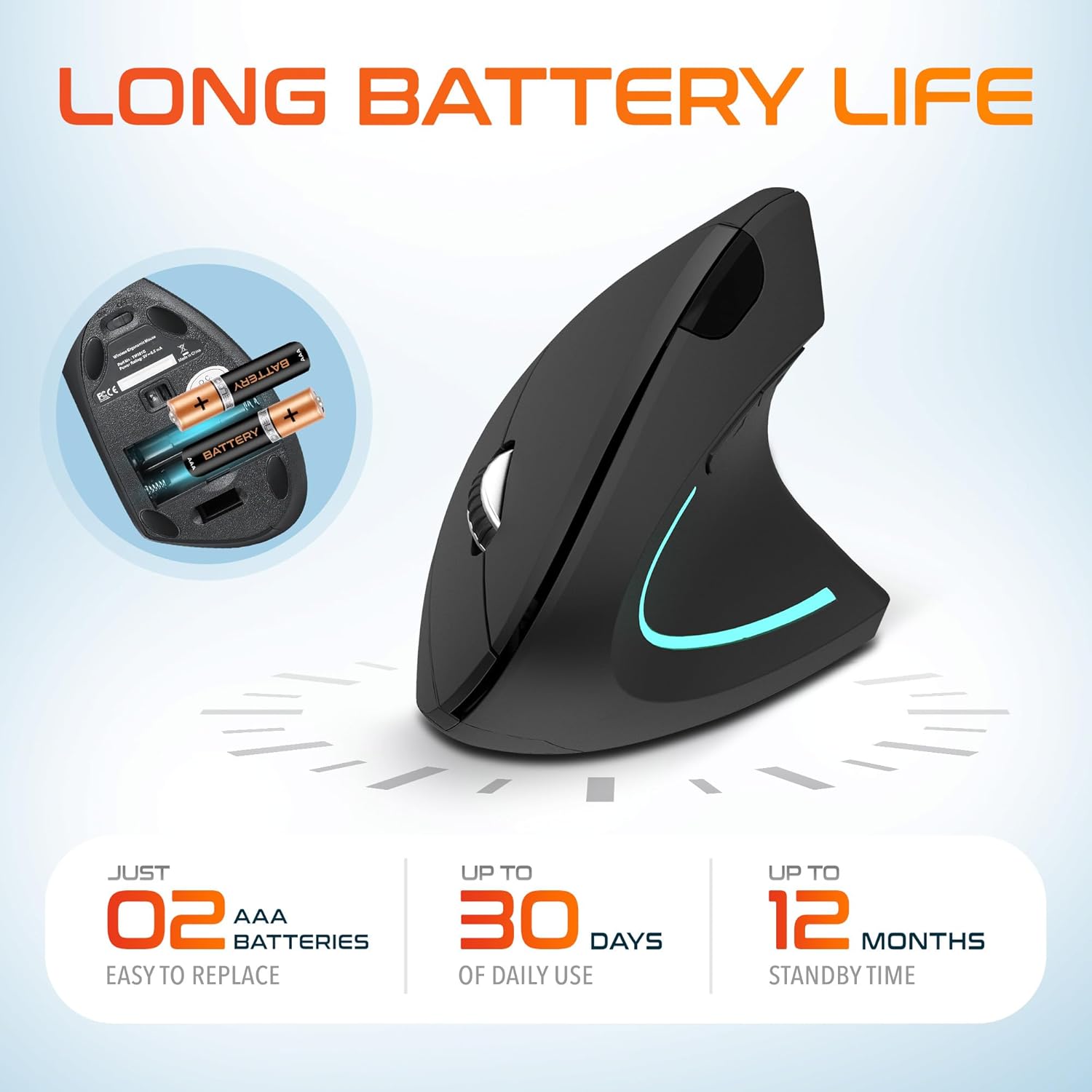
Image: The underside of the Delton S12 mouse with the battery compartment open, showing the correct placement for two AAA batteries.
3. Connecting the USB Dongle
The mouse connects wirelessly via a 2.4GHz USB dongle. No drivers are typically required for most operating systems.
- Remove the USB dongle from its storage slot, usually located near the battery compartment.
- Plug the USB dongle into an available USB port on your computer (PC, Laptop, Mac, Chromebook, etc.).
- The computer should automatically detect and install the necessary drivers. The mouse is ready for use once detected.

Image: The Delton S12 mouse positioned next to its USB dongle, ready for connection to a computer.
Кіраванне мышшу
The Delton S12 mouse features six buttons and a scroll wheel for enhanced functionality.
1. Функцыі кнопак
- Пстрычка левай кнопкай мышы: Primary selection and activation button.
- Пстрыкніце правай кнопкай мышы: Доступ да кантэкстных меню.
- Кола пракруткі: Пракручвае вертыкальна дакументы і web старонкі. Таксама можна націснуць для адкрыцця функцыі сярэдняй кнопкай мышы.
- Кнопка пераключэння DPI: Рэгулюе адчувальнасць курсора (DPI).
- Кнопка "Наперад": Перамяшчаецца наперад web браўзэры або file даследчыкі.
- Кнопка "Назад": Пераходзіць назад у web браўзэры або file даследчыкі.

Image: Diagram illustrating the location and function of the six buttons on the Delton S12 Ergonomic Vertical Wireless Mouse.
2. Рэгуляванне DPI
The mouse offers three adjustable DPI levels (800, 1200, 2400) to suit different tasks and preferences. Press the DPI Switch Button (located behind the scroll wheel) to cycle through the settings. An indicator LED will change color to show the current DPI level:
- Сіні святлодыёд: 800 DPI (Lower sensitivity, suitable for precise work)
- Чырвоны святлодыёд: 1200 DPI (Medium sensitivity, standard use)
- Зялёны святлодыёд: 2400 DPI (Higher sensitivity, suitable for faster cursor movement)

Image: Close-up of the Delton S12 mouse showing the DPI indicator LED changing colors (blue, red, green) for different sensitivity settings.
Тэхнічнае абслугоўванне
1. Уборка
Каб падтрымліваць аптымальную прадукцыйнасць, рэгулярна чысціце мыш. Выкарыстоўвайце мяккую сухую тканіну для працірання паверхні. Для ўстойлівага бруду злёгкуamp можна выкарыстоўваць тканіну, але сачыце за тым, каб вільгаць не трапляла ўнутраныя кампаненты. Пазбягайце выкарыстання агрэсіўных хімічных рэчываў або абразіўных ачышчальнікаў.
2. Замена батарэі
When the mouse performance degrades or it stops responding, it's time to replace the batteries. Follow the battery installation steps outlined in the Setup section. Dispose of used batteries responsibly according to local regulations.
Ліквідацыю непаладак
Мышка не рэагуе:
- Пераканайцеся, што мыш уключана.
- Праверце, ці правільна ўсталяваныя батарэйкі і ці дастаткова яны зараджаныя. Пры неабходнасці замяніце іх.
- Verify the USB dongle is securely plugged into a working USB port on your computer. Try a different USB port.
- Move the mouse closer to the USB dongle to ensure it's within the 30-foot operating range.
- Перазагрузіце кампутар.
Няправільны рух курсора:
- Працярыце аптычны датчык на ніжняй частцы мышы мяккай сухой тканінай.
- Пераканайцеся, што вы карыстаецеся мышшу на адпаведнай паверхні. Пазбягайце моцна бліскучых або празрыстых паверхняў. Рэкамендуецца выкарыстоўваць кілімок для мышы.
- Праверце перашкоды ад іншых бесправадных прылад.
DPI Indicator Light Not Changing:
- Press the DPI switch button firmly. If the issue persists, ensure batteries are fresh.
Тэхнічныя характарыстыкі
| Марка | Дэльтан |
| Нумар мадэлі | S12 |
| Тэхналогія падлучэння | Бесправадная сувязь 2.4 ГГц (USB-адаптар) |
| Тэхналогія выяўлення руху | Аптычны |
| Ўзроўні DPI | 800, 1200, 2400 |
| Колькасць кнопак | 6 |
| Рука арыентацыі | правільна |
| Крыніца харчавання | Battery Powered (2 x AAA batteries required) |
| Сярэдні тэрмін службы батарэі | Up to 30 days (daily use) |
| Далёкасць бесправадной сувязі | Да 30 футаў |
| Сумяшчальныя прылады | PC, Laptop, Mac, Chromebook, iOS devices |
| Аперацыйная сістэма | Windows 11/10/9/8/7/XP, Mac OS 9/8/7, Linux, Chrome OS |
| Матэрыял | Пластыкавыя |
Гарантыя і падтрымка
Інфармацыя аб гарантыі:
This Delton S12 Ergonomic Vertical Wireless Mouse comes with a 1-Year Manufacturer Warranty. This warranty covers defects in materials and workmanship under normal use. For warranty claims, please retain your proof of purchase.
Падтрымка кліентаў:
For technical assistance, troubleshooting, or any questions regarding your Delton S12 mouse, please contact Delton customer support. Refer to the product packaging or the official Delton webсайт для атрымання самай актуальнай кантактнай інфармацыі.