
Уводзіны
This manual provides detailed instructions for the safe and proper installation, operation, and maintenance of your Atlantic Full-Motion Wall Mount. Please read all instructions carefully before beginning installation and retain this manual for future reference.
The Atlantic Full-Motion Wall Mount is designed to securely hold televisions ranging from 47 to 86 inches, with a maximum weight capacity of 121 lbs (55 kg). It offers versatile viewing options including tilt, swivel, and extension capabilities to optimize your viewвопыту.
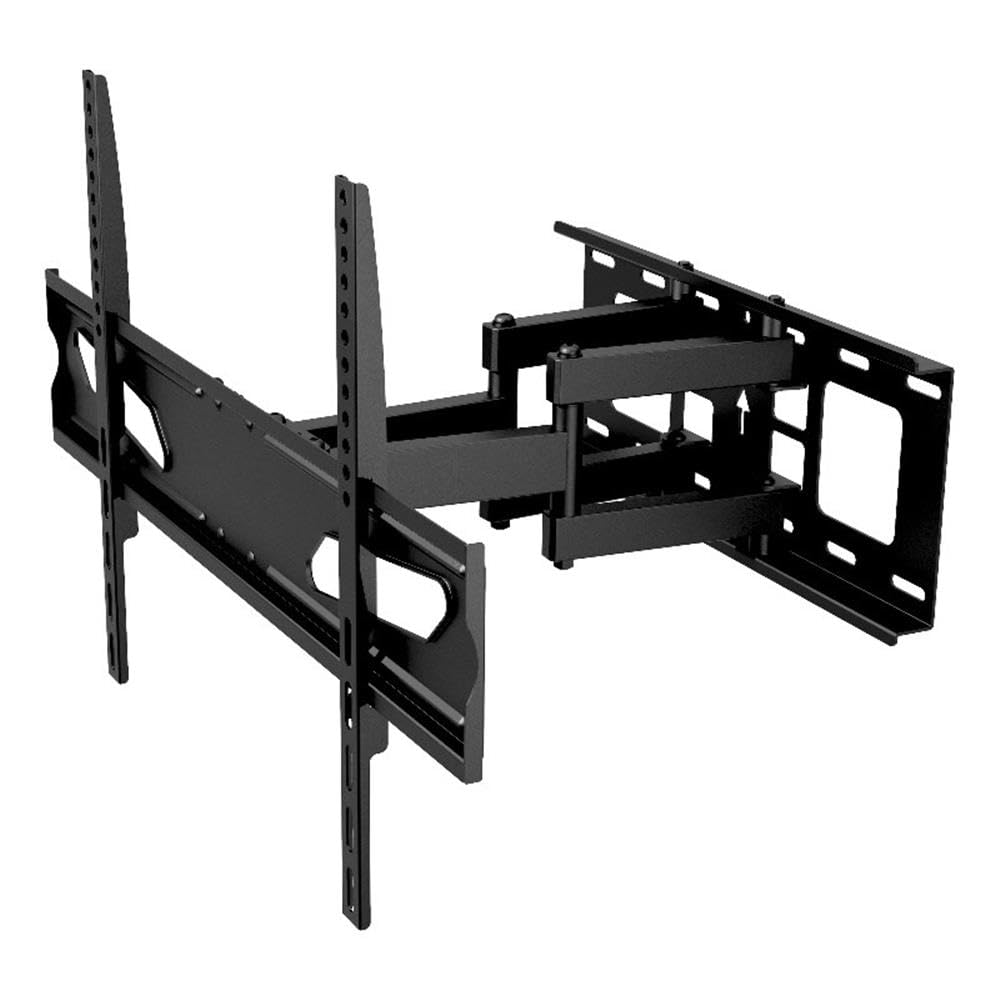
Image: The Atlantic Full-Motion TV Wall Mount, highlighting its ability to tilt ±20°, swivel ±45°, and extend up to 15.5 inches from the wall. It is suitable for TVs from 47 to 86 inches, supporting up to 121 lbs (55 kg).
Інфармацыя па бяспецы
WARNING: Failure to read and follow these instructions can result in serious personal injury, property damage, or voiding of your warranty.
- Ёмістасць вагі: Не перавышайце максімальную грузападымальнасць 55 кг (121 фунтаў). Гэта мацаванне прызначана для выкарыстання толькі з максімальна пазначанай вагой. Выкарыстанне з вырабамі, цяжэйшымі за пазначаную максімальную вагу, можа прывесці да нестабільнасці і траўмаў.
- Памер тэлевізара: This mount is designed for TVs between 47 and 86 inches. Ensure your TV falls within this range.
- Канструкцыя сцяны: The wall mount must be securely fastened to a solid wall stud (wood or metal) or concrete/brick wall. Do not install on drywall alone. If unsure about your wall structure, consult a qualified professional.
- інструменты: Use appropriate tools for installation. Ensure all screws are tightened securely but do not overtighten.
- дзеці: Трымайце дзяцей далей падчас усталёўкі. Дробныя дэталі могуць выклікаць небяспеку ўдушша.
- Прафесійная ўстаноўка: If you have any doubts about installing this product, please contact a professional installer.
Змест пакета
Please verify that all components are present and undamaged before installation. Refer to the parts list included in your product packaging for a complete inventory. If any parts are missing or damaged, do not proceed with installation and contact customer support.
Настройка і ўстаноўка
Proper installation is critical for the safety and stability of your TV. Follow these steps carefully.
1. Prepare the Wall and Locate Studs
Identify the exact location on your wall where you intend to mount the TV. Use a stud finder to locate the center of the wall studs. Mark these locations clearly. For concrete or brick walls, use a masonry drill bit and appropriate anchors (not always included, check your package).
2. Attach Wall Plate to Wall
Position the wall plate against the wall, aligning the mounting holes with the marked stud centers. Use a level to ensure the plate is perfectly horizontal. Drill pilot holes as recommended in your specific hardware kit, then secure the wall plate using the provided lag bolts and washers. Ensure it is firmly attached.
3. Прымацуйце кранштэйны тэлевізара да тэлевізара
Lay your TV face down on a soft, clean surface to prevent scratches. Identify the VESA mounting holes on the back of your TV. Select the appropriate screws, washers, and spacers from the hardware kit that fit your TV's VESA pattern. Attach the two vertical TV brackets to the back of your TV. Ensure they are securely fastened and evenly spaced.

Image: A diagram illustrating the TV mounting pattern (VESA compatibility) ranging from minimum 75mm/3 inches to maximum 600mm/23.6 inches horizontally and 410mm/16.1 inches vertically. Also shows overall mount dimensions.
4. Павесьце тэлевізар на насценную кранштэйну
With assistance, carefully lift the TV and hook the attached TV brackets onto the wall plate. Ensure the brackets are properly seated and locked into place. Most mounts include safety screws or locking mechanisms to prevent accidental dislodgement. Secure these as per the instructions in your hardware kit.

Выява: бок А view of the wall mount, illustrating its extension capabilities. The mount can extend from 2.7 inches (profile from wall) to 15.5 inches from the wall.
Інструкцыя па эксплуатацыі
Once installed, your full-motion mount allows for flexible TV positioning.
- Пашырэнне: Gently pull the TV away from the wall to extend the arm. The mount can extend up to 15.5 inches from the wall.
- Паваротны: Carefully push or pull the TV horizontally to swivel it left or right. The mount offers a ±45° swivel range.
- Нахіл: Adjust the vertical angle of the TV by gently pushing the top or bottom of the TV. The mount allows for a ±20° tilt (20° downward and upward). This can help reduce glare.
- Screen Level Adjustment: The mounting plate allows for a ±3° rotation for last-minute level adjustments after installation.

Image: An illustration demonstrating the ±45° swivel range of the TV wall mount, allowing for flexible viewныя вуглы.

Image: A living room setting demonstrating the full-motion capability, specifically the swivel range, to find the perfect viewкут нахілу.

Image: A living room scene showing a TV mounted on the wall, tilted ±20° to avoid unwanted glare and improve viewз камфортам.

Image: This image indicates the mount fits TVs up to a maximum of 86 inches (47-86 inches) and highlights the ±3° screen level adjustment feature.
Тэхнічнае абслугоўванне
Рэгулярнае тэхнічнае абслугоўванне забяспечвае даўгавечнасць і бяспечную працу вашага тэлевізара.
- Уборка: Працірайце мацаванне мяккай сухой тканінай. Пазбягайце выкарыстання абразіўных ачышчальнікаў або растваральнікаў, якія могуць пашкодзіць пакрыццё.
- Праверце злучэнні: Periodically check all screws and bolts to ensure they remain tight. Over time, vibrations or adjustments can cause them to loosen. Do not overtighten.
- Праверце на знос: Inspect the mount for any signs of wear, damage, or corrosion. If any issues are found, discontinue use and contact customer support.
Ліквідацыю непаладак
If you encounter issues with your TV mount, refer to the following common solutions.
- Тэлевізар не стаіць роўна: Use the ±3° screen level adjustment feature to fine-tune the horizontal alignment. If this does not resolve the issue, re-check the wall plate installation to ensure it was level.
- Difficulty moving the TV (tilt/swivel/extend): Ensure no cables are snagged or obstructing movement. Check if any adjustment knobs or bolts are overtightened. Loosen slightly if necessary, but ensure the TV remains secure.
- Мацаванне адчуваецца няўстойлівым: Immediately remove the TV from the mount. Re-check all wall plate and TV bracket connections. Ensure the mount is securely fastened to wall studs or appropriate concrete/brick anchors. Verify that your TV's weight and size are within the mount's specifications. If instability persists, contact a professional installer.
Тэхнічныя характарыстыкі
| Асаблівасць | Спецыфікацыя |
|---|---|
| Нумар мадэлі | 63607415 |
| Сумяшчальнасць па памеры тэлевізара | 47" – 86" |
| Ёмістасць вагі | 121 фунтаў (55 кг) |
| профіfile ад Уол | 2.7" |
| Пашырэнне ад сцяны | Да 15.5 цаляў |
| Дыяпазон нахілу | ±20° (20° downward and upward) |
| Дыяпазон павароту | ±45° |
| Screen Level Adjustment | ±3° |
| Сумяшчальнасць VESA | ад 200x100 да 600x400 мм |
| Матэрыял | Трывалая сталёвая канструкцыя |
| Вага прадмета | 10.8 фунта |
| Памеры прадукту | 15.43 х 25.98 х 16.93 цалі |
| UPC | 031742074158 |
Інфармацыя аб гарантыі
This Atlantic Full-Motion Wall Mount comes with a 1-гадовая абмежаваная гарантыя вытворцы. This warranty covers defects in materials and workmanship under normal use. It does not cover damage resulting from improper installation, misuse, abuse, accident, or unauthorized modifications. Please retain your proof of purchase for warranty claims.
Падтрымка кліентаў
For technical assistance, missing parts, or warranty inquiries, please contact Atlantic customer support. You can typically find contact information on the manufacturer's official webсайце або на ўпакоўцы вашага прадукту.
Webсайт: www.atlantic-inc.com (Калі ласка, праверце афіцыйную webсайт для атрымання найбольш актуальнай кантактнай інфармацыі.)