
Уводзіны
This manual provides detailed instructions for the safe and effective operation of your ENEGON RGB Video Light. Please read this manual thoroughly before using the product and retain it for future reference.
Што ў скрынцы
Пасля распакавання пераканайцеся, што ўсе наступныя рэчы наяўныя:
- 1 RGB Video Light
- 1 Portable Carrying Bag
- Шруба 1 1/4
- 1 зарадны кабель Type-C
- 1 Дапаможнік

Image: Contents of the ENEGON RGB Video Light package.
Прадукт скончаныview і Асаблівасці
The ENEGON RGB Video Light is a versatile lighting solution designed for various photography and videography needs. Key features include:
- Маляўнічыя светлавыя эфекты: Features 90 bi-color LED beads and 48 RGB color LED beads, providing up to 1500Lux at 0.5 meters. Offers 3 modes with 24 common lighting scene effects in RGB full color.
- Рэгуляванне: Adjust hue (0-359 degrees), color saturation (0-100%), brightness (0-100%), and color temperature (2500K-9000K). All settings are displayed on the built-in LCD screen.
- Высокая дакладнасць колеру: CRI of ≥95 and TLCI of ≥95 for accurate color rendering.
- Built-in Battery & Power Bank Function: Equipped with a 3.7V 4000mAh rechargeable battery. Features a USB Type-C charging port and a USB output port, allowing it to function as a power bank. Full charge in approximately 2.5 hours.
- Універсальны мантаж: Includes a cold shoe for mounting on DSLR cameras, camcorders, tripods, and lamp трымальнікі.
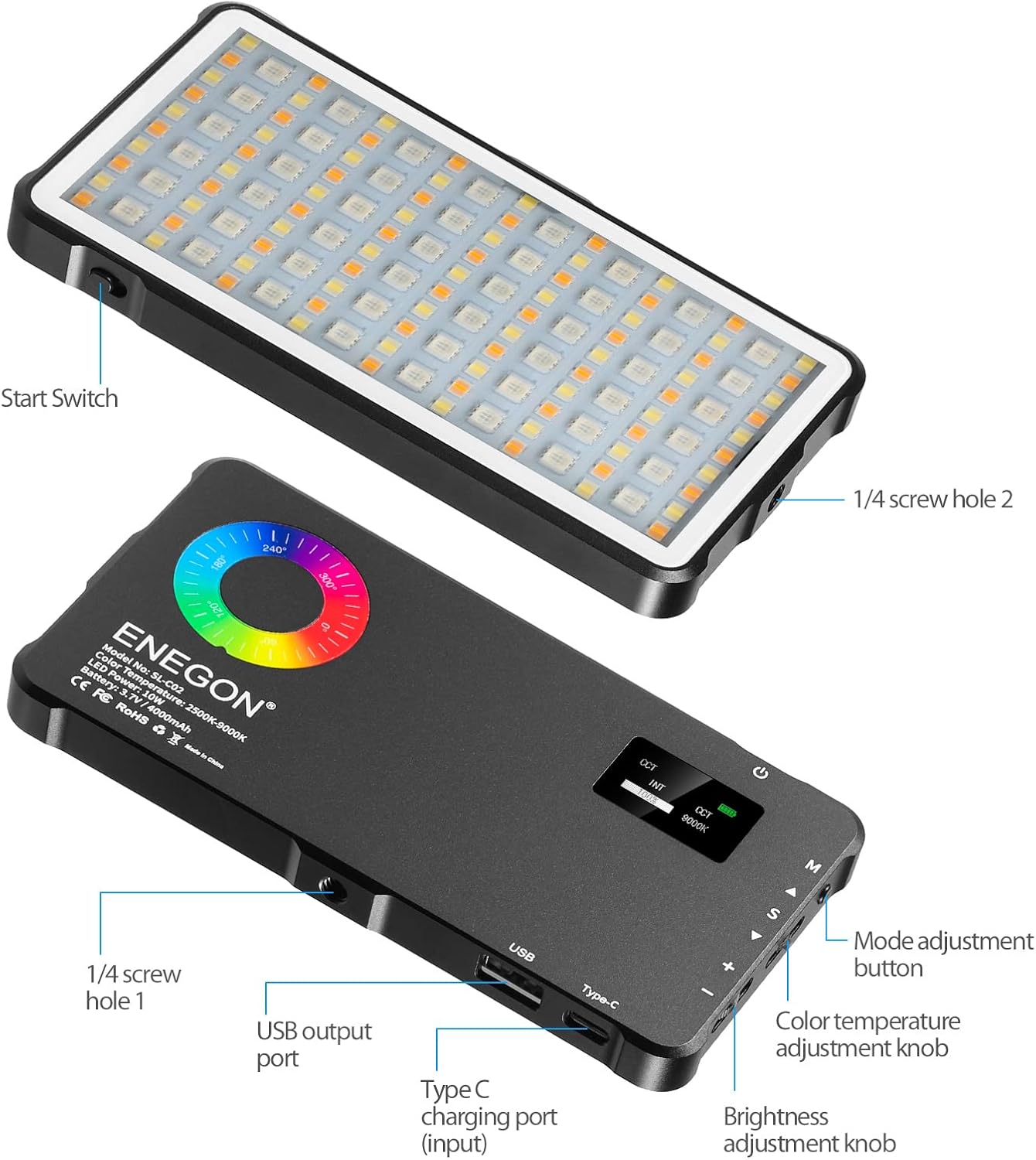
Выява: спераду і ззаду view of the ENEGON RGB Video Light, highlighting controls and ports.

Image: Visual representation of brightness, color temperature, and RGB color adjustments.

Image: Icons representing the 24 available light effects.
Настройка
- Распакуйце: Акуратна дастаньце ўсе кампаненты з упакоўкі.
- Першапачатковая плата: Before first use, fully charge the RGB Video Light using the provided Type-C charging cable. Connect the cable to the Type-C charging port on the device and a suitable USB power source. The LCD screen will indicate charging status.
- Attach Mount (Optional): If using with a camera or tripod, screw the 1/4 screw adapter into one of the 1/4 screw holes on the light. Then attach it to your desired device.
Інструкцыя па эксплуатацыі
Familiarize yourself with the controls located on the side of the light:
- Кнопка харчавання: Press and hold to turn the light ON/OFF.
- Mode Adjustment Button (M): Press to cycle through different lighting modes (CCT, HSI, Scene Effects).
- Color Temperature Adjustment Knob (S): In CCT mode, rotate to adjust color temperature from 2500K to 9000K.
- Brightness Adjustment Knob (+/-): Rotate to adjust brightness from 0% to 100% in any mode.
- Hue Adjustment (A/V): In HSI mode, use the up/down buttons to adjust hue from 0 to 359 degrees.
- Saturation Adjustment (S): In HSI mode, use the S button to adjust color saturation from 0% to 100%.
Using Scene Effects:
In Scene Effects mode, use the mode button to cycle through the 24 pre-programmed lighting effects such as "Sun," "Candle," "Police," "Fire," etc. Adjust brightness as needed.
Зарадка і акумулятар
The ENEGON RGB Video Light features a built-in 4000mAh rechargeable Lithium Polymer battery. A full charge takes approximately 2.5 hours and provides up to 2 hours of continuous use at maximum brightness.
- Зарадка: Connect the provided Type-C USB cable to the Type-C input port on the light and a standard USB power adapter (not included).
- Функцыя Power Bank: The light also has a USB output port, allowing you to use its internal battery to charge other devices, such as smartphones, in an emergency.

Image: The ENEGON RGB Video Light demonstrating its charging and power bank capabilities.
Варыянты мантажу
The versatile design of the ENEGON RGB Video Light allows for multiple mounting configurations:
- Мацаванне халоднага башмака: Use the integrated cold shoe to attach the light directly to DSLR cameras, camcorders, or other compatible accessories.
- 1/4" Screw Holes: The light features 1/4" screw holes on multiple sides, enabling attachment to tripods, light stands, or other photographic equipment.

Малюнак: Examples of mounting the ENEGON RGB Video Light on various devices.
Тэхнічныя характарыстыкі
| Асаблівасць | Дэталь |
|---|---|
| Памеры прадукту | 5.94" Д х 3.15" Ш х 0.47" В (15.15 х 8.05 х 1.20 см) |
| Вага прадмета | 10.8 унцыі (306 грам) |
| Нумар мадэлі тавару | ES-EN-SL-C02-KM-VD-NEW |
| акумулятар | 1 Lithium Polymer battery (3.7V 4000mAh) |
| Тэрмін службы батарэі | Up to 2 hours (at max brightness) |
| Час зарадкі | Прыбл. 2.5 гадзіны |
| Каляровая тэмпература | 2500K-9000K |
| CRI | ≥95 |
| TLCI | ≥95 |
| Тэхналогія падлучэння | USB |
| Абсталяванне інтэрфейсу | USB тыпу C |
Тэхнічнае абслугоўванне
- Keep the device clean by wiping with a soft, dry cloth.
- Пазбягайце ўздзеяння на прыладу экстрэмальных тэмператур, вільготнасці або прамых сонечных прамянёў.
- Не спрабуйце самастойна разабраць або адрамантаваць прыладу. Звярніцеся ў службу падтрымкі па дапамогу.
- Store the device in its portable carrying bag when not in use to protect it from dust and scratches.
Ліквідацыю непаладак
- Не гарыць святло: Пераканайцеся, што акумулятар зараджаны. Падключыце да крыніцы харчавання з дапамогай кабеля Type-C.
- Святло не зараджаецца: Verify the Type-C cable is securely connected to both the light and the power source. Try a different USB power adapter.
- Непаслядоўная светлавая аддача: Check battery level. Ensure no obstructions are blocking the LED panel.
- Device not charging from light (power bank function): Ensure the light has sufficient charge. Connect the device to the USB output port securely.
Гарантыя і падтрымка
For warranty information, technical support, or service inquiries, please refer to the contact details provided in the product packaging or visit the official ENEGON webсайт. Захоўвайце чэк аб куплі як пацвярджэнне пакупкі для гарантыйных прэтэнзій.
Афіцыйныя відэа пра прадукт
Watch these official videos for additional guidance and demonstrations of your ENEGON RGB Video Light.
Video: Full Color RGB Video Light demonstration by Creator Coyal.
Video: RGB Video Light features and usage by Virginia Grant.