
Aspen ASTF-A40-BLK
Кіраўніцтва карыстальніка мыйнага вентылятара Aspen 40 цаляў
Model: ASTF-A40-BLK
1. Уводзіны
Дзякуй за пакупкуasing the Aspen 40-inch Washable Tower Fan. This manual provides important information regarding the safe operation, installation, maintenance, and troubleshooting of your new fan. Please read this manual thoroughly before use and retain it for future reference.
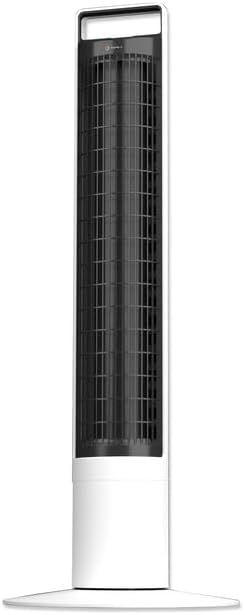
Выява: спераду view of the Aspen 40-inch Washable Tower Fan.
2. Інфармацыя па бяспецы
Заўсёды выконвайце асноўныя меры бяспекі пры выкарыстанні электрапрыбораў, каб знізіць рызыку пажару, паражэння электрычным токам і траўмаў людзей.
- Не выкарыстоўвайце вентылятар з пашкоджаным шнуром або вілкай.
- Не пракладвайце шнур пад дывановым пакрыццём. Не накрывайце шнур дыванкамі, дарожкамі або падобнымі пакрыццямі. Размясціце шнур далей ад зоны руху і так, каб аб яго не спатыкнуцца.
- Always unplug the fan before moving, cleaning, or performing maintenance.
- Do not immerse the main unit (base) in water or other liquids. Only the detachable tower is designed for washing.
- Ensure the fan is completely dry before reassembling and plugging in after cleaning.
- Гэты вентылятар прызначаны толькі для выкарыстання ў памяшканні.
3. Змесціва ўпакоўкі
Праверце наяўнасць усіх кампанентаў у камплекце:
- Aspen 40-inch Tower Fan (Main Unit and Detachable Tower)
- Base Assembly (2 parts)
- Пульт дыстанцыйнага кіравання (з 1 батарэйкай CR2 у камплекце)
- Кіраўніцтва карыстальніка (гэты дакумент)
4. Настройка
Follow these steps to assemble and set up your tower fan:
- База зборкі: Connect the two halves of the base assembly. Align the fan tower with the assembled base and twist clockwise to secure it. A screwdriver may be needed for initial base assembly.
- Размяшчэнне: Place the fan on a firm, level surface. Ensure there is adequate space around the fan for proper airflow and oscillation.
- Падключэнне сілкавання: Падключыце шнур сілкавання да звычайнай электрычнай разеткі.

Image: Illustration of the fan base assembly process.
5. Інструкцыя па эксплуатацыі
Your Aspen Tower Fan can be operated using the control panel on top of the unit or the included magnetic RF remote control.
Функцыі панэлі кіравання і пульта дыстанцыйнага кіравання:

Image: Close-up of the fan's top control panel and the magnetic remote control, showing button functions.
- Уключэнне/выключэнне харчавання: Націсніце кнопку харчавання (⏻), каб уключыць або выключыць вентылятар.
- Хуткасць вентылятара: Cycle through 4 fan speeds (Low, Medium, High, Turbo) by pressing the fan speed button (⇋).
- Ваганні: Націсніце кнопку ваганняў (↻) to activate or deactivate the 60-degree narrow-angle oscillation feature. This provides a consistent, focused breeze.

Image: Visual representation of the fan's 60-degree narrow-angle oscillation, showing airflow.
- Таймер: Set the auto-off timer for up to 8 hours by pressing the timer button (◷). Each press adds an hour to the timer.
- Начнік: Activate the 3-color LED nightlight by pressing the nightlight button (💡). Cycle through colors or turn off the light.

Image: The Aspen Tower Fan with its base illuminated by the built-in nightlight.
Зручныя функцыі:
- Ручка для пераноскі: The integrated handle on top of the fan allows for easy transport.

Image: A hand holding the fan by its convenient top carry handle.
- Magnetic Remote: The remote control magnetically attaches to the top of the fan for convenient storage.
6. Тэхнічнае абслугоўванне
The Aspen Tower Fan features an easy-wash design for convenient cleaning. Regular cleaning ensures optimal performance and extends the life of your fan.
Cleaning the Detachable Fan Tower:
- Remove Remote: First, remove the magnetic remote control from the top of the fan.
- Detach Tower: Twist the fan tower counter-clockwise from the base and gently pull it up to detach.
- мыць: The detached fan tower can be washed or rinsed with soap and water. You can soak it or spray it with a water nozzle.
- Цалкам высахнуць: Allow the fan tower to dry completely before reassembling. Ensure no moisture remains inside.
- Зборка: Align the line on the fan tower with the unlock symbol on the base, then push down and twist clockwise to lock it into place. Reinsert the remote.

Image: A person rinsing the detached fan tower with a shower head in a bathtub.

Image: A visual sequence showing a dusty fan, the rinsing process, and a clean, fresh fan.
Навучальнае відэа:
Video: Official Aspen video demonstrating how to clean the tower fan. This video shows the steps for detaching the tower, washing it, and reassembling it.
7. Выпраўленне непаладак
If you encounter issues with your Aspen Tower Fan, refer to the following common problems and solutions:
| праблема | Магчымая прычына | Рашэнне |
|---|---|---|
| Вентылятар не ўключаецца. | No power, loose connection, remote battery low. | Check power cord connection. Ensure outlet is working. Replace remote battery (CR2). |
| Паменшаны паток паветра. | Dust buildup in tower. | Clean the detachable fan tower as per Maintenance section. |
| Вентылятар выдае незвычайны шум. | Obstruction, improper assembly. | Ensure no foreign objects are inside. Check if the tower is securely locked into the base. |
| Не працуе пульт дыстанцыйнага кіравання. | Battery depleted, obstruction between remote and fan. | Replace the CR2 battery in the remote. Ensure no objects are blocking the signal path. |
If the problem persists after trying these solutions, please contact Aspen customer support.
8. Тэхнічныя характарыстыкі
| Асаблівасць | Дэталь |
|---|---|
| Марка | асіна |
| Назва мадэлі | Aspen Tower Fan Black (ASTF-A40-BLK) |
| Памеры прадукту | 12" Г x 12" Ш x 41" У |
| Вага прадмета | 9.9 фунта |
| Колер | Белы |
| Крыніца харчавання | Правадная электрычная |
| Колькасць узроўняў магутнасці | 4 хуткасцяў |
| Метад кантролю | Дыстанцыйнае |
| Асаблівасці | Lightweight, Oscillating, Detachable for Washing, 3-Color Nightlight, 4 Timers, Magnetic RF Remote |
| Тып нумара | Спальня, гасцёўня, хатні офіс |
| Уключаныя кампаненты | Дыстанцыйнае |
| Выкарыстанне ў памяшканні/на вуліцы | У памяшканні |
| Батарэі | Патрабуецца 1 батарэя CR2 (у камплекце) |
9. Гарантыя і падтрымка
Specific warranty details are not provided in this manual. For warranty information, product support, or to purchase replacement parts, please contact Aspen customer service.
You can visit the official Aspen store on Amazon for more information: Aspen Store