
Уводзіны
This manual provides detailed instructions for the installation, operation, and maintenance of your Gravity D96CP HiFi Audio Processor Car Stereo. Please read this manual thoroughly before using the product to ensure proper function and to prevent damage.
Інфармацыя па бяспецы
- Ensure all wiring is correctly connected to prevent short circuits or damage to the unit and vehicle.
- Не карыстайцеся прыладай такім чынам, каб гэта адцягвала вас ад кіравання. Заўсёды надавайце прыярытэт бяспецы дарожнага руху.
- Калі вы не ўпэўненыя ў якіх-небудзь кроках, звярніцеся да спецыяліста па ўсталёўцы.
- Трымайце прыладу далей ад вады і празмернай вільгаці.
- Do not attempt to repair the unit yourself. Refer servicing to qualified personnel.
Што ў скрынцы
Пасля адкрыцця ўпакоўкі пераканайцеся ў наяўнасці ўсіх кампанентаў:
- Gravity D96CP Car Stereo Unit
- Пульт дыстанцыйнага кіравання
- Электраправодка
- Кіраўніцтва карыстальніка (гэты дакумент)
Note: Additional accessories such as a trim kit, specific vehicle wiring harness, or RCA cables may be required for installation and are sold separately.
Прадукт скончаныview
Пярэдняя панэль

Малюнак 1: Фронт view of the Gravity D96CP Car Stereo. The 6.5-inch touchscreen displays the main interface with icons for various functions. Physical buttons for IR, RST, Power, Band, Volume Up/Down, and Disc Eject are located on the left side. A USB port is at the bottom left.
Задняя панэль і раздымы

Малюнак 2: Rear panel of the Gravity D96CP Car Stereo. This view highlights the multiple RCA jacks for audio/video input and output, a TV antenna port (functionality may vary), a radio antenna input, and the main connector for the wiring harness.
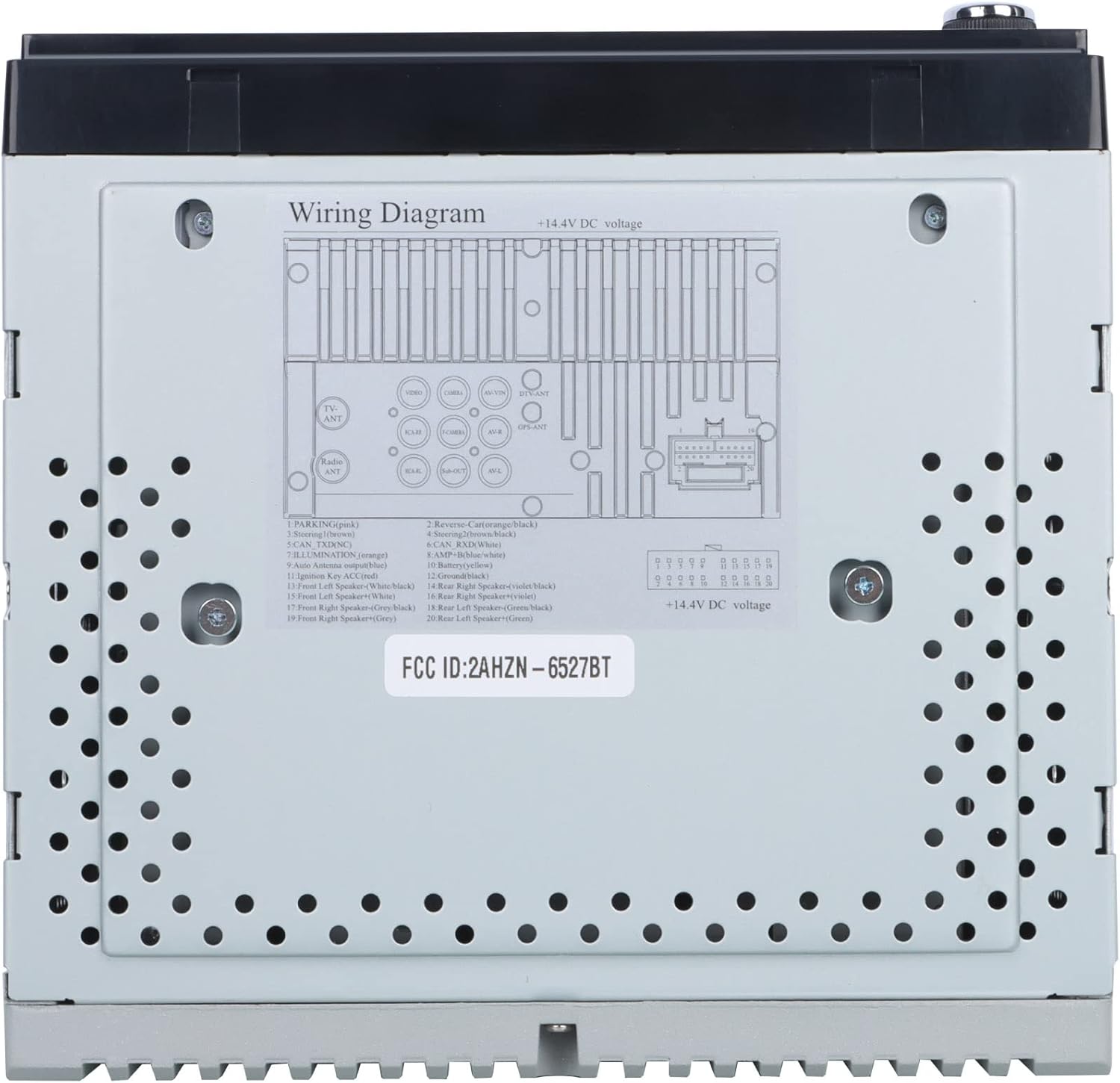
Малюнак 3: Detailed wiring diagram for the Gravity D96CP. This diagram illustrates the pin assignments for the main power and speaker harness, including connections for parking brake, reverse, illumination, antenna, and ampкантроль Lifier.
Настройка і ўстаноўка
Proper installation is crucial for the performance and safety of your car stereo. If you are not confident in performing the installation yourself, seek professional assistance.
Кантрольны спіс перад устаноўкай
- Перад пачаткам любых пракладак электраправодкі пераканайцеся, што акумулятар аўтамабіля адключаны.
- Verify the stereo's dimensions fit your vehicle's dashboard opening. A trim kit may be necessary.
- Obtain a vehicle-specific wiring harness adapter if not included, to avoid cutting factory wires.
Электраправодныя злучэнні
Спасылацца на Малюнак 3 for the detailed wiring diagram. Key connections include:
- Харчаванне (жоўты): Пастаяннае напружанне 12 В.
- Запальванне (чырвоны): Switched 12V supply (ACC).
- Грунт (чорны): Падключыце да чыстай кропкі зазямлення шасі.
- Правады акустычных сістэм: Connect to corresponding vehicle speakers (Front Left, Front Right, Rear Left, Rear Right). Ensure correct polarity.
- Reverse (Orange/Black): Connect to the vehicle's reverse light circuit for automatic camera display.
- Parking (Pink): This unit may not have a dedicated parking brake interlock. Exercise caution when operating video functions while driving.
- Антэна (сіняя): Сілавая антэна/ampдыстанцыйнае ўключэнне Liferier.
- Знешні мікрафон: Падключыце знешні мікрафон для паляпшэння якасці званка.
Note: The unit features RCA jacks for video in/out and audio in/out, allowing connection of external sources or additional screens. RCA cables are not included.
Інструкцыя па эксплуатацыі
Базавая аперацыя
- Уключэнне/выключэнне харчавання: Націсніце кнопку харчавання на пярэдняй панэлі.
- Рэгулятар гучнасці: Use the VOL+ and VOL- buttons on the front panel or the touchscreen controls.
- Выбар рэжыму: Tap the desired icon on the touchscreen (e.g., Radio, Bluetooth, USB, AUX, Phonelink, Settings).
Apple CarPlay / Android Auto
Connect your iPhone (for CarPlay) or Android phone (for Android Auto) to the stereo via a certified USB cable. The system will automatically detect and launch the respective interface. This allows access to phone functions like navigation, music, calls, and messages directly from the stereo's touchscreen or via voice commands (Siri/Google Assistant).
- Пераканайцеся, што аперацыйная сістэма вашага тэлефона абноўлена.
- Use the original USB cable for optimal connection stability.
- The phone screen and stereo screen operate independently, allowing different content to be displayed on each.
Люстраная спасылка
The Mirror Link function projects your smartphone's screen directly onto the car stereo display. Connect your phone via a USB cable, and follow the on-screen prompts to activate mirroring. Any content displayed on your phone will be synchronized in real-time on the 6.5-inch stereo screen.
Злучэнне Bluetooth
- Спалучэнне: Go to the Bluetooth menu on the stereo. Enable Bluetooth on your smartphone and search for available devices. Select "Gravity D96CP" (or similar name) and confirm pairing.
- Гучная сувязь: Once paired, you can answer/make calls directly from the stereo. The external microphone picks up your voice, and audio plays through the car speakers.
- Паток аўдыё: Stream music and audio from your phone to the stereo. Control playback (play/pause, skip) via the stereo's touchscreen or your phone.
Прайгравальнік DVD/CD
Insert a DVD or CD into the disc slot. The unit will automatically detect the disc and begin playback. Use the touchscreen controls for playback functions (play, pause, skip, menu).
радыё
- У галоўным меню абярыце значок «Радыё».
- Выкарыстоўвайце функцыю сканавання, каб знайсці даступныя станцыі, або наладзьцеся на частату ўручную.
- Save preferred stations to preset buttons for quick access.
Прайграванне з USB
Insert a USB drive into the front USB port. The unit will automatically detect compatible media files (audio, video, images) and allow you to browse and play them.
Тыл View Камера рэзервовага капіравання
Калі сумяшчальны задні view camera (sold separately) is connected and the reverse wire is properly installed, the stereo will automatically display the camera feed when the vehicle is shifted into reverse.
Тэхнічнае абслугоўванне
- Ачыстка экрана: Выкарыстоўвайце мяккую тканіну без ворса, каб акуратна працерці сэнсарны экран. Не выкарыстоўвайце абразіўныя ачышчальнікі або растваральнікі.
- Генеральная ўборка: Keep the unit free from dust and debris. Use a soft, dry cloth for exterior cleaning.
- Абнаўленні прашыўкі: Праверце вытворцы webперыядычна правярайце сайт на наяўнасць даступных абнаўленняў прашыўкі для паляпшэння прадукцыйнасці і дадання новых функцый.
Ліквідацыю непаладак
| праблема | Магчымая прычына | Рашэнне |
|---|---|---|
| Прылада не ўключаецца. | Incorrect wiring (power/ground), blown fuse. | Check all power and ground connections. Inspect the fuse on the wiring harness. |
| Няма гуку. | Speaker wires incorrectly connected, volume too low, mute activated. | Verify speaker wiring polarity and connections. Increase volume. Check if mute is active. |
| Apple CarPlay/Android Auto not connecting or unstable. | Non-original USB cable, outdated phone OS, loose connection. | Use a certified, original USB cable. Ensure phone OS is updated. Reconnect the USB cable firmly. |
| Bluetooth connection issues or poor call quality. | Interference, phone not paired, microphone issue. | Re-pair the device. Ensure the external microphone is properly connected and positioned. |
| DVD player plays sound but no video. | Disc issue, video format incompatibility, parking brake safety feature (if present). | Try a different DVD. Ensure the video format is supported. Verify parking brake connection if applicable. |
| Screen goes black when headlights are turned on. | Illumination wire incorrectly connected. | Check the illumination wire connection (orange wire) to ensure it's correctly wired to the vehicle's dimmer circuit or constant 12V if no dimmer is desired. |
Тэхнічныя характарыстыкі
| Нумар мадэлі | VGR-D96CP |
| Марка | Гравітацыя |
| Памер экрана | 6.5 цаляў |
| Тэхналогія падлучэння | Дапаможны, Bluetooth, USB |
| Тып кантролера | Android, Google Assistant, iOS |
| Асаблівасці | Spotify, Touchscreen, Apple CarPlay, Android Auto, Mirror Link, DVD/CD Player |
| Сумяшчальныя прылады | Mobile Phone, Speaker |
| Рэжым выхаду гуку | Акружаць |
| Канфігурацыя канала аб'ёмнага гуку | 5.1 |
| Кадзіроўка відэа | MPEG-2 |
| Колькасць каналаў | 4 |
| Вага прадмета | 3.89 фунта |
| Памеры ўпакоўкі | 9.69 х 9.41 х 7.17 цалі |
Інфармацыя аб гарантыі
Specific warranty details for the Gravity D96CP are not provided in the available product information. Please refer to the warranty card included with your purchase or contact Gravity customer support for detailed warranty terms and conditions.
Падтрымка кліентаў
For technical assistance, troubleshooting beyond this manual, or inquiries regarding your Gravity D96CP car stereo, please contact Gravity customer support. Contact information is typically found on the product packaging or the manufacturer's official webсайт.