
RedThunder K84
RedThunder K84 Wireless Keyboard and Mouse Combo User Manual
Мадэль: K84
1. Уводзіны
Thank you for choosing the RedThunder K84 Wireless Keyboard and Mouse Combo. This high-performance 2.4G wireless set is designed to provide a seamless and responsive experience for both work and gaming. Featuring a compact 75% layout keyboard with rainbow backlighting and a lightweight honeycomb optical mouse, this combo offers comfort, durability, and convenience. This manual provides detailed instructions for setup, operation, maintenance, and troubleshooting to ensure optimal performance of your device.

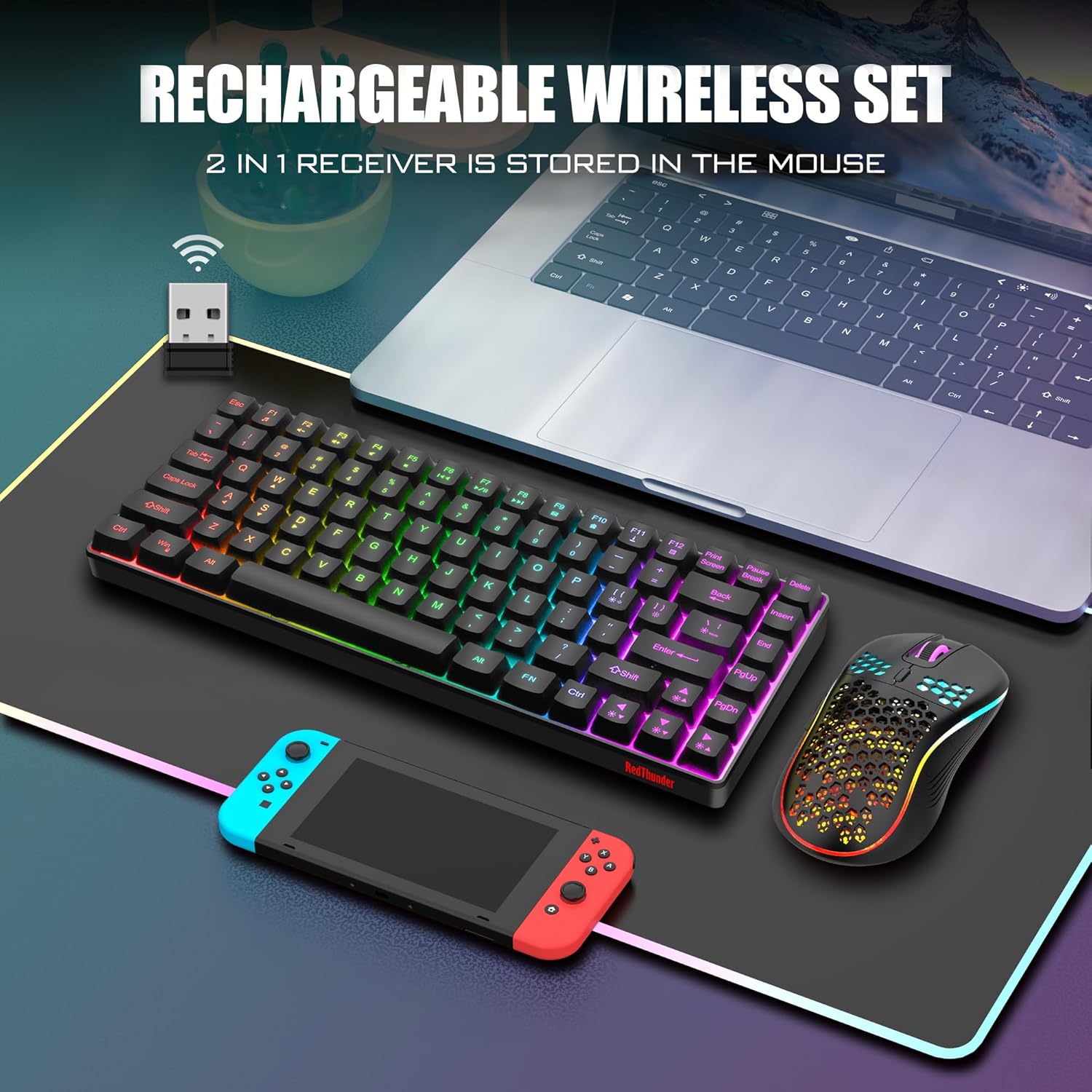
The RedThunder K84 Wireless Keyboard and Mouse Combo, showcasing the compact keyboard, honeycomb mouse, and the shared USB receiver.
2. Змесціва ўпакоўкі
Калі ласка, пераканайцеся, што ўсе прадметы прысутнічаюць у вашай упакоўцы:
- Бесправадная клавіятура RedThunder K84
- RedThunder Wireless Mouse
- USB Receiver (shared for both keyboard and mouse)
- Зарадны кабель USB-C
3. Кіраўніцтва па наладцы
3.1 Першапачатковая зарадка
Before first use, it is recommended to fully charge both the keyboard and mouse. The keyboard is equipped with an 1850 mAh battery, and the mouse with a 500 mAh battery. Use the provided USB-C charging cable to connect the devices to a computer's USB port or a compatible USB charger. A full charge typically takes approximately 8 hours for initial use.

The USB-C charging port on the keyboard, indicating where to connect the charging cable.
3.2 Падключэнне USB-прыёмніка
The keyboard and mouse share a single USB receiver for wireless connectivity. The receiver is typically stored in a compartment on the bottom of the mouse or keyboard (location may vary by unit). Remove the USB receiver and plug it into an available USB port on your computer or gaming console.
The shared USB receiver, which connects both the keyboard and mouse to your device.
3.3 Уключэнне
Once the USB receiver is connected, turn on the keyboard and mouse using their respective power switches. The devices are designed for plug-and-play functionality and should automatically pair with the receiver. If pairing issues occur, refer to the Troubleshooting section.
4. Інструкцыя па эксплуатацыі
4.1 Функцыі клавіятуры
The K84 keyboard features an 84-key compact layout, retaining essential media and arrow keys. It includes various backlight modes and brightness levels.
- Backlight Mode Switching: Прэса FN + M to cycle through 3 groups of rainbow backlight effects (3 static modes, 1 dynamic breathing mode).
- Рэгуляванне яркасці падсвятлення: Прэса FN + Page Up каб павялічыць яркасць, FN + Page Down каб паменшыць яркасць (3 узроўні).
- Breathing Rate Adjustment: Прэса FN + +/- to adjust the breathing speed (4 rates).
- Уключэнне/выключэнне падсвятлення: Прэса FN + Scroll Lock каб уключыць або выключыць падсветку.

Illustration of the keyboard's backlight control keys and their functions.
4.2 Функцыі мышы
The honeycomb optical mouse features a lightweight design and adjustable DPI settings.
- Рэгуляванне DPI: Press the DPI button located on top of the mouse to cycle through 1200, 2400, and 3200 DPI settings.
- Эфект асвятлення: The mouse has a built-in 7-color cyclic gradual lighting effect.

Close-up of the RedThunder mouse, highlighting the DPI adjustment button.
4.3 Рэжым энергазберажэння
Both the keyboard and mouse are equipped with smart energy-saving functions. If there is no operation within 2 minutes, they will automatically enter sleep mode to conserve battery. Press any key on the keyboard or move/click the mouse to wake them up.
5. Тэхнічнае абслугоўванне
5.1 Ачыстка
To maintain the appearance and functionality of your keyboard and mouse:
- Выкарыстоўвайце мяккую, сухую тканіну для працірання паверхняў.
- Для ўстойлівага бруду злёгку ачысціцеampпрацярыце тканіну вадой або мяккім ачышчальным растворам. Пазбягайце агрэсіўных хімічных рэчываў.
- Use compressed air to remove dust and debris from between the keyboard keys and mouse crevices.
5.2 Сыход за акумулятарам
Каб падоўжыць тэрмін службы батарэі:
- Пазбягайце частай поўнай разрадкі акумулятараў.
- Захоўвайце прылады ў прахалодным, сухім месцы, калі яны не выкарыстоўваюцца працяглы час.
- Charge the devices regularly, even if not used daily, to maintain battery health.
6. Выпраўленне непаладак
If you encounter issues with your RedThunder K84 combo, please refer to the following common solutions:
| праблема | Магчымая прычына | Рашэнне |
|---|---|---|
| Клавіятура/мыш не рэагуе | Low battery; USB receiver disconnected; Pairing lost. | Charge devices fully. Ensure USB receiver is securely plugged in. Turn devices off and on. If connection is lost, try re-pairing by turning off both devices, unplugging the receiver, plugging it back in, then turning on the mouse and keyboard. |
| Падсвятленне не працуе | Падсветка выключана; нізкі ўзровень зарада батарэі. | Прэса FN + Scroll Lock to toggle backlight. Charge the keyboard. |
| Курсор мышы нерэагуе або не рэагуе | Брудны аптычны датчык; непрыдатная паверхня; нізкі ўзровень зарада батарэі. | Clean the optical sensor on the bottom of the mouse. Use on a clean, non-reflective surface. Charge the mouse. |
| Mouse scroll wheel stutters or doesn't work | Debris in scroll wheel mechanism; Software issue. | Try cleaning around the scroll wheel with compressed air. Restart your computer. If the issue persists, contact customer support. |
| Кароткі тэрмін службы батарэі | Frequent use of backlight; Aging battery. | Reduce backlight brightness or turn it off when not needed. Ensure full charges. If battery life significantly degrades over time, it may indicate battery wear. |
7. Тэхнічныя характарыстыкі
| Асаблівасць | Дэталь |
|---|---|
| Нумар мадэлі | К84 |
| Тэхналогія падлучэння | Бесправадная сувязь 2.4G (USB-прыёмнік) |
| Раскладка клавіятуры | 75% (84 Keys) TKL |
| Падсвятленне клавіятуры | Rainbow Backlit (3 static, 1 dynamic breathing mode) |
| Мыш DPI | 1200 / 2400 / 3200 DPI |
| Ёмістасць батарэі клавіятуры | 1850 mAh (Rechargeable Lithium Ion) |
| Ёмістасць батарэі мышы | 500 mAh (Rechargeable Lithium Ion) |
| Тэрмін службы клавіш клавіятуры | 10,000,000 XNUMX XNUMX націсканняў клавіш |
| Матэрыял | Акрыланітрылбутадыенстырол (АБС) |
| Сумяшчальныя прылады | Gaming Console, Laptop, PC |
| Вага прадмета | 1.43 фунта |
| Памеры ўпакоўкі | 15.63 х 6.18 х 1.81 цалі |
8. Гарантыя і падтрымка
RedThunder products are designed for durability and performance. For any issues not covered in this manual or for warranty inquiries, please contact RedThunder customer support. You can often find contact information on the product packaging or the official RedThunder webсайт.
Афіцыйнае кіраўніцтва карыстальніка ў фармаце PDF таксама даступна для запампоўкі: Спампаваць кіраўніцтва карыстальніка (PDF)
Note: No official product videos with creator type 'Seller' were available in the provided data to embed in this manual.
Звязаныя дакументы - К84
 |
RedThunder K84 Wireless Keyboard and Mouse Combo User Manual User manual for the RedThunder K84 wireless keyboard and M84 mouse combo. Learn about setup, features like 75% compact layout and honeycomb mouse, troubleshooting, and safety guidelines. |
 |
Marvo KM409 Gaming Combo Keyboard and Mouse - User Guide Official user and installation guide for the Marvo KM409 Gaming Combo, featuring keyboard and mouse specifications, features, setup instructions, and troubleshooting tips. |
 |
Кіраўніцтва карыстальніка гульнявой клавіятуры Camiysn SKY 87 Кіраўніцтва карыстальніка для гульнявой клавіятуры Camiysn SKY 87, у якім падрабязна апісаны яе функцыі, характарыстыкі, інструкцыі па эксплуатацыі і інфармацыя аб гарантыі. Даведайцеся, як эфектыўна карыстацца гульнявой клавіятурай. |
 |
JOMAA X617 Fenisio Wireless Keyboard and Mouse Combo User Manual User manual for the JOMAA X617 Fenisio wireless keyboard and mouse combo. Covers 2.4GHz USB and Bluetooth 5.0 connectivity, product specifications, button functions, indicator lights, charging, maintenance, and troubleshooting for optimal use. |
 |
Кіраўніцтва карыстальніка ProtoArc KM100-A: Падсветленая Bluetooth-клавіятура-мыш для Mac Падрабязнае кіраўніцтва карыстальніка для камбінаванай клавіятуры і мышы Bluetooth з падсветкай ProtoArc KM100-A для Mac. Даведайцеся пра функцыі прадукта, спалучэнне Bluetooth для macOS і iOS, зарадку і выкарыстанне мультымедыйных клавіш. |
 |
JOMAA TM255M Vertical Trackball Mouse User Manual User manual for the JOMAA TM255M ergonomic vertical trackball mouse, detailing features, setup, and safety instructions for wireless computer and laptop use. |
Ask a question about this manual
Ask about setup, troubleshooting, compatibility, parts, safety, or missing instructions. Manuals+ will review the question and use this page’s manual context to help answer it.