
1. Прадукт скончыўсяview
The tomtoc TechPack-T73 X-Pac Laptop Backpack is designed for business professionals and commuters, offering a blend of sleek design, durability, and extensive storage. This 28L backpack is crafted with premium materials to protect your electronic devices and organize your essentials for city life and travel.

Малюнак 1: Спераду view of the tomtoc TechPack-T73 X-Pac Laptop Backpack.
2. Асноўныя магчымасці
- X-Pac Enhanced Design: The front panel features X-Pac fabric, providing a technical and sleek aesthetic. This material contributes to the backpack's low-profile, futuristic look and offers enhanced durability and water resistance.
- Ёмістасць 28 л: A spacious top-loading main compartment accommodates various items. The backpack includes a dedicated tech compartment and two front pockets for easy access to smaller items. A zippered side pocket offers quick access to essentials like earphones, power banks, or keys.
- Intimate Tech Protection: A dedicated compartment is designed to fit a 16-inch MacBook Pro and a 12.9-inch iPad Pro. This compartment features high-density soft padding for protection against drops and shocks, complemented by water-resistant YKK zippers.
- Высокая якасць матэрыялаў: Constructed with durable 1680D Nylon and YKK buckles for longevity. All compartments utilize YKK zippers to withstand long-term wear and tear.
- Камфорт на ўвесь дзень: Padded shoulder straps, a streamlined back panel, and an adjustable sternum strap ensure comfortable carrying. A durable top handle and a luggage pass-through strap are included for convenience during travel.

Figure 2: Detail of the X-Pac fabric, highlighting its water-resistant properties.

Figure 3: The dedicated tech compartment with protective padding.
3. Настройка
- Распакаванне: Дастаньце заплечнік з упакоўкі. Праверце яго на наяўнасць пашкоджанняў падчас дастаўкі.
- Рэгуляванне папружкі: Place the backpack on your back. Adjust the shoulder straps to ensure the backpack sits comfortably and securely. The top of the backpack should align with your shoulders.
- Грудны рэмень: Fasten the adjustable sternum strap across your chest and tighten it to distribute weight evenly and enhance stability, especially when carrying heavier loads.
- Familiarize with Compartments: Open and close all zippers and compartments to understand their layout and capacity.

Figure 4: Adjusting the sternum strap for optimal comfort and weight distribution.
4. Інструкцыя па эксплуатацыі
- Loading the Main Compartment: Open the top-loading main compartment. Place larger items such as clothing, books, or bulkier gear. Utilize the internal sleeves for documents or smaller flat items.
- Using the Tech Compartment: Unzip the dedicated tech compartment. Carefully slide your 16-inch MacBook Pro into the laptop sleeve and your 12.9-inch iPad Pro into the tablet sleeve. Ensure devices are fully seated and zip securely.
- Accessing Front Pockets: Use the two front zippered pockets for quick-access items like pens, notebooks, or small personal accessories.
- Side Pocket Usage: The zippered side pocket is ideal for items requiring frequent access, such as earphones, a power bank, or keys.
- Варыянты пераноскі:
- Стыль заплечніка: Wear using the padded shoulder straps and sternum strap for extended comfort.
- Briefcase Style: Use the durable side handle to carry the backpack horizontally.
- Luggage Pass-Through: Slide the backpack onto the handle of your rolling luggage using the pass-through strap on the back panel for effortless transport.

Figure 5: Main compartment with internal organization for various items.

Figure 6: Utilizing the luggage pass-through strap.
Відэа 1: Скончанаview of the tomtoc TechPack-T73 X-Pac Laptop Backpack (30L version shown).
5. Тэхнічнае абслугоўванне
- Уборка: For minor dirt, wipe the exterior with a damp тканінай і мяккім мылам. Для больш глыбокай ачысткі памыйце ўручную халоднай вадой з мяккім мыйным сродкам. Не сцірайце ў пральнай машыне або сушыце ў сушыльнай машыне.
- Сушка: Air dry the backpack completely in a shaded, well-ventilated area. Avoid direct sunlight or heat, which can damage the fabric.
- захоўванне: Store the backpack in a cool, dry place away from direct sunlight when not in use. Ensure it is empty and clean to prevent odors or mildew.
- Сыход за маланкай: Periodically clean zippers with a small brush to remove dirt or debris. Lubricate with a silicone-based zipper lubricant if they become stiff.
6. Выпраўленне непаладак
- Жорсткія маланкі: If zippers are stiff, apply a small amount of zipper lubricant or rub a graphite pencil along the teeth.
- Плямы: Treat stains promptly with a spot cleaner suitable for nylon fabrics. Test on an inconspicuous area first.
- Нязручная пасадка: Re-adjust shoulder straps and sternum strap. Ensure the backpack is not overloaded beyond its intended capacity.
- Пранікненне вады: While the X-Pac fabric and YKK zippers offer water resistance, prolonged exposure to heavy rain may lead to some moisture ingress. For extreme conditions, consider using a rain cover.
7. Тэхнічныя характарыстыкі
| Асаблівасць | Дэталь |
|---|---|
| Нумар мадэлі | T73M1D1 |
| Ёмістасць | 28 літра |
| Памеры прадукту | 18.5 х 12.2 х 6.5 цалі (47 х 31 х 16.5 см) |
| Вага прадмета | 3.09 фунта (1.4 кг) |
| Матэрыял | X-Pac Fabric (front panel), 1680D Nylon (body) |
| Маланкі | YKK Zippers (water-resistant on tech compartment) |
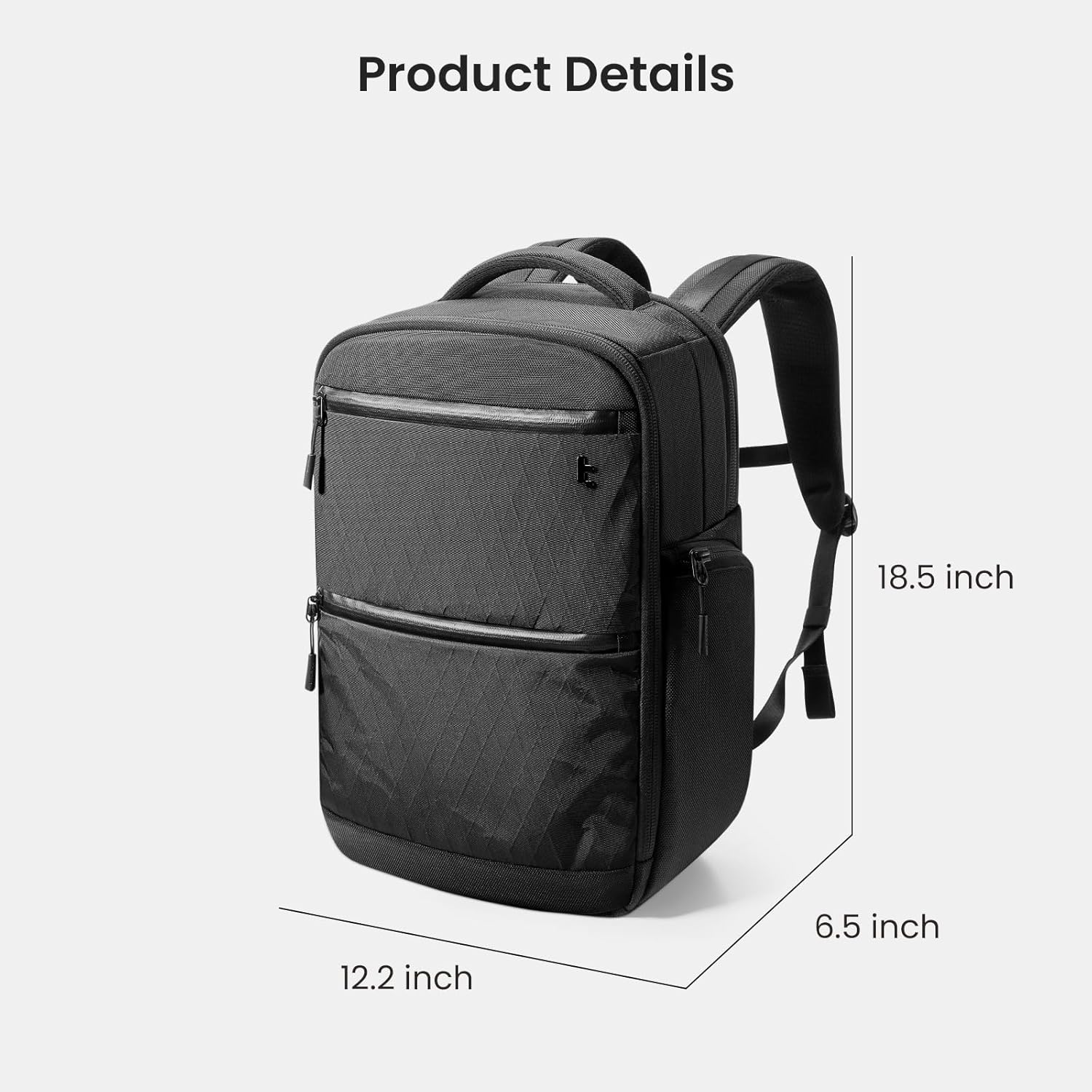
Figure 7: Product dimensions of the tomtoc TechPack-T73 backpack.
8. Гарантыя і падтрымка
For warranty information, product support, or to contact customer service, please visit the official tomtoc website or refer to the warranty card included with your purchase. Keep your proof of purchase for any warranty claims.