
1. Уводзіны
The Shanrya GFQ3-80/4P Dual Power Automatic Transfer Switch (ATS) is a miniature household power switch designed for automatic switching between a main power source and a backup power source. It is primarily used to ensure continuous power supply by automatically transferring the load to the backup source when the main power fails, and back to the main source when it is restored. This device is suitable for PZ30 distribution boxes and is ideal for emergency power systems in various settings such as factories, shopping centers, and nurseries, operating at 50 or 60Hz AC rated 220V.
2. Інфармацыя па бяспецы
- Толькі кваліфікаваны персанал: Ўстаноўку і тэхнічнае абслугоўванне павінны выконваць толькі кваліфікаваныя электрыкі.
- Адключыць харчаванне: Always disconnect all power sources before installing, wiring, or servicing the switch to prevent electric shock.
- Правільная электраправодка: Ensure all wiring connections are secure and comply with local electrical codes and standards. Incorrect wiring can lead to malfunction or hazards.
- Умовы навакольнага асяроддзя: Не падвяргайце прыладу ўздзеянню празмернай вільгаці, пылу або экстрэмальных тэмператур.
- агляд: Regularly inspect the switch for any signs of damage or wear. Do not operate a damaged device.
3. Прадукт скончыўсяview
The GFQ3-80/4P ATS is engineered for reliability and ease of use. It features a compact design and robust construction using PC flame-retardant plastic material and silver contacts, ensuring high insulation, temperature resistance, and anti-aging properties.
Асноўныя характарыстыкі:
- Millisecond-Level Switching: Ensures a non-stop power supply by transferring to backup power almost instantaneously when the main power is abnormal.
- Трывалая канструкцыя: Made from PC flame-retardant plastic with high insulation and silver contacts for enhanced safety and reliability.
- Двайныя рэжымы працы: Supports both automatic and manual switching for flexible control.
- Лёгкая ўстаноўка: Designed for 35mm standard DIN rail mounting with snap-on installation.
Ідэнтыфікацыя кампанента:
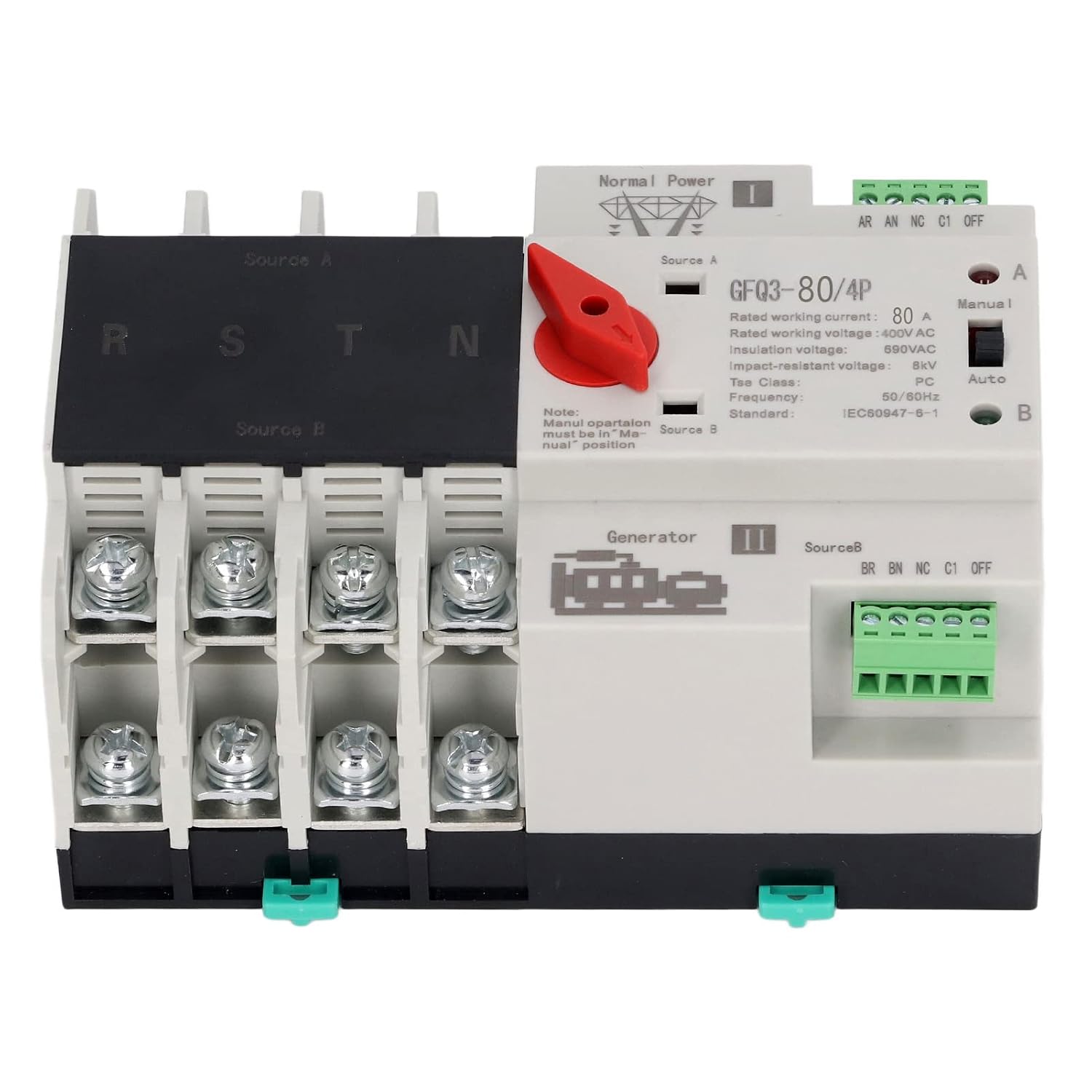
Малюнак 1: Фронт view of the GFQ3-80/4P ATS, showing terminals for Source A (Normal Power) and Source B (Generator), output terminals (R, S, T, N), and the Manual/Auto selector switch.

Малюнак 2: Вуглавы view of the GFQ3-80/4P ATS, highlighting the red manual selector handle and control terminals.
4. Тэхнічныя характарыстыкі
| Параметр | Каштоўнасць |
|---|---|
| Тып прадмета | Двайны аўтаматычны пераключальнік харчавання |
| мадэль | GFQ3-80/4P |
| Матэрыял | PC, Silver |
| Rated Current (Le) | 80А |
| Ізаляцыя Voltage (Ui) | 690 В пераменнага току |
| Намінальны выпtagе (Ue) | 400 В пераменнага току |
| Частата | 50/60 Гц |
| Намінальны кантроль Voltage (Us) | 220VAC (85%Us-110%Us) |
| Гатунак | PC Grade |
| палякі | 4P |
5. Настройка і ўстаноўка
The GFQ3-80/4P ATS is designed for easy installation on a standard 35mm DIN rail. Ensure all power is disconnected before proceeding with installation.
5.1 Мантаж
- Locate a suitable 35mm DIN rail within your PZ30 distribution box or electrical panel.
- Align the ATS with the DIN rail. The device features a snap-on mechanism for secure attachment.
- Press the ATS firmly onto the DIN rail until it clicks into place. Ensure it is stable and does not wobble.

Малюнак 3: Illustration of the 35mm standard guide rail and snap installation method for the ATS.
5.2 Электраправодка
Refer to the wiring diagram on the device and the following instructions for proper connection. Ensure all connections are tight and secure.
- Source A (Normal Power): Connect the main power supply (e.g., utility grid) to the 'Source A' input terminals. These are typically labeled R, S, T, N for a 4-pole system.
- Source B (Backup Power): Connect the backup power supply (e.g., generator, UPS) to the 'Source B' input terminals. These are also typically labeled R, S, T, N.
- Выхадная нагрузка: Connect the electrical load (e.g., building's electrical system) to the output terminals of the ATS.
- Тэрміналы кіравання: Connect the control wiring as per your system requirements. The device has terminals for 'Normal Power' and 'Generator' status monitoring and control.

Малюнак 4: Example of the ATS wired into an electrical panel, demonstrating connections to power sources and load.
6. Інструкцыя па эксплуатацыі
The GFQ3-80/4P ATS offers both automatic and manual operation modes.
6.1 Аўтаматычны рэжым
- Ensure the 'Manual/Auto' switch on the front panel is set to the 'Auto' position.
- In this mode, the switch will automatically monitor the main power supply (Source A).
- If Source A fails or its voltage drops below acceptable levels, the ATS will automatically switch the load to Source B (backup power) within milliseconds.
- When Source A is restored and stable, the ATS will automatically switch the load back to Source A.
6.2 Ручны рэжым
- Set the 'Manual/Auto' switch on the front panel to the 'Manual' position.
- To manually switch between Source A and Source B, use the red selector handle.
- Rotate the red handle to position 'I' to connect to Source A.
- Rotate the red handle to position 'II' to connect to Source B.
- Заўвага: Manual operation overrides automatic functions. Always ensure the desired power source is available and stable before manual switching.
7. Тэхнічнае абслугоўванне
Regular maintenance ensures the longevity and reliable operation of your ATS.
- Візуальны агляд: Periodically inspect the device for any signs of physical damage, loose connections, or overheating.
- Уборка: Трымайце прыладу чыстай ад пылу і смецця. Выкарыстоўвайце для чысткі сухую мяккую тканіну. Не выкарыстоўвайце вадкія ачышчальнікі.
- Праверкі злучэння: Ensure all terminal connections remain tight and secure. Loose connections can cause arcing and overheating.
- Функцыянальны тэст: Periodically test the automatic transfer function by temporarily disconnecting the main power source to ensure the switch transfers to backup power correctly.
8. Выпраўленне непаладак
If you encounter issues with your ATS, refer to the following troubleshooting guide:
| праблема | Магчымая прычына | Рашэнне |
|---|---|---|
| Device does not switch automatically | Switch is in Manual mode; No power from backup source; Faulty control circuit. | Set switch to 'Auto' mode; Check backup power supply; Consult a qualified electrician. |
| Няма магутнасці | Both power sources are off; Loose wiring connections; Internal fault. | Verify both power sources are active; Check all wiring connections; Contact support. |
| Перагрэў | Loose connections; Overload; Insufficient ventilation. | Tighten all connections; Ensure load does not exceed rated current; Improve ventilation around the device. |
Калі праблема не знікне пасля спробы гэтых рашэнняў, звярніцеся ў службу падтрымкі кліентаў.
9. Гарантыя і падтрымка
Каб атрымаць інфармацыю аб гарантыі, тэхнічнай падтрымцы або абслугоўванні, звярніцеся да дакументацыі, якая была прыкладзена да вашай пакупкі, або звярніцеся непасрэдна да прадаўца. Захоўвайце чэк аб пакупцы як пацверджанне пакупкі.